

God of War Steam Top Up: Overview & Activation
Acquiring God of War for PC through BitTopup gives you direct access to the critically acclaimed action-adventure title on your Steam account. This PC version brings Kratos and Atreus into the harsh Norse wilderness, complete with native 4K support, unlocked frame rates, and wide monitor compatibility. Please note that this product delivers the standalone God of War PC release, distinguished from its sequel God of War Ragnarok.
When you complete your God of War Steam top up, you receive an authentic digital activation key or direct balance allocation for your Steam client. BitTopup displays all live pricing directly on the product checkout page, ensuring clear and transparent payment without hidden fees.
Supported Regions and Regional Activation Requirements
Digital game keys on Steam often feature regional constraints tied to specific market territories. Before completing your purchase, ensure your Steam account’s registered country matches the regional parameters of the key listed below. This product is specifically formatted for South East Asia and designated Asian storefront regions.
| Region Code | Country / Territory | Activation Compatibility | Delivery Format |
|---|---|---|---|
| SG / MY | Singapore, Malaysia | Supported (Direct Steam Client) | Digital Product Key |
| PH / TH | Philippines, Thailand | Supported (Direct Steam Client) | Digital Product Key |
| ID / VN | Indonesia, Vietnam | Supported (Direct Steam Client) | Digital Product Key |
| HK / TW | Hong Kong, Taiwan | Supported (Direct Steam Client) | Digital Product Key |
| KR | South Korea | Supported (Direct Steam Client) | Digital Product Key |
| BN / MM | Brunei, Myanmar | Supported (Direct Steam Client) | Digital Product Key |
If your Steam account is registered to a country outside these listed territories, you must adjust your store location with a local payment method before activation, or select a region-free code suited to your home market.
Safe and Password-Free Digital Key Delivery Process
Security is a fundamental requirement when buying PC games online. BitTopup protects your personal gaming data by operating a completely password-free delivery model:
- Zero Account Sharing: You will never be asked for your Steam account password, Steam Guard mobile authenticator codes, or temporary login credentials.
- Official Digital Key Code: Your purchase generates a verified 15-digit or 25-digit alphanumeric activation key provided directly on your BitTopup order summary screen.
- Encrypted Transactions: Every transaction is processed through verified, secure payment gateways with end-to-end data encryption.
- Account Safety Guaranteed: Redeeming an official product key directly inside your own Steam client ensures your Steam profile remains safe from unauthorized access.
How to Find Your Steam Account Details and Order Info
To ensure your Steam client is properly configured for code redemption and library management, locate your Steam account credentials using the steps below.
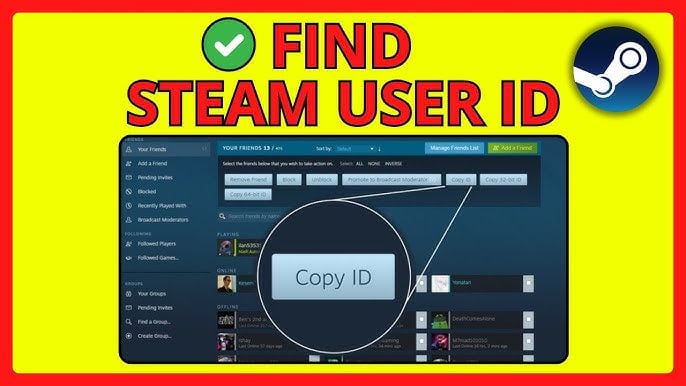
- Launch the Steam application on your PC or log in through your web browser.
- Click on your profile username in the upper-right corner of the interface.
- Select Account details from the dropdown menu.
- View your Steam ID and confirm your Country/Region setting matches your purchased product region.
- Keep your BitTopup order receipt open on your browser to view your newly generated game code.
Step-by-Step Steam Client Activation Guide
Activating your God of War digital key on Steam takes less than two minutes. Follow these direct steps:
- Open the Steam Client on your desktop computer.
- In the top navigation toolbar, click Games, then select Activate a Product on Steam... (Alternatively, click the + Add a Game button located in the bottom-left corner of the Steam client and choose Activate a Product on Steam).
- An activation window will appear. Click Next, then click I Agree to accept the Steam Subscriber Agreement.
- Copy the product key received from your BitTopup order page and paste it into the Product Code box.
- Click Next. Steam will validate the key and assign God of War permanently to your library.
- Select Install to choose your target hard drive directory and begin downloading the game files.
God of War PC Features and Steam Deck Support
The PC edition of God of War features substantial visual and mechanical upgrades designed for modern computer hardware and handheld gaming PCs:
- High-Fidelity Visuals: True 4K resolution support with unlocked framerates, improved screen-space reflections, enhanced shadows, and higher-resolution texture assets.
- Performance Enhancements: Full integration of NVIDIA DLSS (Deep Learning Super Sampling), NVIDIA Reflex low-latency technology, and AMD FidelityFX Super Resolution (FSR).
- Ultra-Widescreen Support: Native 21:9 ultra-widescreen support for an expanded panoramic field of view.
- Customizable Controls: Extensive button mapping for keyboard and mouse, alongside native controller support for PlayStation DualSense and DualShock 4 pads.
- Steam Deck Compatibility: Fully Steam Deck Verified in 2026. The game runs smoothly on portable hardware with default graphical presets configured for stable frame pacing and battery efficiency.
Troubleshooting Common Steam Code and Regional Errors
If you experience an issue while redeeming your God of War code, apply the following troubleshooting steps:
- Invalid Product Code: Verify that you have copied the code correctly without trailing spaces. Check for common character misreads (such as mistaking the number
0for the letterO, or1forI). - Code Already Redeemed / Duplicate Code: Refresh your Steam library and type "God of War" into your search bar. If you have multiple Steam accounts, verify that you are logged into the correct profile.
- Region Restriction Error: If Steam displays an error stating the game is unavailable in your region, confirm that your Steam Store Country setting matches the Asian region designated for the product.
- Network / Connection Timeouts: If Steam servers are undergoing Tuesday maintenance or temporary downtime, wait five minutes and submit the code again.
- Customer Support Assistance: If an error persists, contact BitTopup customer support with your order ID and a screenshot of the Steam redemption error for direct assistance.
Frequently Asked Questions
Can I buy and activate God of War on Steam?
Yes. When you purchase God of War on BitTopup, you receive an authentic digital key that redeems directly into your personal Steam library, granting full access to download and play the PC game.
Which regions are valid for this God of War Steam recharge?
This product is valid for accounts configured in supported Asian markets, including Singapore, Malaysia, Philippines, Thailand, Indonesia, Vietnam, Hong Kong, Taiwan, South Korea, Brunei, and Myanmar. Check your Steam account country before redemption.
Do I need to share my Steam password to purchase or redeem God of War?
No. BitTopup never asks for your Steam password, email credentials, or Steam Guard codes. You receive a standard digital key to enter directly into your own Steam client.
How do I activate my God of War digital key on the Steam client?
Open your Steam desktop application, click Add a Game in the lower-left corner, select Activate a Product on Steam, enter your key from BitTopup, and click confirm to add the title to your library.
What should I do if my God of War code encounters a regional error?
Ensure your Steam store region matches the region of the purchased key. If your account region is correct but the error persists, contact BitTopup customer support with your order number for verification.
Is God of War playable on the Steam Deck in 2026?
Yes. God of War maintains its Steam Deck Verified status in 2026, offering solid performance, native controller support, and readable interface text on handheld hardware.









![ToGather: Island CD-Key [STEAM] - Doładuj](https://pic.bittopup.com/apiUpload/a3e30e5c466353a03be69541b03285a5.png?imageView2/0/w/120/h/120/format/webp/ignore-error/1 "ToGather: Island CD-Key [STEAM] - Doładuj")