


Google Play Gift Card (HK) Top Up: Digital Code & Usage Guide
A Google Play Gift Card (HK) is a digital prepaid voucher used to credit Hong Kong Dollar (HKD) funds directly to your Google Play Store balance. Once redeemed, the wallet funds allow you to purchase premium Android games, make in-app purchases (such as diamonds, gems, skins, and battle passes), purchase ebooks, and rent or buy digital movies within the Hong Kong Play Store ecosystem.
Because Google enforces strict geographic currency matching, a Hong Kong digital gift card can only be applied to a Google account registered with a Hong Kong payments profile. BitTopup provides legitimate, unused digital codes delivered directly to your screen and email inbox, allowing you to top up your account without linking a personal credit card or sharing your Google account login details.
| Content Category | Supported via HK Gift Card | Notes |
|---|---|---|
| In-App Game Purchases | Yes | Supported for games installed via the Hong Kong Play Store |
| Paid Apps & Games | Yes | Full balance redemption on single purchases |
| Google Play Books & Media | Yes | Available for digital items listed in HKD |
| Recurring Subscriptions | Conditional | Depends on specific app billing provider rules |
| Cross-Region Accounts | No | Account country and IP must match the Hong Kong region |
Step-by-Step Guide: How to Recharge Your Google Play HK Balance
Redeeming your digital code is simple and can be completed directly on an Android smartphone, tablet, or through any desktop web browser. Follow the specific instructions below for your preferred platform.
Method 1: Redeeming on an Android Device
- Open the Google Play Store app on your Android device.
- Tap your Profile Icon located in the upper right corner of the screen.
- Select Payments & subscriptions from the menu.
- Tap Redeem code.
- Enter the 16-digit alphanumeric digital code received from BitTopup.
- Tap Redeem and confirm the account details when prompted. Your HKD balance will update immediately.
Method 2: Redeeming on a Desktop Web Browser
- Open your web browser and visit
play.google.com/redeem. - Ensure you are signed in to the specific Google account you intend to fund.
- Type or paste your 16-digit HK digital code into the input box.
- Click Redeem and confirm the transaction.
Strict Hong Kong Region Lock & Account Verification
Google maintains strict geo-location and account settings verification. A Google Play Gift Card (HK) will fail to redeem if your Google Payments Profile is set to any region other than Hong Kong, or if your network location indicates you are outside the territory during redemption.
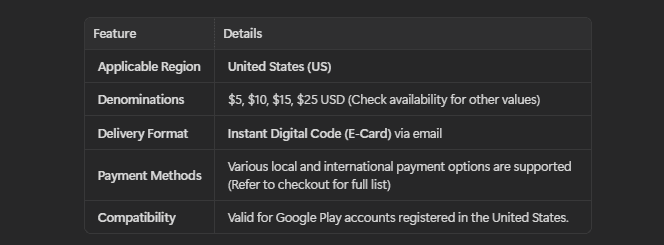
How to Verify Your Google Play Account Country
Before redeeming your code, verify your active account region by following these steps:
- Open the Google Play Store app on your device.
- Tap your Profile Icon > Settings > General > Account and device preferences.
- Scroll down to the Country and profiles section.
- Verify that Hong Kong is listed and active with a green checkmark.
If your account is assigned to a different country, you must switch your Google Payments profile to Hong Kong or create a dedicated Hong Kong Google account before attempting to use an HKD gift voucher.
How to Fix Common Google Play HK Code Redemption Errors
If you experience an error while redeeming your digital code, review the common error codes and their solutions below:
Error: "We need more info to redeem your gift card"
This error (often associated with PRS verification) occurs when Google flags a transaction due to proxy usage, VPN detection, or account inconsistency. * Fix: Disable all VPNs, proxies, or custom DNS services. Ensure your device is connected to a clean, direct network connection. If the issue persists, clear the Google Play Store cache via Settings > Apps > Google Play Store > Storage > Clear Cache, then restart your device before trying again.
Error: "Code is invalid or has already been redeemed"
- Fix: Carefully check for common character misreadings (such as confusing the letter 'O' with the number '0', or 'I' with '1'). Check your current balance under Payments & subscriptions > Payment methods to verify if the funds were already credited on a previous click.
Error: "Gift cards can only be used in the country where they were purchased"
- Fix: This confirms a region mismatch. Your Google account's primary payments profile is not set to Hong Kong. Update your Google Play country settings or log in with an account specifically configured for Hong Kong.
Available Denominations and Balance Check Methods
Google Play Gift Cards for the Hong Kong region are available in various HKD denominations to suit your spending requirements, ranging from smaller values for individual gacha pulls to larger packages for extensive in-game events. Current live pricing for each package is displayed directly on the BitTopup product selection panel above.
How to Check Your Remaining HKD Balance
- Open the Google Play Store app.
- Tap your Profile Icon in the top right.
- Tap Payments & subscriptions > Payment methods.
- Your current Google Play balance (HKD) will be displayed at the top of the payment list.
Why Buy Google Play Gift Card (HK) on BitTopup
- Instant Digital Delivery: Digital voucher codes are displayed directly on your order confirmation screen and sent to your registered email immediately after payment verification.
- 100% Account Safety: We only deliver legitimate, factory-issued digital codes. You never need to share your Google password, email credentials, or account access with anyone.
- Transparent Live Checkout: Review exact prices and localized payment methods clearly before finalizing your order.
- 24/7 Customer Support: Our dedicated help center is available around the clock to assist you with order inquiries and code activation assistance.
Frequently Asked Questions
Can a Google Play HK gift card be used internationally?
No. Google Play gift codes are strictly region-locked. A Hong Kong (HKD) gift card can only be redeemed on a Google account with an active Hong Kong payments profile and used for items priced in HKD.
How do I recharge my Google Play account with a Hong Kong gift card?
Open the Google Play Store app, tap your profile icon, navigate to Payments & subscriptions > Redeem code, enter your 16-digit code, and confirm.
Why am I getting a region mismatch error when redeeming my HK gift code?
This error occurs if your Google Payments Profile country is not set to Hong Kong, or if Google detects an IP address from outside the Hong Kong region during code entry. Ensure your account country is set to Hong Kong and disconnect any active VPN tools.
Do Google Play Gift Cards (HK) expire?
No. Google Play gift card codes and redeemed balances do not have an expiration date. Once added to your Google Play balance, the funds remain available until spent.
Can I add funds directly to an existing physical Google Play gift card?
No. Google Play gift cards are non-reloadable. Each code provides a fixed, one-time top up to your Google account balance. To add more funds, simply purchase a new digital code on BitTopup.
What should I do if my Google Play HK code cannot be redeemed?
First, verify your account region under Google Play Settings. If the region is correct and you have disabled any network proxies, double-check that every character was entered accurately. If the issue remains unresolved, reach out to BitTopup 24/7 customer support with your order number for prompt assistance.