



MiFinity eVoucher JPY Top Up: What Is It and How Does It Work?
A MiFinity eVoucher is a prepaid digital voucher that lets you deposit funds into your MiFinity eWallet account without linking a bank account or credit card. Issued in Japanese Yen (JPY), each digital voucher features a unique 16-digit code, an expiry date, and a card verification value (CVV).
When you buy a MiFinity eVoucher (JPY), you receive a secure prepaid code designed for online digital funding. You can redeem this PIN directly within your personal eWallet dashboard or use it at supported partner merchants during checkout. This prepaid payment model gives you total spending control, keeps your personal banking details private, and allows you to manage entertainment, gaming, and digital service budgets with precision.
Step-by-Step Guide: How to Redeem and Recharge Your MiFinity eWallet
Adding funds to your eWallet with a JPY voucher is quick and straightforward. Follow these exact steps inside your desktop web browser or the official mobile application:
- Log in to Your eWallet: Open the official app or visit the web portal and sign in to your personal account.
- Select Deposit: Navigate to the balance dashboard and click the Deposit button.
- Choose MiFinity eVoucher: From the list of available deposit methods, select MiFinity eVoucher as your payment source.
- Select Currency and Enter Value: Choose JPY as the deposit currency and enter the exact face value of your purchased voucher.
- Enter the 16-Digit Voucher Details: Input your 16-digit voucher number, the voucher expiration date, and the 3-digit CVV code received after your purchase.
- Confirm the Transaction: Review the summary and submit the transaction. Your eWallet balance will update immediately.
Locate Your Account Details: Finding Your MiFinity Account Number
To verify that your account receives the funds properly, or if you need to manage multiple currency pockets, locate your account identifier within the portal.
To locate your account details:- Sign in to your account dashboard on mobile or desktop.- Click on the profile icon or open the Settings / Account tab.- Your unique account number and verified email address are listed under your profile information.- You can also view your separate sub-wallets (such as your JPY wallet or international currency pockets) directly on the main balance overview screen.
MiFinity eVoucher JPY Denominations and Currency Compatibility
MiFinity eVouchers in Japanese Yen (JPY) are issued in fixed denominations to suit different spending requirements. When choosing your denomination, make sure your target eWallet balance or merchant supports JPY transactions.
| Voucher Denomination (JPY) | Recommended eWallet Wallet | Use Case |
|---|---|---|
| ¥1,000 – ¥5,000 JPY | JPY Sub-Wallet | Small in-game microtransactions and digital services |
| ¥10,000 – ¥25,000 JPY | JPY Sub-Wallet | Standard monthly subscription funding and purchases |
| ¥50,000+ JPY | JPY Sub-Wallet | High-value payments and merchant transactions |
Foreign Exchange (FX) Considerations
If your primary eWallet is held in USD, EUR, or GBP, you can still deposit a JPY voucher. However, the system will automatically convert the Japanese Yen value to your wallet's base currency using current real-time exchange rates. To avoid currency conversion fees, create a dedicated JPY sub-wallet inside your account settings before redeeming your JPY voucher.
Where to Spend and Pay with MiFinity eWallet in 2026
In 2026, the MiFinity payment ecosystem continues to expand across digital sectors worldwide. Once your funds are credited to your eWallet balance, you can use your balance at thousands of global online merchants:
- Online Gaming and Interactive Entertainment: Fund digital game accounts, virtual platform credits, and downloadable content directly without exposing payment cards.
- Digital Service Subscriptions: Pay for cloud storage, online software tools, streaming entertainment, and virtual private network services.
- Peer-to-Peer Transfers: Send funds directly to friends or family members who also use an eWallet account worldwide using their registered email address or phone number.
- Cross-Border Payments: Shop at international eCommerce platforms that accept electronic wallet payments, bypassing local credit card restrictions.
Fees, Single-Use Terms, and Expiration Rules
Understanding the operating conditions of your voucher prevents unexpected transaction failures:
- Single-Use Rule: MiFinity eVouchers are single-use prepaid cards. You must redeem the entire face value of the voucher in a single transaction. Partial redemptions are not supported; any leftover balance cannot be split across multiple deposits.
- Expiration Window: Each voucher comes with an active validity period (typically 12 months from generation). The specific expiration date is provided alongside your 16-digit PIN code. Make sure to deposit your voucher before this date.
- Maintenance Fees: Once deposited into your eWallet, your funds remain active under standard account terms. Unredeemed vouchers held beyond their validity window may become void.
- Balance Limits: Verify your account verification tier. Unverified starter accounts have lower annual deposit limits, while verified accounts enjoy higher limits.
Troubleshooting Common MiFinity eVoucher Redemption Errors
If you experience an issue while redeeming your voucher, review these common error codes and solutions:
- Invalid PIN or CVV: Double-check that all 16 digits and the 3-digit CVV are entered accurately without accidental spaces or dashes.
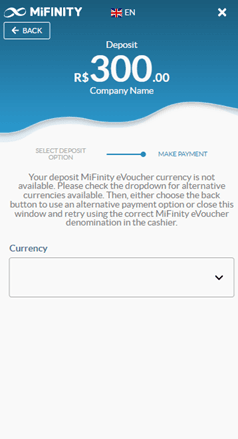
- Currency Mismatch Error: Ensure you selected JPY as the payment/deposit currency on the redemption form. Choosing an incorrect currency code during entry can cause rejection.
- Voucher Already Redeemed: A single-use voucher cannot be processed twice. If you previously attempted redemption and experienced a network disconnect, check your eWallet transaction history to verify if the funds were credited.
- Account Limit Exceeded: If the voucher deposit exceeds your account's unverified maximum balance limit, complete the quick identity verification process in your profile to expand your deposit ceiling.
- Geographic Restrictions: Ensure your registered account is eligible to receive JPY funds according to regional service terms.
Why Buy MiFinity eVoucher JPY on BitTopup?
BitTopup provides a reliable, secure way to purchase digital codes:
- Instant Screen & Email Delivery: Your 16-digit voucher number, CVV, and expiration date appear directly on screen immediately after payment confirmation and are backed up to your email.
- Zero Account Credentials Required: BitTopup never asks for your eWallet login credentials, passwords, or personal banking data. You purchase only the prepaid code.
- Live Transparent Pricing: Check the live checkout screen for real-time pricing and available regional payment options with no hidden processing surcharges.
- Round-the-Clock Support: Dedicated 24/7 customer service is available to assist with order processing or code questions whenever you need help.
Frequently Asked Questions
How do I redeem my MiFinity eVoucher (JPY) into my eWallet?
Log in to your account, click Deposit, select MiFinity eVoucher, pick JPY as the currency, type in your full voucher face value, and enter the 16-digit voucher PIN, expiry date, and CVV. Confirm the entry to add the balance instantly.
What is a MiFinity eVoucher?
A MiFinity eVoucher is an electronic prepaid card featuring a unique 16-digit code. It allows individuals to fund their electronic wallet or pay directly at participating online merchants without using traditional credit cards or disclosing sensitive bank accounts.
Can I use a JPY MiFinity eVoucher if my eWallet is set to another currency?
Yes. You can deposit a JPY voucher into an account that uses USD, EUR, or GBP. The platform converts the Japanese Yen balance to your account's primary currency based on live exchange rates. Alternatively, you can open a JPY sub-wallet inside your account to hold the Yen directly without conversion fees.
Do MiFinity eVouchers expire?
Yes. Each voucher has a fixed expiration date printed alongside your digital code (typically 12 months from the date of issue). You should redeem your voucher into your wallet before that date expires.
Can I use a MiFinity eVoucher multiple times or split the balance?
No. MiFinity eVouchers are single-use prepaid products. The entire face value of the voucher must be redeemed in one transaction. Partial redemptions and balance splitting across multiple deposits are not allowed.
Do I need to share my MiFinity password or bank details to buy an eVoucher?
No. You never need to share your personal eWallet password, account credentials, or private banking details on BitTopup. You simply purchase the digital voucher code and redeem the 16 digits yourself directly in your secure account.