

MyCard TW Top Up: Fast, Secure Taiwan Point Card Delivery
MyCard is one of the most widely used prepaid payment systems across Taiwan, Hong Kong, and Macau. A MyCard (TW) digital point card provides players with a direct, flexible way to purchase in-game currency, monthly passes, premium items, and subscriptions across hundreds of online titles and mobile games published in the Taiwan region.
When you purchase a MyCard TW point card on BitTopup, you receive an authentic digital Card Serial Number (卡號) and Card Password (密碼) directly after checkout. This digital voucher code allows you to top up your favorite games or add credit directly to your personal MyCard Member account without sharing your private game login credentials.
What Is MyCard Taiwan (TW) and How Does It Work
Operated by Soft-World International Corporation, MyCard TW functions as a standardized digital gaming currency throughout the Traditional Chinese gaming market. Instead of linking credit cards to multiple individual game publishers or app storefronts, players use MyCard point cards to fund their game accounts directly.
Each MyCard TW code contains two pieces of information:1. Card Serial Number (Card ID / 卡號): A unique identifier for the specific card purchase.2. Card Password (PIN / 密碼): The secure authentication key used to confirm the redemption.
Points redeemed from a MyCard (TW) voucher convert into the target game's proprietary currency (such as Diamonds, Gold, Cash Points, or Gems) based on the publisher's official exchange rate.
Supported Games and Digital Services in the Taiwan Region
MyCard TW is integrated into hundreds of gaming and digital entertainment platforms operating on Taiwan servers. Popular titles and platforms supporting MyCard Taiwan points include:
- Mobile Titles:Fate/Grand Order (TW), Tower of Saviors, Blue Archive (TW), Goddess of Victory: Nikke (TW), Lineage W, Lineage M, Ragnarok Origin, and Arknights (TW).
- PC MMORPGs and Online Games:Ragnarok Online (GNJOY Taiwan), Lineage (Taiwan NCSoft), Black Desert Online (TW/HK/MO), Final Fantasy XIV (Traditional Chinese), and TalesRunner.
- Cross-Platform Titles:Genshin Impact, Honkai: Star Rail, and Zenless Zone Zero via official third-party web top-up centers for Taiwan region accounts.
- Digital Media & Content Portals: Digital book platforms like BookWalker (Taiwan), streaming portals, and online comic reading platforms accepting MyCard payment processing.
Available Denominations and Point Values for MyCard TW
MyCard (TW) points correspond directly to New Taiwan Dollars (TWD) at a standard 1 Point = 1 TWD base value. BitTopup provides multiple denominations to suit small microtransactions or large in-game bundle purchases.
| Denomination (Points) | Face Value (TWD) | Common In-Game Applications |
|---|---|---|
| 50 - 150 Points | 50 - 150 TWD | Daily login passes, small gacha currency packs, consumable item bundles |
| 300 - 500 Points | 300 - 500 TWD | Standard Monthly Cards, basic Battle Passes, starter bundles |
| 1,000 - 1,490 Points | 1,000 - 1,490 TWD | Premium Battle Passes, mid-tier multi-pull currency packs |
| 2,000 - 3,000 Points | 2,000 - 3,000 TWD | Large gacha currency packs, collector cosmetic sets |
| 5,000 - 10,000 Points | 5,000 - 10,000 TWD | Maximum currency bundles, competitive event preparation packs |
Note: Current pricing for all denominations is updated in real time on the BitTopup checkout screen.
How to Find Your Account Details and Prepare for Redemption
Before redeeming your MyCard TW point card, ensure you have your game's user identification details ready if using an official web top-up center.
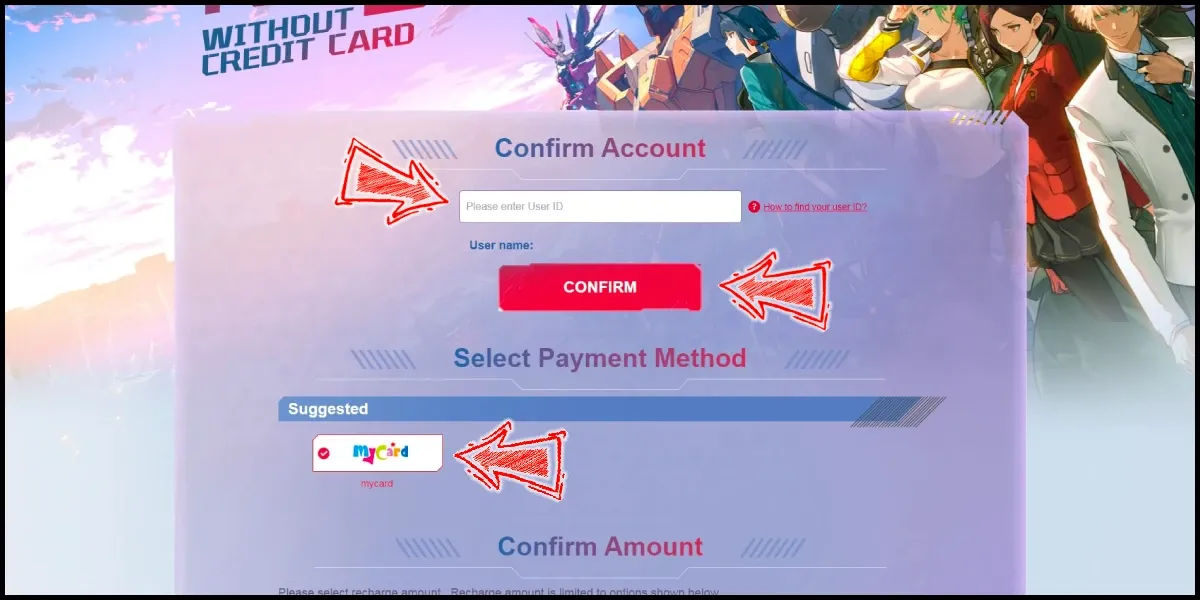
To locate your account identifier for direct game top-ups:1. Open your target game on your device.2. Tap your player avatar, profile icon, or navigate to the in-game Settings menu.3. Locate your User ID (UID), Account ID, or Character ID along with your assigned Server Name.4. Copy or note down the numeric ID accurately so that points are credited to the correct profile on the redemption web portal.
How to Redeem MyCard TW Code: Direct Game Top-Up vs MyCard Member Wallet
MyCard offers two distinct redemption paths. You can either deposit the points directly into a specific game or store the points inside a personal MyCard Member Wallet.
Method 1: Direct In-Game / Web Top-Up (點數卡儲值)
This method applies the entire face value of your purchased card directly to a specific game account.
- Visit the official web top-up or billing portal of your chosen game.
- Select your login method, enter your Game UID / Account ID, and pick your exact Server and Character.
- Under the payment options list, select MyCard Point Card (MyCard 點數卡).
- Enter the Card Serial Number and Card Password provided in your BitTopup order.
- Click Confirm / Submit. The in-game items or currencies will arrive in your account mailbox or inventory immediately.
Method 2: MyCard Member Wallet Top-Up (會員點數儲值)
This method stores your points in your MyCard Member account balance, allowing you to spend partial amounts across multiple games or hold balance for future releases.
- Go to the official MyCard portal (
mycard520.com) and log in to your MyCard Member account. - Click on Top Up (點數儲值) from the main menu and choose Point Card Top Up (點數卡).
- Enter your Card Serial Number and Card Password.
- Confirm the submission. The points will be credited to your MyCard Member Wallet balance.
- When playing a supported game, choose MyCard Member Deduction (會員扣點) at checkout to pay using your stored balance.
Region Lock Rules: Taiwan Account Compatibility and Restrictions
MyCard (TW) codes are region-locked to services, games, and web portals configured for the Taiwan (TW) market.
- Server Compatibility: These codes work on Taiwan, Hong Kong, and Macau (TW/HK/MO) game servers that process payments via MyCard Taiwan.
- Global Server Restrictions: MyCard TW points cannot be used on Global, North American (NA), European (EU), or Southeast Asian (SEA) game servers unless the game publisher specifically maintains a Traditional Chinese payment gateway accepting MyCard TWD point cards.
- Wallet Currency Matching: A MyCard (TW) point card must be redeemed to a MyCard account set to Taiwan region currency or applied directly to a billing page configured for TWD settlement.
Always confirm that your game account operates on the Taiwan server or has an official MyCard payment gateway before completing your purchase.
Common Redemption Errors and Troubleshooting Steps
If you run into an error message while redeeming your MyCard TW serial number and password, review these standard fixes:
- Card Number or Password Incorrect (卡號或密碼錯誤): Ensure there are no accidental spaces before or after the code strings. Pay close attention to easily confused alphanumeric characters (e.g., number
0vs letterO, number1vs capitalI). Copy and paste the codes directly from your BitTopup order details. - Card Already Redeemed (此卡已儲值): Verify whether you or someone with access to your device already submitted the code on another browser tab or directly into your MyCard Member Wallet. Check your in-game transaction logs or MyCard Member balance history.
- Region or Currency Mismatch (地區不符 / 幣別限制): The game top-up page you are using may be configured for Global or Southeast Asian payment channels. Switch the billing portal region selector to Taiwan (台灣) or Traditional Chinese (繁體中文).
- System Busy / Transaction Timeout: If the publisher's payment gateway undergoes brief maintenance, wait 5 to 10 minutes, verify whether the in-game currency was already credited, and retry if the balance remains unchanged.
Why Buy MyCard (TW) Codes on BitTopup
BitTopup provides a straightforward, reliable purchasing experience for gamers looking for digital vouchers and point cards:
- Instant Digital Delivery: Your MyCard TW Serial Number and Password are generated immediately upon completed payment and displayed directly on your order confirmation screen and sent to your email.
- Zero Account Sharing: We never ask for your private game password, social logins, or verification codes. You receive an independent digital voucher code to redeem on official portals yourself.
- Transparent Live Pricing: Checkout values reflect current market rates clearly with zero unannounced processing additions.
- 24/7 Dedicated Support: Our customer service team is available around the clock to assist with order verification and redemption questions.
Frequently Asked Questions
Can I use MyCard (TW) on game accounts outside of Taiwan?
MyCard (TW) codes are intended for game accounts and services operating on Taiwan (TW/HK/MO) regional servers. They are generally incompatible with dedicated Global, North America, Europe, or SEA servers unless the publisher's official website explicitly features a MyCard Taiwan payment option on its billing portal.
How do I redeem my MyCard Taiwan serial number and password?
You can redeem your code by going directly to the official payment center of your game, selecting MyCard Point Card, and typing in the serial number and password. Alternatively, you can log in to your account on mycard520.com and deposit the card into your MyCard Member Wallet balance.
What is the difference between direct top-up and MyCard Member Wallet?
Direct top-up consumes the full point card value in a single transaction to credit currency directly to one game character. Top-up via the MyCard Member Wallet adds the points to your personal MyCard account balance, allowing you to spend customized point amounts across multiple games over time.
Do MyCard (TW) point cards have an expiration date?
Standard MyCard (TW) digital point cards purchased on BitTopup do not have a strict expiration date, meaning you can hold the card code until you are ready to redeem it. However, special promotional points credited from publisher events may have specific validity windows once deposited into a MyCard Member Wallet.
What should I do if my MyCard TW code displays an error during redemption?
Double-check that the Serial Number and Password were typed correctly without leading or trailing spaces. Confirm that the top-up portal is set to the Taiwan region. If the problem persists, take a screenshot of the exact error message and reach out to BitTopup 24/7 customer support with your order number for verification assistance.
Which payment options are supported when purchasing MyCard TW on BitTopup?
BitTopup supports a wide variety of secure international and local payment methods, including major credit/debit cards, e-wallets, and regional payment solutions. Check the live checkout page to see the available payment options for your country.