

A-Cash (SG) Top Up: Digital PlayPark Currency Overview
A-Cash (SG), traditionally known as @Cash Singapore, is the official digital prepaid currency used to recharge Asiasoft and PlayPark game accounts across Singapore. By purchasing an A-Cash Singapore card, players receive a digital Serial Number and Security Code (PIN) that can be redeemed directly on the PlayMall portal or legacy Asiasoft Passport system. Once credited, the points convert into standard game cash, allowing you to acquire in-game cash shop items, cosmetics, seasonal passes, gachapon tickets, and character upgrades.
BitTopup provides direct access to digital A-Cash SG vouchers with immediate PIN delivery upon payment verification. You do not need to share account passwords or sensitive login credentials to complete a transaction. Simply buy the card code, receive your serial and PIN, and redeem it through the official PlayMall payment gate.
Compatible PlayPark and Asiasoft Games for A-Cash (SG)
A-Cash SG prepaid codes support the entire library of PlayPark PC and mobile titles serviced under the Singapore region. Top-ups made with Singapore A-Cash load PlayPark Points (SGD) into your master wallet, which can then be converted into individual game currencies:
- MapleStory SEA (MapleSEA): Direct conversion to Maple Cash for Royal Hair coupons, Gachapon, Miracle Cubes, and exclusive decorative cash items.
- Audition Next Level (PC): Refill Audition Cash (Audition Town) for designer avatars, VIP tickets, and song access.
- Club Audition Mobile: Purchase rubies, exclusive dance gear, and premium battle passes.
- Flyff Online: Acquire Flying mounts, upgrade scrolls, inventory expansions, and premium consumables.
- Cabal Online: Convert points into Cabal Cash for Blessing Beads, Force Wings, and dungeon entry tickets.
- Rohan Online & Special Force 2: Purchase supply crates, battle equipment, and account utility items.
Available A-Cash Singapore Denominations and Rates
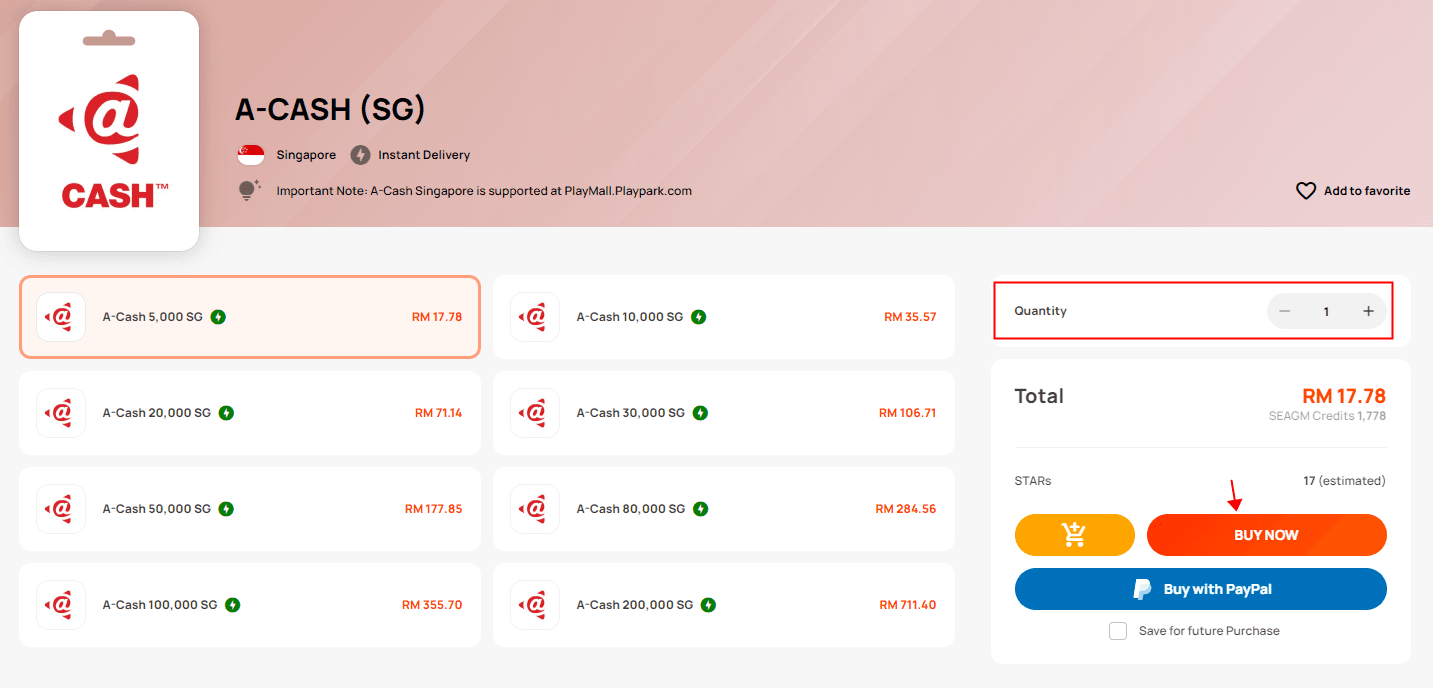
A-Cash SG follows standard Singapore Dollar (SGD) face values. In the PlayMall ecosystem, 10,000 @Cash / A-Cash points correspond directly to 10.00 SGD in PlayPark wallet credit.
| Denomination (Points) | Nominal SGD Value | Primary Use Case |
|---|---|---|
| 5,000 @Cash (SG) | 5.00 SGD | Starter packs, basic utility scrolls, daily buffs |
| 10,000 @Cash (SG) | 10.00 SGD | Gachapon tickets, basic avatar cosmetics, monthly packs |
| 20,000 @Cash (SG) | 20.00 SGD | MapleSEA Miracle Cubes, premium royal styling items |
| 30,000 @Cash (SG) | 30.00 SGD | Mid-tier bundles, event milestone spending |
| 50,000 @Cash (SG) | 50.00 SGD | High-tier character enhancement packs, seasonal passes |
| 100,000 @Cash (SG) | 100.00 SGD | Hardcore progression bundles, major game event charging |
Note: Exact retail pricing in your local currency is calculated and displayed in real time on the BitTopup checkout page before you place your order.
Step-by-Step Guide: How to Redeem A-Cash SG on PlayMall
Redeeming your digital code takes less than two minutes on the official PlayPark PlayMall portal. Follow these exact steps:
- Open your web browser and go to the official PlayMall portal:
https://playmall.playpark.com. - Log in with your PlayPark account method (PlayID, Google, Facebook, or Apple ID).
- On your account dashboard, click on the Top Up (or Refill) button.
- From the list of available payment channels, select @Cash Singapore (or A-Cash SG).
- Enter the Card Serial Number and Card Password (PIN) exactly as provided in your BitTopup order details.
- Click Submit or Confirm to execute the reload.
- Once the transaction completes successfully, your PlayMall wallet balance will update in SGD. You can now transfer those points into your chosen game (e.g., MapleSEA or Audition).
How to Verify Your PlayPark Account Region and UID
A-Cash (SG) cards are strictly region-locked to Singapore PlayMall profiles. Before redeeming your code, make sure your registered account currency is set to Singapore Dollar (SGD).
To check your account region:1. Log in to https://playmall.playpark.com.2. Look at the upper-right corner of the profile screen under your account name.3. Verify that your designated wallet currency displays SGD. If your account is set to THB, MYR, or PHP, Singapore A-Cash cards will not be accepted by the system.4. Your registered Login ID (PlayID, email address, or linked social ID) serves as your primary account identifier across all connected PlayPark services.
Region Lock and Currency Rules for Singapore Accounts
PlayPark enforces strict currency and regional segmentation across its Southeast Asian portals:
- Singapore vs. Malaysia Accounts: Singapore A-Cash codes credit SGD wallets only. If your PlayMall account was registered under Malaysia (MYR), Thailand (THB), or Philippines (PHP), you cannot use an SG A-Cash voucher on it.
- MapleSEA Passport System: If you manage legacy MapleSEA accounts through the Asiasoft Passport interface, ensure you select the Singapore @Cash charging route. Cross-currency redemptions will fail with an invalid region code error.
- Non-Transferable Funds: Once an A-Cash code is converted into PlayMall SGD points, the funds remain bound to that specific account and cannot be refunded or shifted to another PlayID.
Troubleshooting A-Cash (SG) Redemption Errors
If you experience an issue when charging your prepaid voucher on PlayMall, review the following troubleshooting checkpoints:
- Error: Invalid Serial / Password: Ensure you are entering the Serial Number in the first field and the PIN/Security Code in the second field. Do not include extra spaces before or after the characters. Copy-paste directly from your order screen to avoid mistaking characters like
0(number zero) andO(letter O), or1(number one) andI(capital i). - Error: Card Already Used: Refresh your PlayMall dashboard or check your transaction history. If the balance did not update, verify if the code was already submitted during a previous session. If you just purchased the code, reach out to BitTopup 24/7 customer support with your order number for verification.
- Error: Channel Not Supported in Your Region: Your PlayMall account currency does not match SGD. Double-check your account profile settings to verify your country registration.
- Browser Timeout / Blank Screen: Clear your browser cache, disable intrusive pop-up blockers, or retry using an incognito window.
Secure Digital Code Delivery on BitTopup Checkout
BitTopup provides a streamlined, transparent checkout process designed for gamers who need fast, secure, and hassle-free top-ups:
- Direct Digital Delivery: Your A-Cash SG Serial and PIN are generated immediately upon completed payment and displayed on your confirmation screen, as well as archived in your user dashboard for easy reference.
- Account Safety Guaranteed: You never need to supply your game passwords, secondary PINs, or PlayPark login credentials. You purchase the digital code and maintain 100% control over redemption.
- Live Checkout Transparency: View the final price, currency conversions, and available local and global payment methods upfront before confirming your order.
- Responsive Support: If you ever need help with order tracking or code delivery, BitTopup 24/7 customer support is available to assist you around the clock.
Frequently Asked Questions
How do I redeem an A-Cash (SG) code on PlayMall?
Log in to https://playmall.playpark.com, select the Top Up button, choose @Cash Singapore / A-Cash SG as your payment method, enter the Serial Number and PIN from your BitTopup order, and click confirm to credit your SGD balance.
Can I use A-Cash (SG) for MapleSEA and Audition Next Level?
Yes. A-Cash SG is fully compatible with MapleSEA, Audition Next Level, Club Audition Mobile, Flyff Online, Cabal Online, and other PlayPark titles operating under Singapore servers.
Can an A-Cash Singapore code be used on non-Singapore PlayPark accounts?
No. A-Cash SG vouchers are region-locked to Singapore PlayMall and Asiasoft Passport accounts configured with SGD currency. Accounts set to Malaysia (MYR), Thailand (THB), or other regions will reject the code.
What is the difference between A-Cash, @Cash, and PlayPark Points?
@Cash is the legacy name for Asiasoft's prepaid game card, while A-Cash is the modern digital voucher designation. When you redeem an A-Cash (SG) card on the PlayMall portal, the system converts the face value into PlayPark Points (SGD), which can then be converted into specific in-game currencies such as Maple Cash or Audition Cash.
What should I do if my A-Cash serial code or password shows as invalid?
Double-check that you did not accidentally swap the serial number and the password fields. Verify that there are no accidental spaces copied into the input boxes. If the error persists, take a screenshot of the error message and contact BitTopup customer support with your order ID for immediate assistance.
Do A-Cash (SG) prepaid codes have an expiration date?
A-Cash SG digital codes typically feature a long validity window from the date of generation. However, it is strongly recommended that you redeem your Serial and PIN into your PlayMall wallet immediately after purchase to secure your funds.