

Garena Shells TH Top Up: Overview and Supported Games
Garena Shells are the centralized virtual currency used across the Garena gaming ecosystem. When you purchase Garena Shells (TH), you receive a digital prepaid voucher code configured specifically for the Thailand server region. These Shells can be stored in your Garena account balance or converted directly into premium in-game currencies for titles published by Garena in Thailand.
Games Supported on Garena Thailand
Converting Shells allows you to purchase battle passes, premium skins, character draws, and event tokens across multiple titles:
- Arena of Valor (RoV Thailand): Convert Shells into RoV Vouchers to purchase seasonal skins, Codex upgrades, and hero bundles.
- Call of Duty: Mobile (CODM TH/Garena): Convert Shells into CP (COD Points) for lucky draws, weapon crates, and Battle Passes.
- Free Fire / Free Fire MAX: Exchange Shells for Free Fire Diamonds for Elite Passes and event spins.
- FC Online (formerly FIFA Online 4 TH): Convert Shells into FC Cash to buy player packs, VIP memberships, and team upgrades.
- Moonlight Blade (TH): Convert Shells into bound and unbound tickets for character progression and cosmetics.
- Black Clover Mobile (TH): Exchange Shells for summoning tickets and in-game packs.
| Game | In-Game Currency | Common Conversion Uses |
|---|---|---|
| RoV (Arena of Valor) | Vouchers | Hero Skins, Valor Pass, Magic Draw |
| Call of Duty: Mobile | CP (COD Points) | Battle Pass, Mythic/Legendary Draws |
| Free Fire | Diamonds | Elite Pass, Weapon Royale, Emotes |
| FC Online | FC / MC | Player Packs, Top Class Membership |
| Moonlight Blade | Vouchers / Cash | Costumes, Mounts, Growth Materials |
How to Recharge Garena Shells TH on BitTopup
BitTopup provides a direct checkout system for Garena Shells Thailand vouchers. The process requires no sensitive account credentials and issues digital prepaid codes immediately upon payment confirmation.
- Select Denomination: Choose the Garena Shells (TH) voucher amount you wish to purchase. Current available packages and prices are displayed on the live BitTopup checkout catalog.
- Confirm Quantity: Specify how many digital codes you need.
- Provide Contact Details: Enter your email address to receive a backup copy of your digital voucher PIN.
- Complete Payment: Select your preferred payment method and finalize the order.
- Retrieve Voucher: Your Garena Shells TH code will display immediately on your order confirmation screen and will also be sent to your email inbox.
How to Check Your Garena Region and Find Player UID
Before redeeming a Thai Shells voucher, confirm that your Garena account is registered in Thailand. Garena Shells (TH) will not work on accounts registered in other countries such as Singapore, Malaysia, Indonesia, or the Philippines.
Finding Your Garena UID and Account Country
- Open your browser and navigate to the official Garena Account Center (
account.garena.com). - Log in with your Garena username and password.
- On the Account Overview dashboard, look for your User ID (UID). This is a numeric ID linked to your Garena profile.
- Look at the Country/Region field. The region must show Thailand (TH) to redeem Garena Shells TH vouchers.
Note: If you play mobile games via guest accounts, Facebook, or Apple ID, make sure your social account is properly bound to a Garena Account registered in Thailand before converting currencies.
Step-by-Step Guide to Redeeming Garena Shells Codes
Redeeming your digital code from BitTopup takes only a few moments on the official Garena Thailand Topup Center.
Method 1: Redeeming directly to your Garena Shells balance
- Visit the official redemption portal:
termgame.com. - Click on Garena Shells at the top of the game selection list.
- Log in using your Garena account credentials.
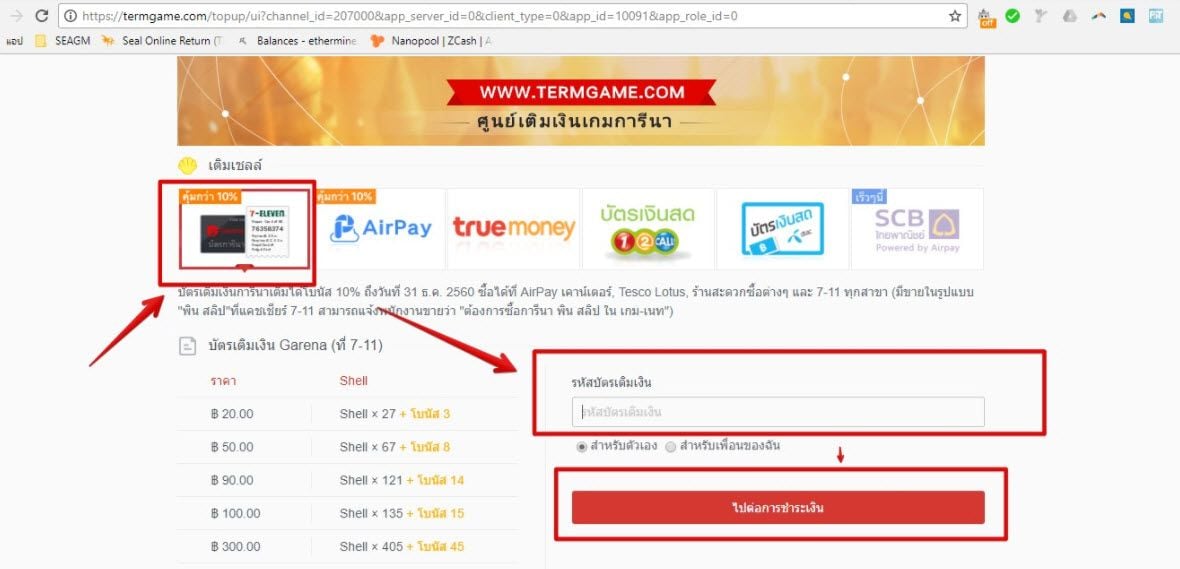
- Select Garena Prepaid Card (บัตรเติมเงินการีน่า) as your redemption method.
- Enter the digital code/PIN provided by BitTopup in the input field.
- Click Confirm. Your Garena Shells balance will update immediately.
Method 2: Direct Game Top Up via Garena Prepaid Card
- Go to
termgame.comand click directly on the game icon (e.g., RoV, Free Fire, or CODM). - Log in using your Garena account or game-linked open ID (e.g., Facebook or Player ID).
- Under the payment options, select Garena Prepaid Card (บัตรเติมเงินการีน่า).
- Type or paste the voucher code from your BitTopup order.
- Click Confirm. The converted in-game currency will be sent directly to your character's mailbox or in-game wallet.
Thailand Region-Lock Requirements and Verification Rules
Garena strictly enforces regional boundaries on prepaid vouchers. Keep the following technical requirements in mind:
- Country Matching: Garena Shells TH codes are valid exclusively for Garena accounts with Thailand set as the registration country.
- Non-Transferable: Shells credited to a Thailand Garena account cannot be transferred to accounts located in other regional servers.
- Currency Conversion Limits: Certain games require conversion directly through
termgame.comrather than the in-game app store. - No Returns on Issued PINs: Because prepaid codes are generated and revealed digitally upon purchase, they are non-refundable. Verify your account region prior to completing your order on BitTopup.
How to Convert Garena Shells to RoV Vouchers, CODM CP, and Free Fire Diamonds
If you already hold a balance of Garena Shells on your Thailand account, you can convert them into specific game currencies at any time.
Converting Shells to RoV Vouchers
- Go to
termgame.comand select RoV. - Log in using your linked Garena ID or game credentials.
- Choose Garena Shells as the payment method.
- Select the voucher denomination you wish to convert from your current Shell balance.
- Confirm the transaction. Open Arena of Valor on your device to access your new Vouchers.
Converting Shells to Call of Duty: Mobile CP
- Select Call of Duty: Mobile on
termgame.com. - Log in using your Garena account.
- Choose Garena Shells as the payment channel.
- Select the desired amount of CP.
- Click confirm. The CP will reflect in your CODM balance immediately.
Converting Shells to Free Fire Diamonds
- Select Free Fire on
termgame.com. - Log in via Player ID or Garena Account.
- Choose Garena Shells.
- Pick the Diamond package corresponding to your Shell balance.
- Confirm the exchange. Log into Free Fire to verify receipt of your Diamonds.
Security Guidelines: Keep Your Garena Account Safe
Protecting your gaming assets is vital. Follow these baseline security practices when buying and redeeming prepaid cards:
- Never Share Passwords: BitTopup delivers prepaid digital codes. You never need to provide your Garena password, email password, or two-factor authentication (2FA) verification codes to anyone.
- Redeem Only on Official Sites: Only enter your voucher PIN on official Garena websites (
termgame.comoraccount.garena.com). Avoid third-party websites claiming to double your Shells or generate free currency. - Enable 2-Step Authentication: Activate the Garena Authenticator app or SMS verification on your Garena Account Center to block unauthorized login attempts.
Troubleshooting Common Garena Voucher Code Errors
If you encounter an issue while redeeming your code on termgame.com, check these common resolutions:
- Error: Invalid Card Number or Password: Check for accidental spaces before or after the code. Ensure characters such as
0(zero) andO(letter), or1(one) andI(capital i) are entered accurately. Copying and pasting directly from your BitTopup order screen prevents manual typing errors. - Error: Account Region Not Supported: Verify your account's country setting at
account.garena.com. If your account is registered in a country outside Thailand, the Thai prepaid code cannot be processed. - Error: Card Has Already Been Used: If you receive this error on your initial attempt, check your Garena Shell balance history on the Topup Center to confirm if the balance credited in the background. If not, contact BitTopup customer support with your order number and a screenshot of the redemption error.
- Server Lag or Delayed Delivery: During peak in-game events, redemption servers may experience brief processing queues. Wait 5 to 10 minutes and refresh your in-game client.
Frequently Asked Questions
Where can I top up and buy Garena Shells (TH)?
You can buy Garena Shells (TH) prepaid voucher codes directly on BitTopup. Select your preferred denomination, complete the payment, and receive your digital code on screen and via email for redemption on the official Garena portal.
How do I redeem my Garena Shells Thailand voucher code?
Go to termgame.com, select either Garena Shells or the specific game you play, log in to your account, choose Garena Prepaid Card as the payment channel, enter your code, and confirm.
Can I use Garena Shells (TH) on an account registered outside Thailand?
No. Garena Shells (TH) vouchers are region-locked. They can only be redeemed on Garena accounts registered with Thailand as the account country.
How do I convert Garena Shells into Call of Duty: Mobile CP or Free Fire Diamonds?
Log in to termgame.com, select Call of Duty: Mobile or Free Fire, choose Garena Shells as your payment method, pick the currency tier you wish to purchase, and confirm the deduction from your Shells balance.
Do Garena Shells prepaid codes expire?
Prepaid voucher codes issued for Thailand have a standard validity period from their generation date. It is recommended to redeem your code on termgame.com immediately after purchase.
What should I do if my Garena Shells voucher code fails to redeem?
First, confirm that your account region is Thailand and that you have entered the code accurately without extra spaces. If the issue persists, reach out to BitTopup 24/7 customer support with your order details for assistance.