



UniPin Voucher ID Top Up: Fast and Secure Digital Game Credits
UniPin Voucher ID is a prepaid digital voucher designed to reload UniPin Credits or make direct game payments across hundreds of online games and digital entertainment services in Indonesia. A UniPin voucher eliminates the need to attach your credit card or bank credentials to individual game accounts. Instead, you purchase a digital code consisting of a Serial Number and a Secret PIN, which you can redeem instantly to credit your gaming account.
Whether you need diamonds, battle passes, monthly memberships, or digital wallet top-ups, UniPin Voucher ID provides a direct, flexible payment method. BitTopup provides instant delivery of UniPin Voucher ID codes with around-the-clock customer support, ensuring you can return to your gaming sessions without delays.
Supported Games and Platforms for UniPin Voucher ID
UniPin Voucher ID can be used directly on the official UniPin payment portal for a wide variety of popular mobile, PC, and web-based games. You can also redeem the voucher directly into your UniPin account to hold UniPin Credits (UC) for future transactions.
Popular titles and digital platforms supported by UniPin Voucher ID include:
- Mobile Legends: Bang Bang (MLBB): Buy Diamonds, Starlight Memberships, and Twilight Passes.
- Free Fire (FF): Reload Free Fire Diamonds and membership cards directly.
- Garena Shells: Convert voucher funds into Garena Shells for use in Garena-published games.
- PUBG Mobile: Purchase UC for Royale Passes and weapon crates.
- Ragnarok Series: Reload Ragnarok Origin, Ragnarok M: Eternal Love, and classic titles.
- Genshin Impact & Honkai: Star Rail: Top up Genesis Crystals, Oneiric Shards, and monthly passes.
- Point Blank: Purchase PB Cash directly via the UniPin gateway.
- Steam Wallet Code IDR: Convert UniPin funds into Steam Wallet balance for PC gaming.
- UniPin Credits (UC): Deposit into your master UniPin account wallet to spend on any supported service at your convenience.
How to Find Your UniPin Account Details and Voucher Code
UniPin Voucher ID is a digital voucher product. You do not need to provide game login credentials to purchase it. When you buy a voucher, you receive two key pieces of information: the Serial Number (typically beginning with a regional identifier like IDMB) and the PIN (a private numeric or alphanumeric code).
If you are redeeming the code directly into a game via the UniPin portal, you will need your target game's User ID and Zone/Server ID, which can be located inside your game profile menu.
If you want to deposit the balance into your UniPin account balance, you only need to log in to unipin.com using your registered email address.
How to Buy UniPin Voucher ID on BitTopup
Acquiring a UniPin Voucher ID on BitTopup takes only a few simple steps:
- Go to the UniPin Voucher ID product page on BitTopup.
- Choose your desired denomination in Indonesian Rupiah (IDR).
- Enter your contact email address where the digital code and receipt should be sent.
- Select your preferred payment method from the available checkout options.
- Complete the payment. Current product pricing is displayed directly on the live checkout interface.
- Retrieve your Serial Number and PIN instantly on your BitTopup order confirmation screen and in your email inbox.
How to Redeem UniPin Voucher ID: Serial and PIN Guide
Redeeming your UniPin Voucher ID is straightforward. Depending on your preference, you can recharge a game directly or credit your UniPin account wallet.
Option 1: Direct Game Top-Up via UniPin
- Open your web browser and navigate to the official UniPin website or the specific game recharge page.
- Select your game (e.g., Mobile Legends, Free Fire, or Point Blank).
- Enter your Game User ID and Server ID / Zone ID.
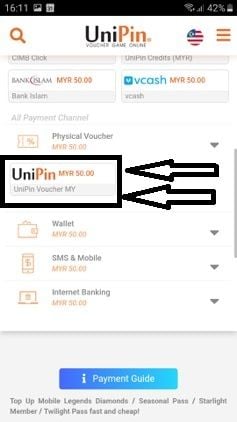
- Under the payment channel list, select UniPin Voucher (or UniPin Code / Physical Voucher).
- Enter the Serial Number into the Serial field.
- Enter the PIN into the PIN field.
- Click Confirm or Submit. The game credits will reflect in your game account instantly.
Option 2: Reloading UniPin Credits (UC Wallet)
- Visit unipin.com and log in to your UniPin account.
- Click the + Top Up button near your account balance.
- Choose UniPin Voucher ID from the list of payment options.
- Input your Serial Number and PIN accurately.
- Click Submit to convert the voucher value directly into UniPin Credits (UC).
Available Denominations and Indonesia Region Currency
UniPin Voucher ID denominations correspond directly to Indonesian Rupiah (IDR) values. When converted to UniPin Credits (UC), 1 IDR equals 1 UC.
| Voucher Denomination (IDR) | UniPin Credits (UC) Equivalent | Recommended For |
|---|---|---|
| 10,000 IDR | 10,000 UC | Small microtransactions and daily event draws |
| 20,000 IDR | 20,000 UC | Weekly passes and basic in-game packs |
| 50,000 IDR | 50,000 UC | Diamond bundles and standard game passes |
| 100,000 IDR | 100,000 UC | Monthly passes, battle passes, and standard top-ups |
| 300,000 IDR | 300,000 UC | Premium item bundles and large credit packs |
| 500,000 IDR | 500,000 UC | High-tier packages, bulk gacha pulls, and big events |
Note: Current live prices, promotional rates, and available inventory are displayed directly on the active BitTopup checkout page.
Indonesia Region Restrictions and Currency Compatibility
UniPin Voucher ID codes are region-locked to the Indonesian region and denominated in IDR. Keep the following rules in mind before purchasing:
- Regional Currency Lock: Indonesian vouchers can only be redeemed on the Indonesian UniPin portal (
unipin.com/id) or on games that accept IDR-denominated UniPin vouchers. - Cross-Region Limitations: You cannot redeem an Indonesian UniPin voucher code on UniPin portals set to other regions (such as Malaysia MYR, Philippines PHP, Thailand THB, or Brazil BRL).
- Game Account Region: Make sure your game account is compatible with Indonesian top-up channels if you plan to use direct game recharge.
Safety Guarantees: Why Choose BitTopup for Game Vouchers
BitTopup provides a safe and frictionless way to buy gaming vouchers:
- No Password Required: We never ask for your game password, login credentials, or account verification codes. You only receive the digital voucher code and redeem it yourself.
- Zero Account Risk: Because you redeem the voucher directly through official UniPin systems, your game account remains completely secure from unauthorized access.
- Instant Digital Delivery: Codes are generated and delivered immediately after successful payment verification.
- 24/7 Customer Support: If you ever experience issues with code delivery or redemption, our multilingual support team is available around the clock to assist you.
Troubleshooting Common UniPin Voucher Redemption Errors
If you encounter an issue while redeeming your UniPin Voucher ID, review these common solutions:
- "Invalid Serial Number or PIN": Ensure you are entering the Serial Number into the Serial field and the PIN into the PIN field. Do not merge them together. Check for accidental spaces before or after the code.
- "Voucher Already Used": Verify if the code was already redeemed on your account or applied to a game order. Check your UniPin Credit history or in-game diamond balance. If the code was just purchased and shows used immediately, contact BitTopup support with your order number.
- "Region Mismatch Error": Check the top-right corner of the UniPin website to confirm the country flag is set to Indonesia (ID). Switching to the correct country portal resolves most regional currency errors.
- "Payment Gateway Timeout / Maintenance": Occasionally, specific game APIs undergo scheduled maintenance. Wait 5 to 10 minutes and try submitting the Serial and PIN again.
Frequently Asked Questions
Where can I buy UniPin voucher codes online?
You can buy UniPin Voucher ID codes directly on BitTopup. Select your desired IDR denomination, enter your email address, and complete your payment to receive your Serial Number and PIN instantly.
How do I redeem my UniPin Voucher ID on the UniPin website?
Log in to your account on unipin.com, click the Top Up button, select UniPin Voucher as your payment method, and enter your Serial Number and PIN. You can also select UniPin Voucher as the checkout method directly on the game top-up page.
Can I use an Indonesian UniPin Voucher ID in other regions?
No. UniPin Voucher ID codes are currency-locked to Indonesian Rupiah (IDR) and intended for use on the Indonesian UniPin portal. They cannot be used on UniPin portals configured for other countries.
What games can I top up using a UniPin Voucher ID?
You can top up Mobile Legends: Bang Bang, Free Fire, Garena Shells, PUBG Mobile, Genshin Impact, Ragnarok Origin, Point Blank, Steam Wallet IDR, and hundreds of other titles listed on the UniPin platform.
How is the UniPin Voucher code delivered after purchase?
Your UniPin Voucher Serial Number and PIN code are delivered immediately on your BitTopup order confirmation screen and sent directly to the email address provided during checkout.
What should I do if my UniPin Voucher ID code does not work?
First, double-check that you entered the Serial and PIN in their respective boxes with no extra spaces, and confirm the UniPin portal country is set to Indonesia. If the error continues, contact BitTopup 24/7 customer support with your order ID for swift assistance.
Do UniPin Voucher ID codes have an expiration date?
UniPin vouchers generally have a long validity period. However, it is recommended to redeem your voucher code promptly after purchase to avoid misplaced codes or unexpected regional policy adjustments.