



Netflix Gift Card (AE) Top Up: What is AED Billing and How Does It Work?
A Netflix Gift Card (AE) is a prepaid digital voucher denominated in United Arab Emirates Dirhams (AED). When you purchase an AE gift card, you receive an authentic digital redemption code that applies a direct monetary credit to your Netflix account balance.
Netflix treats your gift card balance as your primary payment source. Each month on your designated billing date, the platform automatically deducts the cost of your selected subscription tier (Basic, Standard, or Premium) from your available AED funds. Unlike credit cards or bank transfers, prepaid gift cards do not trigger unexpected recurring charges once your credit runs out. You retain complete control over your entertainment spending by reloading your balance only when you choose.
Prepaid AED gift cards are ideal for streaming subscribers who prefer not to link personal debit or credit cards to online platforms, as well as for family members sharing entertainment budgets in the UAE.
Step-by-Step Guide: How to Recharge Your Netflix UAE Account via Digital Code
Recharging your Netflix account with an AED digital code is quick and requires no technical setup. Follow these steps to apply your balance immediately:
- Select Your AED Denomination: Choose the desired Netflix Gift Card (AE) value on BitTopup and complete the checkout process.
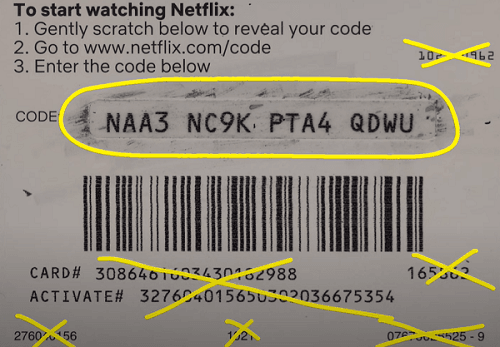
- Access Your Code: Retrieve your unique alphanumeric redemption code directly from your BitTopup order history or confirmation email.
- Go to the Redemption Page: Open a web browser on your phone, tablet, or PC and navigate to
netflix.com/redeem. - Sign In or Register: Log in to your existing UAE Netflix account. If you are a new subscriber, create an account using your preferred email address.
- Enter the Digital Code: Type or paste your 11-digit alphanumeric code into the redemption input field.
- Confirm Redemption: Click Redeem. The full AED value will immediately credit to your account balance, and your subscription status will update instantly.
How to Access Your Account Details and Redeem Your Digital Code
Unlike gaming platforms that rely on numeric User IDs (UIDs), Netflix accounts are identified by your registered email address and regional billing profile.
To ensure your gift card applies to the correct account, follow these verification steps before entering your code:
- Check Your Profile: Log in to the Netflix mobile app or desktop website, click your profile icon in the top-right corner, and select Account.
- Verify Your Billing Email: Confirm that the email address listed under Membership & Billing matches the account you intend to fund.
- Check Country Settings: Review your billing history to ensure your currency is displayed in AED (United Arab Emirates Dirham).
Netflix UAE Subscription Plan Pricing and Gift Card Duration Estimates (2026)
Understanding your monthly tier cost helps you plan how long an AED denomination will keep your streaming service active. Netflix calculates subscription durations down to the exact day based on your remaining credit.
The following breakdown estimates how long popular gift card values (AED 100, AED 250, AED 500) will support each UAE subscription tier:
| Subscription Tier | Streaming Quality & Screens | Approximate Monthly Cost (AED) | AED 100 Card Duration | AED 250 Card Duration | AED 500 Card Duration |
|---|---|---|---|---|---|
| Basic Plan | 720p HD, 1 screen at a time | ~35 AED / month | ~2.8 Months | ~7.1 Months | ~14.2 Months |
| Standard Plan | 1080p Full HD, 2 screens at a time | ~45 AED / month | ~2.2 Months | ~5.5 Months | ~11.1 Months |
| Premium Plan | 4K Ultra HD + HDR, 4 screens at a time | ~65 AED / month | ~1.5 Months | ~3.8 Months | ~7.6 Months |
Note: Plan pricing reflects current 2026 Netflix UAE rates. If your remaining balance is less than a full month's plan cost, Netflix extends your service for a prorated number of days proportional to the exact leftover amount.
Important Regional Compatibility: UAE (AED) Account Requirements
Netflix enforces strict geo-locking policies regarding gift card currencies. An AE gift card is exclusively compatible with accounts that bill in United Arab Emirates Dirhams (AED).
- Currency Matching: If your Netflix account was registered in another country (such as the United States, India, the United Kingdom, or the Eurozone) and bills in USD, INR, GBP, or EUR, an AED gift card code cannot be applied.
- Using AED Cards on Foreign Accounts: To use an AED gift card on an account originally created abroad, you must cancel your current foreign subscription, wait for the remaining billing period to expire fully, and then reactivate the membership using your AED gift card while connected from the UAE.
- New Accounts: If you are setting up a new streaming profile, ensure you register while located in the United Arab Emirates so the base currency defaults to AED.
How to Switch Existing Payment Methods to a Netflix Gift Card Balance
If you currently pay for your subscription using a credit card, debit card, or a third-party billing provider, you can transition your account to a prepaid gift card balance.
Switching from Credit or Debit Cards
- Visit
netflix.com/redeem. - Enter your AED code and confirm.
- Netflix will automatically consume your gift card credit before charging your backup credit card again. Your card details remain on file but will not be charged until the prepaid balance drops to zero.
Switching from Third-Party Providers (Telecom, Apple, or Google Play)
If your Netflix subscription is billed as part of a home internet or mobile package (such as local UAE telecom bundles) or through Apple/Google billing, you cannot directly apply a gift card to that linked invoice.1. Cancel your Netflix package through your telecom provider or app store subscription settings.2. Allow your active billing cycle to reach its end date so the account enters inactive status.3. Log in to your inactive account on netflix.com/redeem and submit your AED gift card code to reactivate your membership independently.
Troubleshooting Common Netflix Gift Card Redemption Errors
If you experience an issue when entering your digital code, review these straightforward solutions:
- Error: "The code entered is invalid": Double-check your code for character mix-ups. Common mistakes include confusing the number
0with the letterO, or the number1with the uppercase letterI. Copy and paste the code directly from your BitTopup order details to avoid manual typing errors. - Error: "The currency of this gift card does not match your account": Your Netflix profile is set to a currency other than AED. Check your account settings to verify the billing currency. If it is not AED, follow the regional reset steps outlined above.
- Error: "This code has already been redeemed": Refresh your browser and check your Billing Details page. In most cases, the code applied on your first click even if the confirmation screen failed to load.
- Error: "An unexpected error has occurred": Disable active VPNs, proxy extensions, or ad blockers on your browser. Ensure your connection reflects a standard UAE network before retrying.
Why Buy and Top Up Netflix Gift Card (AE) on BitTopup
BitTopup provides a fast, secure, and transparent digital code purchasing experience for streaming enthusiasts across the UAE:
- Instant Digital Delivery: Your Netflix AED code is generated immediately upon order confirmation. You can access it straight from your order screen and receive a backup copy via email.
- Zero Account Risk: BitTopup never asks for your Netflix account password, personal login credentials, or verification PINs. You receive an independent digital code that you redeem yourself on the official Netflix platform.
- Flexible Payment Options: Complete your purchase smoothly with an extensive selection of trusted local and international payment methods.
- Transparent Live Checkout: What you see at checkout is exactly what you pay. There are no hidden processing surcharges or surprise activation fees.
- 24/7 Dedicated Customer Support: If you ever have a question about code delivery or redemption steps, our customer support team is available around the clock to assist you.
Frequently Asked Questions
Can I use an AE Netflix gift card on an account registered in another country?
No. Netflix gift cards are strictly currency-locked. An AED gift card can only be redeemed on an account whose billing currency is set to United Arab Emirates Dirhams (AED). If your account is tied to another currency, you must let your current billing cycle expire and reactivate your account in the UAE.
How do I recharge my Netflix membership using an AED gift card code?
Go to netflix.com/redeem, sign in to your UAE Netflix account, enter the alphanumeric code received from BitTopup, and select Redeem. The credit will apply to your account immediately.
How long will an AED 100 Netflix gift card last on my subscription plan?
An AED 100 card provides approximately 2.8 months of service on the Basic plan (~35 AED/month), 2.2 months on the Standard plan (~45 AED/month), or 1.5 months on the Premium plan (~65 AED/month). Exact duration depends on your active tier and live Netflix rates.
Can you reload an existing Netflix gift card once the balance is used?
No. Individual digital gift card codes are single-use vouchers. Once a code is redeemed and its balance is applied to your account, the code cannot be reloaded. To add more funds, simply purchase a new Netflix Gift Card (AE) on BitTopup and redeem the new code.
What happens if my Netflix account is already billed through a telecom or mobile provider?
Accounts linked to third-party billing providers cannot apply gift card balances directly. You must cancel the subscription through your carrier or third-party service, wait for the current paid period to end, and then reactivate your account at netflix.com/redeem using your AED gift card.
Do Netflix UAE gift card digital codes have an expiration date?
No. Authentic Netflix gift card codes do not expire. Once purchased, you can redeem your AED digital code whenever you wish, and the balance remains in your Netflix account until it is fully used by your monthly subscription.