




Zalando Gift Card UK Top Up: Instant Account Credit for Fashion Lovers
A digital Zalando gift card is the quickest and most flexible way to add credit to your Zalando UK account. Whether updating your seasonal wardrobe, purchasing designer footwear, or stocking up on sportswear and beauty products, a prepaid voucher allows you to shop securely without linking personal credit or debit cards to your account.
When you purchase a Zalando UK code on BitTopup, you receive a digital alphanumeric code instantly upon checkout completion. You can redeem this code immediately to fund your Zalando customer wallet or apply it during checkout on your next order.
How to Recharge Your Zalando UK Balance and Find Your Account Details
Unlike gaming platforms that rely on numeric player IDs or server tags, Zalando uses your registered email address as your account identifier. All voucher credits you redeem are tied directly to your profile.
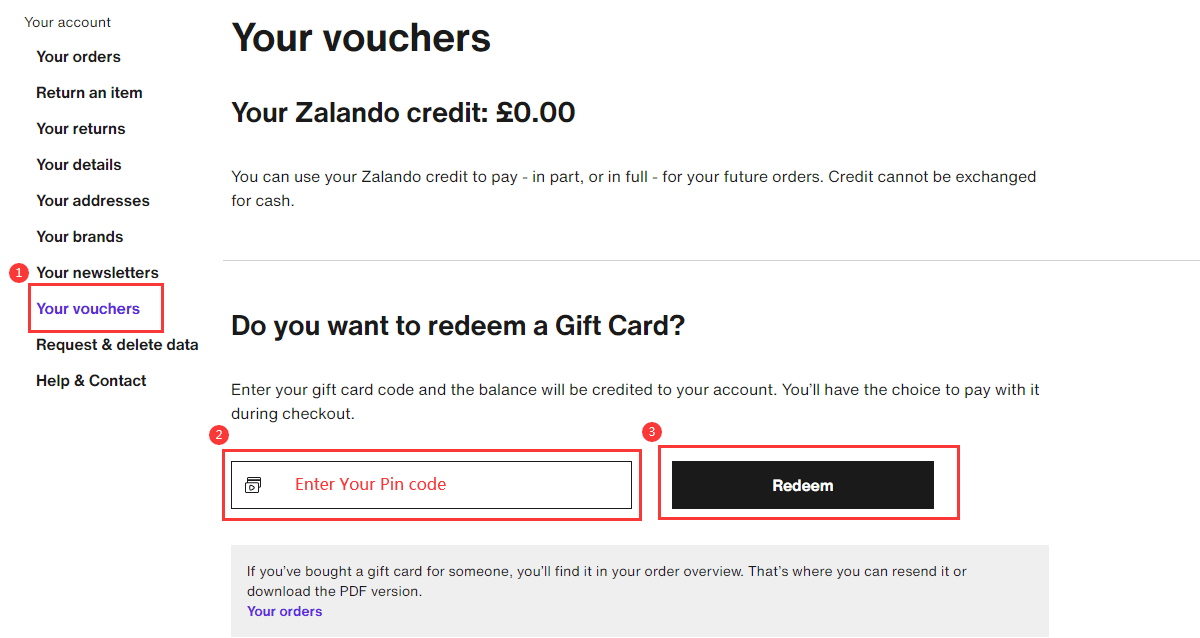
To verify your profile details and access your balance storage:
- Visit zalando.co.uk on a web browser or open the official Zalando app on iOS or Android.
- Log in using your registered email address and password.
- Click on the User Profile icon located in the top-right corner of the header.
- Select My Overview or Gift Cards & Vouchers from the drop-down menu.
- Here you can view your current account balance in British Pounds (GBP) and enter new digital codes.
Step-by-Step Guide: Redeeming Your Voucher Code on Web and Mobile App
You can apply your Zalando UK gift card in two distinct ways: by loading it directly into your account wallet before shopping, or by applying it during the final payment step of your purchase.
Method 1: Pre-loading to Your Account Balance
- Log into your account at zalando.co.uk or via the Zalando app.
- Go to your Account Settings and select Gift Cards & Vouchers (or My Gift Card Balance).
- Enter your digital voucher code into the input box.
- Click Redeem Gift Card.
- The total amount in GBP will be credited to your account balance instantly and automatically deducted from your next eligible order.
Method 2: Applying at Checkout
- Browse the Zalando catalogue, select your desired items, and add them to your shopping bag.
- Proceed to the Checkout screen.
- Complete the delivery address section and continue to the Payment stage.
- Scroll to the field labeled Do you have a voucher or gift card?.
- Enter your digital code exactly as shown and click Redeem.
- The order total will recalculate immediately. If the voucher does not cover the total sum, you can settle the remainder using any other accepted payment method.
Zalando UK Gift Card Specifications and Regional Rules
Zalando operates separate regional stores across Europe, and voucher codes are strictly currency- and region-locked.
| Specification | Details |
|---|---|
| Eligible Region | United Kingdom only (zalando.co.uk & UK App) |
| Currency | British Pound Sterling (GBP) |
| Delivery Method | Instant digital code delivery via screen and email |
| Account Sharing | Not required (100% passwordless) |
| Expiry Policy | No expiration date on standard paid gift cards |
| Stacking | Yes (combine multiple cards up to retailer limits) |
Strict Region-Locking Notice
Gift cards issued for the UK market are denominated in GBP and can only be redeemed on zalando.co.uk or the UK version of the Zalando mobile app. They cannot be used on European domains such as zalando.de, zalando.fr, or zalando.it. Ensure your Zalando account region and shipping address are set to the United Kingdom before purchasing.
Stacking Multiple Gift Cards and Expiry Policies
- Stacking Balances: You can redeem multiple Zalando gift cards onto a single account. The values combine into one unified wallet balance, which you can spend across separate purchases until exhausted.
- No Expiry on Paid Gift Cards: Purchased Zalando gift vouchers do not carry an expiration date. You can hold the credit in your account for as long as you wish.
- Returns and Refunds: If you return an item paid for with gift card credit, Zalando refunds the amount back to your digital account balance, ready for your next order.
- Promotional Codes vs. Gift Cards: Promotional discount vouchers (such as seasonal %-off coupon codes) often have strict minimum spend rules and expiry dates. Regular prepaid gift cards behave like cash credit and can be combined with qualifying promotional discounts.
Troubleshooting Common Zalando Code Errors
If you experience an issue when entering your voucher on Zalando, check the following solutions:
- Regional Mismatch Error: If the site displays an error stating the voucher is invalid for your region, verify that you are logged into zalando.co.uk rather than an international Zalando portal.
- Character Confusion: Take care not to confuse similar characters, such as the number
0and the letterO, or uppercaseIand number1. Copy and paste the code directly from your BitTopup order confirmation screen to prevent typos. - Wrong Input Field: Ensure you are entering the code in the Gift Card section rather than a promotional campaign discount box, as some checkout forms separate these categories.
- Already Redeemed: Check your My Gift Card Balance tab. If you previously entered the code, the funds may already be sitting in your balance ready to be used.
Why Buy Your Zalando Digital Code on BitTopup
BitTopup provides a streamlined, secure solution for acquiring digital vouchers and account credit:
- Passwordless Transaction: You never need to share your Zalando login credentials or account passwords. You purchase the digital code and apply it yourself.
- Instant Digital Delivery: Digital codes are generated and displayed on screen immediately after payment confirmation, with a backup copy sent to your email address.
- Clear Pricing: All available denominations and checkout prices are clearly displayed in real time on the order page.
- 24/7 Customer Support: If you ever need help with an order, our dedicated customer assistance team is available around the clock to assist you.
Frequently Asked Questions
How do I redeem a Zalando gift card in the UK?
Log into your account on zalando.co.uk or the mobile app, go to Gift Cards & Vouchers under your account profile, enter the code, and click redeem. Alternatively, enter the code into the voucher box during checkout.
Can I use a UK Zalando gift card on European Zalando websites?
No. UK Zalando gift cards are denominated in GBP and are valid exclusively on the UK storefront (zalando.co.uk). They cannot be redeemed on European platforms such as Zalando Germany, France, or Italy.
Do Zalando UK gift cards expire?
Standard purchased Zalando gift cards do not expire. Your credit remains in your account until you decide to spend it.
Can I combine multiple gift cards on a single Zalando order?
Yes. You can add multiple gift card codes to your Zalando wallet balance. Zalando will apply your combined credit total against your shopping bag total automatically.
How can I check my remaining Zalando account credit?
Log into your Zalando UK profile, open the user menu, and select Gift Cards & Vouchers or My Overview. Your active GBP balance will be displayed on the page.
Is it possible to recharge or reload an existing Zalando gift card?
Physical or digital gift card codes cannot be reloaded directly. To add more funds to your Zalando account, simply purchase a new digital code on BitTopup and redeem it to top up your existing wallet balance.
What should I do if my Zalando code is not working?
Verify that you are on the UK website (zalando.co.uk), ensure there are no accidental spaces before or after the code, and confirm whether the balance has already been added to your account overview. If issues persist, contact customer support for assistance.