




eBay Gift Card CA Top Up: Overview and Digital Card Basics
An eBay Gift Card (CA) is a prepaid digital voucher denominated in Canadian Dollars (CAD). It provides a secure, convenient payment method to purchase goods directly on ebay.ca. Each digital card comes with a unique 13-digit redemption code that applies monetary credit directly against your checkout total.
Using a digital gift card removes the requirement to link your personal credit card or bank account directly to individual merchant transactions. Because these codes operate on a fixed CAD balance, they give buyers precise control over spending while protecting personal financial details during checkout.
| Feature | Details |
|---|---|
| Card Currency | Canadian Dollars (CAD) |
| Redemption Platform | ebay.ca checkout |
| Code Format | 13-digit alphanumeric digital code |
| Reload Capability | Non-reloadable (Single-issue balance) |
| Expiration Policy | No expiration date or maintenance fees |
| Account Linking | Code balance links to your eBay account upon partial use |
How to Recharge and Redeem Your eBay Gift Card (CA) at Checkout
Redeeming your digital code is straightforward and handled directly within the standard eBay Canada purchase flow. Follow these steps to apply your CAD funds:
- Log in to your registered eBay account on ebay.ca.
- Browse the marketplace, select your items, and click Add to cart or Buy It Now.
- Proceed to the payment screen by clicking Go to checkout.
- Verify that your Canadian shipping address is selected correctly.
- Scroll down to the Gift cards, coupons, eBay Bucks field located beneath the payment method options.
- Enter your 13-digit digital code accurately without spaces or hyphens.
- Click Apply. The order summary will update immediately to reflect the deducted CAD balance.
- If your gift card does not cover the entire purchase total, select a secondary payment method (such as a credit card or debit card) to pay the remaining balance, then confirm your order.
Note: You do not need a PayPal account to redeem an eBay gift card. As long as you complete checkout through an active eBay account with a Canadian address, the system accepts the 13-digit voucher code directly.
Locating Your Digital Code and Card Information
Unlike mobile gaming platforms that require a numerical Player ID or UID before purchase, digital gift cards for eBay are delivered as standalone voucher codes. You do not need to share your eBay account login credentials or password to complete an order on BitTopup.
Once your transaction completes, your 13-digit voucher code is delivered instantly to your screen and sent directly to your registered email address.
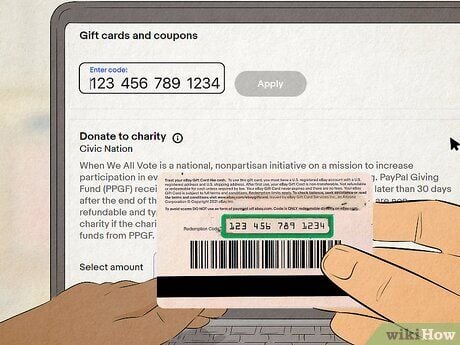
To locate and copy your code:* Check your purchase confirmation page on BitTopup.* Review your order receipt sent via email.* Copy the 13-digit string directly into the redemption box on ebay.ca to prevent manual typing errors.
Regional Rules: Using CAD eBay Gift Cards on ebay.ca vs ebay.com
eBay enforces strict regional and currency boundaries on its gift cards. Understanding these boundaries ensures a smooth checkout experience:
- Currency Lock: A Canadian (CA) gift card carries funds strictly in CAD. It is designed specifically for purchases made on ebay.ca.
- Cross-Border Limitations: You cannot apply a CAD gift card on the US marketplace (ebay.com) or international sites (such as eBay UK or eBay Australia) if the listing requires settlement in USD or other foreign currencies.
- Shipping Address Requirements: To redeem a CAD gift card, your default shipping address on eBay must be located within Canada. If your account defaults to a foreign delivery address, the checkout system may reject the code.
- IP & Network Location: Using an active VPN with a foreign server can trigger fraud detection filters during checkout. Ensure your network connection reflects your actual Canadian region when applying your voucher.
Eligible Marketplace Items vs Restricted Purchase Categories
While an eBay Gift Card (CA) covers millions of consumer products, specific regulatory and security guidelines restrict certain categories:
Eligible Items
- Consumer electronics, computers, and gaming hardware
- Fashion, apparel, footwear, and accessories
- Home goods, tools, appliances, and kitchenware
- Auto parts, accessories, and maintenance supplies
- Collectibles, trading cards, toys, and memorabilia
- Books, media, and musical instruments
Restricted Categories (Non-Eligible)
- Bullion and Currency: Gold bars, silver rounds, legal tender coins, and paper money.
- Virtual Currencies: Cryptocurrency vouchers, mining contracts, and digital tokens.
- Third-Party Gift Cards: Retailer gift cards, prepaid credit cards, gaming store cards, and additional eBay gift cards.
- Classified Ads & Real Estate: Real estate transactions, industrial heavy machinery listings, and motor vehicle deposits placed through specialized classifieds.
Can You Reload or Transfer Funds from an eBay Gift Card?
- Non-Reloadable Structure: eBay digital gift cards are single-use balance instruments. Once the total CAD value of the 13-digit code is spent, the code becomes inactive. You cannot add money, top up, or reload an existing card code.
- Remaining Balance Retention: If you make a purchase that costs less than your card value, you do not lose the leftover funds. The remaining CAD balance stays linked to your 13-digit code (and is tied to your specific eBay account). You can use that same code on your next purchase by entering it at checkout.
- No Account Balance Consolidation: eBay does not offer a unified "digital wallet" where multiple cards can be merged into a single balance pool. Each card code must be entered separately at checkout (up to the platform's allowed limit of 4 gift codes per transaction).
- No Cash Conversion: Funds loaded onto an eBay gift card cannot be withdrawn as cash, refunded to a bank account, or transferred to another user.
Troubleshooting Invalid Code, Region Lock, and Redemption Errors
If you experience an issue when entering your voucher code, use these troubleshooting steps to resolve the problem:
1. "Invalid Code" or Format Error
- Check for common character misreads: numeral
0vs letterO, numeral1vs letterI, or numeral8vs letterB. - Verify that the code contains exactly 13 alphanumeric characters.
- Ensure no extra blank spaces were copied at the beginning or end of the text string.
2. "This code cannot be applied to this order"
- Check the items in your shopping cart. If any product belongs to a restricted category (bullion, other gift cards, virtual currency), remove it.
- Ensure the checkout currency is CAD on ebay.ca.
3. Region Lock or Address Mismatch
- Verify that your shipping destination is a valid Canadian address.
- Disconnect any active VPN, proxy, or data-saver extensions that might route your internet traffic outside Canada.
4. "Code Already Redeemed" Error
- eBay links a gift card to the first account that applies it. If you have multiple family accounts, check if the code was entered on another profile.
- If you previously began a checkout session but canceled or timed out, eBay places a temporary security hold on the funds for 15 to 30 minutes. Wait half an hour, then re-enter the code at checkout.
Why Buy eBay Gift Card (CA) Digital Codes on BitTopup
BitTopup offers a secure, reliable solution for purchasing Canadian eBay Gift Card digital codes:
- Zero Account Sharing: You never need to provide your eBay password or account credentials. You receive an authentic 13-digit code to redeem independently.
- Instant Digital Delivery: Codes are generated and delivered directly to your confirmation screen and email inbox immediately after payment processing.
- Live, Transparent Pricing: View exact rates and denomination values on the live checkout page with no hidden processing fees.
- 24/7 Customer Support: Dedicated customer service agents are available around the clock to assist you with order verification and delivery inquiries.
Frequently Asked Questions
Can I add money or reload an eBay gift card?
No. eBay gift cards are non-reloadable. Once the original CAD value has been completely spent, the code cannot have funds added to it. To obtain more balance, purchase a new digital code.
How do I redeem my 13-digit eBay gift card code at checkout?
Go to ebay.ca, add your desired products to the cart, and proceed to checkout. Under the payment section, locate the Gift cards, coupons, eBay Bucks box, type in your 13-digit code, and click Apply.
Can I use a Canadian (CAD) eBay gift card on ebay.com?
No. CAD gift cards are region-locked for use on ebay.ca with a Canadian shipping address. They cannot be converted or redeemed for items priced in USD on ebay.com.
Can you convert an eBay gift card to cash or transfer it to a bank account?
eBay gift card funds cannot be redeemed for cash, transferred to a bank account, or deposited into a PayPal balance, except where required by Canadian provincial law.
What items cannot be purchased with an eBay gift card?
You cannot use your gift card to buy bullion, coins, paper currency, virtual/crypto currencies, third-party gift cards, or real estate and motor vehicle deposits.
What should I do if my eBay gift card shows an invalid code error?
Double-check the 13-digit code for typos, confirm you are shopping on ebay.ca, verify that your shipping address is in Canada, and make sure no active VPN is obscuring your regional connection.
Do eBay gift cards expire or carry maintenance fees?
No. eBay gift cards have no expiration date, and no maintenance or dormancy fees are ever deducted from your balance.