Why Crashes Increased in 2026
January 2026 Windows security updates modified kernel isolation and memory integrity protocols, impacting ACE initialization. Results: error 1400006 (anti-cheat timeout) and 554696704 (service block). Windows Defender Core Isolation prevents ACE kernel-level loading, causing launch crashes.
GPU driver updates (NVIDIA/AMD, late 2025) introduced shader compilation methods conflicting with Unreal Engine rendering, causing GPU TDR events in high-density urban environments.
Three Most Common Error Types
0xC000007B: 32-bit/64-bit mismatch or corrupted system libraries. Requires 64-bit dependencies, but missing Visual C++ Redistributables introduce 32-bit DLLs triggering exceptions.
GPU TDR Timeout: GPU fails to respond within 2 seconds, OS terminates driver. Common with GTX 960 2GB, RX 5500 at thermal limits or overclocked.
qbcore.dll Exception 0x80000003: Breakpoint exception from anti-cheat debugging detection. False positives from MSI Afterburner, RTSS, hardware monitors.
Recent Update Impact
Launcher errors 7801113/7801110 from corrupted %AppData%\Local\ArenaBreakoutLauncher cache during interrupted updates. Error 154140716 (integrity check failure) from modified/missing files, even from incomplete Steam downloads. Requires 20-30GB free space beyond 70GB installation.
Complete 0xC000007B Error Fix
0xC000007B = STATUS_INVALID_IMAGE_FORMAT. Windows can't execute due to invalid code—typically 32-bit DLLs in 64-bit process or missing DirectX/Visual C++ runtimes.
Step 1: Install Visual C++ Redistributables
Download 2015-2022 versions (x86 + x64) from Microsoft. Run with admin rights, select repair if already installed. Restart to register DLLs properly.
Step 2: Replace Corrupted System DLLs
Check C:\Windows\System32 and SysWOW64 for XINPUT1_3.dll, d3dx9_43.dll, MSVCR120.dll. Run Command Prompt as admin:
sfc /scannow (15-30 min)DISM /Online /Cleanup-Image /RestoreHealth for deeper corruption
Step 3: Compatibility Mode
Right-click launcher.exe > Properties > Compatibility:
- Enable Run as administrator
- Test Windows 8 mode on Windows 11

Apply same to UAGame.exe in Binaries\Win64. Verify settings persist after updates.
Step 4: Verify DirectX 12
Install DirectX End-User Runtime Web Installer for legacy D3DX libraries. Confirm GPU supports DirectX 12 Feature Level 12_0+ via dxdiag.exe > Display tab.
Solving GPU TDR Timeout Crashes
GPU TDR = Timeout Detection and Recovery. Screen freezes when GPU exceeds 2-second Windows threshold, triggering driver termination.
Understanding TDR
WDDM scheduler monitors GPU responsiveness. Arena Breakout's complex shaders during map loading or intense firefights exceed timeout. Event Viewer logs as event ID 4101 (nvlddmkm/amdkmdap source).
Method 1: Update/Rollback Drivers
NVIDIA: Clean install via DDU in Safe Mode, then latest Game Ready driver. If crashes started post-update, rollback.
AMD: Use Adrenalin drivers post-September 2025 for DirectX 12 multi-threading fixes.
Intel Arc: Latest drivers with DirectX 12 Ultimate support. Monthly updates essential.
Method 2: Increase TDR Timeout (Registry)
Open regedit as admin:
- Navigate: HKEY_LOCAL_MACHINE\SYSTEM\CurrentControlSet\Control\GraphicsDrivers
- Create DWORD TdrDelay = 8
- Create DWORD TdrDdiDelay = 8
- Restart system
Warning: Extended timeout masks hardware issues. If crashes persist, check GPU temps/power.
Method 3: Reduce Graphics Load
Add -safe launch parameter (Steam > Properties > Launch Options) for 30 FPS low settings test. Remove all GPU overclocks via MSI Afterburner. Keep temps below 83°C (NVIDIA), 85°C (AMD).
Disable RTSS overlay for UAGame.exe—injection interferes with rendering.
Testing Stability
Play 2+ hours monitoring GPU via HWiNFO64/GPU-Z. Track temps, power, clocks, memory. Stable configs maintain consistent clocks without throttling.
Install on SSD with 20-30GB free space—HDD causes texture streaming delays triggering apparent hangs.
Fixing qbcore.dll Anti-Cheat Errors
qbcore.dll = ACE anti-cheat core. Exception 0x80000003 = breakpoint from debugging detection. False positives from overlay software (Discord, OBS, GeForce Experience) or monitoring utilities.
Common Causes
Error 1-1704-30015228: Corrupted ACE folder or Windows security conflicts. Prevents launch.
Error 1400006: ACE drivers loaded but failed client communication—antivirus blocking.
Error 554696704: Windows policies block ACE service startup. Faulting module KERNELBASE.dll = service startup failure.
Reinstall ACE Components
- Run C:\Program Files\AntiCheatExpert\uninstaller.exe as admin
- Delete C:\Windows\System32\drivers\ACE-BASE.sys, ace-game.sys, ace-game-0.sys
- Restart
- Delete C:\Program Files (x86)\Arena Breakout Infinite\ACE folder
- Launch via Steam for auto-reinstall, or run ACE-Setup64.exe from Binaries\Win64\AntiCheatExpert
Check services.msc for AntiCheatExpert service. Set startup to Manual, not Automatic.
Whitelist in Windows Security
Windows Security > Virus & threat protection > Exclusions:
- Entire Arena Breakout directory
- launcher.exe, UAGame.exe, ACE-Client.exe
- C:\Program Files\AntiCheatExpert
Disable Core Isolation and Memory Integrity: Windows Security > Device Security > Core isolation. Trade-off: system security vs game compatibility.
Contact Support
If crashes persist, export Event Viewer logs (.evtx) from Windows Logs > Application > Application Error source. Verify no cheat engines/memory editors running—ACE scans all processes.
Advanced Troubleshooting
Windows Event Viewer
Open eventvwr.msc > Windows Logs > Application. Find Error events, source Application Error at crash time.
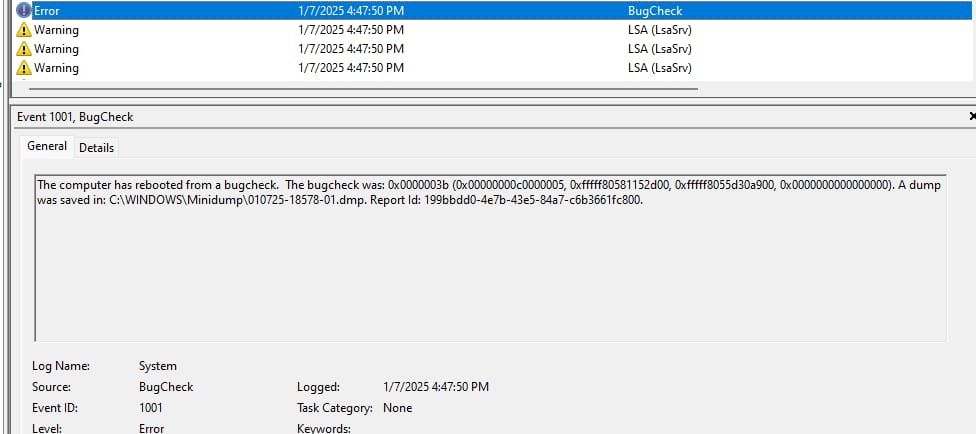
Key details: faulting module, exception code, fault offset.
- 0xc0000005 = access violation
- 0x80000003 = breakpoint (anti-cheat)
Cross-reference modules with recent changes. dbgcore.DLL = Windows debugging vs ACE conflict. GPU driver DLLs = graphics instability.
Memory Testing
Run mdsched.exe > Restart now and check. Tests RAM during boot. For thorough testing: MemTest86 (8+ hours).
Errors = failing RAM needing replacement. Test sticks individually to isolate defective module. Upgrade 12GB configs to 16GB (2x8GB) matched kits.
Clean Boot
msconfig.exe > Services > Hide Microsoft services > Disable all. Startup > Task Manager > Disable all. Restart.
If crashes stop, re-enable in groups of 5-10 to identify conflict. Common culprits: RGB software (iCUE, Aura Sync), VPN clients.
BIOS/UEFI Settings
Access during boot (Del/F2/F12):
- Enable XMP/DOCP memory profiles
- Enable VT-x/AMD-V virtualization
- Disable CSM if Windows in UEFI mode
- Secure Boot: fully enabled or disabled, not partial
Monitor temps in BIOS. CPU >90°C or GPU >85°C = improve cooling, reapply thermal paste, adjust fan curves.
System Requirements & Hardware Compatibility
2026 Minimum vs Recommended
Minimum: i5-7500/Ryzen 5 1400, 12GB RAM, GTX 960 2GB—struggles with AI/physics, no RAM headroom.
Recommended: i7-9700/Ryzen 5 3600X, 16GB RAM, RTX 2060/RX 6600 6GB—40-50% better single-thread, stable extended sessions.
GTX 960 2GB hits VRAM limits. RTX 2060/RX 6600 provides comfortable headroom.
GPU Compatibility
NVIDIA: GTX 1060 6GB = practical 1080p medium minimum. RTX series ready for DLSS if implemented.
AMD: RX 5500+ needs Adrenalin 23.9.1+ drivers for stability. RX 6600 = excellent 1080p.
Intel Arc A380: Entry-level, GTX 1650 equivalent. Latest drivers required, less reliable than NVIDIA/AMD.
RAM/VRAM Requirements
12GB RAM - 4-6GB for Windows/background = 6-8GB for game. Causes paging, stuttering, crashes.
16GB RAM eliminates memory crashes for most. 32GB for content creators running OBS.
VRAM by resolution/settings:
- 1080p medium: 4GB
- 1080p high: 6GB
- 1440p: 8GB minimum
- 4K: 10GB+
Storage: SSD vs HDD
HDD = frequent stuttering, 30+ second freezes, anti-cheat timeouts. SSD mandatory with 20-30GB free beyond 70GB install.
NVMe optimal, SATA sufficient. Avoid Windows drive if possible—updates/indexing saturate bandwidth.
Preventive Measures (500+ Hours Experience)
Optimal Windows Settings
Disable Game Bar/Game Mode: Settings > Gaming. Causes frame pacing issues, ACE conflicts.
Power plan: High Performance or Ultimate Performance (unlock via powercfg -duplicatescheme e9a42b02-d5df-448d-aa00-03f14749eb61).
Pause Windows updates during gaming: Settings > Update & Security > Advanced options.
Graphics Settings Balance
Start medium preset, increase incrementally monitoring temps/VRAM. Shadow quality and view distance = heaviest cost. Disable motion blur, depth of field.
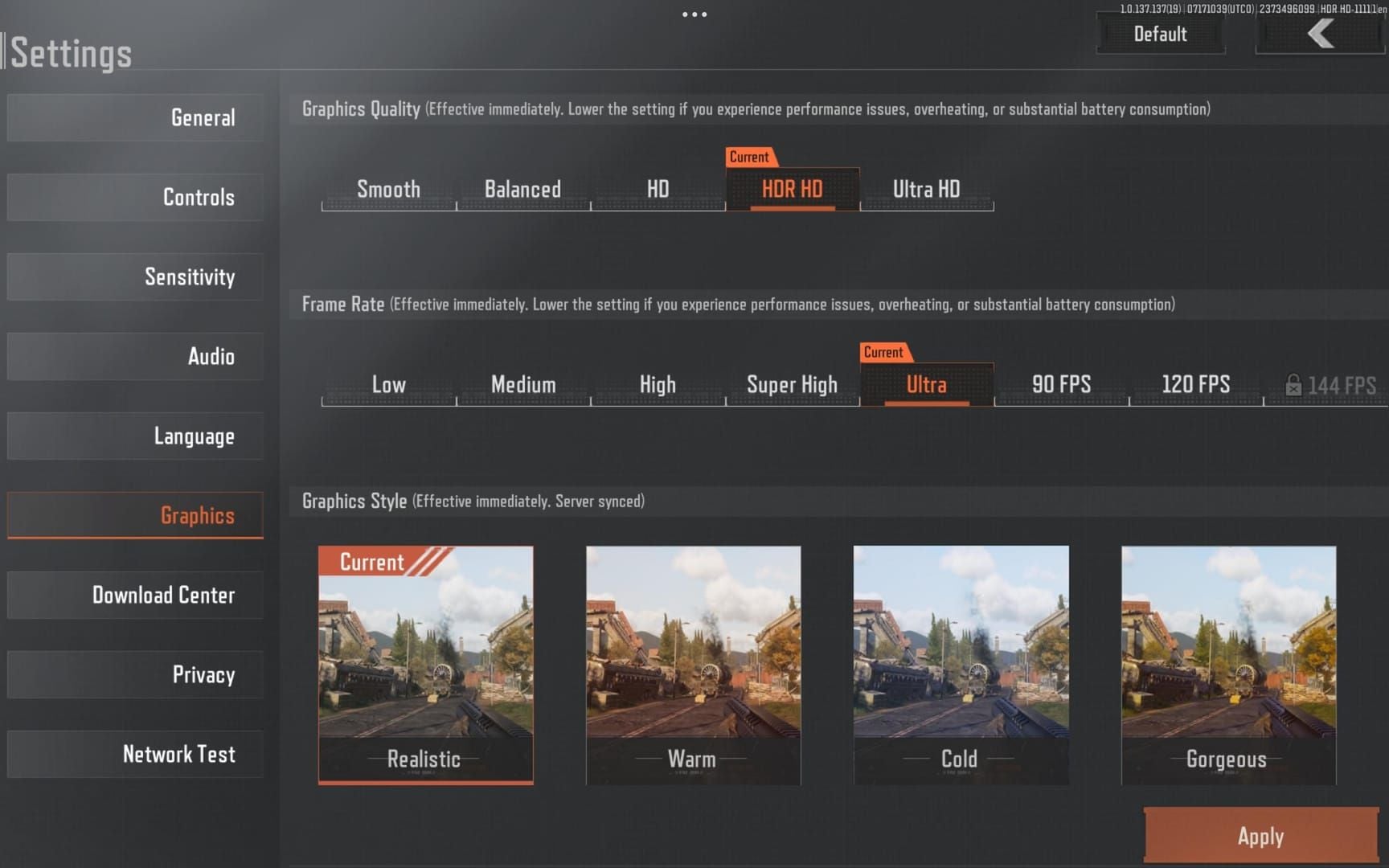
Cap framerate to refresh rate +10 FPS (70 for 60Hz monitors). Prevents menu overwork, excess heat. V-Sync adds input lag.
For in-game currency: buy Arena Breakout bonds recharge from BitTopup—reliable, competitive pricing, fast delivery.
Close Background Apps
Exit browsers (2-4GB RAM, memory leaks). Use lightweight Firefox with tab suspension if needed.
Exit RGB software after setting static profiles. Disable MSI Afterburner/EVGA Precision overlays—use Task Manager for monitoring.
Maintenance Schedule
Weekly: Disk Cleanup > Clean system files. Removes shader cache corruption.
Monthly: Update GPU drivers after community feedback, not immediately. Use DDU for clean install. Verify game files via Steam (Properties > Verify integrity).
Common Misconceptions
Myth: Anti-Cheat Errors = Ban
Errors 1-1704-30015228, 1400006, 554696704 = technical failures, not cheat detection. These prevent launch. Actual detection occurs silently during play, followed by account notifications.
Myth: Reinstalling Always Fixes Crashes
Reinstall only fixes corrupted game files—minority of crashes. Driver issues, Windows corruption, hardware instability persist. Try targeted solutions first: verify files (5 min vs 2+ hours), reinstall ACE only, update drivers, test safe mode.
Myth: Higher Settings = More Crashes
Correlation = GPU temp/VRAM usage, not settings quality. Well-cooled system with adequate VRAM runs max settings more stably than thermally-constrained low settings. Focus on thermal management.
Truth About Optimization Tools
Game boosters disable critical services, modify registry blindly, inject hooks conflicting with ACE. Windows 10/11 auto-optimizes. Manual optimization delivers better results without risks.
Quick Reference: Emergency Solutions
5-Minute Checklist
- Restart system completely
- Verify files: Steam > Properties > Verify integrity
- Run launcher.exe + UAGame.exe as administrator
- Delete %AppData%\Local\ArenaBreakoutLauncher
- Flush DNS:
ipconfig /flushdns in admin Command Prompt - Close overlays: Discord, Steam, GeForce Experience
- Disable antivirus temporarily
Resolves ~60% of crashes in 5 minutes.
Clean Reinstall When
File verification repeatedly redownloads same files = persistent corruption. Modified game files = needs pristine baseline.
Backup: Copy %AppData%\Local\ArenaBreakout to safe location. Uninstall via Steam, manually delete install directory. Reinstall to C:\Games\ArenaBreakoutInfinite with 100GB free (70GB + 30GB headroom).
Verify files before first launch. Apply admin permissions to executables.
Backup Settings
Config: %AppData%\Local\ArenaBreakout\Saved\Config\WindowsClient (graphics, keybinds, audio).
Launcher: %AppData%\Local\ArenaBreakoutLauncher\config.json.
Restore after fresh install. Don't restore corrupted configs.
BitTopup for Gaming Experience
Stable performance achieved? Enhance gameplay with BitTopup's Arena Breakout bonds—competitive pricing, fast delivery, secure payments, excellent customer service ratings. Focus on gameplay, not transaction concerns.
FAQ
What causes 0xC000007B error?
Missing Visual C++ Redistributables (2015-2022, x86+x64) or DirectX runtime. Install all redistributables, run sfc /scannow, install DirectX End-User Runtime.
How to fix GPU TDR timeout?
Update drivers via clean install, increase TDR timeout (registry TdrDelay=8), reduce settings/overclocks. Keep GPU <83°C (NVIDIA), <85°C (AMD).
Is qbcore.dll error false positive?
Exception 0x80000003 can be false positive from MSI Afterburner, Discord, monitors. Reinstall ACE (delete ACE folder, relaunch), whitelist executables in antivirus.
Why startup crashes in 2026?
Windows updates conflict with ACE kernel drivers. Disable Core Isolation/Memory Integrity (Windows Security > Device Security). Delete %AppData%\Local\ArenaBreakoutLauncher, run launcher as admin.
Minimum specs to avoid crashes?
Official: 12GB RAM, GTX 960 2GB. Practical: 16GB RAM, 4GB+ VRAM GPU. SSD with 100GB free (70GB + 30GB), DirectX 12, 64-bit Windows 10 1909+.
Fix anti-cheat initialization failed?
Error 1400006: Run C:\Program Files\AntiCheatExpert\uninstaller.exe, delete drivers from System32\drivers, restart, delete game ACE folder. Launch via Steam for auto-reinstall. Whitelist executables in antivirus.