

Arena Breakout Top Up: Direct Bonds Delivery with Numeric Player ID
Surviving extraction in Kamona requires serious tactical preparation, elite firepower, and reliable gear protection. Arena Breakout Bonds serve as the primary premium currency on mobile, allowing operatives to rent secure containers, expand stash limits, unlock the seasonal Battle Pass, and acquire exclusive weapon skins.
BitTopup provides a direct recharge service for mobile players. By utilizing your numeric Player ID, orders are credited straight to your game account without requiring account sharing, login credentials, or third-party passwords. Choose your desired Bond package, enter your operative ID, and gear up for your next tactical deployment.
What Are Arena Breakout Bonds and How to Use Them Efficiently
Bonds represent the core hard currency in Arena Breakout. While standard raids award Koen and bartered gear, premium Bonds unlock permanent utility upgrades and quality-of-life perks that protect your operational economy.
1. Secure Container Subscriptions (Composite & Bulletproof Cases)
Securing high-value loot before extraction is essential. Bonds allow you to rent secure containers (such as the 2x2 Bulletproof Case or 2x3 Composite Case). Any item placed inside your secure container stays with your operative even if you are eliminated in combat, protecting costly keys, gold items, and medical supplies.
2. Stash Expansion Boxes and Key Chains
As your armory fills with tactical rigs, armor plates, and modified weapons, basic stash slots quickly run out. Use Bonds to acquire Stash Expansion Boxes, Large Weapon Cases, Ammo Boxes, and Key Chains from in-game dealers to organize your inventory without selling vital loadouts.
3. Premium Battle Pass and Exclusive Supply Crates
Unlocking the premium seasonal Battle Pass grants immediate access to exclusive operative uniforms, weapon camouflages, bonus Koen packs, and high-tier equipment bundles throughout the season.
4. Direct Koen Conversion and Combat Bundles
If you experience consecutive failed extractions and run low on operational liquid assets, Bonds can be converted into standard Koen packages or tactical equipment bundles to get your operative back on the field immediately.
Mobile vs PC Infinite: Currency and Cross-Progression Rules
Arena Breakout on mobile platforms (iOS and Android) and Arena Breakout: Infinite on PC operate as completely separate games with distinct servers, economies, and account databases.
| Feature | Arena Breakout (Mobile) | Arena Breakout: Infinite (PC) |
|---|---|---|
| Supported Platforms | iOS, Android | Windows PC (Standalone / Steam) |
| Account Architecture | Mobile Server Profile | PC Infinite Server Profile |
| Primary Premium Currency | Mobile Bonds | PC Infinite Bonds |
| Cross-Progression / Cross-Save | Not Supported | Not Supported |
| BitTopup Mobile Top-Up Validity | Valid for all Mobile Accounts | Not Valid for PC Infinite |
Important Note: Bonds purchased on this page are strictly for the mobile version of Arena Breakout. They cannot be transferred, synced, or converted to Arena Breakout: Infinite accounts on PC.
How to Find Your Numeric Arena Breakout Player ID
To ensure your Bonds arrive without delay, submit your accurate numeric Player ID during checkout. Do not use your character nickname, as special characters or duplicate display names can cause delivery errors.
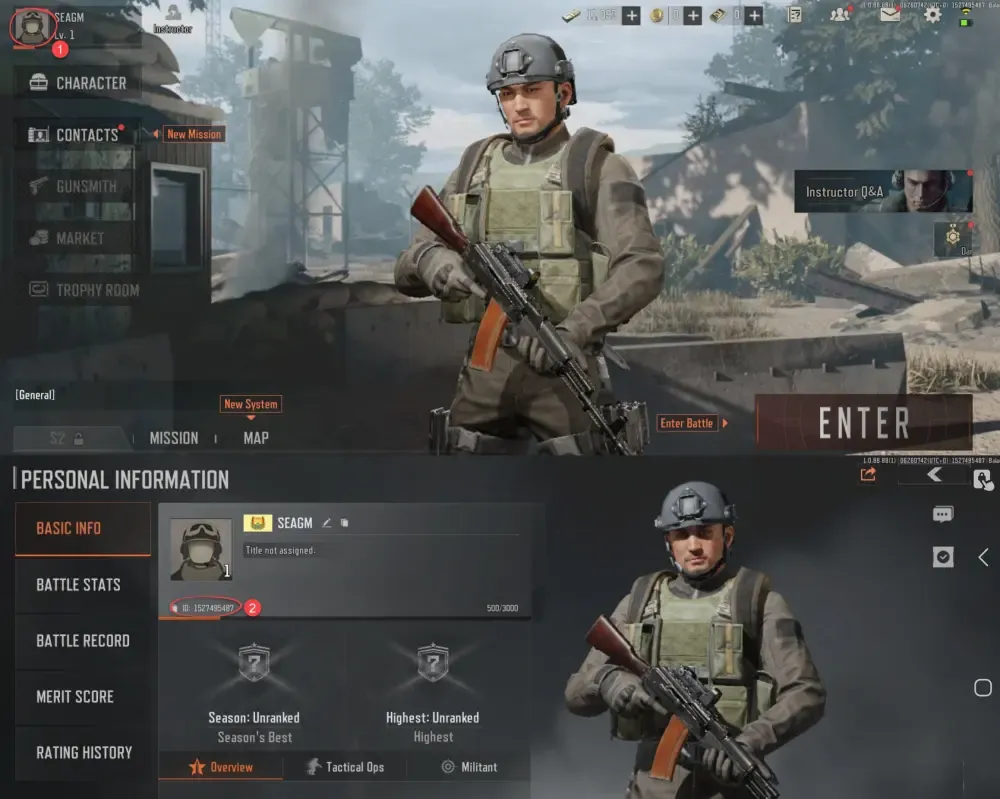
Follow these steps to locate your numeric ID:1. Open Arena Breakout on your mobile device and log in to your account.2. Tap your Profile Avatar located in the top-left corner of the main lobby.3. Navigate to the Basic Info tab.4. Locate the numeric string displayed beneath your operative name (labeled as ID / Player ID).5. Tap the Copy icon next to the number to copy it directly to your clipboard.
Step-by-Step Guide to Top Up Arena Breakout Bonds Online
Recharging your account on BitTopup takes less than a minute. Follow this walkthrough to complete your purchase:
- Select Your Bond Amount: Review the available Bond packs on the product selection grid and choose the denomination you need.
- Input Player ID: Paste your numeric Player ID into the required field. Double-check the numbers to ensure accuracy.
- Proceed to Secure Checkout: Click the recharge button and select your preferred payment method from the available local and global options.
- Receive Your Bonds: Once payment confirmation is complete, the Bonds are routed directly to your in-game profile via automated delivery.
Why Top Up Arena Breakout via BitTopup Safe Checkout
- Strictly Password-Free Transactions: You only need to provide your public numeric Player ID. BitTopup will never ask for your game password, social login credentials, or verification codes.
- Zero Ban Risk: Automated delivery utilizes direct-to-account top-up channels, preserving full compliance with account safety protocols.
- Transparent Pricing: All Bond denominations and current live pricing are displayed clearly on the checkout page before payment.
- 24/7 Order Support: Dedicated customer service agents are available around the clock to assist with order tracking, ID verification, and payment questions.
Troubleshooting and Delivery Verification in the Dark Zone
If your Bond balance does not update immediately after your order shows completed, use the following checklist:
- Restart the Game App: Completely close Arena Breakout from your device's background tasks and relaunch it. This forces the client to synchronize your wallet balance with the server.
- Check Your In-Game Mail: Certain special promotions, bonus items, or tier rewards are delivered as system attachments inside your operative mailbox.
- Verify Submitted ID: Check your BitTopup order receipt to confirm that the numeric Player ID submitted matches your active character profile.
- Contact Customer Service: If your balance does not reflect after restarting, provide your BitTopup order number to our 24/7 live support team for immediate resolution.
Frequently Asked Questions
How do I find my Arena Breakout Player ID for top up?
Open Arena Breakout, tap your profile avatar in the top-left corner of the lobby screen, and open the Basic Info tab. Your numeric Player ID is displayed directly below your operative name. Use the copy icon next to the number to copy it accurately.
Do Arena Breakout Mobile Bonds transfer to Arena Breakout: Infinite on PC?
No. The mobile version of Arena Breakout and the PC version (Arena Breakout: Infinite) operate on separate servers with distinct account systems. Bonds purchased for the mobile game cannot be transferred or accessed on PC.
Is it safe to recharge Arena Breakout with only my Player ID?
Yes. Recharging via numeric Player ID is the safest method available because it requires no account passwords, email access, or login sharing. Your account remains fully in your control throughout the entire transaction.
What can I purchase with Bonds in Arena Breakout?
Bonds can be spent on renting secure containers (Composite Case, Bulletproof Case), purchasing Stash Expansion Boxes, unlocking the premium Seasonal Battle Pass, acquiring exclusive weapon skins, and converting into Koen for gear replenishment.
How long does it take for Bonds to appear in my Arena Breakout account?
Orders processed through BitTopup are automated. Under normal network conditions, Bonds are delivered directly to your account immediately after payment confirmation is received.
Can I buy Koen directly using Arena Breakout Bonds?
Yes. Inside the in-game store, you can convert your Bonds directly into Koen bundles or use them to purchase specialized supply crates to fund your weapon builds and tactical armor.