

Crossfire: Legends SEA Top Up: Instant Diamonds Direct to Your UID
Diamonds serve as the primary premium currency in Crossfire: Legends SEA. They allow players to purchase Heroic weapon crates, unlock premium Season Passes, upgrade VIP tiers, and acquire specialized combat equipment. BitTopup provides a direct-to-account recharge method designed specifically for players across Southeast Asia, requiring only your in-game User ID.
Recharging through BitTopup eliminates the need to share private account credentials or link third-party social logins. The process sends Diamonds straight to your Crossfire: Legends SEA account profile, ensuring fast fulfillment so you can get back to your matches without delay.
How to Recharge Crossfire: Legends SEA Diamonds on BitTopup
Completing your Crossfire: Legends SEA recharge takes only a few quick steps:
- Select Diamond Denomination: Choose the exact Diamond package you wish to purchase from the product catalog.
- Enter Account Details: Input your numerical Crossfire: Legends User ID into the required field.
- Select Payment Method: Choose your preferred payment option from the available local e-wallets, credit/debit cards, or online banking channels displayed at checkout.
- Complete Checkout: Review your details and finalize the payment. Diamonds are credited directly to your in-game balance once the transaction is processed.
How to Find Your Crossfire: Legends User ID
Your User ID is a unique numerical string linked to your game account. You must enter this exact ID to ensure your Diamonds credit to the correct profile.
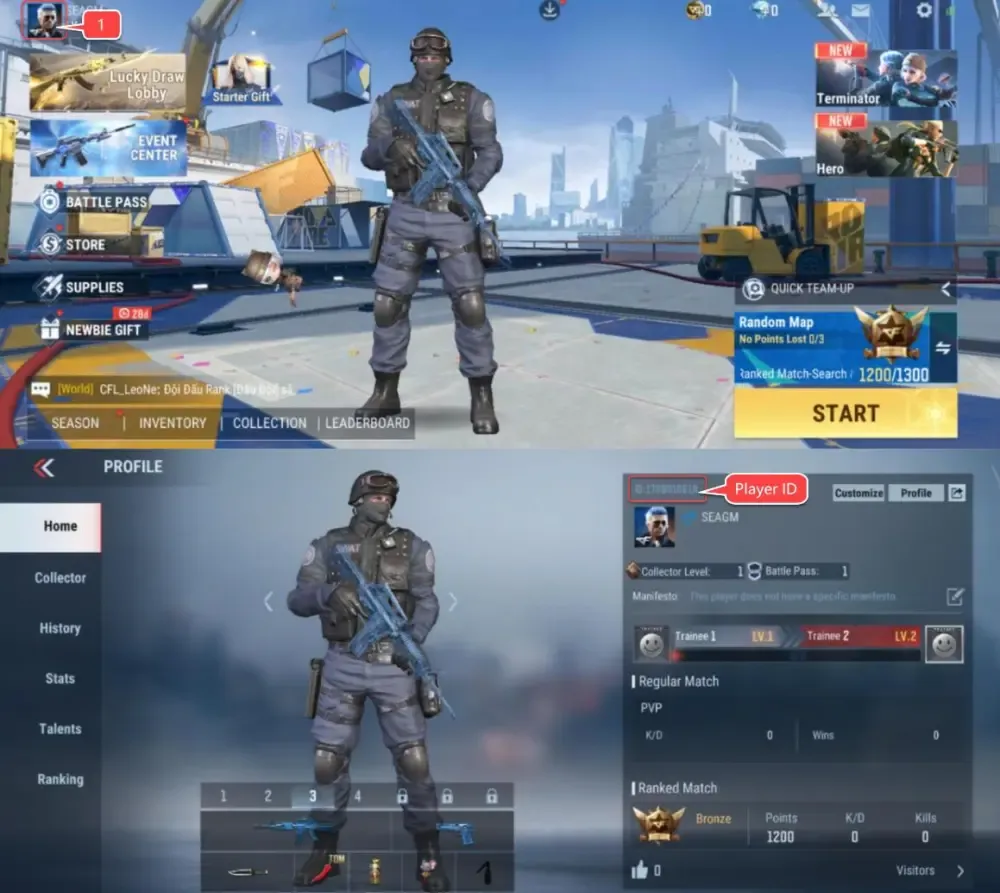
Follow these steps to locate your User ID:
- Launch Crossfire: Legends on your mobile device and log in to your account.
- Tap your Avatar / Profile Icon located in the top-left corner of the main lobby screen.
- Open the Basic Info or Player Profile tab.
- Locate your User ID (UID) displayed beneath your character nickname.
- Tap the Copy icon next to your ID to avoid manual typing errors.
Crossfire: Legends SEA Diamond Packages & Supported Payment Options
BitTopup supports a wide selection of Diamond packages tailored to different in-game requirements, from small top-ups for daily supplies to large bundles for full VIP upgrades.
| Diamond Package Category | Primary Utility in Game | Delivery Method |
|---|---|---|
| Starter Packages | Daily crates, basic weapon draws, consumable boosts | Direct UID Injection |
| Mid-Tier Bundles | Season Battle Pass activation, elite character skins | Direct UID Injection |
| Large Bundles | Heroic Arsenal draws, VIP tier level-ups, exclusive weapon packs | Direct UID Injection |
All live prices, currency conversions, and available localized Southeast Asian payment channels (including popular e-wallets like GCash and regional bank transfer options) are clearly displayed directly on the live BitTopup checkout screen.
What Can You Buy with Diamonds in Crossfire: Legends SEA
Diamonds unlock the full scope of competitive and cosmetic customization in Crossfire: Legends SEA:
- VIP Progression: Spending Diamonds accumulates VIP points. Higher VIP levels grant permanent combat buffs, bonus EXP/GP gain, exclusive kill effects, and dedicated VIP weapon variants.
- Heroic Arsenal & Mystery Draws: Use Diamonds to open rare weapon crates containing iconic Heroic firearms (such as the M4A1-Born Beast, AK47-Transform, and Barrett-Destruction) featuring superior reload speeds, damage modifiers, and unique aesthetics.
- Battle Pass / Season Pass: Unlock the premium tier of the seasonal pass to gain access to limited-edition weapon skins, character outfits, and exclusive profile frames.
- Revive Coins & Consumables: Purchase vital supplies required for high-tier mutant modes, raid challenges, and wave-based survival maps.
Direct-to-Account Safety: Why BitTopup Never Requires Account Passwords
Account security is critical when purchasing game currency online. BitTopup uses direct API UID injection for Crossfire: Legends SEA:
- No Password Required: You never have to share your game password, Google account, Facebook login, or verification codes.
- Zero Risk of Account Hijacking: Because no login access is granted, your personal information, inventory, and account ownership remain completely in your hands.
- Safe & Verified: Top-ups processed via direct User ID comply with standard game top-up protocols, safeguarding your account from suspensions.
- 24/7 Customer Support: If you have questions about your order, our dedicated customer support team is available around the clock to assist you.
Crossfire: Legends SEA Top-Up Troubleshooting and Delivery Verification
If your Diamonds do not appear immediately after completing your order, follow these standard verification steps:
- Restart the Game App: Close Crossfire: Legends completely from your device background apps and relaunch it. This forces the client to sync with the game server and update your currency balance.
- Check In-Game Mailbox: Certain promotional bonus Diamonds or specific bundle rewards are delivered through the in-game mail system. Check your mailbox tab to claim any pending items.
- Verify Payment Status: Confirm that your chosen payment method successfully processed the transaction and generated a transaction ID.
- Check User ID Accuracy: Review your order confirmation receipt on BitTopup. If you notice a typo in the submitted User ID, contact BitTopup customer support immediately with your order number and transaction proof for resolution.
Frequently Asked Questions
How do I recharge Crossfire: Legends SEA Diamonds?
Select your desired Diamond package on BitTopup, input your Crossfire: Legends User ID, select your preferred payment method at checkout, and complete the payment. Your Diamonds will be credited directly to your account.
Where can I find my Crossfire: Legends User ID?
Tap your character avatar in the top-left corner of the main lobby screen. Your numerical User ID is listed on your profile info page beneath your nickname. Use the copy button next to it to copy the exact numbers.
Can I top up Crossfire: Legends SEA with GCash and local e-wallets?
Yes. BitTopup provides multiple localized payment methods for Southeast Asian players, including popular regional e-wallets like GCash, card payments, and online banking. All active options are displayed during checkout.
Do I need to share my game account password to recharge on BitTopup?
No. BitTopup only requires your in-game User ID to send Diamonds to your account. You never need to share passwords, social media logins, or one-time verification codes.
How long does it take to receive Crossfire: Legends Diamonds after payment?
Diamonds are processed automatically and typically reflect in your in-game balance shortly after payment confirmation. If there is a minor network delay, restarting your game client will update the balance.
What should I do if I entered the wrong User ID or my recharge is delayed?
If your Diamonds have not arrived after restarting your game, check your order status on BitTopup. If you entered an incorrect User ID or experience an extended delay, reach out to BitTopup 24/7 customer support with your order number and payment receipt for swift assistance.