



Nike Gift Card (FI) Top Up: Quick Digital Code Delivery
A Nike Gift Card (FI) gives you complete access to premium footwear, athletic apparel, training gear, and lifestyle collections on Nike's official Finland storefront. Issued in Euros (EUR), these digital gift cards offer a flexible and reliable payment method for shopping on Nike.com/fi and through the official Nike App in Finland.
BitTopup provides an instant digital delivery service for Finland Nike gift vouchers. You do not need to share account passwords or link your personal bank details directly to the storefront. You purchase the digital code, receive your card number and PIN, and apply the balance directly during checkout.
How to Buy and Recharge Nike Gift Card (FI) Online
Acquiring a digital code on BitTopup is designed for speed, security, and convenience:
- Select Denomination: Choose your required EUR card balance from the available product options.
- Review Order: Confirm the region is Finland (FI) to ensure compatibility with your localized Nike profile.
- Enter Contact Details: Provide the email address where your digital voucher code and purchase receipt should be delivered.
- Complete Payment: Choose your preferred secure payment method at checkout. Live pricing and currency rates are displayed directly on the checkout screen without hidden platform fees.
- Instant Code Retrieval: Your 16-digit card number and security PIN will appear in your BitTopup order history and be dispatched to your email instantly.
How to Access Your Card Details and Code
Unlike direct in-game top-ups that require a public User ID (UID), a Nike digital card works via standard numeric vouchers. Once your purchase finishes, locate your voucher details as follows:
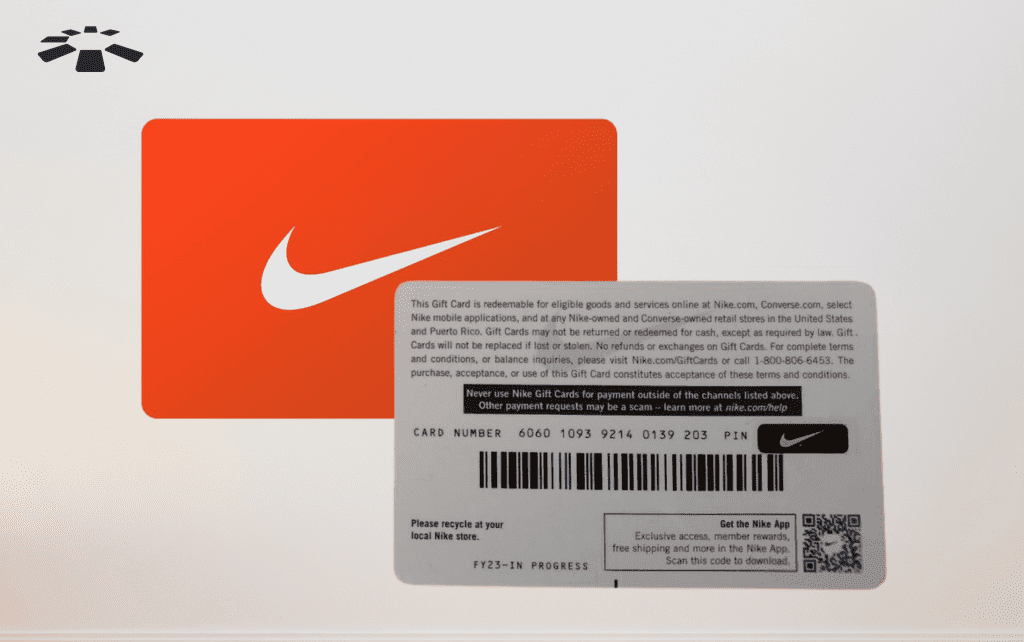
- Open your BitTopup Order History or check your order confirmation email.
- Locate the 16-digit gift card number.
- Locate the accompanying 6-digit numeric PIN.
- Copy or write down both credentials accurately to use during your store checkout.
Step-by-Step Nike Digital Code Redemption Guide for Nike Finland
You can redeem your Nike Finland gift card on desktop via Nike.com/fi or on mobile through the Nike App.
Redeeming on Nike.com (Finland):
- Go to Nike.com/fi and sign in to your Nike Member account.
- Add your selected shoes, athletic clothing, or accessories to your shopping bag.
- Proceed to the Checkout screen.
- In the Payment section, check the box labeled "Do you have a gift card, product voucher, or promo code?" (or click "Add Gift Card").
- Enter your 16-digit Gift Card Number and 6-digit PIN.
- Click Apply. The card balance will automatically deduct from your order total. If your order exceeds the card value, pay the remaining amount using a credit card or other accepted payment method.
Redeeming on the Nike App:
- Open the Nike App on your mobile device (ensure your region is set to Finland).
- Place your items into the cart and tap Checkout.
- Select Payment Options and tap Add Nike Gift Card.
- Type your card number and PIN, then confirm to apply the discount.
How to Check Your Nike FI Gift Card Balance Online
Checking your card's remaining funds before or after placing an order is straightforward:
- Visit the official Nike Finland website.
- Scroll to the footer and select Gift Cards or access the Check Gift Card Balance page.
- Enter the 16-digit card number and the 6-digit security PIN provided by BitTopup.
- Click Check Balance to view the live EUR balance instantly.
- You can also view remaining funds directly in your cart during the checkout step before finalizing an order.
Regional Restrictions and Expiration Policies for Nike Finland Cards
Before purchasing, review the operational guidelines and regional conditions for Finnish Nike cards:
| Feature | Policy Details |
|---|---|
| Region / Country | Finland (FI) |
| Supported Currency | Euro (EUR) |
| Eligible Platforms | Nike.com/fi, Nike App (FI Region) |
| Expiration Date | No expiration date on digital codes |
| In-Store Usability | Valid on official online stores and select official Nike retail stores in Finland |
| Stacking Limit | Up to 10 gift cards per single online checkout |
| Account Requirement | Guest checkout supported, but Nike Membership recommended |
Note: A Finland EUR gift card cannot be applied on regional Nike storefronts outside the European Union designated area, nor can it be used on third-party distributor sites or marketplaces.
Secure Payment Methods for Nike Gift Card Recharge on BitTopup
BitTopup prioritizes transaction security and user convenience with clear benefits:
- Zero Account Risk: You never have to share Nike account passwords or personal login tokens. You receive a standalone digital gift code to redeem yourself.
- Encrypted Processing: Transactions are protected through certified payment gateways utilizing standard SSL data encryption.
- Live Checkout Transparency: Pricing is displayed directly at live checkout in EUR without surprise processing surcharges.
- 24/7 Customer Service: If you encounter questions regarding voucher retrieval or code verification, BitTopup support staff are available around the clock to assist you.
Common Nike Gift Card Issues and How to Fix Them
If you experience friction while applying your digital voucher, consult these common solutions:
1. "Invalid Card Number or PIN" Error
- Cause: Typographical errors or accidental spaces copied before or after the numbers.
- Fix: Re-enter the 16 digits and 6-digit PIN manually. Ensure there are no spaces or special characters.
2. "Currency / Store Region Mismatch"
- Cause: Attempting to use a Finland (FI) EUR card on a US, UK, or other foreign regional Nike domain.
- Fix: Ensure your browser URL is set to
nike.com/fiand that your shipping address is located in Finland.
3. Gift Card Not Covering the Entire Cart Total
- Cause: Order total including delivery exceeds the gift card denomination.
- Fix: Enter a secondary payment method (such as a credit/debit card or a second Nike gift card) to cover the difference.
4. Promo Code and Gift Card Conflicts
- Cause: Certain promotional codes may have custom terms regarding combined payment methods.
- Fix: Apply the promotional discount code first, verify the adjusted cart total, and then enter your gift card details in the payment step.
Frequently Asked Questions
Can I reload or add more money to an existing Nike gift card?
No. Digital Nike gift cards are fixed-value cards and cannot be topped up or reloaded once the balance reaches zero. To add more funds to your shopping budget, purchase a new digital code on BitTopup.
Does a Nike gift card for Finland expire?
No. Nike gift cards issued for Finland do not carry an expiration date. You can use your balance immediately or keep it for upcoming seasonal product launches and sales events.
Can I use my Nike Finland gift card on other regional stores or Amazon?
No. The card is locked to the Finland storefront (Nike.com/fi and the Nike App in Finland). It cannot be used on third-party retail platforms, unauthorized marketplaces, or international Nike websites outside the supported European region.
How do I check my Nike gift card balance online?
Go to the official Nike balance check page on Nike.com/fi, type your 16-digit card number and 6-digit PIN, and click Check Balance. The page will display your current remaining EUR funds.
Can I convert my Nike gift card into cash or transfer it?
No. Digital cards cannot be exchanged for cash, refunded, or transferred between different cards, except where required by local consumer protection laws.
Can multiple Nike gift cards be used on a single order in Finland?
Yes. Nike allows you to combine up to 10 gift cards on a single order at checkout on Nike.com/fi, making it easy to pool multiple cards for high-value gear and footwear purchases.