




Nike Gift Card (IE) Top Up and Digital Voucher Overview
A Nike Gift Card (IE) provides a quick, secure way to purchase authentic footwear, athletic apparel, training gear, and lifestyle accessories directly from Nike Ireland. Whether you are shopping for the latest running shoes, football boots, limited SNKRS app drops, or everyday sportswear, a digital voucher code functions as direct store credit at checkout.
When you complete a Nike Gift Card (IE) top up on BitTopup, you receive a digital card number and security PIN. This credit can be applied immediately to your Nike Member profile or entered during checkout on Nike.com/ie and the official Nike App. It removes the need to link personal credit cards or share banking details on your shopping account.
How to Recharge and Buy Nike Gift Card (IE) on BitTopup
Purchasing a digital Nike Gift Card for Ireland is direct and simple on BitTopup:
- Select the desired Nike Gift Card (IE) Euro denomination on the product page.
- Confirm the quantity and verify that the region tag matches Ireland (IE).
- Click Buy Now to move to the secure checkout.
- Complete your transaction using the available payment methods displayed on the live checkout screen.
- Once confirmed, access your 16-digit voucher code and 6-digit security PIN directly in your BitTopup order dashboard.
All real-time pricing and active denominations are maintained directly on the live checkout interface.
Where to Locate Your Voucher Code and PIN
Unlike direct-to-account game top-ups that require an in-game UID or character ID, Nike Gift Cards are delivered as unique digital voucher credentials. You do not need to submit your Nike account password or login credentials at any stage of the purchase.
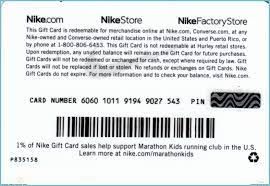
To view your code:
- Log into your BitTopup account and open your User Center.
- Go to My Orders and locate your completed Nike Gift Card (IE) transaction.
- Reveal your 16-digit card number and the corresponding security PIN.
- Copy both strings carefully so you can paste them during checkout on Nike.com or the Nike App.
Step-by-Step Guide to Redeem Your Card on Nike IE
You can redeem your digital gift card across desktop browsers and mobile devices.
Redeeming on Desktop (Nike.com/ie)
- Visit the official Irish Nike storefront (Nike.com/ie) and log into your Nike Member account.
- Add your selected apparel, trainers, or accessories to your shopping bag.
- Click your bag and proceed to the Checkout screen.
- Fill in your delivery details and advance to the Payment section.
- Select the checkbox or dropdown marked Do you have a Nike Gift Card?
- Enter your 16-digit digital card number and 6-digit PIN.
- Click Apply. The gift card balance will immediately deduct from your order total.
Redeeming on the Nike App
- Open the Nike App on your mobile device (ensure your store location is set to Ireland).
- Select your items, pick your size, and tap Add to Bag.
- Go to checkout and select Payment Method.
- Choose Add Gift Card.
- Type or paste your 16-digit card number and PIN, then confirm.
- Complete the checkout process to place your order.
Reloading Existing Gift Cards vs. Adding New Digital Top-Up Codes
Shoppers often wonder if an existing Nike card can be topped up directly with arbitrary balances online. Digital Nike gift cards cannot be reloaded once their initial face value is spent. Instead of topping up a single spent card number, you purchase a new digital Nike Gift Card (IE) voucher code on BitTopup whenever you need fresh store credit.
Nike allows you to stack up to 10 gift cards on a single checkout order. If your purchase exceeds the value of a single card, you can enter multiple codes sequentially or split the remaining balance with an accepted credit/debit card or PayPal account.
Regional Restrictions and Eurozone Store Compatibility
Gift cards issued for Ireland are denominated in Euros (€) and are calibrated for the Irish retail region. Store credit policies follow strict geographical rules.
| Feature | Details |
|---|---|
| Card Currency | Euro (€) |
| Eligible Platforms | Nike.com/ie, Nike App (IE Region), SNKRS App (IE Region) |
| Eligible Products | Full-price apparel, footwear, accessories, sale items, member exclusives |
| Ineligible Items | Purchasing other Nike Gift Cards |
| Cross-Border Usage | Intended for the Irish storefront. Cannot be redeemed on US, UK, or non-Euro regional sites |
| Expiration Policy | Digital gift cards issued in Ireland do not expire under standard retail policy |
| Card Stacking | Up to 10 valid gift cards per transaction |
Always ensure your Nike account location settings and shipping destination are set to Ireland to prevent currency rejection during checkout.
How to Check Your Nike Ireland Gift Card Balance
If you have already used a portion of your voucher code and want to see how much credit remains:
- Go to the official Nike Ireland Gift Card Balance Check page on Nike.com/ie.
- Enter the 16-digit card number.
- Enter the 6-digit PIN.
- Click Check Balance to view the remaining Euro balance.
- Alternatively, adding the card during checkout will show the exact deduction applied before you finalize your order.
Troubleshooting Common Nike Gift Card Redemption Errors
If your code is not accepted at checkout, check these common issues:
- Incorrect PIN or Card Number: Ensure no extra spaces were added before or after the numbers when copying and pasting. The PIN must be exactly 6 digits.
- Store Region Mismatch: If your browser or app is set to the United Kingdom (£) or United States ($), an Irish Euro code will return an error. Switch your country selector to Ireland (English).
- Cart Incompatibilities: Nike Gift Cards cannot be used to buy another digital gift card. If a gift card is in your cart, remove it before applying your code.
- Temporary Server Sync: If checkout freezes after applying a code, refresh your cart and re-enter the card details.
Account Safety and Why Order from BitTopup
BitTopup delivers a secure, streamlined purchasing experience for global shoppers:
- Zero Account Sharing: You never need to supply your Nike password, email login, or private personal data. You receive an independent digital code to enter directly on Nike's site.
- Instant Dashboard Access: Your voucher credentials are generated and displayed in your order center as soon as payment is confirmed.
- Clear Regional Tagging: Every product listing clearly displays region compatibility, eliminating confusion between Euro, GBP, and USD denominations.
- 24/7 Customer Support: If you encounter any difficulty viewing your order or locating your credentials, customer service is available around the clock to assist you.
Frequently Asked Questions
Can I add money or reload an existing Nike gift card?
No. Nike does not support reloading funds directly onto a depleted digital gift card. To add more funds to your shopping budget, purchase a new Nike Gift Card (IE) code on BitTopup. You can apply multiple cards to a single order at checkout.
How do I redeem my Nike Gift Card (IE) on Nike.com or the Nike App?
Proceed to the payment step during checkout on Nike.com/ie or the Nike App. Select Add Gift Card, input your 16-digit card number alongside the 6-digit security PIN, and click Apply to deduct the amount from your total.
How can I check the balance on my Nike Ireland gift card?
Visit the official Nike Ireland balance checker online at Nike.com/ie, enter your 16-digit card number and 6-digit PIN, and click Check Balance. You can also check the remaining balance directly in the payment section during checkout.
Can I use my Nike Gift Card (IE) in another country or store?
Nike Gift Cards are region- and currency-locked. A Nike Gift Card (IE) denominated in Euros must be redeemed on the Irish storefront (Nike.com/ie or the Nike App configured to Ireland). It cannot be applied on storefronts using different currencies, such as the UK or US sites.
Can I convert my Nike gift card to cash or transfer it?
Nike gift cards cannot be redeemed for cash, refunded, or transferred to another payment balance, except where required by applicable consumer law. Once purchased, the credit remains available for eligible purchases on Nike platforms.
Why is my Nike gift card not working at checkout?
The most common causes are typing errors in the 16-digit number or 6-digit PIN, having an active storefront set to a country other than Ireland, or having another gift card product inside your shopping cart. Verify your region settings and re-enter your code carefully.