

Delta Force Top Up: In-Game Currency Utility and Overview
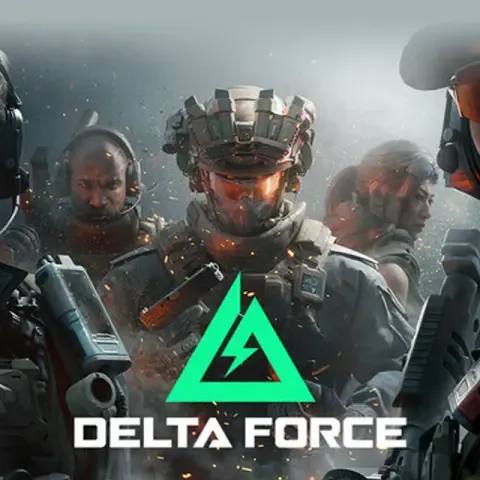
Delta Force delivers tactical first-person combat across large-scale Warfare battles and high-stakes Operations extraction zones. To customize your operators, acquire elite weapon blueprints, and access premium seasonal content, you need Delta Coins—the primary premium currency in Delta Force.
Delta Coins grant direct access to exclusive tactical gear, operator appearances, Mandelbrick decryption keys, and the seasonal Battle Pass. Having a ready reserve of Delta Coins ensures you can acquire limited-time bundles and weapon aesthetics as soon as they hit the tactical armory.
BitTopup provides a direct Player ID recharge service that credits Delta Coins to your account without requiring your login credentials or password.
Delta Coins, Battle Pass, and Mandelbrick Decoders Explained
Delta Force features multiple currency types and tactical assets. Understanding how each functions helps you optimize your in-game purchases.
Delta Coins
Delta Coins represent the premium currency purchased through direct recharge. They serve as the universal currency for:* Activating the Premium Warfare Pass.* Purchasing limited-edition operator skins and weapon blueprints.* Buying Mandelbrick Decoders to unlock encrypted drop crates.* Acquiring utility bundles and armory expansion packages.
Mandelbrick Decoders
Mandelbricks are high-value encrypted crates found in extraction modes or awarded through seasonal milestones. To extract the valuable weapon skins and cosmetics inside, you must decrypt them using Decoders purchased with Delta Coins.
Delta Tickets and Armory Credits
Delta Tickets and standard credits are earned strictly through gameplay, match completion, and seasonal mission milestones. These are used for base loadout modifications and standard equipment requisitions.
| Currency / Asset | How It Is Acquired | Primary In-Game Use |
|---|---|---|
| Delta Coins | Direct top up on BitTopup | Store bundles, Battle Pass, Decoders, premium skins |
| Mandelbrick Decoders | Purchased using Delta Coins | Decrypting high-tier Mandelbrick loot crates |
| Battle Pass | Unlocked with Delta Coins | Tiered seasonal rewards, exclusive operator skins |
| Delta Tickets | Gameplay missions & matches | Standard armory modifications and base equipment |
How to Find Your Delta Force Player ID (PC and Mobile)
To recharge your account on BitTopup, you only need your Delta Force Player ID. Follow these steps to locate your ID on PC or Mobile:
- Launch Delta Force and log in to your account.
- Click or tap your Avatar / Profile Icon located in the top-left corner of the main lobby screen.
- Open the Basic Info tab on your profile page.
- Locate your Player ID (a unique string of numbers displayed beneath your username).
- Click or tap the Copy Icon next to the Player ID to copy it directly to your clipboard.
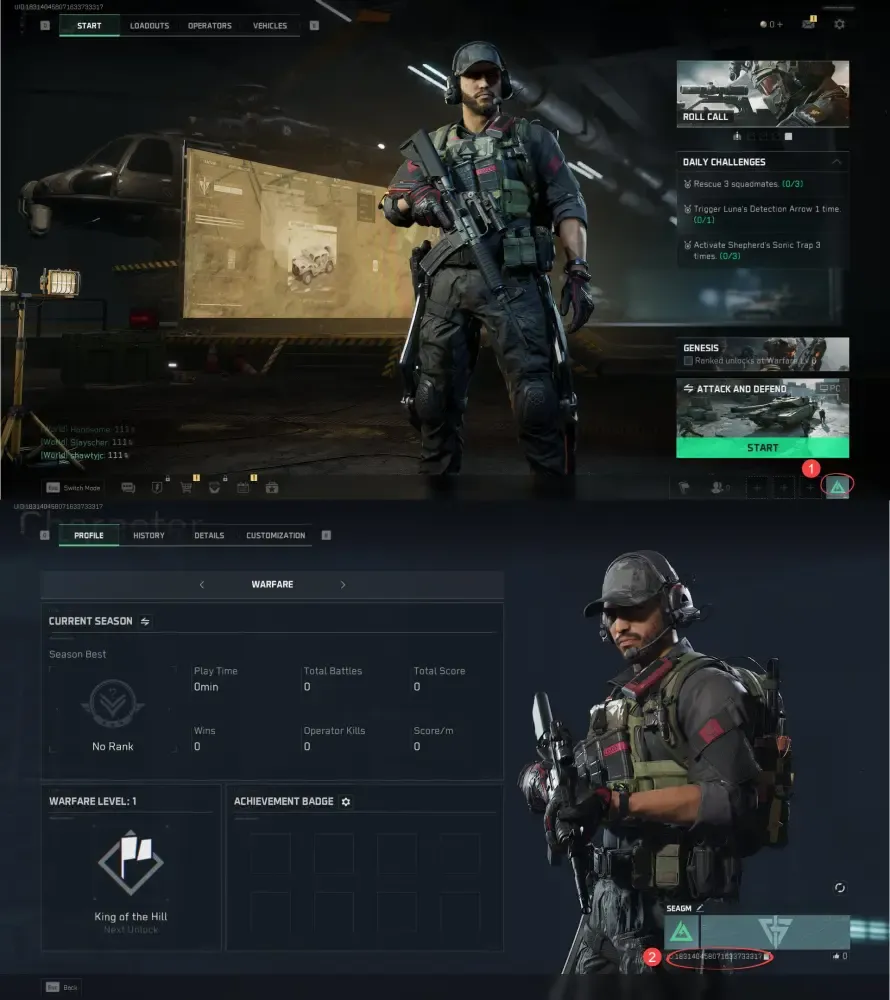
Make sure to copy the numeric Player ID exactly as displayed to prevent any delivery delays.
How to Recharge Delta Force Coins Using Player ID on BitTopup
Recharging your Delta Force account through BitTopup takes only a few simple steps:
- Select Denomination: Choose the Delta Coins package you wish to purchase from the product selection list.
- Enter Player ID: Paste your numeric Delta Force Player ID into the designated input field.
- Confirm Details: Verify that your Player ID is accurate before proceeding.
- Complete Checkout: Choose your preferred payment method from the options available on the live checkout page and finalize the transaction.
- Receive Coins: Your Delta Coins will be credited directly to your in-game account. Launch the game and check your coin balance or in-game mail tab.
Live pricing, available denominations, and real-time checkout options are always displayed directly on the product selection menu.
Why BitTopup Is the Safest Platform for Delta Force Top Ups
BitTopup is engineered to provide safe, reliable, and swift digital game recharges for players worldwide.
- Zero Login Requirements: You never need to share your account password, email login, or verification codes. All transactions process through your public Player ID.
- Encrypted Transactions: BitTopup uses industry-standard security protocols to safeguard your personal data and payment information.
- Live Checkout Selection: Access transparent, up-to-date pricing with localized payment options tailored to your region.
- Dedicated Support: BitTopup customer service is available around the clock to assist you with order status checks, payment confirmations, and account inquiries.
Cross-Platform Support: Mobile, PC, and Level Infinite Accounts in 2026
Delta Force features cross-progression across PC and Mobile platforms through unified account systems such as Level Infinite Pass.
When you top up your Delta Coins on BitTopup using your Player ID, your coin balance updates across linked devices sharing that same account ID. Whether you play on PC or Mobile in 2026, purchases made with your recharged Delta Coins synchronize with your central operator profile. Ensure your Level Infinite account is linked to both clients if you switch between desktop and mobile devices.
Troubleshooting Delta Force Recharge Delays and Customer Support
If your Delta Coins do not appear in your balance immediately after completing checkout, follow this standard troubleshooting checklist:
- Restart the Game Client: Close Delta Force completely and relaunch it to refresh your client connection to the server.
- Check the In-Game Mailbox: Certain packages or bonus items are distributed via the in-game notification and mail system rather than updating the balance bar directly.
- Check Order Status on BitTopup: Log in to your BitTopup account and review your order history to confirm the payment was processed successfully.
- Verify Submitted Player ID: Check your receipt to ensure the Player ID submitted during checkout matches your in-game profile.
- Contact Support: If your balance has not updated after a short wait, reach out to BitTopup customer support with your Order ID and transaction confirmation for immediate resolution.
Frequently Asked Questions About Delta Force Top Up
How do I buy Delta Force coins on BitTopup?
Select your Delta Coins package, input your Delta Force Player ID, proceed to the live checkout page, and complete payment using your chosen method. The coins credit directly to your in-game profile.
Where can I find my Delta Force Player ID?
Open Delta Force, select your profile avatar in the top-left corner of the main lobby, go to the Basic Info tab, and copy the numeric Player ID displayed under your codename.
Do I need to share my Delta Force password to top up?
No. BitTopup requires only your public Player ID. You should never share your account password or two-factor authentication codes.
What items can I unlock with Delta Coins in Delta Force?
Delta Coins allow you to buy the Premium Warfare Pass, limited-edition weapon blueprints, operator cosmetics, Mandelbrick Decoders, and special tactical armory bundles.
How long does it take for Delta Coins to arrive after recharge?
Orders on BitTopup are processed automatically. Coins typically reflect in your account balance or in-game mail shortly after your payment is confirmed.
Are Delta Coins usable across both PC and Mobile versions in 2026?
Yes. As long as your PC and Mobile clients are bound to the same unified account (such as Level Infinite Pass), your character progression and inventory synchronize across both platforms.
What should I do if I entered the wrong Player ID during checkout?
Contact BitTopup customer support immediately with your transaction receipt and correct Player ID. If the order has not yet been processed by the automated delivery system, support agents can assist in updating your details.