

How to Complete a Whiteout Survival Top Up with Player ID
Topping up your Whiteout Survival account on BitTopup requires only your Player ID (UID). You do not need to share your account login credentials, passwords, or linked social media accounts. Follow these steps to purchase Frost Stars:
- Select Your Frost Star Amount: Browse the available denominations and choose the package that fits your in-game goals.
- Enter Your Player ID: Input your Whiteout Survival numeric Player ID in the designated field.
- Confirm Character Information: Check your Player ID carefully to prevent sending the currency to another account.
- Proceed to Checkout: Choose your preferred payment option from the available global and local payment solutions.
- Receive Your Frost Stars: Once payment is confirmed, the Frost Stars are credited directly to your in-game balance.
How to Find Your Whiteout Survival Player ID
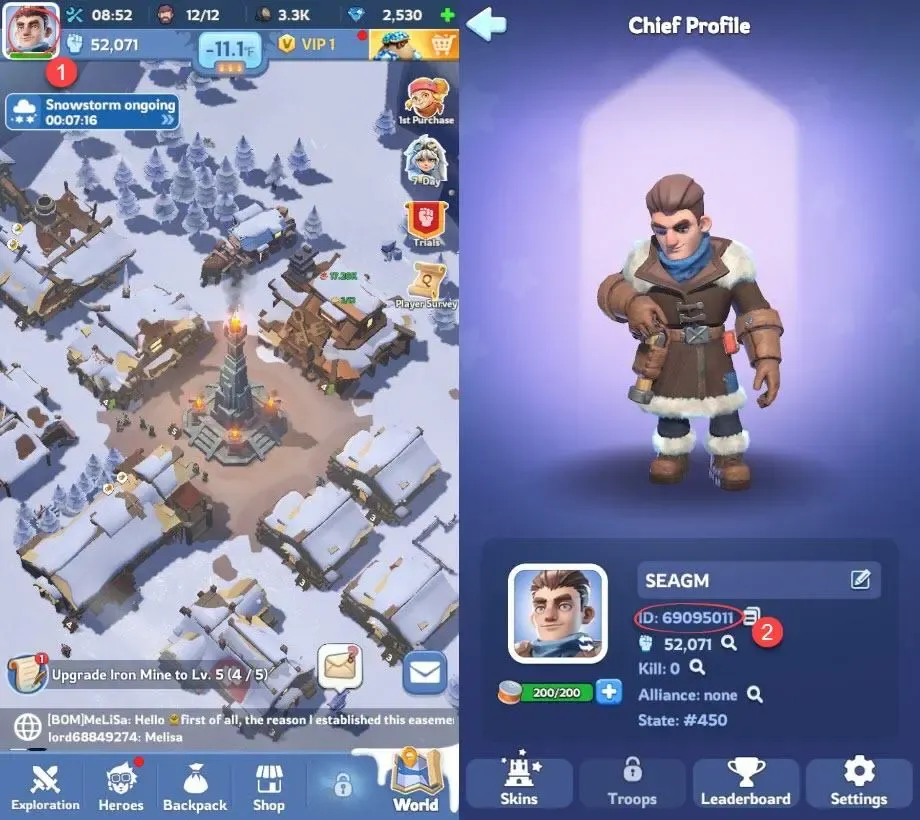
Your Whiteout Survival Player ID is a unique numeric identifier linked to your game profile. You can locate and copy it directly inside the game client:
- Launch Whiteout Survival on your mobile device or PC emulator.
- Tap your Chief Avatar located in the top-left corner of the main screen.
- Open your Chief Profile window.
- Locate your Player ID (UID) displayed beneath your Chief name and avatar image.
- Tap the Copy button next to your Player ID to copy the number to your clipboard.
- Paste the ID into the BitTopup recharge field.
What Are Frost Stars and How to Redeem Them In-Game
Frost Stars serve as the premium alternative currency in Whiteout Survival. They are designed to give players full flexibility when purchasing in-game items, value bundles, and special event packs.
Key Mechanics of Frost Stars
- Direct Value Parity: Frost Stars match the exact value of standard real-money packs in the game shop. For instance, a pack priced at $4.99 requires an equivalent amount of Frost Stars to unlock.
- Stored Balance: Unlike direct pack purchases that apply immediately upon payment, Frost Stars stay in your account balance until you choose to spend them.
- Pack Flexibility: You can hold your Frost Stars and use them during major server events, Alliance Mobilization, State vs. State (SvS) battles, or limited-time recruitment windows.
How to Spend Frost Stars in the Game
- Log into your Whiteout Survival account after your BitTopup order is complete.
- Open the in-game Shop, Deals, or Event page.
- Select any pack or bundle you wish to acquire.
- When the payment window appears, select Frost Stars as your payment method.
- The corresponding amount of Frost Stars will be deducted, and your pack rewards will appear instantly in your inventory.
Security Comparison: Player ID Direct Recharge vs Account Login Sharing
Account safety is critical when purchasing game currencies. BitTopup uses direct Player ID processing to protect your data and prevent unauthorized access.
| Feature | BitTopup Player ID Top-Up | Third-Party Account Login Sharing |
|---|---|---|
| Password Required | No | Yes (High Risk) |
| Account Sharing Risk | None | High (Risk of theft or hijacking) |
| Game Terms Compliance | Safe direct crediting | Violates terms against shared logins |
| Verification Codes / OTP | Not required | Required (Exposes private accounts) |
| Delivery Method | Direct to server balance | Manual login by strangers |
| Account Ban Risk | Zero ban risk | High ban risk due to IP anomalies |
Safety Checklist for First-Time Buyers
- Never provide your Google, Apple ID, Facebook, or game account passwords to any recharge service.
- Always verify your numeric Player ID before completing your transaction.
- Use verified payment methods through trusted checkout systems on BitTopup.
Best Packs and Bundles to Purchase in Whiteout Survival 2026
Managing your Frost Star spending helps you maximize resource gain, speed up construction, and build stronger troops. In 2026, several bundles offer top value for your investment:
- Monthly Cards and Growth Funds: The Monthly Card provides sustained daily gems, stamina, and build queue enhancements, making it the most cost-effective continuous upgrade. Growth Funds award massive gem payouts as your Furnace reaches milestone levels.
- Hero Shard and Recruitment Packs: Powerful Generation heroes dominate arena battles and rally combat. Using Frost Stars on targeted hero packs lets you upgrade your rally leaders and unlock crucial combat skills.
- Chief Gear and Charm Materials: Chief Gear provides flat combat buffs that apply across all troop types. Purchasing gear enhancement packs during training or prep phases gives you an advantage in State vs. State battles.
- Speedup Bundles: Essential for pushing high-tier Furnace upgrades (Level 30, Fire Crystal upgrades) and fast troop training during Alliance Mobilization or King of the Icefield events.
Whiteout Survival Top-Up Delivery Time and Status Verification
BitTopup processes orders through direct system integration. Under normal network conditions, Frost Stars are delivered directly to your account shortly after payment confirmation.
How to Verify Delivery
- Refresh Your Client: Close Whiteout Survival completely and relaunch the application to sync your game data with the server.
- Check Your Balance: Open the in-game shop and check your Frost Star counter in the top currency bar.
- Check System Mail: Look in your in-game mailbox for confirmation notices regarding currency additions.
- Order Status on BitTopup: You can track the processing status of your transaction in your BitTopup user center.
If your balance does not reflect the purchase within a few minutes of completion, reach out to the BitTopup 24/7 customer support team with your order number and Player ID for assistance.
Supported Global Payment Methods on BitTopup
BitTopup provides diverse payment solutions so players worldwide can top up their accounts securely. All available options and live conversion rates are displayed clearly at the checkout screen.
- Credit and Debit Cards: Visa, Mastercard, and other major bank card networks.
- E-Wallets and Local Payment Channels: Region-specific digital wallets and online banking systems.
- Secure Checkout: All transactions are protected with industry-standard encryption protocols.
Final prices, currency selections, and payment method availability are updated live during checkout based on your region.
Frequently Asked Questions About Whiteout Survival Top Up
Where can I buy Frost Stars for Whiteout Survival?
You can purchase Frost Stars safely on BitTopup. Simply provide your Whiteout Survival Player ID, select the Frost Star package you need, and complete your purchase using the supported payment methods on the live checkout page.
How do I find my Whiteout Survival Player ID for recharge?
Tap your Chief avatar in the upper-left corner of the Whiteout Survival home screen. Your Player ID (UID) is located directly under your Chief name. Tap the copy icon next to it to paste it directly into the order field.
Do I need to provide my Whiteout Survival password to top up on BitTopup?
No. BitTopup requires only your Player ID (UID). You never need to share your game password, linked email, or verification codes.
What are Frost Stars used for in Whiteout Survival?
Frost Stars are the universal premium currency in Whiteout Survival. They are used to purchase in-game packages, daily deals, monthly cards, hero shards, and speedups directly from the in-game shop without needing direct payment cards inside the app.
What are the best packs to buy in Whiteout Survival?
The best purchases include Monthly Cards, Chief Gear upgrade materials, hero recruitment bundles for your current generation heroes, and Fire Crystal construction packs for late-game progression.
Why is Player ID top up safer than login top up?
Player ID top-ups send currency directly to your game profile through official delivery channels. This eliminates the risk of password leaks, account hijacking, unauthorized access, or account bans caused by foreign IP logins.
What should I do if my Whiteout Survival Frost Stars do not appear immediately?
First, restart your Whiteout Survival app to refresh the connection to the game server. If the balance still has not updated, check your order status in your BitTopup account dashboard and contact the 24/7 BitTopup customer support team with your order ID.
Whiteout Survival Recharge Packages
Available Whiteout Survival packages: 99 Frost Star · 299 Frost Star · 499 Frost Star · 999 Frost Star · 1999 Frost Star · 4999 Frost Star · 7499 Frost Star · 9999 Frost Star. Enter your game ID, pick a package and pay; current prices and discounts of up to 42% are shown in the selector above.
People search for this as "Whiteout Survival top up", "Frost Star top up" or "Whiteout Survival gems". This page tops up Frost Stars directly to your game ID.
Whiteout Survival Recharge Guides
Other strategy and mobile games you can top up
BitTopup also tops up: Identity V Echoes, Genshin Impact top up, Delta Force top up, PUBG UC top up.