

Arena of Valor (ID) Vouchers Top Up: Overview and In-Game Uses
Arena of Valor (AOV) ID vouchers serve as the primary premium currency for the Indonesian server (Baratayuda server managed by Garena). Acquiring vouchers gives players immediate access to high-tier in-game content, cosmetic upgrades, and progression accelerators without spending months farming in-game gold.
Core Uses for AOV ID Vouchers
- Hero Unlocks: Purchase newly released champions and meta picks across all roles—including Dark Slayer Lane duelists, Junglers, Mid Lane mages, Abyssal Dragon Lane marksmen, and Supports—without depleting your gold balance.
- Skin Tiers and Visual Upgrades: Unlock cosmetic tiers including Heroic, Epic, Legend, Mythic, and Dimension Breaker skins. Vouchers also grant access to exclusive collaboration skins, custom recall effects, defeat animations, and battle emotes.
- Valor Pass (Codex): Unlock Elite Pass and Deluxe Pass tracks in each season's Valor Pass. Leveling up the pass awards exclusive seasonal hero skins, voucher rebate chests, avatar frames, and rare trial cards.
- Magic Draw and Lucky Draw Rolls: Use vouchers to roll in the Lucky Draw and Magic Draw for rare Pendants, which can be exchanged for limited-edition Legend and Special skins in the redemption shop.
- Account Services: Purchase Rename Cards, Hero Fragment packs, Skin Fragment packs, and EXP/Gold booster cards directly from the in-game shop.
Step-by-Step Guide to Finding Your Arena of Valor Player ID
To complete an Arena of Valor (ID) Vouchers recharge, you only need your numeric Player ID (OpenID). Do not use your in-game nickname (IGN), as duplicate or special-character names cannot be verified by the direct recharge system.
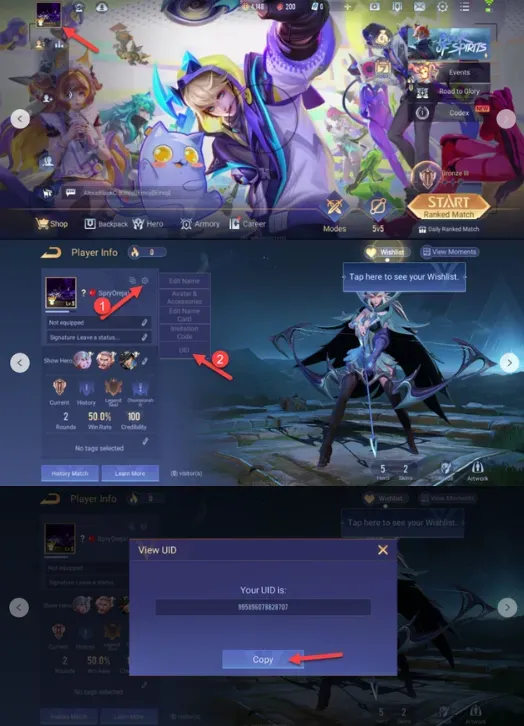
Follow these steps to find your exact Player ID:
- Launch the Arena of Valor application on your mobile device.
- Tap your Avatar / Profile Icon in the top-left corner of the main lobby.
- On your profile screen, select the Settings gear icon (located near your profile card or the bottom-left area of the profile interface).
- Locate the OpenID / Player ID section, which displays a string of numbers.
- Tap the Copy icon next to your Player ID to copy it to your clipboard.
How to Top Up Arena of Valor (ID) Vouchers Online
BitTopup delivers vouchers straight to your game account via direct ID top-up. Follow this quick guide to place your order:
- Select Voucher Pack: Choose the voucher amount you need from the available denominations. Current pricing and active package tiers are displayed directly on the live checkout interface.
- Enter Player Information: Paste your numeric Player ID into the designated input field.
- Select Payment Method: Choose from the available secure checkout methods.
- Confirm and Pay: Complete the payment. The system validates the transaction and initiates direct delivery.
- Check Balance In-Game: Open Arena of Valor, return to the main lobby, and check your updated voucher balance in the top currency bar.
Arena of Valor (ID) Region Compatibility and Account Rules
Arena of Valor uses distinct regional publishing clients across Asia, Europe, and the Americas. Arena of Valor (ID) Vouchers are specifically configured for the Indonesian (Garena Baratayuda) server.
Server Compatibility Matrix
| Region / Server | Publishing Platform | ID Voucher Compatibility | Supported Login Types |
|---|---|---|---|
| Indonesia (ID / Baratayuda) | Garena | Fully Compatible | Garena, Google Play, Apple ID, Facebook, Guest |
| Thailand (RoV) | Garena | Not Compatible | Garena, Facebook, Apple ID |
| Vietnam (Lien Quan) | Garena | Not Compatible | Garena, Facebook, Apple ID |
| Taiwan / HK / MO | Garena | Not Compatible | Garena, Facebook, Apple ID |
| Global / EU / NA / LATAM | Level Infinite | Not Compatible | Level Infinite Pass, Google, Apple, Facebook |
Account Binding Guidelines
- Login Type Independence: Direct voucher recharges work regardless of whether your Indonesian account is linked to a Garena account, Google Play, Apple ID, Facebook, or running temporarily as a guest account. The delivery system maps directly to the unique server-side Player ID.
- Cross-Server Incompatibility: If your account belongs to the Global client (Level Infinite) or other Garena territories (such as Thailand's RoV or Vietnam's Arena of Glory), Indonesian vouchers will not credit to your balance. Always verify that your game client connects to the Indonesian server before placing an order.
Safe and Secure Direct Recharge with Player ID on BitTopup
Direct top-up systems protect your personal gaming data by eliminating account-sharing risks. Here is why Player ID direct crediting on BitTopup is the safest way to buy AOV vouchers:
- No Passwords or Logins Required: You never need to share your game password, Garena credentials, email access, or two-factor authentication (2FA) verification codes. Your login details remain entirely in your hands.
- Zero Risk of Account Hijacking: Because top-ups are processed externally through your public Player ID, third parties never gain entry to your game profile, linked social accounts, or payment profiles.
- Fast and Automated Processing: Orders route automatically to the server database for direct crediting once payment is confirmed.
- Clear Pricing: All pack values and charges are displayed clearly on the checkout page before payment.
- 24/7 Dedicated Support: If you have questions about order delivery or need help verifying your Player ID, BitTopup customer support is available around the clock.
Common AOV Top-Up Issues and Troubleshooting Tips
If you experience a delay or cannot locate your vouchers after ordering, review these troubleshooting steps:
- Force Restart the Game App: Completely exit Arena of Valor, swipe it away from your recent apps / multitasking screen, and restart the game. This forces the client to establish a fresh connection with the server and sync your updated voucher wallet.
- Check Your In-Game Mailbox: Certain event-related voucher bundles, promotional rebates, and bonus items arrive as mail attachments inside the in-game mailbox rather than auto-crediting to the top bar.
- Verify Your Submitted Player ID: Check your BitTopup order receipt to confirm that the Player ID entered during checkout matches your in-game profile. If an incorrect ID was provided and the order was completed, the balance will have been credited to that account and cannot be retracted.
- Confirm Payment Completion: Check your banking or payment app to ensure the transaction was processed successfully and not left in a pending state.
- Contact Customer Support: If your payment is confirmed and your Player ID is correct but your vouchers have not appeared after several minutes, contact BitTopup 24/7 support with your Order ID and transaction receipt for direct verification.
Frequently Asked Questions (FAQ)
How do I find my Arena of Valor Player ID?
Open Arena of Valor, tap your profile avatar in the upper-left corner of the main lobby, select the Settings icon on your profile page, and locate your numeric OpenID/Player ID. Tap the copy icon next to the number sequence to copy it.
Do I need to share my password to recharge Arena of Valor (ID) Vouchers?
No. Recharging through BitTopup requires only your numeric Player ID. You should never disclose your password, Garena login details, or verification codes to anyone.
Can I top up an EU or Global account with Arena of Valor ID vouchers?
No. Arena of Valor (ID) Vouchers only work for accounts registered on the Indonesian (Garena Baratayuda) server. Global, EU, NA, and other regional versions operate under separate publishers and billing infrastructures.
How long does it take for AOV Vouchers to reflect in my account?
Once your payment is verified, the system processes your recharge directly to your Player ID. In most cases, vouchers appear in your in-game balance within moments. Restarting the game client helps refresh the balance display.
What should I do if I entered the wrong Player ID during checkout?
Contact BitTopup customer support immediately with your transaction details. If the order has not yet been processed by the automated delivery system, support can help correct the ID. If the delivery has already succeeded to an active account on the game server, completed digital transactions cannot be reversed or refunded.
Is Arena of Valor still active and supported in 2026?
Yes. Arena of Valor remains fully active in 2026 with ongoing ranked seasons, hero balance updates, regular Valor Pass releases, and major regional competitive tournaments across Southeast Asia.