

Flash Party LuckyCoin Top Up: Uses and In-Game Currency Guide
LuckyCoins serve as the primary premium currency in Flash Party, the popular cross-platform fighting game. Players use LuckyCoins to purchase premium heroes, customize their fighters with exclusive outfits, access seasonal progression passes, and obtain cosmetic battle effects.
Having an adequate balance of LuckyCoins gives you direct access to the latest content drops without waiting through long gameplay grinds. Because all Flash Party microtransactions center around this currency, securing a direct Flash Party LuckyCoin top up ensures your account is always prepared for new hero releases, limited-time shop rotations, and seasonal events.
| Item / Feature | Currency Required | Primary In-Game Benefit |
|---|---|---|
| Starcard / Party Pass | LuckyCoins | Unlocks premium seasonal reward tracks, exclusive skins, and bonus chests. |
| Hero Outfits & Skins | LuckyCoins | Provides alternate character visuals, recolors, and themed visual styles. |
| Custom K.O. Effects | LuckyCoins | Changes the blast-zone elimination animation when defeating opponents. |
| Lobby Emotes & Stickers | LuckyCoins | Allows in-match taunts and communicative expressions in player lobbies. |
| Profile Customization | LuckyCoins | Grants custom player banners, avatars, and victory display badges. |
What You Can Unlock with Flash Party LuckyCoins
Premium Party Pass and Starcard
The Flash Party Starcard acts as the seasonal battle pass. Activating the premium track with LuckyCoins lets you earn exclusive tier rewards as you gain battle experience. These rewards include rare hero skins, resource bundles, profile frames, and extra currency refunds that help fund future passes.
Exclusive Hero Outfits and Weapon Reskins
Character skins in Flash Party range from thematic seasonal outfits to high-tier visual redesigns that modify skill animations and visual cues. Direct store purchases with LuckyCoins let you acquire these items immediately rather than waiting for random drop rotations.
K.O. Effects and Arena Cosmetics
Defeating an opponent by launching them out of the arena is the core mechanic of Flash Party. With LuckyCoins, you can equip custom K.O. animations that trigger whenever you score a ring-out. You can also customize your respawn platforms, hit spark effects, and match-intro animations to personalize your arena presence.
How to Buy Flash Party LuckyCoin on BitTopup
Recharging your Flash Party account on BitTopup takes only a few straightforward steps without requiring any account login details:
- Select Your Package: Choose the denomination of Flash Party LuckyCoins you wish to purchase from the product catalog.
- Enter Your Player ID: Input your numeric Flash Party Player ID into the designated field. Make sure to double-check the digits for accuracy.
- Proceed to Checkout: Click the purchase button to open the live checkout screen, where updated pricing and available payment methods are displayed.
- Complete Payment: Choose your preferred payment option and finalize the transaction through our encrypted payment gateway.
- Receive Your LuckyCoins: Your order will process immediately, and the LuckyCoins will credit directly to your in-game balance.
How to Find Your Flash Party Player ID
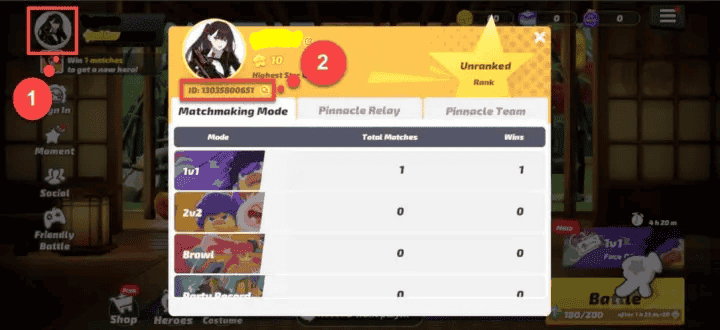
To ensure your LuckyCoins arrive without delay, you must provide your exact in-game Player ID. Follow these steps to find and copy your ID:
- Open Flash Party on your mobile device or PC.
- Tap your Avatar/Profile icon located in the top-left corner of the main lobby screen.
- In the profile overview window, locate your numeric Player ID displayed under your nickname.
- Tap the Copy icon next to the number to copy the ID directly to your clipboard.
Account Safety and Direct Player ID Delivery Guarantee
Account security is essential when purchasing digital game currency. BitTopup uses a direct Player ID delivery system that keeps your account safe at all times:
- Zero Login Credentials Required: You never have to share your game password, Google account, Apple ID, or third-party login tokens. Crediting requires only your public Player ID.
- Anti-Ban Compliance: All currency deliveries use standard crediting protocols that comply with game terms. Your account remains in good standing without risk of suspension or currency deductions.
- Encrypted Transactions: Every transaction is processed through secure, industry-standard encrypted payment gateways to protect your personal and financial information.
Why Choose BitTopup for Flash Party Recharge
BitTopup provides a reliable platform for purchasing game currencies globally:
- Competitive Pricing: Transparent, updated rates are clearly displayed on the checkout page before payment.
- Multiple Secure Payment Options: Support for international and local payment methods allows you to pay using the channel most convenient for you.
- Real-Time Order Tracking: Monitor your order status live from payment confirmation to successful delivery.
- Dedicated Customer Support: Our 24/7 support team is available to assist you if you experience any order issues or have questions regarding your recharge.
Flash Party Recharge Troubleshooting and Delivery Support
If you have completed your purchase but do not see your LuckyCoins immediately, follow these troubleshooting steps:
- Restart the Game Client: Completely close Flash Party from your background apps and reopen it to force a fresh data sync with the game servers.
- Verify Your Player ID: Check your BitTopup order confirmation receipt to confirm that the Player ID you entered matches your in-game profile ID exactly.
- Check Order Status: Visit the BitTopup order center to verify whether your payment has completed processing.
- Contact Support: If the currency has not arrived after a short processing window, contact BitTopup customer support with your Order ID and Player ID for rapid resolution.
Frequently Asked Questions
How do I find my Flash Party Player ID?
Open Flash Party, tap your profile avatar in the top-left corner of the main screen, and locate the numeric ID displayed below your player name. Tap the copy icon next to it to copy the number to your clipboard.
What are Flash Party LuckyCoins used for?
LuckyCoins are used to unlock premium heroes, purchase the Starcard (Party Pass), obtain exclusive character skins, and equip custom K.O. visual effects, respawn platforms, and lobby emotes.
Do I need to provide my Flash Party login password to recharge?
No. BitTopup only requires your numeric Player ID. You should never share your game password or login credentials with anyone.
How long does it take to receive LuckyCoins after recharge?
Deliveries are processed automatically as soon as payment is confirmed. In most cases, the currency reflects in your in-game balance within moments.
Can I buy Flash Party LuckyCoins for a friend using their Player ID?
Yes. Enter your friend's Flash Party Player ID instead of your own during the order setup. The LuckyCoins will be delivered directly to their game account.
What should I do if my LuckyCoins do not appear after completing the payment?
First, restart your game to refresh your account data. If the balance remains unchanged, check your order status on BitTopup and contact customer service with your order details for assistance.