

Hami Party Top Up: Coins and Voice Room Currency
Hami Party is an interactive social audio platform where users connect in real-time voice chat rooms, participate in karaoke sessions, play casual mini-games, and celebrate special events with friends worldwide, particularly across the MENA region.
Coins serve as the primary virtual currency within Hami Party. When you top up your coin balance, you gain access to a wide selection of in-app features designed to enhance your social interactions:
- Luxury Animated Gifts: Send virtual gifts ranging from flowers and greeting cards to luxury sports cars, private yachts, and glowing castles. These gifts appear directly on screen with custom animations, showing support to room hosts and friends.
- VIP Entrance Effects and Badges: Stand out whenever you join a voice room with custom vehicle entrances, animated profile frames, and exclusive VIP name badges.
- Room Boosting and Ranking: Voice room hosts use coins to launch interactive events, activate room lucky draws, and increase room exposure on the global and regional discovery pages.
- Interactive Mini-Games: Use coins to participate in community party games hosted directly inside voice channels.
Recharging your balance ensures you never run out of coins during live room competitions, PK battles, or special community celebrations.
How to Find Your Hami Party Player ID
To complete a coin recharge, you only need to provide your unique numerical Player ID. You do not need to share your account password or link your social media credentials. Follow these simple steps to locate your ID:
- Open the Hami Party app on your mobile device.
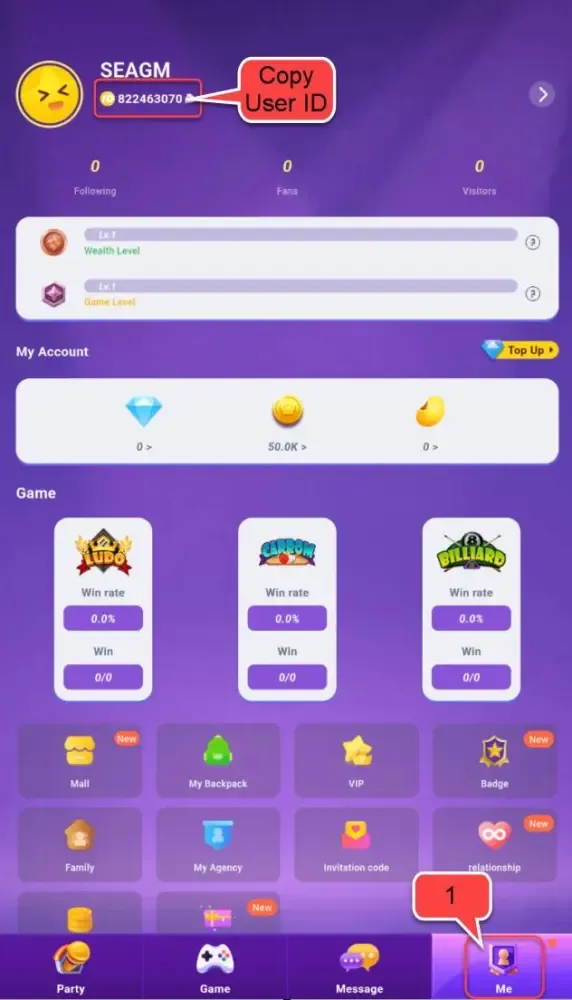
- Tap the Profile (or Me) tab located in the bottom-right corner of the home screen.
- Locate your profile avatar at the top of the screen.
- Your Player ID (a series of numbers) is displayed directly below your display name.
- Tap the Copy icon next to the number to copy your Player ID to your clipboard.
Make sure to double-check the copied ID before placing your order to avoid sending coins to another user's account.
How to Recharge Hami Party Coins Online on BitTopup
To buy Hami Party coins quickly and safely, complete the following steps:
- Select Your Coin Package: Browse the available Hami Party coin amounts on this page and pick the package that fits your needs. The exact price and coin quantity are displayed on the live checkout module.
- Enter Your Player ID: Paste your numerical Hami Party Player ID into the required input field.
- Choose Your Payment Method: Select from the available regional and international payment channels presented at checkout.
- Confirm and Pay: Review your order details and complete the transaction through the secure payment gateway.
- Check Your In-App Balance: Once payment confirmation is complete, the coins are credited directly to your Hami Party account. Open your app and check your updated wallet balance.
Direct ID Recharge and Account Security
Account safety is essential when making digital purchases. BitTopup uses direct ID recharge, which processes coin deliveries straight through official server channels without requiring sensitive personal credentials.
- Zero Password Sharing: You are never asked for your account password, email access, phone verification code, or social login details.
- No Account Access Risks: Because nobody logs into your account, your personal chat logs, friend lists, and account settings remain 100% private and protected.
- Safe for Gifting: Since only a Player ID is required, you can safely send coin top-ups directly to friends, family members, or favorite room hosts without needing their login credentials.
Regional Compatibility and Recharge Overview
Hami Party coins can be purchased for accounts across global regions, including major MENA communities in Saudi Arabia, the United Arab Emirates, Egypt, Kuwait, Qatar, and international servers.
| Recharge Parameter | Details |
|---|---|
| Required Account Info | Numerical Player ID only |
| Account Access Needed | No password or private login required |
| Supported Platforms | Android and iOS versions of Hami Party |
| Supported Regions | MENA and Global server accounts |
| Delivery Method | Direct server-side coin credit |
| Customer Support | 24/7 live assistance for order tracking |
All package pricing, currency conversions, and available payment options update automatically on the live checkout interface.
Troubleshooting Hami Party Balance and Delivery Issues
If your coins do not appear in your in-app wallet immediately after completing your order, follow these troubleshooting steps:
- Restart the Hami Party App: Fully close the app from your recent apps switcher and reopen it. This forces the app to sync with the server and refresh your wallet balance.
- Check Your In-App Wallet History: Navigate to your profile, tap Wallet or Coins, and review your recent transaction history to verify if the credit has registered.
- Verify the Submitted Player ID: Check your order receipt to confirm that the Player ID you entered matches your in-app profile ID exactly.
- Check Payment Status: Ensure your payment went through successfully and that your bank or payment provider did not place the transaction on hold.
- Contact Support: If the balance remains uncredited, reach out to BitTopup customer support with your Order ID, the Player ID used, and a screenshot of your in-app profile. The support team is available 24/7 to verify order status and resolve delivery inquiries.
Frequently Asked Questions
Where can I find my Hami Party Player ID to complete a recharge?
Open the Hami Party application and tap the profile icon in the bottom right corner. Your numerical Player ID is visible directly beneath your nickname. Tap the copy icon next to the number to copy it accurately.
Do I need to provide my Hami Party account password to buy coins?
No. Recharges on BitTopup require only your numerical Player ID. You should never share your account password, SMS verification codes, or login details with anyone.
How long does it take for Hami Party coins to arrive after payment?
Coin orders are processed automatically once payment confirmation is received. Under normal network conditions, coins are credited directly to your Hami Party account within minutes.
Can I recharge Hami Party coins for a friend using their Player ID?
Yes. Because the top-up process only requires a Player ID, you can enter your friend's ID during checkout to send coins straight to their in-app wallet.
What should I do if I entered an incorrect Player ID during checkout?
Orders processed with a valid but incorrect Player ID credit immediately to the account associated with that number and cannot be reversed. If you notice an error before the order completes, contact 24/7 customer support immediately with your order details.
What luxury gifts and room features can I unlock with Hami Party coins?
Coins allow you to purchase animated gifts (such as supercars, castles, and flowers), unlock VIP room entry effects, acquire decorative profile avatar frames, and host interactive mini-games in voice rooms.