

State of Survival Top Up: Direct Account Funding
State of Survival requires strategic planning, continuous resource management, and disciplined upgrading to protect your settlement against the infected and rival alliances. Diamonds serve as the universal premium currency in the game, enabling Chief upgrades, instant resource acquisitions, speedups, and participation in high-tier events.
Choosing a reliable State of Survival top up service ensures you receive your diamonds directly into your account balance without operational friction. BitTopup provides an efficient platform where players can top up their accounts globally using only their User ID (UID). By eliminating unnecessary intermediaries and account-sharing risks, you keep your login credentials secure while maintaining resource readiness for upcoming combat events.
How to Find Your State of Survival User ID (UID)
To complete an order on BitTopup, you only need your unique game User ID. Follow these steps inside the game client to locate and copy your UID accurately:
- Launch State of Survival on your mobile device or PC emulator.
- Tap your Chief Avatar located in the top-left corner of the main settlement view.
- In your Chief Profile screen, look below your Chief Name and State Number.
- Locate the numeric string labeled User ID (UID).
- Tap the small Copy icon next to the number to copy it directly to your clipboard.
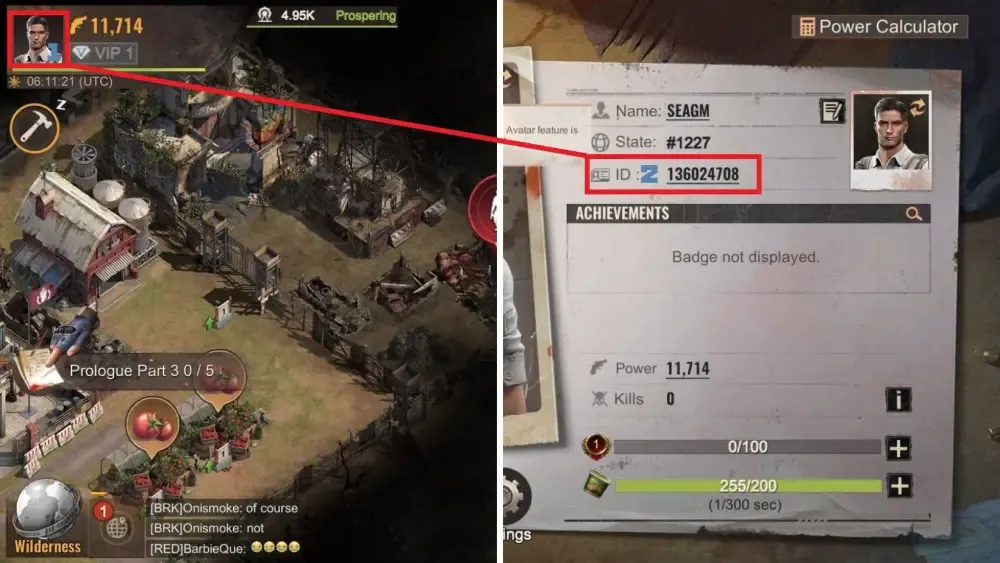
Double-check that you paste the exact UID into the order field on BitTopup to prevent delivery delays or crediting the wrong account.
Step-by-Step Guide to Recharge State of Survival Diamonds on BitTopup
Recharging your diamond balance on BitTopup takes only a few simple steps:
- Select Denomination: Choose the diamond package or bundle amount that matches your current upgrade plan.
- Enter Your UID: Paste your copied State of Survival User ID into the designated input box.
- Review Live Pricing: Check the live order summary and local payment total displayed directly on the checkout screen.
- Complete Payment: Choose your preferred secure payment method to finalize the purchase.
- Verify In-Game: Open your State of Survival client, refresh the home screen, and verify your updated diamond total.
What Are Diamonds Used for in State of Survival? (Plasma, Heroes, Events)
Diamonds provide direct access to the most vital progression systems in State of Survival. Allocating diamonds efficiently can dramatically increase your battle power and alliance contribution.
Plasma Core Upgrades and HQ Progression
Once your Headquarters reaches Level 30, conventional resources are no longer enough. Advancing into Plasma Tier buildings requires Plasma Cores. Diamonds allow Chiefs to purchase Plasma packages, complete laboratory research milestones, and accelerate high-tier troop enhancements.
Hero Recruitment and Gear Materials
Legendary heroes form the backbone of march formations. Recharging diamonds gives you the flexibility to acquire Hero Search Maps, targeted fragment crates, and Chief Gear crafting materials during limited-time hero development cycles.
Speedups and Energy Management
Troop training, building construction, and technology research demand substantial time. Diamonds let you purchase speedup bundles on demand or refill your Chief Stamina to participate in continuous Rally events against Infected Fiends.
State of Survival Diamond Bundles vs In-Game Store Packs
Maintaining a liquid diamond balance provides distinct tactical advantages over buying locked store packs on impulse. Having diamonds ready in your balance allows you to activate in-game items exactly when competitive timing demands it.
| Spending Priority | Primary Resource Gained | Optimal Strategic Timing |
|---|---|---|
| Plasma Progression | Plasma Cores & Polymer | Headquarters Level 30+ expansion phases |
| Hero Roulette & Searches | Legendary Hero Fragments | Targeted generational hero banner events |
| Chief Gear & Badges | Design Plans & Alloy | Pre-war preparation and SvS scoring phases |
| Emergency Hospital Healing | Healing Speedups & Resources | Capital Clash defense and Reservoir Raid |
| VIP Points Progression | Permanent March Buffs | Early game to unlock high-tier VIP perks |
Safe Top-Up Best Practices: Why You Never Need to Share Account Passwords
Account security is essential for protecting your investment in your settlement. Many unauthorized sellers request direct login credentials, social media passwords, or device link codes. Sharing login details exposes your profile to permanent account theft, unauthorized spending, and violations of game security policies.
BitTopup operates strictly on a User ID-only model:- No Passwords Required: You never submit your password, Google Play, Apple ID, or Facebook credentials.- Zero Account Takeover Risk: Because no third party logs into your account, your data remains in your control.- Safe for Alliances: You can safely place orders for alliance leaders, rally leads, or teammates using only their public UID.
Optimizing Diamond Spending for SvS, Reservoir Raid, and Capital Clash
High-stakes competitive modes in State of Survival demand careful resource management. Here is how top players prepare their diamond reserves ahead of battle cycles:
State vs State (SvS) Preparation
During the SvS Preparation Stage, spending diamonds on designated scoring days yields massive point returns. Coordinate your diamond purchases with Speedup Training, Chief Gear Upgrades, and Hero Growth days to secure individual milestone crates and state-level rank rewards.
Capital Clash and Turret Warfare
During active warfare for the Capital, casualty counts escalate quickly. Having an emergency reserve of diamonds ensures your alliance can instantly clear hospital queues with healing speedups, refresh troop defense buffs, and maintain unbroken rally pressure on contested buildings.
Reservoir Raid Strategy
In Reservoir Raid, stamina management and quick march relocations dictate map control. Reserve diamonds for fast relocator purchases and stamina replenishment so your march queues remain active across water treatment plants and processing stations.
Troubleshooting State of Survival Top-Up and Delivery Issues
If you have completed a purchase on BitTopup and are waiting for your balance to update, use these verification steps:
- Restart the Game Client: Fully close State of Survival from your background apps and reopen it to force a server synchronization.
- Check the In-Game Mailbox: Look under your System Mail tab for delivery confirmations or resource attachments.
- Verify Your UID: Confirm that the User ID entered at checkout matches your current Chief Profile.
- Check Payment Confirmation: Verify that your payment provider has successfully processed the transaction.
- Contact Support: If your diamonds have not arrived after completing these steps, reach out to the BitTopup 24/7 customer support team with your order number for prompt assistance.
Frequently Asked Questions
How do I find my State of Survival User ID (UID)?
Open the game, tap your Chief Avatar in the upper-left corner of the screen, and locate the numeric UID displayed beneath your Chief Name. Tap the copy icon next to it to copy the number.
Do I need to provide my game password to recharge diamonds?
No. BitTopup requires only your public User ID (UID). You should never share your game password or linked social account details with anyone.
What can State of Survival Diamonds be used for in-game?
Diamonds can be spent on Plasma Cores, Hero Recruitment Maps, Chief Gear materials, construction and research speedups, stamina refills, and seasonal event items.
How quickly will diamonds be credited to my State of Survival account?
Diamonds are processed automatically upon successful payment and sent directly to your game balance. Always restart your game client after checkout to view the updated total.
Can I buy State of Survival diamonds for an alliance member using their UID?
Yes. Because only a User ID is required, you can enter any valid player UID during checkout to send diamonds directly to a friend or alliance teammate.
What should I do if my recharged diamonds do not appear in my account?
First, restart your game to refresh server data and check your in-game mailbox. If the balance remains unchanged, contact BitTopup customer support with your transaction order number to verify delivery status.