The 30-Minute Fix Protocol
Minutes 0-5: Basic Refresh
Pull-to-refresh (fixes 50-95% of sync issues):
- Go to Me > Wallet
- Pull down screen 3-5 times
- Wait 60-90 seconds between each
Force close app completely:
- Android: Recent Apps > swipe away
- iOS: Swipe up > remove from multitasking
- Wait 10 seconds, reopen
Check transaction history: Me > Wallet > Purchase History. If it appears here but balance hasn't updated, it's a display glitch.

Log out/in: Wait 30 seconds between logout and login to re-establish server connection.
Minutes 5-15: Payment Verification
Locate your transaction ID from confirmation email or receipt—essential for support escalation.
Verify payment amount matches standard packages:
- 60 Diamonds: $1
- 660 Diamonds: $10
- 3300 Diamonds: includes 30% bonus
Check payment status: Confirm charge moved from pending to completed in your bank app.
Time check: If under 10 minutes and you're outside Asia, you're still in normal processing window.
Minutes 15-25: ID Verification (Critical)
Find your BIGO ID: Me > Profile. It's 8-12 digits, numeric only.
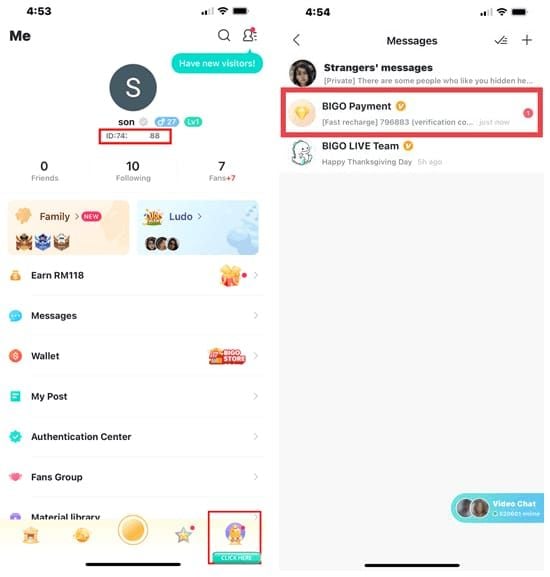
Compare against purchase ID: Even one digit difference sends diamonds to a different account. BIGO ID 901216366 ≠ 901216365.
Common ID mismatch causes:
- Autofill inserting old saved ID
- Copy-paste including invisible characters
- Third-party platform storing outdated ID
- Logged into wrong account (if you have multiple)
For reliable ID verification during checkout, buy BIGO diamonds online through BitTopup—mandatory ID confirmation prevents misdirected purchases.
Minutes 25-30: Cache & Network
Clear cache (Android): Settings > Apps > Bigo Live > Storage > Clear Cache. Fixes 70-80% of display glitches.
Offload app (iOS): Settings > General > iPhone Storage > Bigo Live > Offload App. Resolves 95% of iOS issues. Then tap Reinstall App.
Restart device: Power off, wait 30 seconds, power on. Clears system-level memory states.
Switch networks: Wi-Fi to mobile data or vice versa. Forces new connection path.
Disable VPN/proxy: These trigger fraud prevention holds. After disabling, set DNS to 8.8.8.8 or 1.1.1.1.
ID Mismatch: The #1 Problem
How It Happens
- Manual entry errors: Transposing digits on small keyboards
- Autofill mistakes: Browser inserts old saved ID from previous account
- Copy-paste issues: Invisible spaces or line breaks
- Platform lag: Third-party site has outdated ID on file
Identifying Wrong Account Recharge
Check Me > Wallet > Transaction History. No record = diamonds didn't reach this account.
Review purchase confirmation email—some platforms include recipient ID. Compare against your actual ID.
Search email for old BIGO registrations. You might have a forgotten secondary account.
Recovery Options
BIGO's policy: No diamond transfers between accounts. Period.
Your options:
- Request refund from BIGO support (7-30 days processing), then repurchase correctly
- If you know the recipient, negotiate voluntary gift exchange during your streams
Prevention is everything. BitTopup's mandatory ID confirmation screens eliminate this 25-70% error category entirely.
Platform-Specific Processing Times
iOS App Store
- Standard: 5-10 minutes
- Peak hours: 15-20 minutes
- Check Settings > [Your Name] > Media & Purchases > Purchase History
- Status must show Completed not Pending
Android Google Play
- Standard: 2-5 minutes
- First-time purchases: 10-30 minutes (fraud review)
- Check Google Play Store > Account > Purchase History
- Clear both Google Play Store cache AND BIGO Live cache
Web Browser Purchases
- Standard: 5-15 minutes
- Don't close confirmation page immediately—wait for Transaction Successful
- Disable ad blockers/privacy extensions during purchase
Third-Party Platforms
Legitimate platforms like BitTopup: 2-5 minutes via direct API integration.
Warning signs of unreliable platforms:
- Vague processing messages without timelines
- No transaction ID provided
- No ID verification during checkout
Advanced Troubleshooting
Complete Cache/Data Clear
Android: Settings > Apps > Bigo Live > Storage > Clear Cache + Clear Data (logs you out—remember credentials first)
iOS: Offload then reinstall, or completely uninstall > restart device > reinstall
Requirement: BIGO Live version 5.0+. Older versions have known sync bugs.
Network Diagnostics
Speed test: Need 5+ Mbps for optimal sync. Under 1 Mbps causes timeouts.
Signal strength: Less than 3 bars on mobile = likely sync issues. Switch to Wi-Fi or move to stronger signal area.
DNS optimization: Change to 8.8.8.8 (Google) or 1.1.1.1 (Cloudflare)
Multi-Device Sync Issues
Log out of BIGO on all devices except one. Wait 5 minutes, then log back in on primary device.
Update all devices to latest BIGO version—version mismatches cause sync conflicts.
Disable iCloud sync (iOS) or Google account sync (Android) for BIGO temporarily.
Set device to automatic time zone—manual settings trigger anti-fraud holds.
When to Contact Support
Escalation Criteria
After 30 minutes if:
- You've completed all troubleshooting steps
- Transaction history shows no record
- Payment confirmed but diamonds missing
Immediate escalation if:
- Payment charged, zero transaction record anywhere
- Diamonds verifiably went to wrong account (platform error)
- Payment gateway shows delivery failure
Peak hour exception: Allow 45-60 minutes before escalating for purchases made 6-11 PM.
Required Documentation
- Payment confirmation screenshot: Transaction ID, amount, date, time
- BIGO ID screenshot: From Me > Profile
- Transaction history screenshot: Showing purchase is absent
- Device info: Model, OS version, BIGO app version (Me > Settings > About)
Contact Template
Email: feedback@bigo.tv
Phone: +65 63519330 (GMT+8 business hours)
Message structure:
**BIGO Diamonds not received. Transaction ID: [number]. BIGO ID: [your ID]. Amount: [amount]. Time: [date/time].
Troubleshooting completed: App refreshed multiple times, cache cleared, device restarted, ID verified. No transaction record after [X] minutes.
Request: Verify transaction and credit diamonds, or process refund to original payment method.
Attachments: Payment_Confirmation.jpg, BIGO_ID_Screenshot.jpg, Transaction_History.jpg**
Resolution Timeframes
- Ticket acknowledgment: 24 hours
- Initial review: 24-48 hours
- Frozen balance investigation: 7-14 days
- Refund processing: 7-30 days (varies by payment method)
Prevention Checklist
Pre-Purchase Verification
- Screenshot your BIGO ID from Me > Profile every time
- Confirm you're logged into correct account (check display name/picture)
- Update BIGO Live to latest version
- Check for account restrictions in Me > Settings
Payment Best Practices
- Use credit cards or PayPal (better dispute resolution than bank transfers)
- Disable VPN/proxy before purchasing
- Ensure sufficient funds/credit limit
- Use payment method from same country as BIGO account
Record Keeping
- Screenshot confirmation page immediately
- Save with descriptive filename: BIGO_Purchase_2026-01-15.jpg
- Create email folder for BIGO confirmations
- Maintain spreadsheet: date, amount, transaction ID, status
Network Readiness
- Run speed test (confirm 5+ Mbps)
- Close bandwidth-heavy apps
- Maintain 1GB+ free storage
- Add BIGO Live to battery optimization exceptions
BitTopup: The Reliable Alternative
Why BitTopup Eliminates Issues
Direct API integration: 2-5 minute delivery across all regions, not multi-layer gateway routing.
Built-in ID verification: Displays account name and profile picture before payment—prevents 25-70% of misdirected purchases.
Real-time tracking: Payment Received > Verification > Processing > Credited. Full visibility.
10-minute guarantee: Delivery within 10 minutes or immediate refund processing.
24/7 support: Help available beyond BIGO's GMT+8 business hours.
Safe Purchase Steps
- Visit BitTopup BIGO Diamonds
- Select diamond package
- Enter BIGO ID—system displays your account name/picture
- Verify displayed info matches your account
- Choose payment method
- Review order summary (quantity, price, recipient ID)
- Complete purchase, monitor order status page
Common Myths Debunked
Myth: All purchases are instant
Reality: Payment gateways need 2-3 minutes minimum for verification. Geographic distance adds latency. Peak times extend to 20-30% longer.
Myth: Payment success = immediate credit
Reality: Payment approval and delivery notification are separate steps. Network interruptions between them create charged-but-not-delivered scenarios.
Myth: Support instantly fixes everything
Reality: Fraud investigations require 7-14 days. Refunds depend on banking timelines (7-30 days). Cross-department coordination takes multiple business days.
Reality check: Multiple independent systems must communicate successfully—your payment method, gateway, BIGO servers, your device. Failure at any point disrupts delivery.
FAQ
How long for diamonds to appear?
95% within 5 minutes, 90% within 10 minutes. Asia: 2-3 min. Europe/Americas: 5-10 min. Peak hours add 20-30%. Escalate after 30 minutes of troubleshooting.
Why aren't diamonds showing after payment?
ID mismatch (25-70% of errors), sync failures (40%), network issues (15-25%), VPN blocking (10-20%). Pull-to-refresh fixes 50-95% of syncs. Clear cache resolves 70-80% of Android glitches.
Recharged wrong account—what now?
BIGO won't transfer diamonds. Options: Request refund (7-30 days) then repurchase correctly, or negotiate gift exchange with recipient if known. Use platforms with ID verification like BitTopup to prevent this.
When to contact support?
After 30 minutes if you've done: app refresh, cache clear, device restart, network switch. Immediate escalation if payment charged but zero transaction record, or diamonds went to wrong account via platform error.
How to prevent delivery issues?
Screenshot BIGO ID before every purchase. Disable VPN. Ensure 5+ Mbps network, 1GB free storage. Update to BIGO 5.0+. Use payment method from same country as account. BitTopup's ID verification eliminates 25-70% of errors.
Safe to buy via third-party platforms?
Yes, if they have direct BIGO API integration. BitTopup offers instant delivery, mandatory ID verification, 24/7 support. Avoid platforms lacking transaction tracking, reviews, or clear refund policies.
Stop diamond delivery headaches.Recharge BIGO Diamonds through BitTopup—instant delivery, built-in ID verification, 24/7 support. Get diamonds in minutes, not hours.