Why Diamonds Don't Arrive
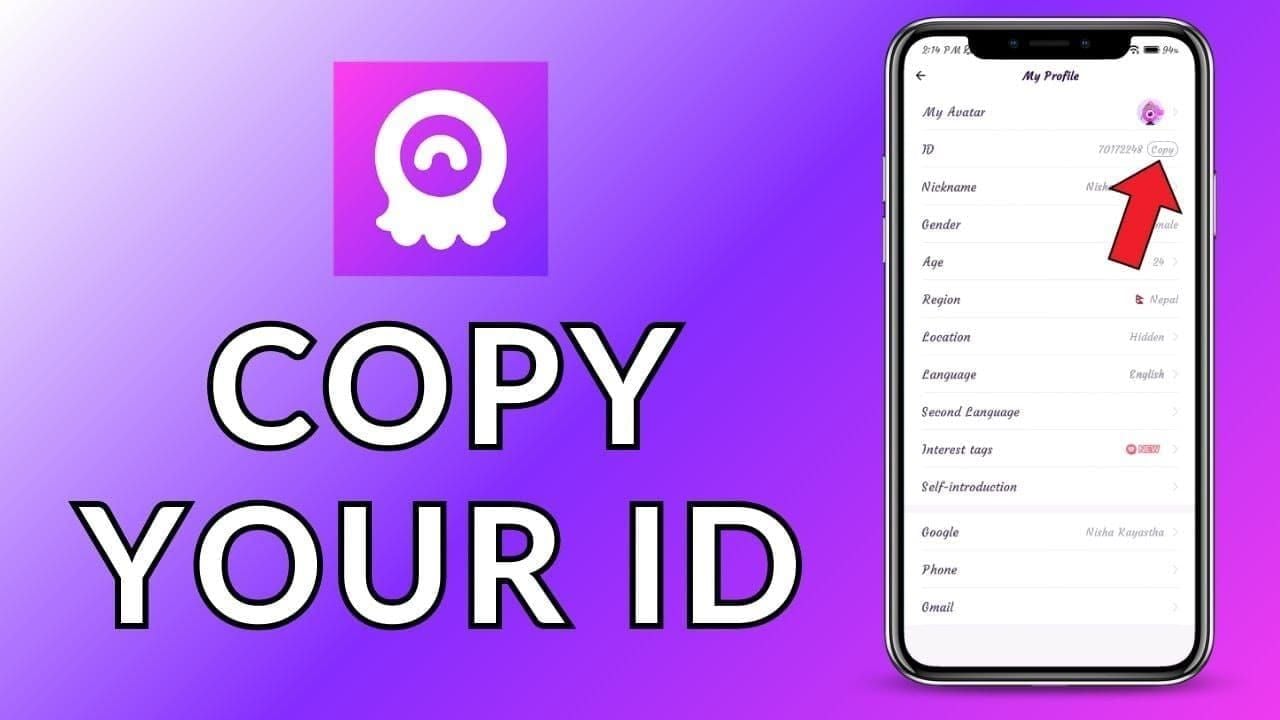
Incorrect User ID (40% of cases): Your Chamet User ID is an 8-12 digit number in Profile > My Profile. One wrong digit sends diamonds to another account—irreversible.
Network delays (35% of cases): Server sync failures between payment processors and Chamet's backend create temporary crediting gaps. 95% resolve automatically within 5-30 minutes.
App sync problems (60% of reported cases): Local app cache doesn't reflect updated balance despite successful backend crediting. Resolves through app refresh.
Delayed vs Failed Transactions
Delayed: Payment confirmed by provider, charge appears on statement, you have transaction ID—but no diamonds in Chamet. Typically resolves within 30 minutes automatically.
Failed: Either payment never processes (no charge) or payment processes but Chamet never receives notification. Requires manual intervention.
Check payment history first. Completed charge with transaction ID = delayed delivery. No transaction record = payment gateway failure—contact payment provider, not Chamet.
Essential Evidence Checklist
Successful refunds depend on documentation quality. Collect immediately—some evidence becomes inaccessible after 24-48 hours.
Critical Documents Required
- Transaction ID/Order Number: Unique identifier from payment confirmation (Google Play: GPA.####-####-####-#####)
- Payment Receipt Screenshot: Full-page showing amount, timestamp, merchant name, status
- Chamet User ID Verification: Screenshot from Me > My Profile showing 8-12 digit ID
- Entered User ID: Screenshot of User ID field during purchase
- Pre-Purchase Balance: Diamond balance from Profile > Wallet before transaction
- Post-Purchase Balance: Current balance showing no credit
- Timeline Documentation: Exact timestamps of payment initiation, confirmation, when you noticed missing diamonds
Without complete documentation, resolution extends from 24-48 hours to 5-10 business days.
Time-Sensitive Evidence (Capture Within 24 Hours)
Payment confirmation screens disappear after closing payment app. Capture immediately before navigating away. Many gateways only display detailed transaction info for 24 hours.
Email receipts arrive within minutes to hours. Save immediately—some providers use dynamic links expiring after 48-72 hours.
Organizing Evidence
Create folder labeled with transaction date and amount (e.g., Chamet_2025-01-15_$50). Use descriptive filenames: transaction_id.jpg,payment_receipt.jpg,user_id_verification.jpg.
Attach evidence in logical sequence: payment proof first, User ID verification, then balance screenshots. Compress files under 5MB each—most support systems reject attachments exceeding 10MB total.
Payment Screenshot Guide
Capturing Payment Completion
Mobile payments:
- Don't navigate away from confirmation screen
- Screenshot (iPhone: Power + Volume Up; Android: Power + Volume Down)
- Verify entire screen captured without cutoffs
- Take second screenshot if truncated
- Save to dedicated evidence folder
Desktop purchases: Use full-page screenshot tools (browser extensions like Full Page Screen Capture) to capture all details including footer information.
Required Visible Details
- Transaction ID/Order Number: Complete alphanumeric string
- Payment Amount: Exact charge matching diamond package price
- Merchant Name: Chamet or Element Colors Electronic Entertainment Limited
- Transaction Timestamp: Date and time of completion
- Payment Method: Last four digits of card/account
- Transaction Status: Completed,Successful, or equivalent
Ensure adequate lighting or use native screenshot functions for crisp images. Blurry text renders evidence unusable.
Common Screenshot Mistakes
- Partial confirmation screens without transaction ID
- Low-resolution making text unreadable
- Obscured information from notification overlays or low battery warnings
- Screenshots not showing complete scrollable content
Review each screenshot immediately after capture before closing confirmation screen.
Locating Transaction IDs
Finding IDs by Payment Method
Google Play: Play Store > Account > Payments & subscriptions > Budget & order history. Find Chamet purchase—order number format GPA.####-####-####-#####. Screenshot complete order details.
Apple App Store: Visit reportaproblem.apple.com, sign in, find Chamet purchase, click Report a Problem. Screenshot complete page showing order number.
PayPal: Activity > All Transactions. Click Chamet payment for details. Transaction ID is 17-character alphanumeric string at top. Screenshot complete details page.
Credit/Debit Cards: Banking app transaction history. Find Chamet charge, tap for details. Screenshot complete transaction detail screen showing all identifiers.
Order Numbers vs Transaction IDs vs Transfer IDs
Order Number: Chamet's internal identifier for your purchase request
Transaction ID: Payment provider's money transfer tracker
Transfer ID/Reference Number: Bank's/processor's internal tracking code
Collect all three when available. Chamet uses Order Number, but payment disputes require Transaction IDs.
Retrieving Transaction History
E-wallets maintain 180-day accessible histories. Access through Activity/History/Transactions section.
Credit card transactions appear in banking app within 24-48 hours. Wait for merchant name update from PENDING TRANSACTION to Element Colors Electronic Entertainment Limited before screenshotting.
Buy Chamet diamonds online via BitTopup auto-saves transaction records to account dashboard with complete documentation—eliminating manual collection.
Chamet Account Evidence
Pre-Purchase Balance Screenshot
Navigate to Me > Wallet before any purchase. Screenshot must show:

- Complete diamond balance number
- Chamet User ID (top of profile)
- Current date/time (device status bar)
- No pending transactions or loading indicators
Establishes baseline proving diamonds weren't already present.
Purchase History Access
Profile > Settings > Help Center > Payment Issues, or Wallet > Transaction History/Recharge Records.
Screenshot showing:
- Recent purchases with dates and amounts
- Absence of current transaction
- Any successful previous purchases
- Current date visible
If problematic transaction appears but diamonds weren't credited, screenshot that entry—proves Chamet registered purchase but failed crediting.
Profile Verification
Screenshot complete profile showing:
- 8-12 digit User ID at top
- Profile name and photo
- Account creation date/level
- Verification badges/status indicators
Verifies you control the account and provides exact User ID for backend checking.
Why Timestamps Matter
Timestamps establish event sequence and prove reporting within reasonable timeframes. Google Play offers 48-hour refund requests, e-wallets provide 180-day dispute windows.
Ensure all screenshots display device status bar with visible date/time. Screenshots taken weeks after purchase raise delayed reporting questions.
Contacting Chamet Support
In-App Support Access
Fastest method: Profile > Settings > Help Center > Payment Issues > Diamonds Not Credited. Routes to payment specialists, reducing response from 48-72 hours to 24-48 hours.
Form requests:
- User ID (auto-populated)
- Transaction date/time
- Payment amount/method
- Transaction ID/order number
- Brief description
Attach evidence screenshots directly—up to 5 images per submission.
Effective Support Message Structure
Subject: Diamond Purchase Not Credited - Transaction ID [your ID]
Body:
**Purchased [amount] diamonds on [date] at [time] using [payment method]. Payment confirmed with Transaction ID [number], but diamonds haven't appeared after [time elapsed].
Chamet User ID: [8-12 digits]
Transaction ID: [complete ID]
Purchase Amount: [exact amount]
Payment Method: [specific method]
Time Since Purchase: [hours/minutes]
Attached screenshots:
- Payment confirmation with transaction ID
- Chamet User ID verification
- Pre-purchase diamond balance
- Current diamond balance (unchanged)
- Payment receipt
Please investigate and credit missing diamonds or process refund.**
Provides all essential information upfront, preventing 24-48 hour delays from information requests.
Required Information
- Exact User ID: 8-12 digit number from profile, not username
- Precise Timestamp: Date and time to the minute
- Complete Transaction ID: Full alphanumeric string without typos
- Payment Method Details: Specific provider and last four digits
- Diamond Package Details: Exact package (e.g., $1.20 for 6,250 diamonds)
Expected Response Times
24-48 hours for properly documented inquiries. Email to chamet.feedback@gmail.com follows this timeline; in-app support often faster.
While waiting, don't:
- Submit multiple tickets (fragments evidence across agents)
- Attempt additional purchases (complicates account history)
- Modify account (avoid changing User ID/profile until resolved)
If 72 hours pass without response, send single follow-up referencing original ticket number.
Support Escalation
When to Escalate
Escalate when:
- No response after 72 hours despite complete evidence
- Generic automated responses not addressing your transaction
- Support requests already-provided evidence
- Contradictory information from different agents
- Support claims no record exists despite payment confirmation
- Resolution exceeds 7 business days without progress updates
Requesting Supervisor Review
**Requesting escalation to senior support specialist/supervisor regarding unresolved diamond delivery. Original ticket [number/date] unresolved after [number] days despite complete documentation.
Submitted:
- Payment confirmation with Transaction ID [number]
- Chamet User ID verification
- Pre/post-purchase balance screenshots
- Complete timeline documentation
Requires senior review as [specific reason]. Please assign supervisor and provide resolution timeline.**
Alternative Contact Channels
Beyond chamet.feedback@gmail.com, use phone support through agent.ichamet.com/user/login.
When calling:
- Have complete evidence ready
- Note agent name and employee ID
- Request case number/ticket reference
- Ask for email confirmation of promises/timelines
- Take notes: date, time, agent name, key points
Escalated Ticket Documentation
Include:
- Timeline of Support Interactions: Dates, summaries, ticket numbers, agent responses
- Previous Responses: Screenshots/forwarded emails showing inadequate communications
- Escalation Justification: Why standard support failed
- Resolution Deadline: Reasonable timeframe (3-5 business days)
- Alternative Resolution: Willingness to accept refund if crediting impossible
Payment Provider Disputes
When to Contact Payment Provider
Initiate disputes when:
- Chamet explicitly denies refund despite valid evidence
- Support stops responding
- Resolution exceeds 14 business days
- Chamet claims no record despite payment confirmation
- Support requests impossible evidence
Google Play: 48-hour refund window (some regions 90 days). PayPal: 180-day disputes. Credit cards: 30-90 days for chargebacks.
Filing Payment Disputes
Google Play: Play Store > Account > Payments & subscriptions > Budget & order history. Find purchase, tap Request a refund. Select I didn't receive what I purchased. Attach transaction ID screenshot. Processed within 48 hours.
Apple App Store: reportaproblem.apple.com, sign in, find purchase, click Report a Problem. Select I didn't receive this purchase. Provide evidence. Reviewed within 48-72 hours, 80%+ approval for documented claims.
PayPal: Activity > All Transactions. Find payment, click Report a Problem. Select I didn't receive my item. Upload evidence. Takes 5-45 days, merchant response required within 10 days.
Credit Cards: Contact issuer, request chargeback for services not received. Provide complete evidence. Takes 30-90 days, provisional credits often within 10 days.
Evidence for Chargebacks
Payment providers require:
- Merchant Contact Attempts: Documentation of Chamet support communications
- Merchant Response: Screenshots of support responses (or lack thereof)
- Service Description: Purchased virtual currency (diamonds) for Chamet app
- Non-Delivery Proof: Account screenshots showing diamonds never appeared
- Transaction Timeline: Chronological summary from purchase through dispute
Coordinating Support and Disputes
Inform Chamet when initiating disputes: Initiated dispute with [provider] regarding Transaction ID [number] due to unresolved delivery after [number] days. Willing to cancel dispute if you credit diamonds or refund within [timeframe].
Often accelerates resolution—chargebacks incur merchant fees. Many stalled cases resolve within 48-72 hours of notification.
If Chamet resolves after dispute initiation, immediately cancel payment provider dispute. Double-recovery can result in account suspension.
Prevention Strategies
Pre-Purchase Checklist
- Verify User ID: Me > My Profile, screenshot 8-12 digit ID
- Copy User ID: Use copy function, not manual typing
- Check Internet: Stable Wi-Fi/mobile data, minimum 3 Mbps
- Disable VPN: VPNs interfere with payment processing
- Screenshot Pre-Purchase Balance: Profile > Wallet
- Verify Payment Method: Sufficient funds, no service issues
- Close Background Apps: Free device resources
Prevents 70% of delivery failures in 2 minutes.
BitTopup Advantages
Third-party platforms offer superior documentation:
- Permanent transaction ID storage in dashboard
- Automated screenshot capture
- Email receipts with complete details
- Gaming platform expertise
- 1-3 minute delivery guarantees
- Competitive pricing
Built-in documentation eliminates manual evidence collection.
Large Purchase Verification
For purchases exceeding $50/100,000 diamonds:
- Test with smallest package first
- Verify account has no restrictions/warnings
- Confirm payment method daily/monthly limits
- Review recent account activity
- Update to latest Chamet app version
Best Practices
- Purchase during off-peak hours: Avoid evenings/weekends
- Use consistent payment methods: Stick with one verified method
- Maintain transaction records: Dedicated folder for confirmations
- Monitor immediately: Check balance within 5 minutes
- Report immediately: Contact support within 1 hour of failure
- Avoid simultaneous purchases: Complete one before starting another
Quick Troubleshooting Fixes
Force-Close and Restart App
Resolves 60% of sync issues.

iOS: Swipe up from bottom, pause mid-screen, swipe up on Chamet preview, wait 10-15 seconds, reopen.
Android: Open Recent Apps, swipe away Chamet, wait 10-15 seconds, reopen.
Check balance in Profile > Wallet.
Clear App Cache
Android: Settings > Apps > Chamet > Storage > Clear Cache (NOT Clear Data). Reopen and check balance.
iOS: Delete app, reinstall from App Store, log back in, check balance.
Resolves 60-90% of persistent sync issues.
Log Out and Back In
- Profile > Settings > Log Out
- Wait 15-20 seconds
- Log back in
- Check Profile > Wallet
Forces servers to send fresh account data.
Check Network Connection
- Disable VPN completely
- Test connection speed (minimum 3 Mbps)
- Switch Wi-Fi to mobile data (or vice versa)
- Force-close and restart Chamet
- Check balance
Network switches trigger delayed credit processing.
Wait Full 30 Minutes
Despite 1-3 minute standard delivery, congestion extends to 30 minutes. Set timer from payment confirmation. Check balance every 5-10 minutes after troubleshooting. 95% of legitimate transactions complete within this window.
Refund Policies and Expectations
When Chamet Refunds
Direct refunds only for unprocessed/non-delivered orders. Policy: No refund if virtual product order processed. If diamonds credited to any account (even wrong User ID), order considered fulfilled.
Refund-eligible scenarios:
- Payment processed but Chamet never received notification
- System errors during crediting with confirmed non-delivery
- Duplicate charges
- Unauthorized transactions with proof of compromise
Refunds to original payment method. E-wallets: 5-10 business days. Credit cards: 10-30 days.
365-Day Rule
Orders deemed completed after 365 days from confirmation. Can't dispute transactions older than one year.
Initiate refund requests within 30 days for maximum success. Payment providers skeptical of delayed claims.
User ID Entry Errors
Incorrect User ID with successful delivery to that account = transaction complete. System functioned correctly—user error, not system failure. No refunds.
Copy User ID from Me > My Profile. Don't type manually.
Refund Timelines
From approval:
- E-wallets: 5-10 business days
- Credit cards: 10-30 business days
- Debit cards: 5-15 business days
- Google Play: 1-3 business days
- App Store: 3-5 business days
Add support investigation time (24-48 hours straightforward, 5-10 days complex) for total duration.
FAQ
How long for diamonds to arrive?
1-3 minutes standard. Network delays extend to 30 minutes in 5% of transactions. If missing after 30 minutes post-troubleshooting, contact support with documentation.
What if diamonds don't show immediately?
Force-close app, wait 10-15 seconds, reopen—resolves 60% of issues. Still missing? Clear cache (Settings > Apps > Chamet > Storage > Clear Cache on Android; reinstall on iOS). If missing after 30 minutes, gather transaction ID, payment screenshot, User ID verification, contact Profile > Settings > Help Center > Payment Issues.
Where's my transaction ID?
Google Play: Play Store > Account > Payments & subscriptions > Budget & order history, find purchase (GPA.####-####-####-#####). Apple: reportaproblem.apple.com. PayPal: Activity > All Transactions, click payment. Credit cards: banking app transaction details.
What screenshots needed?
Seven critical: (1) payment confirmation with transaction ID/amount/timestamp; (2) User ID from Me > My Profile; (3) User ID field entered during purchase; (4) pre-purchase balance from Profile > Wallet; (5) current balance showing no credit; (6) payment receipt; (7) Chamet purchase history. Ensure clarity, include device date/time.
How to contact support?
In-app fastest: Profile > Settings > Help Center > Payment Issues > Diamonds Not Credited. Responds 24-48 hours. Email: chamet.feedback@gmail.com. Phone: agent.ichamet.com/user/login. Include complete evidence initially.
Can I get refund?
Yes, if order never processed or diamonds genuinely not delivered. Policy: No refund if virtual product order processed—if credited anywhere (including wrong User ID you entered), no refund. Contact Chamet first with evidence. If unresolved after 7-10 days, initiate payment provider dispute: Google Play 48-hour requests, Apple reportaproblem.apple.com, PayPal 180-day disputes, credit cards 30-90 day chargebacks.
Avoid delivery issues—purchase through BitTopup for instant delivery, comprehensive records, and responsive support. Diamonds in seconds with automatic documentation.