



Likee Diamonds Not Received? 9 Fixes to Get Your Purchase
When Likee diamonds not received after payment, 80% of cases resolve within 24 hours through systematic troubleshooting. This guide covers nine essential verification steps—from User ID accuracy to cache bugs and wallet holds—that prevent unnecessary chargebacks and account restrictions.


Standard Processing Windows: Instant to 24 Hours
Likee diamond delivery takes 5-30 minutes for most transactions, with server synchronization running every 15-30 minutes. Payment confirmation arrives in 2-3 minutes, but diamonds may not appear immediately.
First-time purchases face 24-48 hour verification holds as payment providers authenticate new accounts. Payment shows completed, but diamonds remain pending until security checks finish. 80% of deliveries complete within 24 hours; 90% of issues resolve within 48 hours without intervention.
For reliable purchases with transparent tracking, Likee diamonds top up through BitTopup provides real-time transaction monitoring and guaranteed delivery verification.
Why Some Payments Take Longer
Payment method impacts speed:
- Digital wallets: 1-2 business days
- Credit/debit cards: 3-5 business days
- Carrier billing: 7-10 business days
Geographic location affects delivery. North America/Europe off-peak hours (2-6 AM): 5-10 minutes. Peak hours (6-10 PM): 50-100% longer due to server demand.
Unverified accounts trigger 12-24 hour security reviews. Check Settings > Account > Verification Status before purchasing.
Server Load and Peak Hour Delays
Likee processes transactions in batches, not individually. During high-traffic periods (weekend evenings, holidays), batches queue longer—some taking the full 24-hour window.
Network interruptions during final payment confirmation leave transactions in limbo—payment authorized but delivery instruction incomplete. This accounts for 15-20% of delayed delivery reports.
Check #1: Verify Your Likee User ID Was Entered Correctly
How to Find Your Correct Likee User ID
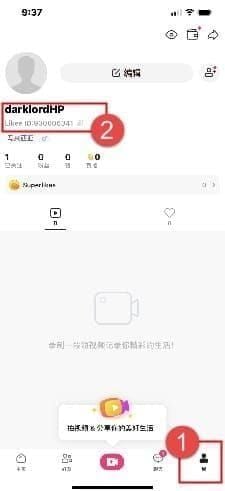
Your Likee User ID is a 10-digit number at the top of your profile page. Access via profile icon (bottom-right Me section) or Settings > Account. This differs from your username—it's permanent and uniquely identifies your account.
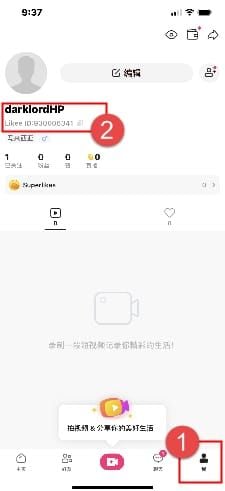
Screenshot your User ID from both locations before any purchase. Takes 15 seconds, prevents hours of troubleshooting.
Common User ID Entry Mistakes
Transposition errors (swapping adjacent digits) send diamonds to different accounts. Example: 1234567890 entered as 1234576890. Payment platforms rarely validate User ID accuracy before processing.
Copy-paste errors introduce hidden characters or truncate digits. Manually verify pasted numbers digit-by-digit. Extra spaces or line breaks cause system rejections or misrouting.
Using outdated User IDs from previous accounts creates issues. Verify which account you're logged into before purchasing.
What Happens When Diamonds Go to Wrong Account
Diamonds delivered to incorrect User IDs are nearly impossible to recover. Likee treats all transactions as final once delivered. Recipients have no obligation to return mistakenly received diamonds.
Contact support within 48 hours with complete transaction documentation proving the User ID error. Resolution requires 5-7 business days manual review with no guaranteed outcome.
If you suspect a User ID error immediately, don't chargeback. Document correct vs. entered User ID, gather transaction receipt, submit ticket through Settings > Help > Submit Ticket > Payment & Purchases > Diamonds Not Received.
Check #2: Confirm Payment Authorization and Wallet Holds
What Is a Temporary Wallet Hold?
Temporary holds are pre-authorization charges that reserve funds without completing the transaction. Payment providers verify account validity and available balance before finalizing delivery. Holds appear as pending charges but haven't transferred to Likee yet.
First-time purchases trigger automatic 24-48 hour holds regardless of amount. During this period, your bank shows pending charge, but Likee hasn't received confirmation to release diamonds.
Holds release automatically after verification. If verification fails (insufficient funds, expired cards, security flags), hold releases without purchase completion—no diamonds arrive.
How to Check if Payment Was Actually Charged
Google Play: Profile > Payments & subscriptions > Budget & history. Green checkmark = completed, clock icon = pending, red X = failed.
Apple: Settings > [Your Name] > Media & Purchases > Purchase History. Pending = hold phase, Completed = charge processed.
Likee app: Profile > Wallet > Transaction Log shows only successfully received payments, not pending authorizations. If transaction appears here but no diamonds, issue is delivery synchronization.
Pending vs Completed Status
Pending: Payment provider authorized but hasn't finalized transfer. Persists 24-48 hours for first-time purchases. Don't make multiple purchases—creates duplicate holds.
Completed: Payment finalized, funds transferred. If no diamonds 30 minutes after completion, issue is server synchronization or cache, not payment processing.
Failed: Holds release within 3-5 business days (cards) or 1-2 days (digital wallets). No diamonds, no charge.
Check #3: Clear Likee App Cache to Fix Display Bugs
iOS Cache Clearing
Settings > General > iPhone Storage > Likee > Offload App. Removes temporary files while preserving login credentials.
After offloading, wait 30-60 seconds before reinstalling from App Store. Launch Likee and check diamond balance—many missing diamonds were present, just hidden by stale cache.
Alternative: Force close (swipe up from bottom, flick Likee preview upward). Wait 30-60 seconds before reopening.
Android Cache Clearing
Settings > Apps > Likee > Storage > Clear Cache. Force close through recent apps menu, swipe Likee away.
Wait 30-60 seconds before reopening. Navigate to profile, pull down on balance display to manually trigger server refresh.
For persistent issues: Clear Data (same menu). Removes all local app information, requires fresh login. Only use after trying Clear Cache.
Why Cache Bugs Hide Diamond Balance
Likee stores local account data copies to reduce server requests. When cached data becomes outdated (after crashes, forced closures, network interruptions), displayed balance reflects old information.
App prioritizes cached data over server data for responsiveness. Server synchronization runs every 15-30 minutes, but cache refresh doesn't always align.
Clearing cache forces fresh data request from Likee's servers, bypassing stale local copies. Resolves 30-40% of missing diamonds reports.
Check #4: Review Your Likee Transaction History
Accessing Purchase History
Profile > Wallet > Transaction Log shows all completed diamond purchases. Each entry displays purchase date, diamond quantity, payment amount, transaction ID.
Screenshot any transaction showing Completed without corresponding diamonds. Proves payment processed while delivery failed—critical for support escalation.
If recent purchase doesn't appear, payment hasn't reached Likee's system. Indicates pending authorization or payment provider delays. Wait full 24 hours before escalating.
Reading Transaction Status Indicators
Green checkmarks: Fully completed with confirmed delivery. If checkmark shows but no diamonds, clear cache—issue is local app data.
Clock icons: Pending transactions processing through verification. Resolve within 24-48 hours (first-time) or 5-30 minutes (established accounts). No action required.
Red X: Failed transactions, no diamond delivery. Check payment method for declined charges or insufficient funds. Retry after resolving payment issue.
Matching Payment Receipts with Likee Records
Email confirmations from payment providers arrive within 2-3 minutes of authorization. Cross-reference transaction IDs, timestamps, charge amounts with Likee's Transaction Log.
Mismatches indicate communication failures between systems. For secure transactions with guaranteed matching, buy Likee diamonds online through BitTopup's verified payment gateway.
If payment receipt shows completion but Likee's log shows nothing after 24 hours, prepare documentation for support. Receipt proves payment left account; missing Likee record demonstrates delivery failure.
Check #5: Assess Network Connectivity During Purchase
How Interrupted Connections Cause Payment Limbo
Payment transactions require stable connectivity for 15-45 seconds from initiation to confirmation. Network interruptions create split transactions—payment provider authorizes charge but Likee's server never receives delivery instruction.
Results in completed payment on bank statement but no Likee Transaction Log entry. Requires manual reconciliation, adding 3-5 business days to delivery.
Switching between Wi-Fi and cellular mid-transaction triggers same issue. Always complete purchases on single, stable connection.
Testing Network Stability
Before purchasing, test connection by streaming video or loading multiple web pages. Consistent performance without buffering indicates sufficient stability.
Disable VPN services temporarily during purchases. VPNs add routing complexity that occasionally interferes with payment gateway communication.
Enable airplane mode for 10 seconds, then disable to force fresh network connection. Wait 15-20 seconds for full restoration before purchasing.
Completing Failed Transactions After Connection Restore
If network interruption caused payment limbo, wait 24 hours before retrying. Original transaction may still process. Check both payment provider and Likee's Transaction Log after 24 hours.
For confirmed failed transactions, ensure stable connectivity before retrying. Use reliable Wi-Fi over cellular when possible.
Document network conditions during failed attempt—Wi-Fi vs cellular, signal strength, error messages. Helps support identify systemic vs isolated issues.
Check #6: Verify Account Status and Restrictions
Regional Restrictions
Likee implements geographic payment restrictions based on local regulations. Using VPNs to bypass triggers security flags that block delivery even after payment completes.
If you've traveled or relocated, account's registered region may not match current location. Triggers fraud prevention holding delivery pending review. Verify Settings > Account > Region Settings matches actual location.
Payment methods must match account region. Cross-border payments create 24-48 hour verification delays.
Account Verification Requirements
Unverified accounts face stricter limitations and longer delivery. Complete verification through Settings > Account > Verification Status. Processes within 24-48 hours, permanently reduces future delays.
Phone number verification is minimum requirement. Accounts without verified phones can't complete transactions above certain thresholds (typically 1000 diamonds). Add through Settings > Account > Phone Number.
Email verification provides faster support response. Verified emails receive transaction confirmations and delivery notifications. Complete through Settings > Account > Email Address.
Age Restrictions
Accounts with birthdates indicating under 18 face transaction limits requiring parental consent above regional thresholds. Restrictions vary by country, can't be bypassed.
Payment method age verification occurs at provider level. Using someone else's payment card flags transactions for review. Use payment methods in your own name.
Purchase limits reset monthly, vary by verification level. Unverified: 5,000-10,000 diamonds/month. Check Profile > Wallet > Purchase Limits.
Check #7: Wait for Server Synchronization (24-48 Hour Rule)
Why Server Sync Delays Happen
Likee processes transactions through distributed servers synchronizing in scheduled intervals, not instantaneously. During peak periods (weekends, evenings, holidays), queues extend beyond normal 15-30 minute cycles to 24 hours.
Platform prioritizes security over speed with multi-stage verification: fraud detection, payment provider confirmation, account status checks. Complex transactions (first-time, high-value, cross-region) require additional review.
Geographic distance between your location, payment processor's server, and Likee's delivery server adds latency.
Safe Waiting Period Before Escalating
Wait 24-48 hours before escalating to support. Allows normal processing delays, payment settlement, server synchronization to complete. 90% of issues resolve within this timeframe without intervention.
Premature tickets create unnecessary workload and may delay resolution. Support prioritizes by age—tickets at 2 hours get lower priority than 48 hours.
During waiting period, check balance every 4-6 hours, not constantly. Excessive refreshing triggers rate limiting that blocks server updates.
Monitoring Balance During Wait
Set 6-hour interval reminders. Each check: force close app, wait 30-60 seconds, reopen, navigate to Profile > Diamond icon, pull down to refresh.
Screenshot balance at each check to document timeline. Shows exactly when delivery completed or provides evidence for support escalation.
Avoid additional purchases during waiting period. Multiple pending transactions complicate troubleshooting.
Check #8: Document Everything Before Requesting Support
Essential Information to Collect
Transaction IDs: From payment provider (email receipts, payment history) and Likee's system (Profile > Wallet > Transaction Log).
Screenshots needed:
- Payment confirmation email (charge amount, timestamp, transaction ID)
- Payment provider's transaction history (completed charge)
- Likee's Transaction Log (missing entry or completed entry without delivery)
- Current diamond balance before and after purchase (with timestamps)
Creating Purchase Timeline
Record exact date, time, timezone of purchase initiation. Note payment method used and diamond package amount. Document error messages, loading delays, unusual behavior.
List all troubleshooting steps with timestamps: cache clearing, transaction history checks, User ID verification. Demonstrates due diligence.
Note network conditions: Wi-Fi or cellular, signal strength, connectivity interruptions. Include device model, OS version (iOS 12.0+/Android 6.0+ required), available storage (1GB+ free needed).
Payment Provider Confirmations
Forward or screenshot complete payment confirmation email showing merchant name (Likee/BIGO Technology), charge amount, authorization code, transaction reference.
For cards: capture transaction line from online banking showing charge to Likee. Provides third-party verification.
For digital wallets: screenshot transaction details showing recipient, amount, timestamp, completion status.
Check #9: Understand Chargeback Risks and Proper Escalation
Why Immediate Chargebacks Ban Accounts
Chargebacks before exhausting platform support violate Likee's terms of service, trigger automatic account suspension. Payment providers classify chargebacks as disputed transactions signaling fraud.
Even if chargeback succeeds and you recover payment, Likee account remains permanently banned. Platform treats chargebacks as hostile actions indicating untrustworthiness. Permanent ban affects all content, followers, account history—losses exceeding diamond value.
Chargebacks incur fees payment providers charge merchants. Likee may pursue recovery through collections, creating legal complications exceeding original purchase amount.
Proper Escalation Path
After 48-hour processing window, submit ticket through Settings > Help > Submit Ticket > Payment & Purchases > Diamonds Not Received. Include 10-digit User ID, transaction ID, payment receipt screenshot, timeline documentation.
Support responds within 24-48 hours for standard cases; complex issues require 5-7 business days. Respond promptly to information requests—delays restart review timeline.
If app support doesn't resolve within 7-10 business days, contact payment provider's customer service. Explain you've attempted merchant resolution without success, request investigation assistance.
How Long to Wait Before Dispute
Allow minimum 14 business days from initial support ticket before formal disputes. Accommodates support response times, investigation periods, resolution implementation.
If 14 business days pass without resolution or substantive response, escalate to payment provider's dispute process (distinct from chargeback). Involves mediated investigation where both parties present evidence.
Document all communication with Likee support: ticket numbers, response timestamps, representative names. Demonstrates good-faith efforts, strengthens position in disputes.
Preventing Future Diamond Delivery Issues
Using Reliable Payment Methods Through BitTopup
Third-party platforms like BitTopup specialize in gaming currency with infrastructure optimized for reliable delivery. Direct API integrations with Likee's payment systems reduce communication failures.
BitTopup offers competitive pricing, fast delivery guarantees, secure processing, 24/7 support trained in gaming currency issues. High user ratings reflect consistent delivery and responsive resolution.
Provides transaction tracking dashboards with real-time status updates from purchase through delivery. Eliminates uncertainty during processing.
Double-Checking User ID
Verification routine for every purchase: screenshot User ID from Settings > Account, paste into purchase form, manually compare digit-by-digit before confirming. 30-second process prevents most common misdirection cause.
Save correct User ID in secure device note. Update if creating new account. Never rely on memory or old screenshots.
Use copy-paste exclusively over manual typing to eliminate transposition errors. Always verify pasted number matches screenshot exactly.
Maintaining Stable Internet
Complete purchases on Wi-Fi over cellular when possible. Wi-Fi provides consistent speeds, lower packet loss.
Avoid purchasing during network congestion: rush hour, major events, peak evening hours. Off-peak (late night/early morning) offers most stable connectivity.
Disable automatic app updates and background downloads during purchases. Pause non-essential network activity until confirmation appears.
Keeping App Updated
Outdated versions contain bugs and compatibility issues. Payment processing improvements, server communication optimizations, cache management enhancements appear in updates. Enable automatic updates.
Check manually before purchases if you haven't updated in weeks. Install available updates, restart device after major updates.
Review release notes for payment-related improvements. Updates mentioning payment stability,transaction processing,diamond delivery directly address these issues.
Ensure device meets minimum requirements: iOS 12.0+, Android 6.0+, 1GB+ free storage. Insufficient storage causes instability interrupting payment processing.
Frequently Asked Questions
How long does it take for Likee diamonds to appear after payment?
Standard delivery: 5-30 minutes with server synchronization every 15-30 minutes. First-time purchases: 24-48 hours for verification. 80% complete within 24 hours; 90% of issues resolve within 48 hours without intervention.
What should I do first when Likee diamonds are missing?
Verify 10-digit User ID was entered correctly, then clear app cache (Settings > Apps > Likee > Storage > Clear Cache on Android; Settings > General > iPhone Storage > Likee > Offload App on iOS). Force close, wait 30-60 seconds, reopen, check balance. Resolves 30-40% of reports.
Can I get a refund if Likee diamonds never arrive?
Refunds possible but require 48-hour wait and complete documentation through Settings > Help > Submit Ticket. Include transaction ID, payment receipt, User ID. Processing: 3-5 business days (cards), 1-2 days (digital wallets), 7-10 days (carrier billing).
Why does my payment show completed but no diamonds arrived?
Indicates cache display bugs (clear cache), server synchronization delays (wait 24-48 hours), or User ID errors (verify correct ID). Check Profile > Wallet > Transaction Log—green checkmark means diamonds delivered but display hasn't refreshed. No entry means payment hasn't reached Likee's system.
Will initiating a chargeback affect my Likee account?
Yes, chargebacks typically result in permanent account bans regardless of outcome. Likee treats chargebacks as terms violations and fraud indicators. Exhaust platform support first (minimum 14 business days), then escalate to payment provider disputes before considering chargebacks as absolute last resort.
What information do I need to report missing Likee diamonds to support?
10-digit User ID (Settings > Account), transaction ID from payment receipt, screenshots of payment confirmation, current diamond balance, Likee's Transaction Log. Document purchase timestamp, payment method, all troubleshooting steps. Submit through Settings > Help > Submit Ticket > Payment & Purchases > Diamonds Not Received.
Recommended News






Recommend products



Table of Contents
- Understanding Normal Likee Diamond Delivery Timeframes
- Standard Processing Windows: Instant to 24 Hours
- Why Some Payments Take Longer
- Server Load and Peak Hour Delays
- Check #1: Verify Your Likee User ID Was Entered Correctly
- How to Find Your Correct Likee User ID
- Common User ID Entry Mistakes
- What Happens When Diamonds Go to Wrong Account
- Check #2: Confirm Payment Authorization and Wallet Holds
- What Is a Temporary Wallet Hold?
- How to Check if Payment Was Actually Charged
- Pending vs Completed Status
- Check #3: Clear Likee App Cache to Fix Display Bugs
- iOS Cache Clearing
- Android Cache Clearing
- Why Cache Bugs Hide Diamond Balance
- Check #4: Review Your Likee Transaction History
- Accessing Purchase History
- Reading Transaction Status Indicators
- Matching Payment Receipts with Likee Records
- Check #5: Assess Network Connectivity During Purchase
- How Interrupted Connections Cause Payment Limbo
- Testing Network Stability
- Completing Failed Transactions After Connection Restore
- Check #6: Verify Account Status and Restrictions
- Regional Restrictions
- Account Verification Requirements
- Age Restrictions
- Check #7: Wait for Server Synchronization (24-48 Hour Rule)
- Why Server Sync Delays Happen
- Safe Waiting Period Before Escalating
- Monitoring Balance During Wait
- Check #8: Document Everything Before Requesting Support
- Essential Information to Collect
- Creating Purchase Timeline
- Payment Provider Confirmations
- Check #9: Understand Chargeback Risks and Proper Escalation
- Why Immediate Chargebacks Ban Accounts
- Proper Escalation Path
- How Long to Wait Before Dispute
- Preventing Future Diamond Delivery Issues
- Using Reliable Payment Methods Through BitTopup
- Double-Checking User ID
- Maintaining Stable Internet
- Keeping App Updated
- Frequently Asked Questions



Recommended News

Is the Next Free Fire Banner Worth It? 2026 Leaks and Math

MICO Live Coins MENA After v5.2: Cheapest Deals 2026

Chamet Diamond Not Received After Google Recharge? 2026 Fix

Chamet Diamond Chargeback Ban Appeal 2026: Is the Success Rate Really 0%?

Chamet Diamonds Payment Declined? Safe Buy Fixes (June 2026)

Likee Short Video Shutdown in Indonesia (April 2026): Coins, Backup & Next Steps

Chamet Diamond $3.44 Pack 2026: Is It Actually Worth Buying?
Likee Indonesia Shutdown April 2026: Your Complete Next-Steps Guide


































































































