Limited Edition Genshin DualSense Features
The DualSense Wireless Controller – Genshin Impact Limited Edition showcases Traveler Twins Aether and Lumine with Paimon in Teyvat-inspired design. Pre-orders begin December 11, 2026 at 10am ET (U.S.) and 10am local time (U.K., France, Germany). Launches January 21, 2026 (Asia/Japan), February 25, 2026 (North America, Europe, Middle East, Africa, Australia, New Zealand).
Price: $84.99 USD, €84.99 EUR, £74.99 GBP, ¥12,480 JPY. Compatible with PS5, PC, Mac, mobile. Includes haptic feedback, adaptive triggers, built-in mic, USB-C port, touchpad, motion sensor.
Version 2.2 introduced PS5 DualSense compatibility. For Lantern Rite banners, secure resources through lantern rite event genesis crystal recharge at BitTopup for competitive pricing and instant delivery.
Design and Build Quality
Custom artwork celebrates Genshin's iconic characters across faceplate and grips. Teyvat-themed colors distinguish this from standard DualSense while maintaining ergonomic shell and textured grips. All buttons, triggers, analog sticks maintain standard positioning for seamless muscle memory transfer.
Haptic Feedback Technology
Haptic feedback translates elemental reactions into distinct vibrations. Electro-Charged produces rapid pulses, Vaporize triggers heavy concentrated feedback. Dual actuators replace traditional rumble motors, generating precise vibrations from subtle exploration cues to intense combat notifications.

Battery life: 12-15 hours with haptics enabled. Customize intensity through PS5 system settings to balance immersion vs battery conservation. Lower settings extend playtime while maintaining essential combat feedback for elemental burst timing.
Adaptive Trigger Capabilities
Adaptive triggers adjust resistance based on in-game actions. Bow characters experience progressive tension when charging aimed shots—light pressure initiates charge, increasing resistance as damage builds. Catalyst users get lighter resistance for rapid skill activation. Sword/claymore users experience moderate resistance matching weapon weight.
Version 4.0 added official gyro support for motion-capable controllers including DualSense. Disable adaptive triggers in accessibility settings for rapid skill spam strategies.
PS5 Compatibility
Version 6.0 requires PS5 hardware (PS4 support ends April 8, 2026). PS5 version runs 3360x2160 at 60 FPS (95% uptime). Loading times under 3 seconds for domains and fast travel.
Link PSN account through Genshin Account Security Settings for cross-save. Synchronization completes in 2-3 minutes, enabling seamless progression between PS5 and mobile.
Essential PS5 System Settings
Access optimal controller performance through PS5 system settings before in-game menus. Navigate Settings > Accessories > Controllers for baseline DualSense configuration.
Controller Configuration Menu
- Settings > Accessories > Controllers > Communication Method: Choose Use USB Cable (wired) or Use Bluetooth (wireless)
- Settings > Accessories > Controllers > Vibration Intensity: Off/Weak/Medium/Strong (Medium balances feedback with 10+ hour battery)
- Settings > Accessories > Controllers > Trigger Effect Intensity: Weak reduces strain for bow users, Strong maximizes immersion
Bluetooth vs USB Performance
Bluetooth: 4-8ms input latency, 30-foot range, 12-15 hour battery
USB-C wired: Sub-2ms latency, simultaneous charging, eliminates battery management
Wired mode critical for Spiral Abyss and boss encounters requiring frame-perfect dodges. Wireless suitable for casual exploration and story content.
Input Lag Reduction
- Enable Game Mode on display (reduces lag from 40-60ms to 10-20ms)
- Disable HDR in Settings > Screen and Video > Video Output > HDR if TV exhibits HDR processing lag
- Set Control Type to Controller in Genshin Settings > Controls
Display and Performance Synchronization
Use Performance Mode (60 FPS) over Resolution Mode. Access through in-game Settings > Graphics > Performance Mode. Enable 120 Hz Output in Settings > Screen and Video if display supports it (reduces system latency despite 60 FPS cap).
Optimal Button Mapping for Combat
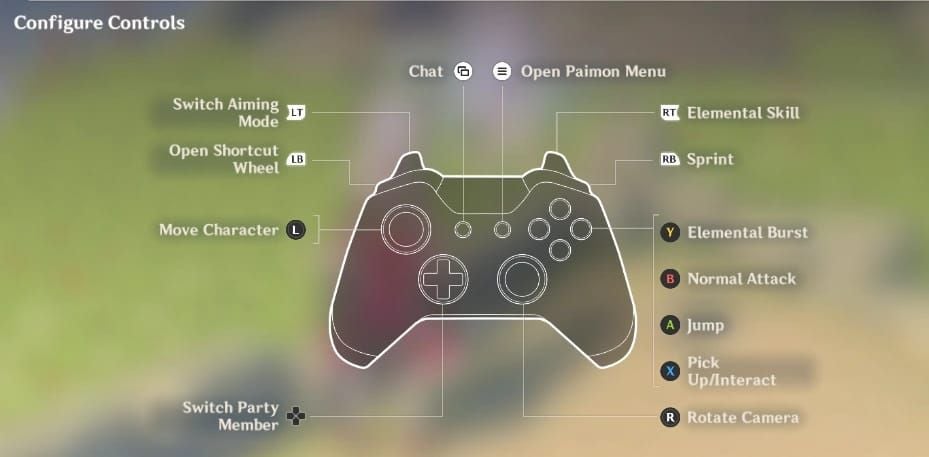
Default PS5 controls:
- Normal Attack: Circle
- Elemental Skill: R2
- Elemental Burst: Triangle
- Jump: Cross
- Party switching: D-Pad (Up=member 1, Right=2, Left=3, Down=4)
Custom Mapping Recommendations
Remap Normal Attack to R1 for characters like Fischl/Yoimiya (frees thumb for camera control). Move Elemental Skill to L1 for support characters with low-cooldown abilities. Consolidate Burst to L1 and Skill to R1 for simultaneous movement, camera, and ability execution.
Access through PS5 Settings > Accessibility > Controllers > Custom Button Assignments. Save multiple profiles for different character archetypes.
Character Switching Optimization
Remap character switches to L1+face button combinations:
- L1+Circle: Character 1
- L1+Cross: Character 2
- L1+Square: Character 3
- L1+Triangle: Character 4
Quick-swap teams (Nahida/Fischl/Xingqiu/Kazuha) gain significant DPS from reduced switch time (200-300ms per rotation). Configure 0.3-second hold requirement to prevent accidental switches.
Sprint, Dodge, Jump Placement
- Sprint: Relocate to L3 (left stick click) to enable sprinting without finger repositioning
- Dodge: Separate to R1 to eliminate unintended sprints during combat
- Jump: Remap to R3 for characters like Xiao/Wanderer performing plunge attacks
Sensitivity and Dead Zone Calibration
Camera sensitivity scale: 1-5. Recommended settings:
- Exploration/melee combat: 3
- Aimed shots: 2-3
- Multi-enemy combat: 4
Character-specific:
- Ganyu charged shots: 2
- Tighnari/Venti/Fischl: 3-4
- Childe melee: 4, bow: 3
Dead Zone Adjustment
Settings > Controls > Controller Dead Zone: 10-15% balances drift prevention with responsive control. New controllers: 5-10%. Controllers with drift: 20-25%. Severe drift requires replacement.
Acceleration Curve
Genshin uses moderate exponential curve (slow precision start, accelerates with stick displacement). Reduce sensitivity by one point if accustomed to linear curves from other shooters.
Haptic Feedback Intensity for Combat
Strong settings maximize reaction feedback but drain battery (8-10 hours). Medium provides 12-15 hour battery with 60-70% feedback clarity. Weak preserves 90% battery life while maintaining critical reaction distinction.
Elemental Reaction Feedback
Distinct vibration patterns:
- Melt: Deep sustained pulses
- Freeze: Sharp crystalline feedback
- Vaporize: Heavy concentrated vibrations
Damage Indication
Light attacks: Subtle feedback
Critical hits/burst damage: Pronounced vibrations
Shield break: Sharp staccato pulses
Environmental damage: Continuous low-intensity vibration
Luna IV Boss Settings
Medium-Strong haptic provides clear telegraph warnings. Charge attack generates building vibration intensity as countdown. Phase transitions trigger strong pulses marking vulnerability windows. Shield health tracked through vibration intensity degradation.
Adaptive Trigger Configuration
Bow characters: Progressive tension during charged attacks (Strong settings maximize immersion, Weak reduces finger fatigue)
Catalyst users: Minimal resistance for rapid skill activation (Weak or disabled)
Sword/claymore: Medium resistance matches weapon weight
Weapon-Specific Settings
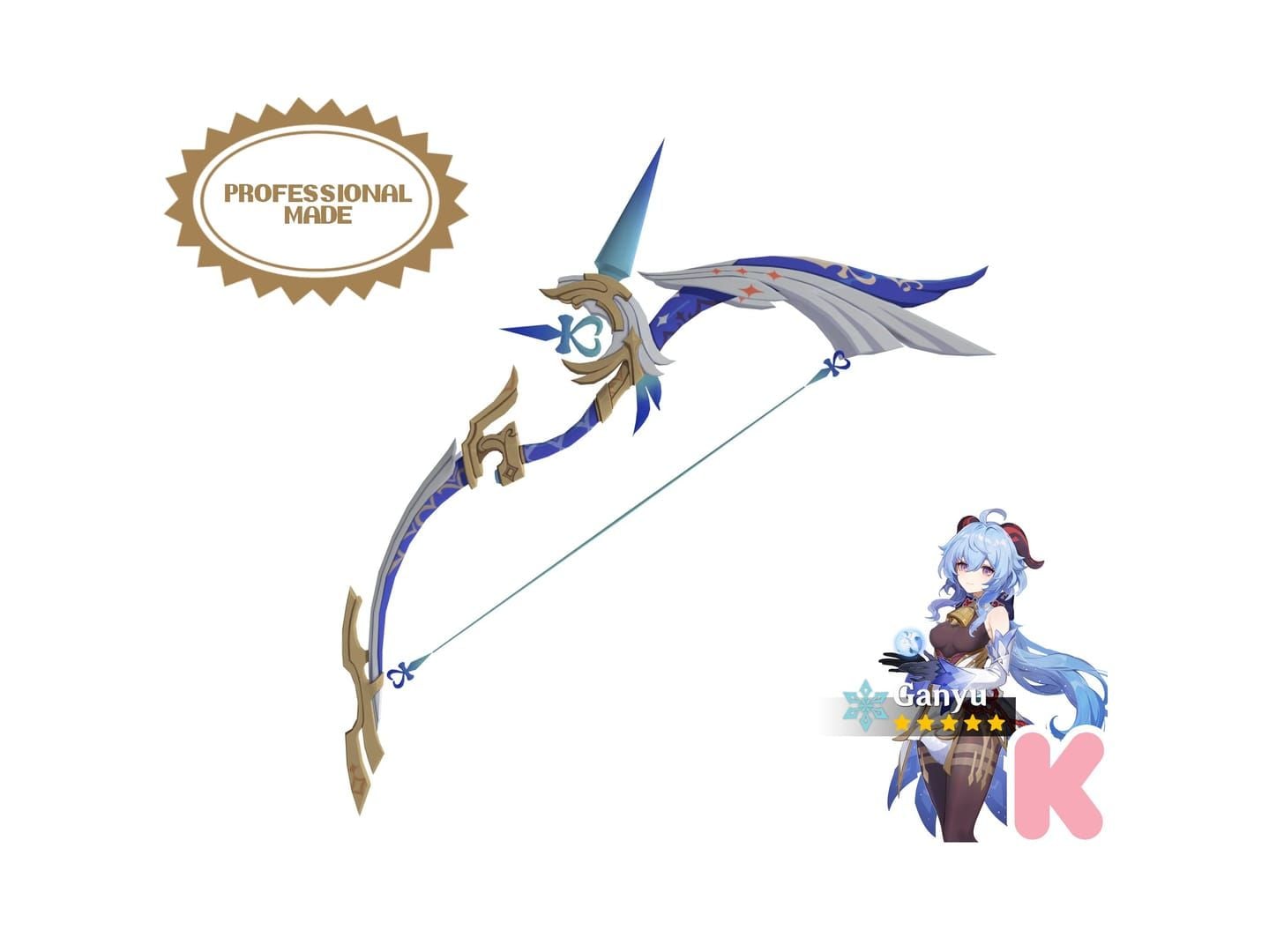
Bow (Ganyu): Strong settings create two-stage resistance for double-charge mechanic
Catalyst (Nahida): Disabled triggers eliminate resistance during skill holds
Claymore (Diluc/Eula): Strong settings complement deliberate attack patterns
Sword (Ayaka/Keqing): Weak settings maintain fast combo speed
Disable entirely for support characters requiring frequent skill spam (Fischl/Xingqiu).
Luna IV Combat Setup
Phase 1: Medium sensitivity, Medium haptics (1.5-second dodge windows)
Phase 2: Sensitivity 4, Weak haptics (0.8-second dodge windows, aerial tracking)
Phase 3: Weak-Medium compromise
Boss Mechanics Requirements
- Wired USB-C for frame-perfect dodges (0.5-second windows)
- Shoulder button character switching for sub-0.5-second swaps
- L1 Burst + R1 Skill mapping for 15-second vulnerability DPS windows
Shield Break Configuration
Elemental shield requires Pyro/Hydro/Electro/Cryo rapid succession. L1+face button switching completes 4-character rotation in 2-3 seconds vs 4-5 seconds D-Pad.
Burst Rotation Mapping
Optimal sequence: Char 1 Burst > Switch > Char 2 Skill+Burst > Switch > Char 3 Skill+Burst > Switch > Char 4 Skill+Burst. Shoulder mapping enables 8-action sequence in 6-7 seconds vs 9-10 seconds default (20-30% more damage).
Lantern Rite Event Optimization
Theater Mechanicus
Cursor sensitivity: 4-5 for rapid tower placement
Disable adaptive triggers for max selection speed
Camera sensitivity: 3 for battlefield overview
Photography Mode
Sensitivity: 1-2 for composition precision
Disable adaptive triggers and haptics
Enable gyro on L2 for fine-tuning (analog for rough positioning, gyro for final adjustments)
Exploration Efficiency
- Sprint: L3 for continuous movement
- Elemental sight: D-Pad for quick activation
- Waypoint: Touchpad swipe for rapid menu access
Character-Specific Configurations
Catalyst DPS
Nahida: Disabled triggers (extended holds), frequent skill reactivation
Wanderer: Sensitivity 4 (aerial combat), disabled triggers (attack spam)
Heizou: Medium triggers (melee-range catalyst)
Bow Main DPS
Ganyu: Sensitivity 2, gyro on L2, Strong triggers for charge feedback
Lyney: Strong triggers for charge stage clarity
Tighnari: Sensitivity 3-4, Medium triggers (spread shot forgives imprecision)
Melee Carry
Hu Tao: Disabled triggers for animation cancel combos
Ayaka: Medium triggers for consistent combo rhythm
Eula: Strong triggers for hold skill Grimheart timing
Support Quick-Swap
Skill on R1, disabled triggers for sub-0.3-second activation. Burst on L1 for rapid buff application (Bennett). Disabled triggers during holds (Kazuha).
Advanced Troubleshooting
Connectivity Issues
Reset controller: Hold PlayStation logo + Share for 10 seconds
Remove unused pairings: Settings > Accessories > Bluetooth Accessories > Delete
Maintain charge above 30% to prevent disconnections
Firmware Updates
Firmware 0280+ required for full compatibility. Check: Settings > System > System Software > Automatic Update. Manual check before major Genshin versions.
Wired Mode Advantages
Sub-2ms latency, eliminates battery concerns, consistent performance. Use 6-10 foot USB-C cables for mobility.
Controller Maintenance
Clean analog sticks with compressed air to prevent drift
Rotate adaptive trigger usage (Strong/Weak/disabled) to extend mechanism lifespan
Maintain 30-80% charge range for battery longevity (avoid full discharge)
Accessibility Features
Button Remapping
Consolidate combat to shoulder buttons for limited mobility
Sticky keys: Sequential presses register as simultaneous inputs
Adjust hold duration for tremor conditions or limited grip strength
Vibration Reduction
Weak settings reduce sensory input 60-70% vs Strong
Selective disabling: Combat vibration on, environmental off
Disable adaptive triggers for joint condition comfort
Ergonomic Tips
Rotate grip every 30-60 minutes (standard/claw/relaxed)
Support controller weight on armrests vs sustained hand-holding
Stretch fingers/wrists between domains
Custom Profiles
Aggressive: Disabled triggers, sensitivity 4, shoulder combat mapping
Defensive: Medium-Strong haptics, sensitivity 2-3, default layout
Exploration: Sprint on L3, elemental sight on D-Pad, sensitivity 3
Steam PC DualSense Configuration
Enable through Steam Settings > Controller > PlayStation Configuration Support. Set gyro activation to Left Trigger Full Pull in Steam Input Action Layer.
Alternative: Disable Steam Input (Properties > Controller > Disable Steam Input) for native DualSense features without input layer latency.
Calibrate gyro: Controller configuration > Calibrate for neutral position and sensitivity scaling.
Wired USB-C to PC provides identical low-latency as PS5. Bluetooth introduces 4-8ms latency.
For character roster preparation, secure wishes through buy genesis crystals for columbina first banner wishes at BitTopup for competitive pricing and instant delivery.
FAQ
How do I optimize my Limited Edition Genshin DualSense for Luna IV combat?
Wired USB-C (sub-2ms latency), sensitivity 3, Medium haptics, Burst on L1 + Skill on R1, character switching to shoulder buttons for sub-0.5-second swaps during shield breaks.
What are the best PS5 controller sensitivity settings for Genshin Impact?
Normal gameplay: 3. Ganyu: 2. Tighnari/Venti/Fischl: 3-4. Childe melee: 4, bow: 3. Enable gyro on L2 for fine aiming.
Does haptic feedback improve Genshin Impact gameplay performance?
Yes—provides elemental reaction confirmation, damage indication, attack telegraphs. Medium settings balance info with 12-15 hour battery. Strong maximizes clarity (8-10 hours). Competitive players may disable to eliminate input processing delay.
How to reduce input lag on DualSense controller for Genshin?
Wired USB-C (sub-2ms vs 4-8ms Bluetooth), enable display Game Mode (10-20ms processing), disable HDR if TV lags, use Performance Mode for 60 FPS frame pacing.
Should I use wired or wireless DualSense for Genshin competitive play?
Wired USB-C: Sub-2ms latency, no battery management, consistent performance. Wireless: 4-8ms latency, disadvantageous for frame-perfect Spiral Abyss and boss mechanics.
How to configure adaptive triggers for bow characters in Genshin?
Strong settings provide progressive resistance indicating charge stages. Ganyu benefits from two-stage resistance for double-charge. Use Weak or disable for finger fatigue while maintaining haptic feedback for charge confirmation.