



Identity V Error 1102: Fix Steam Payment Failed (2025)
Quick Fix: Error 1102 occurs when Steam's payment system fails during Echoes purchases. Most issues resolve in 15 minutes using these verified methods: cancel pending transactions, clear Steam cache, disable proxies, or switch payment gateways. Alternatively, bypass Steam entirely through secure platforms like BitTopup.

What Error Code 1102 Means
Error 1102 is a payment processing failure in Steam's client infrastructure. The transaction can't complete authorization with the payment gateway, entering a pending state that blocks new purchase attempts. This is client-specific—not a server issue affecting all players—and stems from local configuration problems, payment verification failures, or network disruptions.
The error doesn't indicate account bans or restrictions. It's a technical payment issue that's solvable through systematic troubleshooting.
For immediate solutions without troubleshooting, identity v echoes top up through BitTopup bypasses Steam's payment system entirely, delivering Echoes within minutes.
How Identity V Integrates with Steam
Identity V uses dual-layer payment architecture:
- Layer 1: Steam's payment system (Steam Wallet, credit cards, PayPal, regional methods)
- Layer 2: NetEase servers deliver Echoes to your account
Error 1102 occurs at Layer 1—before reaching NetEase systems.
Critical distinction: Steam ID ≠ Identity V UID. Steam purchases auto-link to your profile, but third-party top-ups require manual UID entry.
Common Triggers
High-traffic periods: Seasonal events and limited skin releases overload Steam's payment servers, causing timeouts.
Regional restrictions: Account region must match payment method's issuing country. Currency conversion failures trigger 1102 errors.
Network issues: VPNs, proxies, or restrictive firewalls interrupt payment authorization.
Technical problems: Outdated Steam clients lack payment protocol compatibility. Corrupted cache files store incorrect session data.
Root Causes
Steam Wallet Issues
Displayed balance may not reflect pending transactions from other games. Payment verification fails when Steam flags unusual patterns or detects region/payment source mismatches.
Expired cards, insufficient credit limits, or outdated billing addresses trigger immediate 1102 errors. PayPal accounts with unresolved disputes can't complete Steam transactions.
Regional Restrictions
Steam enforces strict regional pricing based on your account's registered country. Echoes pricing varies significantly across regions—using payment methods from different countries triggers automatic rejection.
Some countries face complete payment gateway blocks due to banking regulations or Steam policies, causing consistent 1102 errors regardless of payment method.
Network Problems
Steam doesn't support proxies or VPNs during payment processing. Masked IP addresses trigger security rejections with error 1102.
Corporate/educational firewalls blocking payment gateway domains prevent authorization. Port misconfigurations and aggressive antivirus software intercept Steam's payment requests.
Steam Overlay Malfunction
The overlay handles in-game purchases. When corrupted or disabled, purchase requests can't reach Steam's payment systems. Overlay crashes leave transactions pending.
Graphics driver conflicts freeze the purchase interface. Running Steam as administrator resolves permission-related malfunctions.
Outdated Software
Steam updates include payment protocol revisions and security certificates. Outdated clients using deprecated APIs receive rejections as error 1102.
Outdated Identity V versions may request non-existent Echoes packages. Version mismatches create protocol errors between Steam's payment interface and the game's store.
Step-by-Step Solutions
Method 1: Cancel Pending Transactions
- Open Steam client → Account Details → Purchase Help Page
- Locate pending Identity V transactions (status shows Pending)
- Select transaction → Cancel this Transaction
- Confirm by clicking Cancel my Purchase
- Fully exit Steam from system tray and relaunch
If no pending transactions appear but 1102 persists, try purchasing through Steam's website instead of the client—different processing pathways.
Method 2: Clear Steam Cache
- Steam Settings → Downloads → Clear Download Cache
- Log in again when prompted (re-establishes payment credentials)
- Right-click Steam.exe → Run as administrator
- Add Steam.exe and SteamService.exe to antivirus exceptions
This removes corrupted transaction data without affecting games or saved payment methods.
Method 3: Fix Network Configuration
- Disable all VPN/proxy services before launching Steam
- Restart entire system (not just Steam)
- Check Steam's server status page before purchasing
- Configure port forwarding for Steam client ports (consult Steam documentation)
Complete system restart clears network stack configurations for direct connections.
Method 4: Switch Payment Methods
Try alternative gateways—PayPal often succeeds when credit cards fail due to different authorization pathways.
Verify billing address exactly matches card issuer's records (including apartment numbers, zip codes, formatting).
For persistent failures, BitTopup offers buy idv echoes online with competitive pricing, instant delivery, and diverse payment methods that bypass Steam restrictions.
Method 5: Verify Account Details
Confirm your Identity V UID and server in-game profile settings. Screenshot error messages, timestamps, and payment confirmations for support documentation.
Check Steam's 14-day refund policy—unused purchases qualify for full refunds. Submit requests through Purchase Help Page with documentation.
Advanced Troubleshooting
Analyze Purchase History
Review complete Steam Purchase History for patterns—specific times, events, or payment methods. Pending transactions unresolved after 24 hours need manual Steam support intervention.
Document transaction ID, timestamp, and exact error message for support.
Regional Lock Resolution
Account region changes require Steam support with valid justification. Verify your payment method's bank supports international transactions and currency conversion.
Some banks block international gaming purchases—contact your financial institution to authorize Steam transactions.
Support Responsibilities
Steam support: Payment processing, transaction failures, refunds (when error 1102 appears during authorization)
NetEase support: In-game delivery, account issues, Echoes paid but not received
If payment completed on Steam but Echoes didn't arrive, contact NetEase. If payment failed with 1102, contact Steam.
Alternative: Secure Third-Party Top-Up
Why Platforms Bypass Error 1102
Third-party services operate independently from Steam's infrastructure, eliminating client-specific errors. They process through diverse gateway networks with broader regional coverage.
BitTopup uses redundant payment systems—when one gateway fails, transactions auto-route through alternatives, maintaining high success rates during peak periods.
Speed and Reliability
Steam: 5-15 minutes when successful, but 1102 troubleshooting adds hours/days. 15-20% failure rate during peak periods.
BitTopup: 2-10 minutes average delivery, 98%+ success rate through diversified infrastructure and real-time monitoring.
Third-Party Top-Up Guide
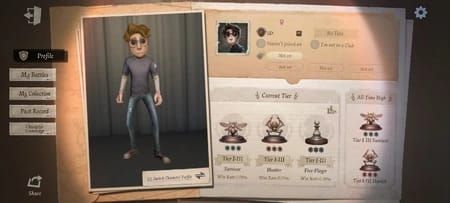
- Find your Identity V UID (in-game profile settings—different from Steam ID)
- Note your server region
- Visit BitTopup's Identity V Echoes page, select package
- Enter UID and server precisely as shown in-game
- Choose payment method from extensive options
- Complete secure checkout
- Monitor delivery (typically within minutes)
24/7 customer service available. Order tracking through account dashboard.
Prevention Tips
Wallet Management
Maintain buffer balance above purchase amount. Review history regularly to cancel stuck pending transactions.
Update payment methods before cards expire or addresses change. Set calendar reminders for proactive updates.
Network Maintenance
Create gaming network profile that auto-disables VPN/proxy when launching Steam. Configure router QoS to prioritize Steam traffic.
Update network drivers and router firmware monthly for protocol compatibility.
Regional Awareness
Research your region's payment restrictions before purchasing. Monitor Steam's pricing updates—wait 24-48 hours after announced changes to avoid transition period instability.
Common Myths
Myth: Error 1102 = Account Ban
False. Error 1102 is exclusively payment processing failure. Banned accounts receive explicit restriction notifications, not generic error codes.
Myth: Failed Transactions Lose Funds
False. Error 1102 aborts before charging. Pending holds release within 24-72 hours. Steam's 14-day refund policy covers undelivered purchases.
Myth: Only Steam Support Can Help
False. Many solutions involve client-side troubleshooting you can perform independently. Alternative platforms like BitTopup provide complete workarounds.
Real Player Cases
Regional restriction: European player's bank blocked Steam as high-risk international merchant. Resolution: authorized Steam as trusted merchant, increased international limit. Switched to BitTopup for easier regional payment support.
Cache corruption: Persistent 1102 despite sufficient funds. Full Steam reinstallation revealed corrupted session data. Now performs monthly cache maintenance with BitTopup as backup.
Event traffic: Error 1102 only during seasonal events due to server load. Switched to BitTopup for event purchases—instant delivery during peak periods.
Echoes Purchase Essentials
Regional Pricing
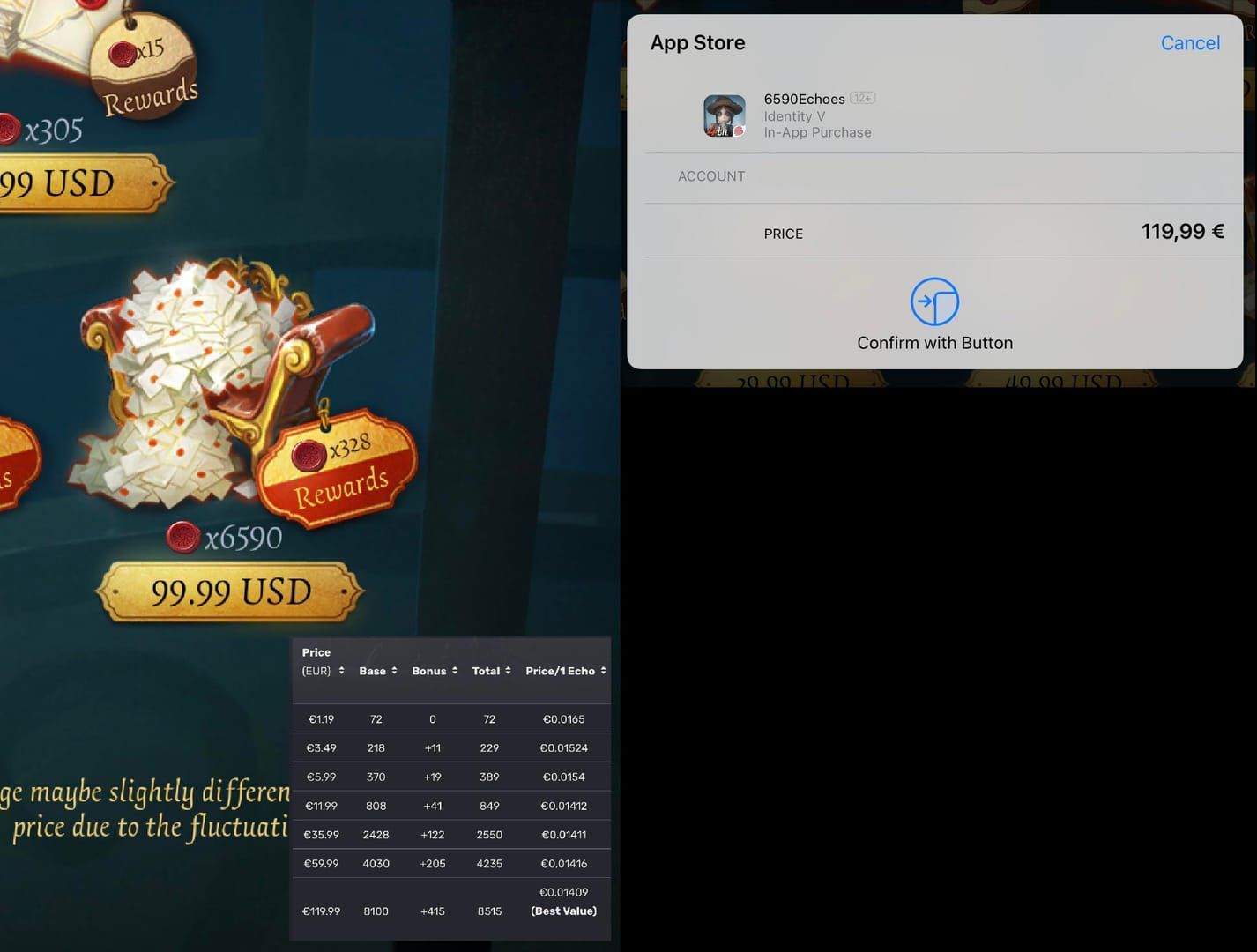
Same package costs 20-30% more/less depending on registered country. Steam prohibits region manipulation—may restrict accounts.
BitTopup often offers competitive pricing rivaling Steam's regional rates, especially during promotions.
Verify Delivery
Check in-game balance within 15 minutes. Echoes appear immediately upon successful delivery. Save confirmation emails until verified.
Screenshot balance before/after for delivery evidence.
Event Value
Identity V offers 10-30% bonus Echoes during events, seasons, anniversaries. Plan major purchases around promotions.
Compare Steam and BitTopup promotional offers—sometimes platform-specific deals beat official rates.
FAQ
How long to fix error 1102? 15-30 minutes for basic troubleshooting (cancel pending, clear cache, disable proxies). Complex cases need 24-72 hours for bank/Steam support. BitTopup provides 2-10 minute workaround.
Will failed payments refund? Error 1102 doesn't complete charges. Pending holds release in 24-72 hours. Steam's 14-day refund covers undelivered purchases—submit through Purchase Help Page.
Can I use multiple payment methods? One method per transaction. Maintain multiple verified methods and switch between attempts if one triggers 1102.
Are third-party platforms safe? Reputable platforms like BitTopup use encrypted processing with millions of transactions served. They deliver to your UID without Steam account access. Verify through reviews and certifications.
Does VPN cause error 1102? Yes. Steam rejects proxy/VPN transactions as security risks. Disable all proxy software before purchasing.
Steam ID vs Identity V UID? Steam ID = platform account. Identity V UID = in-game player identifier (in profile settings). Third-party top-ups require manual UID entry.
Skip payment errors—get Identity V Echoes instantly through BitTopup. Secure, fast, error-free. Top up now and return to the manor within minutes!
Recommended Articles



Recommended Products

Table of Contents
- Understanding Error 1102
- What Error Code 1102 Means
- How Identity V Integrates with Steam
- Common Triggers
- Root Causes
- Steam Wallet Issues
- Regional Restrictions
- Network Problems
- Steam Overlay Malfunction
- Outdated Software
- Step-by-Step Solutions
- Method 1: Cancel Pending Transactions
- Method 2: Clear Steam Cache
- Method 3: Fix Network Configuration
- Method 4: Switch Payment Methods
- Method 5: Verify Account Details
- Advanced Troubleshooting
- Analyze Purchase History
- Regional Lock Resolution
- Support Responsibilities
- Alternative: Secure Third-Party Top-Up
- Why Platforms Bypass Error 1102
- Speed and Reliability
- Third-Party Top-Up Guide
- Prevention Tips
- Wallet Management
- Network Maintenance
- Regional Awareness
- Common Myths
- Myth: Error 1102 = Account Ban
- Myth: Failed Transactions Lose Funds
- Myth: Only Steam Support Can Help
- Real Player Cases
- Echoes Purchase Essentials
- Regional Pricing
- Verify Delivery
- Event Value
- FAQ
Recommended Products

Recommended Articles
Free Fire Beginner Guide: What to Unlock and What to Skip in 2026

Guild Fest Rewards Worth It? 2026 Selection Priority Guide
Are Microsoft Rewards Milestones Worth It for Office in 2026?
How to Get Free Gold in Marvel Snap in 2026 (All F2P Methods)
Never After Free Gift Packs: Active Codes and Drops Guide (2026)
How to Reach Eggsecutive VP Salmon Run in Solo Freelance Matches

How to Farm Rare Skin Fragments in MLBB | August 2026

Genshin Impact Stygian Onslaught 7.0 Teams | August 2026




























































































