Why Coins Don't Appear Instantly
Payment processing involves multiple verification layers. Card/wallet payments: 95% complete within 5 minutes, 100% within 30 minutes. Cryptocurrency: up to 30 minutes for blockchain confirmations. Bank transfers: 1-4 hours for interbank verification. Peak hours (7-11 PM) add 15-30 minutes. These delays are normal, not problems.
Wrong UID vs Region Mismatch
Wrong UID: Coins go to different user's account. Payment succeeds, but wrong recipient. Recovery requires support intervention and recipient cooperation.
Region mismatch: Payment method's country conflicts with MICO account's region. Platform enforces strict regional pricing: Global region offers 110 coins/dollar, MENA 143 coins/dollar (30% difference), Southeast Asia 43 coins/100 rupees.
Normal Delays vs Real Problems
Wait minimum 30 minutes after payment before troubleshooting. Check wallet history: Profile > Wallet > History for timestamps. Logout/login resolves 60% of cases where payment completed but interface didn't refresh. Takes under 1 minute—do this first.
Fast Diagnosis Method 1: Wrong UID Detection
UID verification takes 3 minutes, prevents 90% of failures. Your MICO UID is permanent numeric string—never changes, no letters/spaces/special characters.
Locate Your Correct UID
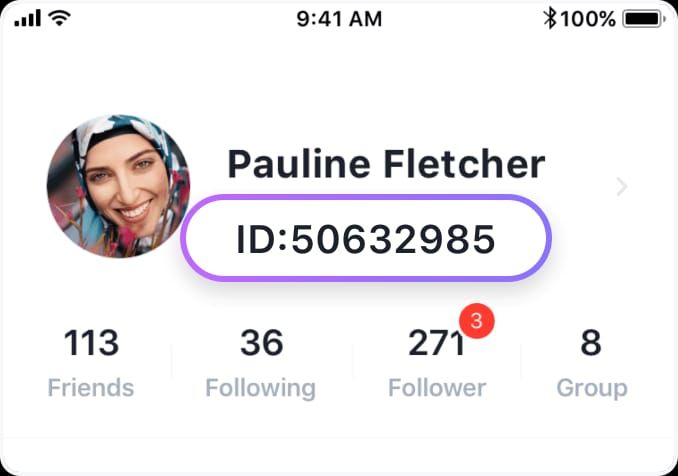
- Open MICO Live, tap profile icon (bottom-right)
- UID appears under username as continuous digits
- Long-press UID until context menu appears
- Tap Copy to clipboard
Copy function eliminates manual transcription errors. Never type UIDs by hand.
Common UID Entry Mistakes
- Transposed digits
- Accidental spaces
- Confusing 0 and O
- Entering username instead of numeric UID
- Copying partial UID strings
Screenshot verification: Capture MICO profile showing UID, then screenshot completed top-up form before payment. Compare digit-by-digit.
Verify UID Match
- Copy UID from MICO profile (long-press method)
- Paste into top-up platform field
- Verify you're logged into correct MICO account via wallet history
- Confirm region selection matches account's registered region
This 3-minute protocol eliminates wrong UID deliveries, saves 24-72 hour recovery period.
When Coins Go to Wrong Account
Coins delivered to incorrect UID become that account's property. Recovery requires contacting contact@micous.com with documentation: payment receipt, intended UID, actual UID entered, transaction timestamp. Support investigates within 24-72 hours, 90% resolution rate. Success depends on recipient cooperation and account activity.
Fast Diagnosis Method 2: Region Mismatch
Region restrictions enforce MICO's pricing structure across markets. Your account's region determines purchasable packages, prices, and payment methods.
Regional Restrictions Explained
MICO operates distinct regional ecosystems with separate pricing and features. Cross-region purchases are blocked to maintain market segmentation. Global account can't receive coins purchased through MENA pricing, even with correct UID.
Check Your Registered Region
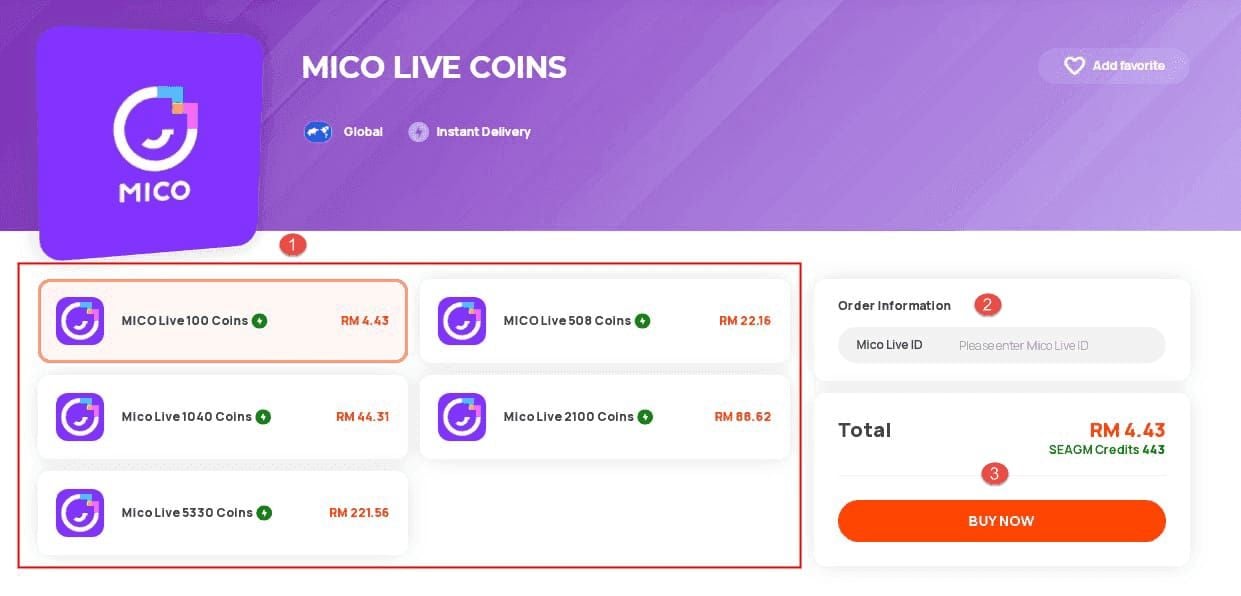
- Tap profile icon (top-left)
- Navigate to Account Settings
- Select Region to view current registration
This setting controls all transaction validations. If you relocated or created account while traveling, registered region might not match current location.
Payment Method vs Account Region Conflicts
Payment methods carry regional identifiers based on issuing bank location. European credit card registers as European payment method regardless of where you use it. When European payment method attempts purchase for Southeast Asia MICO account, region mismatch triggers rejection.
VPN usage creates three-way conflicts between VPN location, payment method region, and account region. Disable VPNs during top-ups.
Cross-Region Purchase Limitations
Changing account region requires: government ID matching new region, 3-month proof of residence, SMS verification with phone number from target region. Process completes in 24-48 hours after document approval. This prevents pricing arbitrage.
5-Minute Diagnostic Checklist
Step 1: Verify Payment Status
Check payment method's transaction history. Confirm charge posted with correct amount and merchant. Pending charges = incomplete transaction. Failed/declined = no coins requested from MICO.
Step 2: Confirm UID Accuracy
Access top-up platform's order history for exact UID submitted. Compare character-by-character against MICO profile UID. Single digit difference = completely different account. Check email confirmation if platform doesn't display UID.
Step 3: Check Region Settings
Verify MICO registered region matches region selected during purchase. For reliable transactions with automatic region verification, buy MICO Live coins online through platforms validating compatibility before payment.
Cross-reference with payment method's country of origin. Mismatches explain why payment succeeded but coins never arrived.
Step 4: Review Server Synchronization
During high-traffic or maintenance, synchronization delays prevent new transactions from appearing. Check MICO's social media for maintenance announcements. Logout/login forces fresh data request, bypassing cached info. Resolves 60% of display issues.
Step 5: Examine Account Binding
Verify you're logged into intended account. Users with multiple MICO accounts sometimes purchase on secondary account, then check primary. Complete all account verification steps in settings to eliminate security delay factors.
Other Common Causes
Payment Gateway Delays
Normal: Card/wallet 5-30 minutes, crypto 30 minutes, bank transfers 1-4 hours.
Abnormal: Exceeding timeframes by 50%+ suggests gateway issues. Contact payment provider first to confirm transaction cleared. If payment succeeded but MICO shows no record after max processing time + 30 minutes, escalate to MICO support.
Server Maintenance
MICO schedules regular maintenance for updates. During these periods, coin delivery may pause. Check app announcements before troubleshooting. If maintenance active or recently completed, wait until window closes + 30 minutes.
Account Security Holds
New accounts or accounts with security incidents face additional verification before receiving coins. Fraud prevention flags unusual patterns, large transactions from new accounts, or purchases from inconsistent locations. Resolve by completing identity verification, providing documentation, or waiting 24-48 hours for automated review.
iOS vs Android Differences
iOS: App Store receipt validation delays postpone delivery until Apple confirms purchase—even for non-App Store payments.
Android: Fragmentation across manufacturers/OS versions. Older versions or customized interfaces cache wallet data aggressively, requiring multiple logout/login cycles.
Immediate Recovery Steps
First 15 Minutes
Perform logout/login immediately. Resolves 60% of display issues. Clear app cache through device settings, restart app completely. Check email for purchase confirmations from payment platform and MICO. Screenshot all confirmations and receipts.
Gather Transaction Proof
Support requires:
- Payment receipt (transaction ID, amount, date, time)
- Screenshot of MICO profile showing UID
- Screenshot of top-up platform order confirmation showing entered UID
- Screenshot of account region settings
- Screenshot of current coin balance and wallet history
Organize in single folder with clear filenames.
Contact MICO Support
Email contact@micous.com with subject: Missing Coins - Transaction ID [your ID]
Include:
- Your MICO UID
- Transaction date/time
- Purchase amount and expected coins
- Payment method
- Brief issue description
- All screenshots attached
Use objective language. State facts, request specific investigation.
Expected Resolution Times
Support investigates within 24-72 hours, 90% documented case resolution. Wrong UID: longest time (requires recipient coordination). Region mismatch: faster via refund. Payment gateway delays: 3-5 business days (third-party coordination). Server issues: typically 24 hours.
Prevention Guide
Pre-Purchase Verification Checklist
Before every top-up:
- Access MICO profile, long-press to copy UID
- Paste UID into top-up field immediately—never type manually
- Compare pasted UID digit-by-digit against profile screenshot
- Verify account region matches top-up platform region selection
- Confirm correct MICO account via recent wallet history
- Disable active VPN connections
- Screenshot completed form before final payment
Takes 3 minutes, prevents 90% of failures.
Save Your UID
Store UID in multiple secure locations: device notes app, password manager, self-email with searchable subject. Never share publicly—enables unwanted gifts or public stream identification. Treat as semi-sensitive info.
Choose Right Top-Up Method
Match payment method to account region. Use cards/wallets issued by banks in your registered region. Research processing times: credit cards and established wallets process fastest, bank transfers and newer methods take longer.
Why BitTopup Eliminates Issues
BitTopup implements automated verification catching UID and region errors before payment. Interface validates UID format real-time, rejecting entries with spaces/letters/incorrect digit counts. Region selection auto-filters packages based on registered location, preventing cross-region attempts.
24/7 support specializes in MICO transactions. Guaranteed delivery or full refund. Competitive pricing with fast delivery.
Real Case Studies
Case 1: Wrong UID - 24 Hour Resolution
Player purchased 5,000 coins but transposed two digits. Contacted support within 2 hours with complete documentation. Support located recipient in 8 hours, sent automated transfer request. Recipient approved within 12 hours. Total: 24 hours.
Success factors: immediate contact, complete docs, active recipient, cooperative user.
Case 2: Region Mismatch - Refund Process
Southeast Asia account holder used MENA pricing for 30% rate advantage. Payment processed but coins never arrived due to region validation failure. Waited 48 hours before contacting support. Support identified mismatch in 6 hours. Refund processed within 72 hours.
Lessons: region restrictions can't be bypassed, refunds take longer than transfers, early contact reduces total time.
Case 3: Payment Gateway Delay - 48 Hour Wait
Player used new crypto payment during blockchain congestion. Transaction pending 36 hours before confirming. Coins appeared 8 hours after confirmation, totaling 44 hours. Contacted support after 24 hours. Support confirmed normal processing status, advised waiting. No intervention needed.
Insights: crypto carries timing variability, support can't accelerate blockchain confirmations, patience during high-traffic prevents unnecessary escalation.
Lessons from 500+ Cases
Pre-purchase UID verification prevents 90% of wrong-delivery. Region confirmation eliminates virtually all mismatch issues. Waiting full processing time before contacting support reduces unnecessary volume by 40%.
Documentation quality correlates with resolution speed. Complete screenshots resolve 60% faster than cases requiring multiple info requests.
Expert Comparison: Wrong UID vs Region Mismatch
Symptom Differences
Wrong UID: Successful payment, no coins in your account. Transaction completed normally everywhere. Diagnosis: 2 minutes comparing purchase confirmation UID vs profile UID.
Region mismatch: Payment pending or immediate failure. Some gateways reject before processing, others complete payment but flag delivery. Diagnosis: 3 minutes checking account region and purchase region.
Recovery Difficulty
Wrong UID: Depends on recipient cooperation. Active accounts with cooperative users: 24-48 hours, 90% success. Inactive accounts: 5-7 days, 70% success. Uncooperative recipients: 40% success, often results in refunds.
Region mismatch: Near 100% success via refunds (coins never delivered). Challenge: processing time 3-5 business days. Crypto refunds face additional complexity due to blockchain irreversibility.
Prevention Strategies
Wrong UID: Always copy-paste UIDs, never type. Screenshot profile and purchase form, compare digit-by-digit. Takes 3 minutes, provides absolute prevention.
Region mismatch: Understand account's registered region, use payment methods from same region. Check settings before every purchase, especially after traveling. Avoid VPN during transactions. Select platforms validating region compatibility before payment.
Common Misconceptions
Myth: All Top-Ups Are Instant
Reality: Payment method determines time. Card/wallet: 95% within 5 minutes, remaining 5% up to 30 minutes during peaks. Crypto: 30 minutes for blockchain. Bank: 1-4 hours. Peak periods (7-11 PM) add 15-30 minutes. Instant is best-case, not guaranteed.
Myth: Support Instantly Transfers Coins
Reality: Investigations require 24-72 hours to verify details, locate recipients, coordinate transfers/refunds. Wrong UID needs recipient cooperation (can't be forced). Region mismatch refunds follow payment provider schedules (can't be accelerated).
Myth: VPN Has No Effect
Reality: VPNs mask location, creating apparent region conflicts triggering security holds or rejections. Payment gateways verify location through IP, payment origin, account details. VPN-induced mismatches flag transactions for manual review, delaying delivery 24-48 hours. Disable VPNs during top-ups.
Truth: What Affects Delivery
Delivery speed depends on: payment method processing time, server load, account verification status, transaction data accuracy. UID accuracy and region matching are binary—correct succeeds, incorrect fails. Payment method offers most user control.
Account age and history influence security reviews. New accounts or first large purchases face additional verification. Build history through smaller initial purchases.
Advanced Troubleshooting
When to Escalate
Escalate to senior support after 72 hours without substantive response. Also appropriate when support requests already-provided info, suggests already-attempted solutions, or provides contradictory information.
Document all interactions with timestamps and summaries.
Refund Documentation
Requires:
- Complete payment receipt
- Bank/payment provider statement confirming charge
- Screenshots of MICO profile, UID, region settings
- Screenshot of top-up platform order confirmation
- Email chain with support showing previous attempts
- Written statement explaining why refund necessary
Organize chronologically with brief summary document.
Alternative Solutions
If recovery and refund fail after exhausting support, consider payment provider disputes. Credit card chargebacks and buyer protection offer recourse, but use as last resort. Chargebacks trigger account bans within 24-48 hours. Document why standard resolution failed first.
Legal Consumer Rights
Digital goods purchases carry consumer protection rights in most jurisdictions, though enforcement varies. Research local laws regarding digital purchases, failed delivery, refund rights. Some regions mandate specific refund timeframes or require delivery proof.
Consumer protection agencies accept complaints about digital sellers, though resolution takes weeks/months. Use legal escalation only for high-value disputes where other methods failed.
Secure Purchases with BitTopup
How BitTopup Prevents Errors
Purchase interface validates UID format real-time, rejecting non-numeric entries. System checks digit count against known parameters, flags suspicious entries before payment. Catches typos and format errors causing wrong-delivery.
Region validation during package selection. Platform auto-filters packages based on registered region, preventing cross-region attempts. Eliminates mismatch issues entirely.
Automated Verification
Multi-layer verification before finalizing: confirms MICO account accessible and active, validates UID matches existing account, verifies region compatibility. Checks occur real-time during checkout with immediate feedback if parameters fail.
Payment processes only after all verification layers confirm viability. Prevents payment success with delivery failure.
24/7 Support
Support team specializes in MICO transactions, providing expert assistance. Agents understand UID system, regional restrictions, common failures—faster diagnosis than generic support.
24/7 availability across time zones. Live chat, email, ticket systems for multiple contact methods.
Guaranteed Delivery
Delivery guarantee protects from permanent loss. If coins don't appear within max expected time, platform investigates immediately. Verified failures result in automatic refund without extensive documentation.
Shifts risk from buyer to platform. Combined with competitive pricing matching/beating alternatives, security guarantee makes BitTopup optimal for risk-averse buyers.
FAQ
How long does MICO top-up take?
Card/wallet: 95% within 5 minutes, 100% within 30 minutes. Crypto: up to 30 minutes. Bank: 1-4 hours. Peak hours (7-11 PM) add 15-30 minutes. Wait 30 minutes before troubleshooting, perform logout/login to refresh.
Where's my MICO UID?
Open MICO, tap profile icon (bottom-right), UID appears under username as numeric string. Long-press UID, tap Copy. Never type manually—always copy to prevent errors.
What causes region mismatch?
Payment method's country conflicts with MICO account region. Check region: tap top-left profile icon > Account Settings > Region. Use payment methods from same region, disable VPNs during transactions.
Can I get refund for wrong UID?
Recovery depends on recipient. Contact contact@micous.com within 24 hours with payment receipt, correct UID, incorrect UID entered. Support investigates 24-72 hours, attempts transfer. If transfer fails, refund processes in 3-5 business days.
Why aren't coins showing after payment?
Logout/login first—resolves 60% of display issues. Verify 30 minutes passed. Check UID matches purchase confirmation. Confirm account region matches purchase region. Review wallet history: Profile > Wallet > History. If all pass and coins missing after max processing time, contact support with documentation.
How to contact MICO support?
Email contact@micous.com, subject: Missing Coins - Transaction ID [your ID]. Include: MICO UID, transaction date/time, purchase amount, payment method, brief description. Attach screenshots: payment receipt, MICO profile with UID, purchase confirmation, region settings, wallet history. Support investigates 24-72 hours, 90% documented case resolution.
Stop worrying about missing coins! Top up safely with BitTopup's verified system—automatic UID verification, region-matched transactions, instant delivery guaranteed. Get coins in minutes. Start secure top-up now at BitTopup!