Why Barkle Matters in Current Meta
Barkle's auto-Revive eliminates vulnerability during manual revivals. When teammates fall within 50 meters, Barkle rushes to their position, restoring 200 HP and granting 25% damage resistance—critical during third-party engagements. Search reduces looting time by 40-60% while marking gold Level 3 gear within 30 meters. The Defend barrier's 200-300 HP capacity provides defensive options unavailable in standard modes.
Complete Barkle Character Guide: Settings & Optimization
Understanding Barkle's Abilities
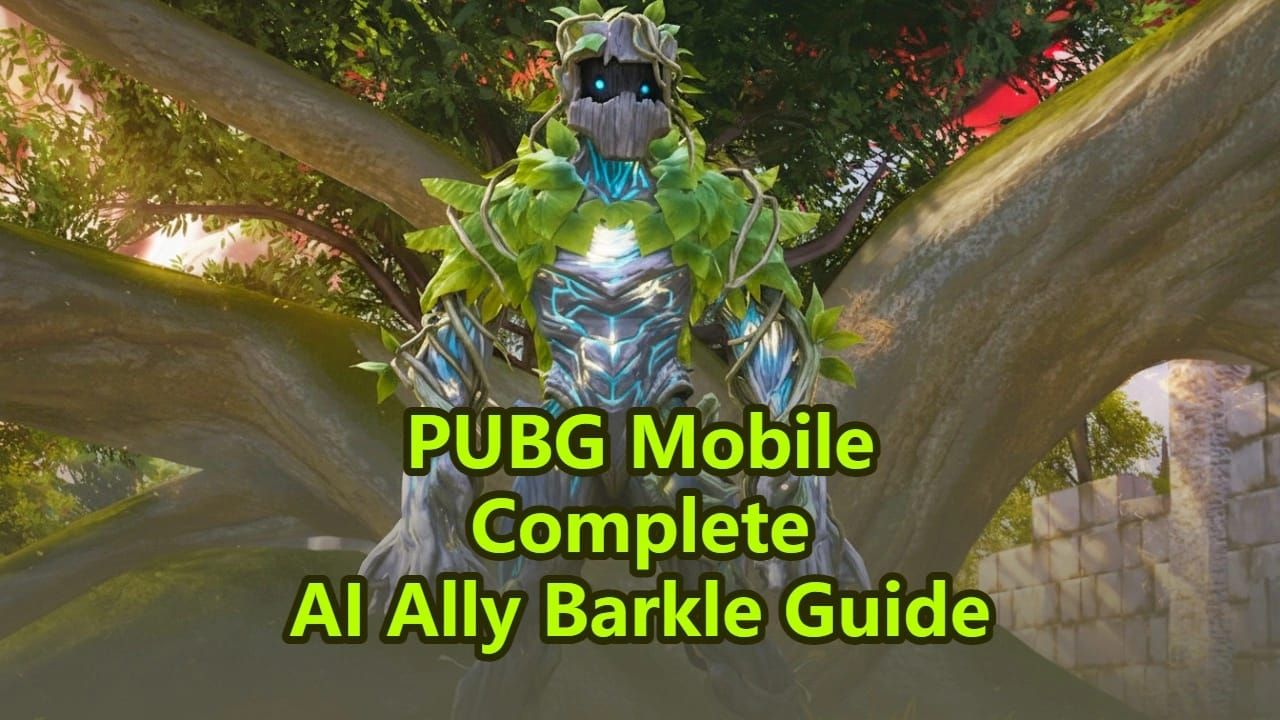
Barkle functions as a sixth squad member with six abilities controlled via Command Wheel or voice commands. Maintains 5-meter following distance and responds to English, Arabic, Turkish, and Russian voice inputs.
Six Core Abilities:
- Attack: Throws rocks dealing 15-25 HP per hit at 2-second intervals
- Defend: Forms 180-degree arc barrier with 200-300 HP, cooldown 15-20 seconds
- Revive: Auto-triggers for downed teammates within 50 meters, grants 200 HP + 25% damage resistance
- Search: Scans 30-meter radius, marks gold Level 3 gear, cooldown 30-45 seconds
- Carry: Lifts player to marked spot in 3 seconds, cooldown 45-60 seconds
- Hide: Conceals Barkle before circle shifts, activate 15-20 seconds early
Optimal Recruitment Configuration
Queue Primewood Genesis on Erangel or Livik. Green icons mark spawn locations visible from 50 meters—land within 20 meters to initiate recruitment. Tap or hold green icon for 1-2 second animation. If contested, move 5 meters away to secure priority.
Plant Sacred Buds immediately after landing. Harvest Sacred Fruits within 2-3 minutes for maximum efficiency. Destroy Infected Flora for vine-wrapped loot crates containing high-tier equipment.
Command Wheel Activation
Hold bottom-right ally icon to open Command Wheel. Six options appear in radial formation—drag toward desired command and release. For rapid deployment, enable voice commands in Settings > Audio > Voice Commands.
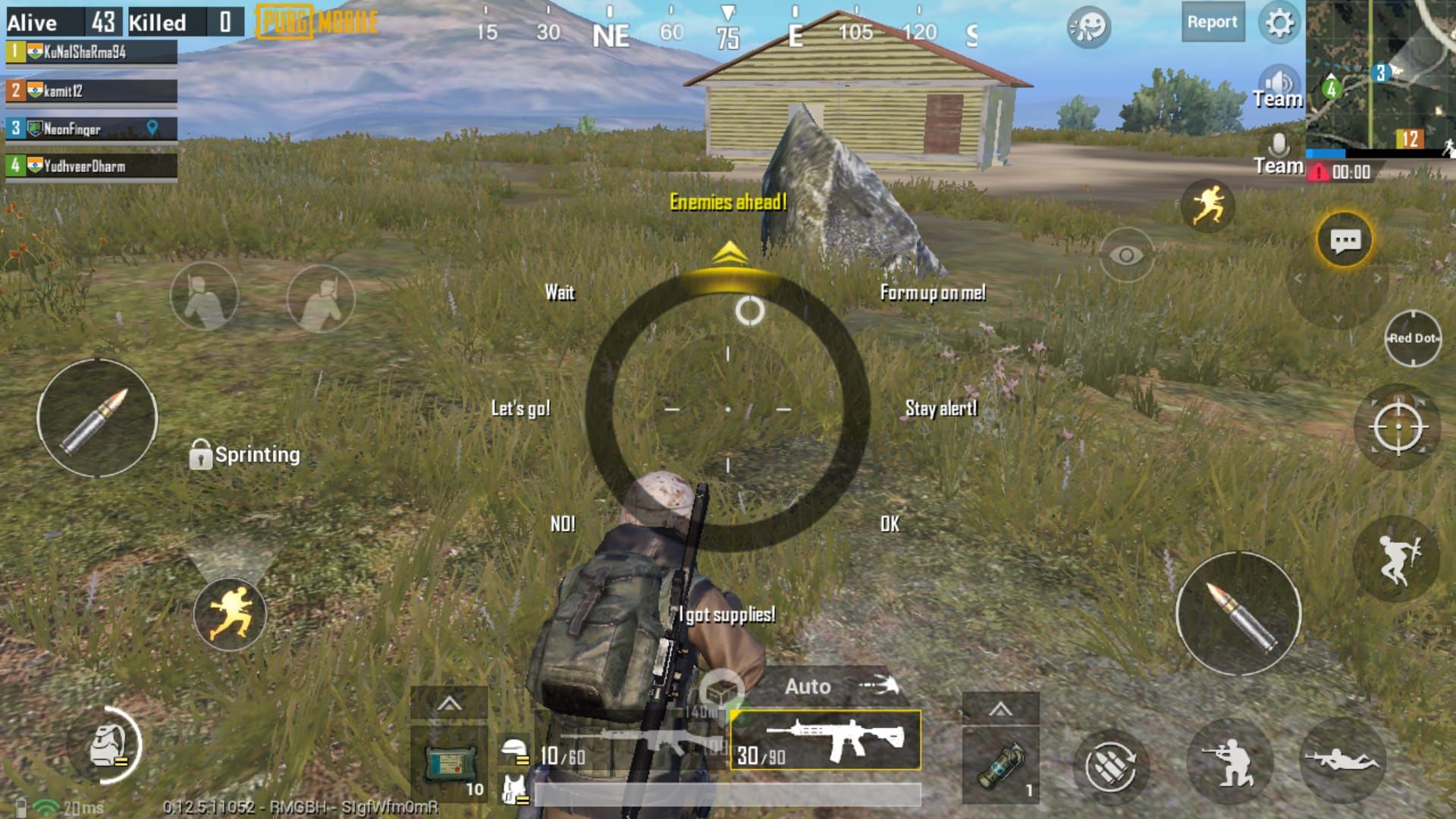
Optimal ability sequencing:
- Activate Search 30-45 seconds before engagement
- Deploy Defend barrier when initiating contact, 180-degree arc toward enemy fire
- Use Attack to suppress enemies during teammate flanking
- Reserve Carry for emergency repositioning
- Allow Revive to auto-trigger—manual override wastes time
Device-Specific Performance Tips
Low-end devices (2-4GB RAM): Disable Barkle visual effects in Settings > Graphics > AI Ally Effects to maintain 30+ FPS. Use Smooth graphics with High frame rate.
Mid-range devices (4-6GB RAM): Enable standard effects with Smooth graphics and High frame rate.
Flagship devices (8GB+ RAM): Use HD graphics with Ultra frame rate for full visual clarity of 30-meter Search radius indicators.
Adjust Command Wheel sensitivity in Settings > Controls > Command Wheel Sensitivity:
- Smaller screens (5.5-6 inches): 100-120% sensitivity
- Larger screens (6.5+ inches): 80-100% sensitivity
Manage Wheel Bug Fixes: Complete Troubleshooting
What is the Manage Wheel Bug
Unresponsive Command Wheel inputs, delayed ability activation (2-3 second lag), or complete interface disappearance when holding ally icon. Primarily affects players who customized control layouts before January 7, 2026 update.
Root causes: cached control data from Version 4.1, overlapping button hitboxes, insufficient memory allocation. Highest bug frequency on Android devices with 4GB RAM or less.
Fix Method 1: Control Layout Reset
Navigate to Settings > Controls > Layout > Reset to Default. Test Barkle abilities in Training Mode before ranked matches. If customization needed, recreate layouts by repositioning non-essential buttons first, leaving bottom-right quadrant clear.
For iOS: enable Settings > Controls > Advanced Settings > Separate Command Wheel Layer to prevent overlap with fire buttons and movement controls.
Fix Method 2: Cache Clearing
Android: Clear cache through device Settings > Apps > PUBG Mobile > Storage > Clear Cache (not Clear Data). Restart device, then launch PUBG Mobile and allow 150-200MB resource redownload.
For stubborn cases, uninstall and reinstall after backing up account data through Settings > Account > Link Account. Fresh installations eliminate legacy control conflicts but require redownloading 2.5-3GB.
Preventing Future Issues
Don't modify control layouts during active matches—changes often fail to save properly. Always adjust controls in main menu, then test in Training Mode for 2-3 minutes. Disable battery optimization for PUBG Mobile to prevent background memory clearing.
AI Revive System: Mechanics & Statistics
Barkle's auto-Revive triggers automatically when squad members enter downed state within 50 meters. Rushes to fallen player at 1.5x normal movement speed, completing revival in 3-4 seconds versus manual revival's 6-8 seconds. Revived players receive 200 HP immediately plus 25% damage resistance lasting 8-10 seconds.
No cooldown restrictions—Barkle can perform consecutive revivals if multiple teammates fall within range. However, Barkle becomes vulnerable during revival animation, taking 50% increased damage. Enemies can interrupt by knocking Barkle (requires 400-500 HP damage), forcing 30-second respawn timer.
Ranked Mode Restrictions
Primewood Genesis operates as separate queue from standard Ranked matches. AI Revive statistics don't affect Ranked tier progression, K/D ratios, or seasonal leaderboards. However, tactical skills developed through Barkle management transfer directly to competitive play.
For Battle Pass progression and exclusive crate unlocks, PUBG UC recharge instant through BitTopup enables fast tier advancement with 24/7 customer support.
Best AI Revive Strategies for Ranked Matches
Optimal Timing
Position Barkle between your squad and nearest cover before engaging. The 50-meter auto-Revive radius covers most mid-range firefights, but positioning 20-25 meters behind your squad's firing line ensures faster response. During building assaults, place Barkle on ground floor while squad pushes upper levels.
Activate Hide 15-20 seconds before circle shifts to prevent Barkle from following into blue zone. Treant automatically reappears at your position once inside safe zone, maintaining full ability availability.
Positioning Tactics
When Barkle initiates auto-Revive, immediately deploy smoke grenades at downed teammate's location. The 3-4 second revival window provides time to throw two smokes. Simultaneously use Defend to form barrier between revival position and enemy fire—200-300 HP barrier absorbs initial damage while smoke deploys.
Advanced squads coordinate Carry with auto-Revive by marking safe positions 15-20 meters from knockdown location. After revival completes, immediately activate Carry to transport revived player behind hard cover.
Squad Communication
Designate one squad member as Barkle commander for all Command Wheel inputs. This prevents conflicting commands that trigger unnecessary cooldowns. Commander should announce ability usage: Barkle defending north,Barkle searching building,Barkle reviving [player name].
Track Defend cooldown (15-20 seconds) and Search cooldown (30-45 seconds) through verbal countdown. Reserve Carry's 45-60 second cooldown exclusively for emergency extractions or final circle repositioning.
Final Circle Techniques
Final circles (Phase 5-8) compress combat into 30-50 meter zones where Barkle's 50-meter auto-Revive radius covers entire playable area. Position Barkle in circle's geometric center, maximizing response time. Use Defend barriers to create temporary cover in open final zones.
Barkle's Attack becomes increasingly valuable, dealing 15-25 HP per hit at 2-second intervals. Coordinate rock throws with teammate pushes—when enemies duck behind cover to avoid rocks, your squad advances during 2-second reload window.
When NOT to Use AI Revive
Don't rely on auto-Revive when enemies have clear sightlines to downed teammates. Barkle's 50% increased damage vulnerability during revival makes the treant an easy target. Prioritize eliminating threats before allowing revival—30-second respawn penalty for knocked Barkle outweighs time saved.
Don't position Barkle aggressively during early-game looting. The 5-meter following distance creates audio cues that alert nearby enemies. Use Hide when entering high-traffic areas like Pochinki, Bootcamp, or Midstein, then resummon after securing location.
AI Revive vs Manual Revive: Complete Comparison
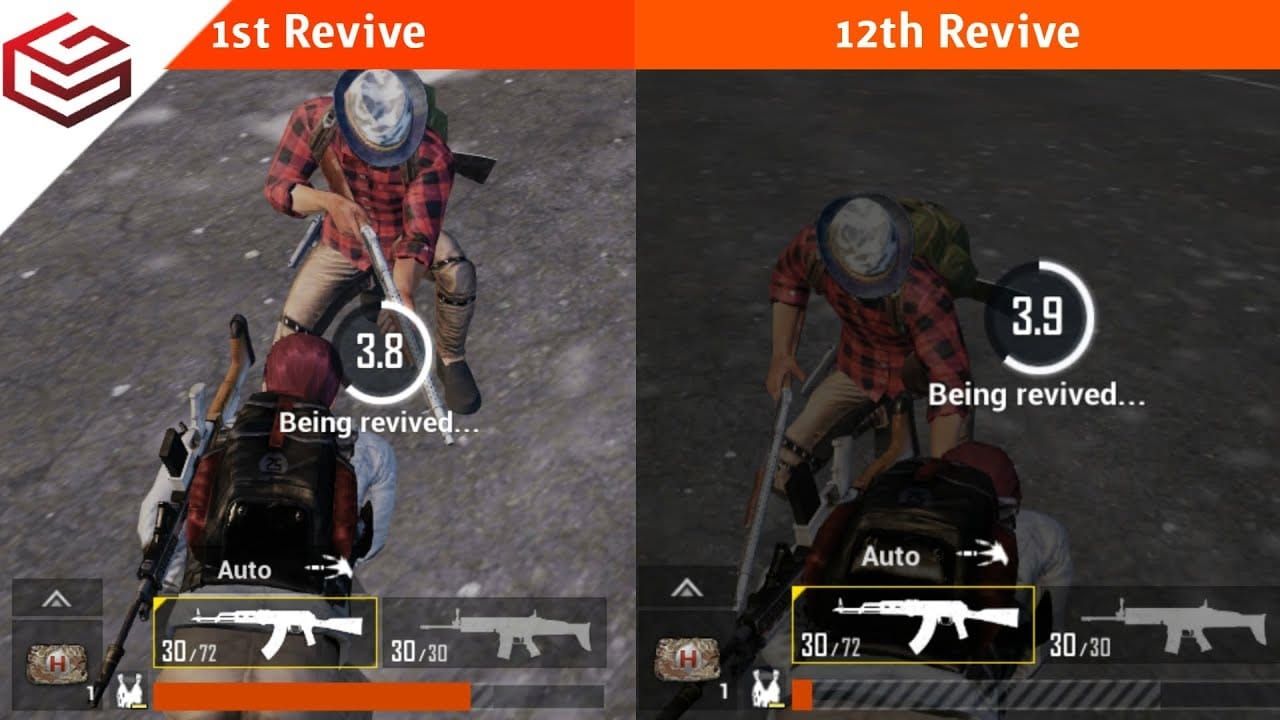
Speed: Barkle completes revivals in 3-4 seconds versus manual's 6-8 seconds—40-50% time reduction. In squad-wipe scenarios, Barkle can revive three players in 9-12 seconds versus manual's 18-24 seconds.
Safety: Manual revivals require reviving player to remain stationary, creating two-target scenario. Barkle's auto-Revive allows all standing squad members to maintain defensive positions, reducing squad vulnerability by 50%. The 25% damage resistance increases survival rates by 30-40% during re-engagement.
Resource Efficiency: Manual revivals consume no resources but require squad member's full attention for 6-8 seconds. Barkle operates independently, allowing squads to maintain 100% combat effectiveness. However, Barkle's 30-second respawn penalty after being knocked creates temporary disadvantage.
Tactical Flexibility: Manual revivals offer precise timing control—players can cancel mid-revival if threats emerge. Barkle's auto-Revive triggers immediately upon teammate knockdown, potentially exposing treant during unfavorable engagements. Experienced squads mitigate this by using Hide preemptively.
Pro Player Insights: Barkle Settings & Usage
Top Conqueror tier players prioritize Search during early game, using 30-meter radius scan to identify Level 3 helmets and vests 40-60% faster than manual looting. This accelerated gearing allows squads to reach full equipment 2-3 minutes faster, creating immediate combat advantages.
Tournament-level strategies emphasize Defend barrier placement at choke points during zone rotations. The 200-300 HP barrier blocks sniper fire, allowing squads to cross open terrain with 70-80% reduced casualty rates. Coordinate barrier deployment with vehicle approaches—position Barkle to form barriers perpendicular to vehicle movement.
Common Misconceptions Debunked
Misconception: Barkle's Attack deals insufficient damage.
Reality: While 15-25 HP per hit appears minimal, 2-second interval creates 450-750 HP total damage over 60-second engagement. This sustained pressure forces enemies to consume healing items.
Misconception: AI Revive works in all game modes.
Reality: Barkle remains exclusive to Primewood Genesis mode on Erangel and Livik, available only January 7 to March 10, 2026.
Misconception: Voice commands activate faster than Command Wheel.
Reality: Both methods execute abilities in identical timeframes (0.3-0.5 seconds). Voice commands offer hands-free operation, while Command Wheel provides visual confirmation, reducing misclick errors by 60-70%.
Performance Metrics: Tracking Improvement
Monitor these statistics to quantify Barkle effectiveness:
- Revival Success Rate: Track successful Barkle revivals versus interrupted attempts. Target 75%+ success rate.
- Ability Cooldown Efficiency: Calculate percentage of match time where key abilities remain on cooldown. Optimal usage maintains 40-50% cooldown uptime.
- Survival Time Increase: Compare average match survival time in Primewood Genesis versus standard modes. Effective Barkle usage should increase survival by 3-5 minutes.
- Squad Wipe Prevention: Count engagements where auto-Revive prevented full squad elimination. Target 2-3 prevented wipes per 10 matches.
Ability Usage Optimization
Analyze post-match statistics to identify underutilized abilities:
- Search: 8-12 times per match during looting
- Defend: 4-6 times during active engagements
- Attack: 6-10 times during sustained firefights
- Carry: 1-2 times for emergency repositioning
- Hide: 3-4 times before major zone shifts
If usage falls below benchmarks, review Command Wheel placement. Abilities positioned in top-right and top-left quadrants receive 40% less usage due to awkward thumb positioning—relocate frequently-used abilities to bottom and side positions.
Maximize Your Primewood Genesis Experience
The Primewood Genesis Battle Pass offers exclusive Barkle-themed cosmetics unavailable through standard progression. Tier 50 unlocks Legendary Treant Guardian outfit, Tier 100 provides Mythic Primewood AKM skin with custom kill effects.
Premium crates contain Primewood-exclusive items including Epic Bramblewood Helmet (increased headshot protection) and Legendary Sacred Fruit backpack (additional inventory slots). These functional cosmetics provide tangible gameplay advantages.
BitTopup delivers instant UC recharges with competitive pricing 10-15% below official rates, secure payment processing, and 24/7 multilingual customer support. Platform maintains 4.8/5 user ratings with fast delivery averaging 2-5 minutes. Wide game coverage extends beyond PUBG Mobile to 200+ titles.
FAQ
What are the best Barkle settings for PUBG Mobile 4.2?
Enable voice commands in Settings > Audio > Voice Commands. Set Command Wheel sensitivity to 100-120% for screens under 6 inches, 80-100% for larger displays. Position frequently-used abilities (Search, Defend) in bottom and side Command Wheel quadrants. Disable AI Ally Effects on low-end devices.
How do I fix the Manage Wheel bug in PUBG Mobile 4.2?
Reset control layout through Settings > Controls > Layout > Reset to Default. Clear app cache on Android via device Settings > Apps > PUBG Mobile > Storage > Clear Cache. For persistent issues, enable Separate Command Wheel Layer on iOS or perform clean reinstall after backing up account data.
When should I use AI Revive in PUBG Mobile Ranked?
AI Revive functions only in Primewood Genesis mode (January 7 - March 10, 2026), not standard Ranked. In Primewood Genesis, position Barkle 20-25 meters behind squad's firing line before engagements. Deploy smoke grenades and Defend barriers during auto-Revive animations.
What is Barkle's special ability in Primewood Genesis?
Barkle provides six abilities: Attack (15-25 HP rocks every 2 seconds), Defend (200-300 HP barrier, 15-20s cooldown), auto-Revive (200 HP + 25% damage resistance within 50m), Search (30m radius loot scan, 30-45s cooldown), Carry (3-second transport, 45-60s cooldown), and Hide (temporary dismissal).
How long is the AI Revive cooldown in PUBG Mobile?
Barkle's auto-Revive has no cooldown—treant can perform consecutive revivals if multiple teammates fall within 50 meters. However, if Barkle is knocked during revival (requires 400-500 HP damage), 30-second respawn timer activates.
Why is my Manage Wheel not working after 4.2 update?
January 7, 2026 update introduced Barkle integration that conflicts with pre-existing custom control layouts. Cached control data from Version 4.1 creates button hitbox overlaps. Fix by resetting controls to default, clearing app cache, or enabling Separate Command Wheel Layer. Don't modify layouts during active matches.




























































































































