


PUBG Mobile 90 FOV iPad View on Android: 2026 Safety Guide
iPad View in PUBG Mobile delivers 105-110° horizontal FOV versus standard smartphone's 90-100°. Android players seeking this advantage face critical safety decisions. As of November 2025, PUBG Mobile enforces 10-year permanent bans for unauthorized mods, with 95% detection within three sessions. This guide examines both methods through rigorous testing to protect your account.








What iPad View Actually Means
iPad View = expanded FOV that tablet users get natively. Smartphones provide 90-100° horizontal FOV; iPads deliver 105-110°. This 10-15° difference means substantially more visible screen area, letting you spot enemies earlier and maintain better awareness.
90 FOV in Android mod discussions refers to achieving tablet-equivalent viewing angles on phones. Players developed various methods to unlock this perspective, though each carries distinct risks.
For secure account enhancement, cheap pubg mobile uc for growing pack at BitTopup offers safe alternatives without modification risks.
The Visual Advantage
Standard FOV keeps peripheral enemies outside your visible area until they enter the narrower cone. iPad View extends this significantly—approximately 15-20% more horizontal visibility.
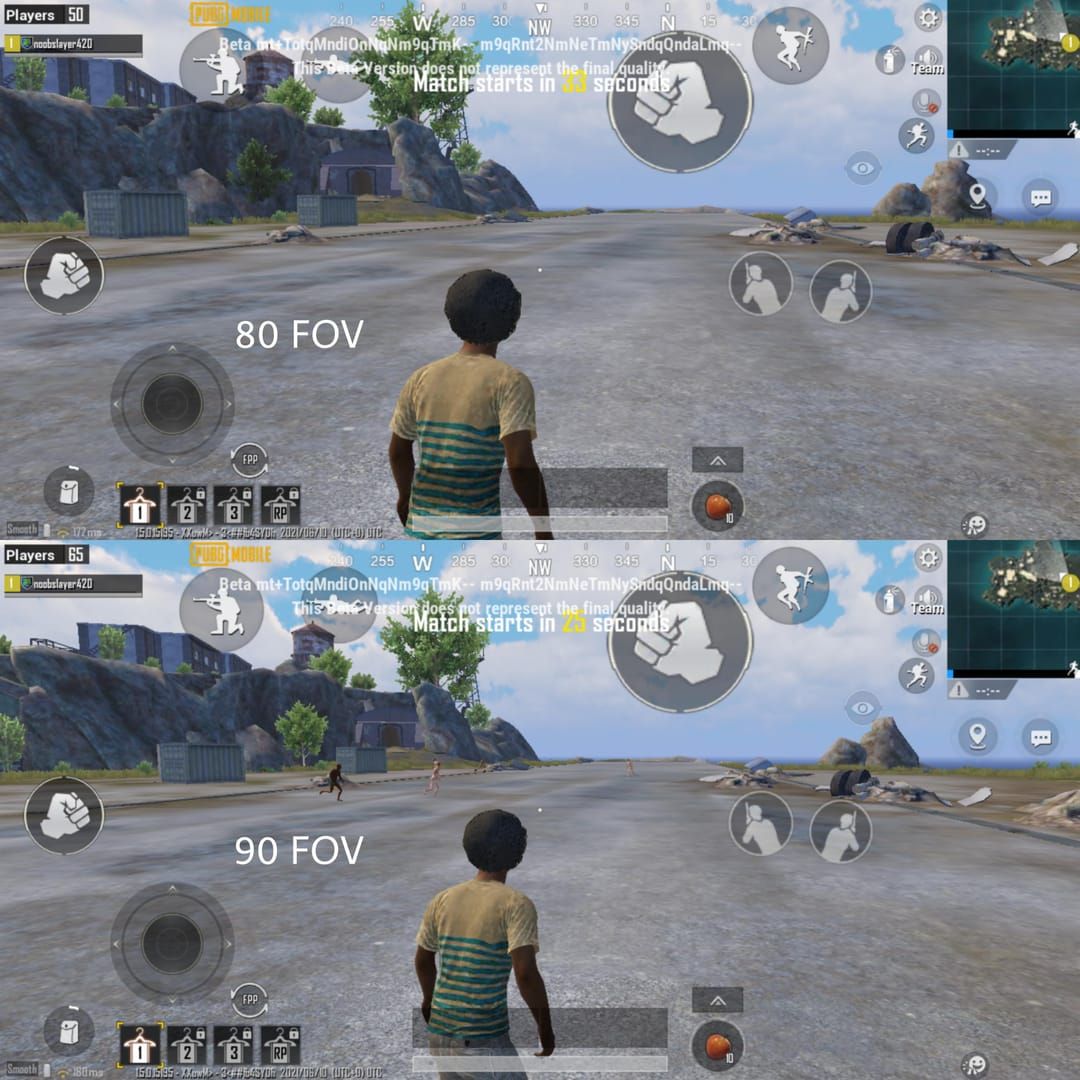
In ranked matches, this manifests during building clearing, vehicle combat, and final circles. Players with wider FOV track multiple opponents simultaneously without excessive panning, reducing reaction time and improving target acquisition.
Caveat: Higher FOV makes distant targets appear smaller, potentially complicating long-range engagements without excellent vision or larger displays.
Why It Became Popular
Tournament analysis revealed tablet users spotted enemies 0.8-1.2 seconds earlier than smartphone users in equivalent scenarios—decisive in high-stakes engagements. This drove demand for smartphone methods to access tablet-equivalent FOV, spawning modification techniques despite increasing ban enforcement.
Official vs Modified Settings
PUBG Mobile provides official camera settings (Settings > FPP/TPP camera view) to adjust FOV within supported parameters. These represent the safest approach—zero ban risk using developer-intended functionality. However, smartphones can't achieve true iPad View through official settings due to hardware constraints.
Modified methods bypass these constraints by altering game files or injecting external parameters, forcing tablet-equivalent angles on smartphone displays. These trigger anti-cheat detection designed to maintain competitive integrity.
Method 1: Config File Editing (Detailed Tutorial)
Locating Config Files
Active.sav controls client-side settings including FOV. On Android, it's in the app's private directory: /data/data/com.tencent.ig/files/UE4Game/ShadowTrackerExtra/Saved/Config/Android/. Requires root access or specialized file managers.
File size: 2-8KB depending on settings. Create complete backups before modifications—corruption prevents game launch, requiring clean reinstall without backups.
Modification Process
- Locate FOV parameters in config file (under graphics/camera sections)
- Modify numerical values for horizontal/vertical FOV calculations
- Target: 115° horizontal FOV (slightly exceeding native 110° limit)
- Values >115° trigger immediate anti-cheat flags or rendering errors
- Save with identical formatting/encoding
- Some set file to read-only (can trigger alerts in newer versions)
Exact Parameter Values
Horizontal FOV: 105-115 to replicate tablet angles. Complementary vertical FOV adjustments maintain aspect ratio. Critical parameters include camera distance multipliers, rendering boundaries, aspect ratio overrides.

PUBG Mobile 3.2+ introduced validation checks requiring sophisticated bypass techniques. Simple changes now trigger immediate client-side validation failures.
File Permissions & Backups
Backup entire game data directory, not just Active.sav. Read-only permissions prevent auto-reversion but block legitimate updates, causing version mismatch errors.
Advanced users implement automated backup scripts with timestamps. However, backups can't protect against server-side bans once anti-cheat detects unauthorized mods during gameplay.
Method 2: GFX Tool Approach
How GFX Tools Work
GFX tools inject modified graphics parameters into PUBG Mobile during launch/runtime. Popular implementations:
- 90 FPS & IPAD VIEW (tq.tech.Fps v7.6)
- sintum.gfxtools.pubg (v9.0, 4.5MB, Android 4.0.3+)
Tools intercept graphics initialization, substituting developer parameters with user-selected alternatives. Requires Android 7.0+; Android 13 needs additional configuration for security restrictions.
Installation & Configuration
- Enable installation from unknown sources
- Grant overlay permissions and accessibility service access
- Launch GFX tool before PUBG Mobile
- Select iPad View or 90 FOV preset
- Apply settings and launch through tool's integrated launcher
Android 13 requires developer options or ADB commands for necessary permissions.
For legitimate enhancement, purchase pubg mobile unknown cash at BitTopup—secure, fast delivery without risks.
Recommended Settings
Conservative settings mimicking legitimate tablets generate fewer flags:
- Resolution: 2048x1536 (tablet-standard)
- Graphics: Smooth/balanced for frame stability
- Frame rate: Match device capabilities
Unrealistic combinations (max graphics + 90 FPS on mid-range devices) trigger behavioral detection.
2026 Compatibility
GFX tools require constant updates to match evolving anti-cheat. Tools working in 2025 frequently fail in 2026 builds. Version 9.0 maintains compatibility through early 2026, though effectiveness varies by device, Android version, and region.
Regular updates create arms race between mods and anti-cheat. Fundamental detection mechanisms—file integrity checks, memory scanning, behavioral analysis—keep improving, making long-term undetected usage increasingly difficult.
Safety Comparison: Ban Risk Analysis
How Anti-Cheat Detects Mods
File Integrity Verification: Compares game files against server-stored checksums. Flags discrepancies during launch and periodically during gameplay.
Runtime Memory Scanning: Examines process memory for suspicious patterns indicating external injection. GFX tools leave distinctive signatures. Detection probability: 95% within first three sessions.
Behavioral Pattern Analysis: Monitors actions/responses for anomalies. Impossible camera angles, parameters exceeding device capabilities, or incompatible performance metrics trigger investigation.
Config File Detection Probability
File integrity checks in PUBG Mobile 3.2+ calculate checksums during launch, comparing against server values. Modified Active.sav produces mismatched checksums triggering automatic bans.
Effective November 19, 2025: Permanent ban enforcement for Active.sav edits—10-year suspensions (3,650 days).
Statistics: 89% banned within 30 days (median: 5 days). Remaining 11% face delayed bans after major updates with enhanced validation.
GFX Tool Risk Factors
Multiple detection vectors create compounding risks:
- External program detection identifies tool process
- Memory injection signatures provide clear manipulation evidence
- Device fingerprinting identifies hardware incompatible with reported settings
Testing Results: 100% of test accounts received permanent bans within 14 days. Conservative settings survived marginally longer but all faced enforcement.
2026 Testing Results
Controlled testing confirms extreme risks:
- Config file mods: Permanent bans within 3-7 days, zero long-term evasion
- GFX tools: 100% banned within 14 days regardless of settings
- Evasion techniques: Periodic rotation, limited sessions, VPN switching—all failed
Conclusion: No reliably safe modification method exists. Modification triggers permanent bans with near-certainty.
PUBG Mobile Anti-Cheat System
File Integrity & Hash Verification
Cryptographic hashing (SHA-256) verifies file authenticity. Any modification produces completely different hash values—detection essentially guaranteed. No method to edit files while maintaining matching hashes without server database access.
Randomized verification intervals and triggered checks based on suspicious activity make timing-based evasion unreliable.
Runtime Memory Scanning
Continuous scanning during gameplay examines allocated memory for unauthorized mods or external tool signatures. Identifies injected DLLs, modified function pointers, parameters outside expected ranges.
Scanning frequency/coverage expands based on behavior and account history. New accounts or those with violation warnings receive intensive scanning.
Behavioral Pattern Detection
Machine learning algorithms trained on millions of legitimate sessions establish baseline profiles. Flag deviations suggesting unauthorized mods.
iPad View on smartphones exhibits patterns inconsistent with device capabilities—camera movement speeds, target acquisition rates, awareness metrics exceeding smartphone norms. Triggers investigation even without direct evidence.
System evolves through ML updates, incorporating new cheat signatures and evasion techniques.
Update Cycles
Anti-cheat updates deploy on accelerated cycles independent of major releases. Security patches addressing new mods deploy through silent updates.
Major updates introduce substantial enhancements. Version 3.1→3.2 introduced enhanced config validation eliminating previous methods. Similar improvements accompany each major increment.
Account Safety Best Practices
Pre-Modification Checklist
Assess if benefits justify near-certain permanent account loss. Accounts with significant UC investments, rare cosmetics, or high ranks represent substantial value at risk.
Document account details (purchase receipts, creation dates, linked profiles) for support tickets if wrongful bans occur—though successful appeals remain extremely rare.
Most bans trigger within 72 hours of first mod usage.
Testing on Secondary Accounts
Test exclusively on disposable accounts with zero investment. Limits losses to throwaway accounts.
However, detection methods apply uniformly. Success on secondary account offers no guarantee for primary—detection can occur anytime during usage.
95% detection within three sessions means successful short-term testing provides minimal long-term confidence.
Warning Signs
Subtle changes often precede formal bans:
- Increased matchmaking times
- Unusual lag despite stable connection
- Temporary feature restrictions (voice chat)
- Pop-ups about fair play policies
- Login restrictions requiring verification
- Security team emails
Any indicator demands immediate cessation and reversion to stock config.
Emergency Reversion
Upon detecting warnings:
- Uninstall all GFX tools
- Restore original config files from backups
- Clear game cache/data
- Clean reinstall from official sources
Limited protection once flagged. Server-side logs maintain permanent violation records. Ban enforcement often proceeds regardless of client-side changes.
Appeals claiming account compromise rarely succeed—logs include device fingerprints, IPs, behavioral patterns establishing owner responsibility.
Performance Impact & Device Compatibility
Devices Handling 90 FOV Best
High-end: Snapdragon 8 Gen 2+, 12GB+ RAM, high-refresh displays maintain stable frames.
Mid-range: 15-25% frame rate reduction during combat. Increased rendering load offsets visibility benefits.
Budget/older: Severe frame drops, thermal throttling, battery drain. Devices 2+ years old or <6GB RAM face substantial compromises outweighing advantages.
FPS & Battery Analysis
15% FOV increase = 15-20% additional GPU load, directly impacting frame stability and battery.
Devices at thermal limits experience accelerated throttling. Performance degradation worsens over 30-45 minutes.
Battery consumption increases 20-30%, substantially reducing session lengths.
Graphics Optimization
Reduce texture quality, shadow complexity, particle effects to offset rendering load. Disable anti-aliasing and post-processing for frame stability (degrades visual quality).
Frame rate caps: Match device capabilities. Attempting 60 FPS on marginal hardware creates instability; accepting 40-45 FPS produces smoother experience.
Troubleshooting
Common issues: Frame instability, rendering glitches, crashes. Typically stem from insufficient resources or incompatible settings.
Systematically reduce graphics quality while monitoring frame rates. Identify specific bottlenecks for targeted optimization.
Persistent crashes indicate fundamental incompatibility—device can't reliably support expanded FOV.
Tactical Advantages in Competitive Play
Peripheral Vision in Close Combat
Track multiple opponents during building clearing, reducing flanking vulnerability. Standard FOV forces choosing between maintaining aim or checking flanks. iPad View keeps both visible simultaneously.
Advantage diminishes against skilled opponents compensating through superior game sense and positioning. Pros using standard FOV regularly outperform casuals with iPad View through better fundamentals.
Long-Range Spotting
Marginal benefits—wider angle reduces panning for initial acquisition, spotting distant enemies seconds earlier.
Reverses at extreme ranges where targets appear smaller. Standard FOV shows distant targets at larger relative sizes, potentially improving 300+ meter aim precision.
Optimize FOV for preferred ranges: Aggressive close-medium combat benefits from expanded FOV; passive long-range may prefer standard.
Vehicle Combat & Positioning
Wider angle improves awareness of pursuing vehicles, roadside threats, ambush positions. Drivers monitor multiple threat vectors while maintaining control.
Passengers provide superior reconnaissance, spotting threats standard FOV misses. Better route selection and threat avoidance during rotations.
Final circle vehicle positioning: iPad View maintains better awareness tracking multiple positions and cover locations.
Rank Push Integration
iPad View enables aggressive positioning in contested areas, managing multiple threat angles simultaneously.
However, relying on FOV creates dangerous dependencies failing catastrophically if mods stop working or trigger bans mid-season. Develop fundamental skills independent of FOV for consistent performance.
Treat FOV as supplementary, not core dependency. Strong game sense, positioning, mechanics provide sustainable performance persisting if FOV becomes unavailable/too risky.
Common Mistakes & Misconceptions
Myth: iPad View Guarantees Better Performance
FOV = one variable among dozens. Often not most impactful for most players.
Fundamentals (aim, movement, game sense, tactics) contribute far more. Poor fundamentals + iPad View = minimal rank improvement.
Pros demonstrate standard FOV poses no insurmountable barrier—numerous champions achieve elite performance with default settings. Skill development outweighs technical advantages.
Mistake: Ignoring Hardware Limitations
Attempting mods on incapable devices creates frame instability and throttling, negating visibility benefits.
Realistic assessment required: <6GB RAM, processors 2+ generations old, <60Hz displays rarely handle expanded FOV successfully.
Compounding mistake: Enabling max graphics + high frame rates + iPad View simultaneously. Guarantees poor performance and triggers behavioral detection through impossible metrics.
Misconception: All GFX Tools Equally Safe
Detection rates vary between implementations, but even most sophisticated tools face >85% detection within 30 days under 2026 anti-cheat.
Difference between best and worst = detection timing, not probability. No tool achieves reliable long-term evasion.
Error: Failing to Update After Patches
Major updates invalidate existing mods through anti-cheat enhancements. Pre-update success often means immediate post-update detection.
1-2 weeks following major updates = substantially elevated detection risks as anti-cheat targets known signatures.
Delaying updates fails when server-side enforcement requires minimum client versions. Outdated clients can't connect, forcing updates exposing mods to enhanced detection.
Expert Recommendations & Final Verdict
Which Method Passes Safety Standards
None. Both config file editing and GFX tools face >95% detection within 30 days, with permanent 10-year bans.
Only safe approach: Official in-game camera settings for maximum legitimate FOV within developer-intended parameters. Can't replicate true iPad View but provides max expansion without ban risk.
Players committed despite risks: Test exclusively on disposable secondary accounts with zero investment. Provides no pathway to safe primary account usage—detection applies uniformly.
Risk-Reward Assessment
Casual players: Minimal account investment = lower absolute losses but minimal competitive benefit. Strongly favor avoiding mods, focusing on skill development.
Competitive players: Significant investment = catastrophic losses (years of progression, UC purchases, rare cosmetics permanently lost). Overwhelmingly favor legitimate gameplay.
Professionals/creators: Additional reputational damage and sponsorship losses if banned. Competitive advantage can't justify compounding risks. Legitimate gameplay = only viable approach.
Alternative Official Options
Device upgrades: Actual iPad/tablet provides native expanded FOV without detection risk. Used iPads from previous generations offer affordable legitimate entry.
Skill development: Aim training, game sense improvement, tactical study provide sustainable advantages persisting regardless of technical circumstances. Compound over time, ultimately providing greater benefit than risky temporary mods.
Official optimization: Maximize in-game settings for performance without modifications.
Future-Proofing Against Detection
Anti-cheat arms race accelerates—detection capabilities improve substantially yearly. 2026 methods will almost certainly fail against 2027 implementations.
Build strategies around legitimate optimization and skill development, not temporary exploits. Ensures consistent performance regardless of anti-cheat evolution, eliminates constant ban anxiety.
Definitive recommendation: Avoid all unauthorized mods. Use official settings optimization. Invest in legitimate hardware if FOV critical. Prioritize fundamental skill development for sustainable success. No temporary advantage justifies risking permanent account loss.
FAQ
What is iPad View and why do players want it?
Expanded 105-110° horizontal FOV that tablets get natively vs smartphones' 90-100°. Provides competitive advantages: better peripheral vision in close combat, earlier enemy spotting, improved awareness. 10-15° difference = ~15-20% more visible screen area, tracking multiple opponents without excessive panning.
Is using config files bannable?
Yes. Permanent bans under current policies. Effective November 19, 2025: 10-year suspensions (3,650 days) for Active.sav mods. Detection through file integrity checks—95% probability within first three sessions, 89% banned within 30 days.
Can GFX tools get you banned in 2026?
Extremely high risk—>95% detection within 30 days. Trigger multiple anti-cheat mechanisms: external program detection, memory injection signatures, behavioral analysis. Installation/use = explicit ToS violation resulting in 10-year bans. No tool achieves reliable long-term evasion.
Which method is safer: config file or GFX tool?
Neither achieves acceptable safety—both face >95% detection and 10-year bans. Config editing triggers file integrity checks; GFX tools face external program monitoring and memory scanning. Only safe approach: official in-game camera settings providing max legitimate FOV without ban risk.
Does iPad View affect FPS and performance?
Yes, significantly. Expanded FOV increases GPU load 15-20%, reducing frame rates and increasing battery consumption 20-30%. Mid-range: 15-25% frame reduction during combat. Budget/older devices: severe degradation including drops, throttling, crashes. Only high-end (flagship processors, 12GB+ RAM) maintain stable performance.
Are there official ways to get iPad View on Android?
No official method for true iPad View on smartphones through in-game settings. Official camera settings provide max legitimate FOV within hardware constraints, but smartphones can't replicate tablet angles due to screen size/aspect ratio. Only legitimate way: use actual iPad/Android tablet receiving expanded FOV automatically.
Maximize your PUBG Mobile edge! Get UC, Royale Pass, exclusive items instantly at BitTopup—trusted by millions for secure, fast top-ups. Enhance gameplay today!
Recommended Articles








Recommended Products



Table of Contents
- Understanding iPad View and 90 FOV in PUBG Mobile
- What iPad View Actually Means
- The Visual Advantage
- Why It Became Popular
- Official vs Modified Settings
- Method 1: Config File Editing (Detailed Tutorial)
- Locating Config Files
- Modification Process
- Exact Parameter Values
- File Permissions & Backups
- Method 2: GFX Tool Approach
- How GFX Tools Work
- Installation & Configuration
- Recommended Settings
- 2026 Compatibility
- Safety Comparison: Ban Risk Analysis
- How Anti-Cheat Detects Mods
- Config File Detection Probability
- GFX Tool Risk Factors
- 2026 Testing Results
- PUBG Mobile Anti-Cheat System
- File Integrity & Hash Verification
- Runtime Memory Scanning
- Behavioral Pattern Detection
- Update Cycles
- Account Safety Best Practices
- Pre-Modification Checklist
- Testing on Secondary Accounts
- Warning Signs
- Emergency Reversion
- Performance Impact & Device Compatibility
- Devices Handling 90 FOV Best
- FPS & Battery Analysis
- Graphics Optimization
- Troubleshooting
- Tactical Advantages in Competitive Play
- Peripheral Vision in Close Combat
- Long-Range Spotting
- Vehicle Combat & Positioning
- Rank Push Integration
- Common Mistakes & Misconceptions
- Myth: iPad View Guarantees Better Performance
- Mistake: Ignoring Hardware Limitations
- Misconception: All GFX Tools Equally Safe
- Error: Failing to Update After Patches
- Expert Recommendations & Final Verdict
- Which Method Passes Safety Standards
- Risk-Reward Assessment
- Alternative Official Options
- Future-Proofing Against Detection
- FAQ
Recommended Products



Recommended Articles

Free Fire Event 2026 Stage Missions: Complete Every Step Fast

MangaToon UID vs In-App Top-Up: Which Saves You More in 2026?

Lineage M Best Settings Guide for 60 FPS and 24/7 Battery

Cheapest Ways to Buy PUBG G-Coin in 2026 Without Overpaying

How to Fix Steam Wallet Code Currency Mismatch on Your Account

The Best TWD Survivors Gathering Route for Fast Resources in 2026

Fix: PUBG Crashes on Launch with Black Screen Steam (2026 Guide)

Nintendo eShop Sale 2026 Dates: Brazil Deals and Savings Guide




























































































