Frame Rate Impact on Mobile Gaming
Each frame represents a game state snapshot—higher rates mean more frequent updates to player positions, projectile trajectories, and environmental changes. At 90 FPS, frame time drops to 11ms versus 16.7ms at 60 FPS.
This creates 5-8ms faster input lag. When you tap to fire or swipe to aim, the game responds measurably quicker. In close-quarters combat, milliseconds determine survival.
30 vs 60 vs 90 FPS Comparison
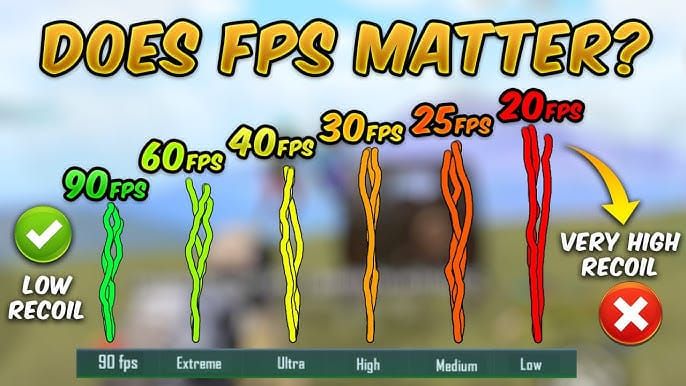
- 30 FPS: Choppy motion, stuttered camera movements, predictive aiming required
- 60 FPS: Smooth motion but noticeable frame-to-frame jumps on fast targets
- 90 FPS: Near-continuous fluidity, select devices achieve 116.8 FPS average
Benefits extend beyond combat. Vehicle driving becomes more controllable, parachute landings gain precision, environmental scanning feels natural. Players report reduced eye strain during extended sessions.
Why 2026 Devices Don't Support 90 FPS by Default
PUBG Mobile uses a device whitelist restricting high frame rates to certified hardware. This prioritizes stability over accessibility—Tencent adds devices only after extensive testing confirms consistent performance.
Device Whitelist System
The whitelist is a hardware database in game files. When PUBG Mobile launches, it queries your device specs against this database. If your processor, GPU, RAM, and display match approved entries, Extreme+ frame rate appears in settings.
Two devices with identical Snapdragon 855+ processors may have different options. Tencent evaluates complete configurations including thermal management, battery capacity, and display quality before certification.
Hardware Capability vs Software Restrictions
Many 2026 mid-range and flagship devices exceed minimum 90 FPS requirements yet remain restricted to 60 FPS. Devices with Snapdragon 870, Snapdragon 860, or Dimensity 1200+ processors with 90Hz+ displays and 6GB+ RAM technically support 90 FPS, but software blocks access.
POCO F3 with Snapdragon 870 and Redmi Note 13 series with Snapdragon 860 demonstrate this gap. Both feature sufficient power, high refresh displays, and adequate RAM, yet required third-party unlocking before official support in PUBG Mobile 3.2+.
Gradual Rollout Strategy
Tencent's phased rollout maintains competitive balance and protects game reputation. The November 6, 2025 PUBG Mobile 4.1 release expanded official 90 FPS support to over 100 devices—the most significant compatibility expansion to date.
2026 Device Compatibility: Can Your Phone Handle It?
Successful 90 FPS requires balanced performance across CPU, GPU, memory, storage, and display.
Minimum Hardware Requirements
- Processor: Snapdragon 855+ or Dimensity 1200+ minimum
- Display: 90Hz+ refresh rate panel required
- RAM: 6GB minimum, 8GB recommended for 98.5% frame consistency
- Storage: UFS 3.0+ for rapid asset loading
- Touch Sampling: 180Hz+ for responsive input
Display must physically support 90Hz—a 60Hz screen running 90 FPS creates screen tearing and wastes processing power.
Processor and GPU Benchmarks
Snapdragon 855+ with Adreno 640 GPU is entry-level for reliable 90 FPS at Smooth graphics. Snapdragon 870 and 888 provide headroom for quality improvements without sacrificing frame rate.
ASUS ROG Phone models 6-8 demonstrate peak performance, averaging 118.2 FPS when configured for 90 FPS. These gaming devices combine flagship processors with advanced cooling and optimized software.
MediaTek Dimensity 1200+ offers comparable performance to Snapdragon 870 in sustained workloads, often maintaining more consistent performance during extended sessions.
RAM and Storage Impact
6GB RAM is minimum viable, but 8GB offers better stability. Additional memory prevents background interference and reduces texture reloading. Players report 98.5% frame consistency on 8GB+ versus occasional drops on 6GB.
UFS 3.0 storage loads Erangel in 12-15 seconds versus 25-30 seconds on older eMMC. During gameplay, faster storage prevents texture pop-in when traversing map regions.
Maintain 15-20GB free storage to prevent performance degradation from fragmentation. PUBG Mobile requires 8-10GB installation plus cache and updates.
Safe Methods to Unlock 90 FPS Without Bans
Multiple approaches exist with different risk profiles and complexity levels.
PUBG Mobile's Anti-Cheat Detection
The security system monitors unauthorized file modifications, memory manipulation, and suspicious performance metrics. Anti-cheat primarily targets wallhacks and aimbots rather than graphics modifications, creating a gray area for FPS tools.
Frame rate modifications that don't alter gameplay mechanics receive lower enforcement priority. Community reports show minimal ban cases specifically from FPS unlocking when using established tools and avoiding aggressive modifications.
Risk never reaches zero. Outdated tools, combining multiple modifications, or extreme settings triggering performance anomaly detection can result in account restrictions.
Method 1: In-Game Settings (Safest)
For devices with hardware capability but software restrictions, access hidden options through in-game settings. Navigate to Settings > Graphics, set Graphics quality to Smooth, then Frame Rate to Extreme+. In PUBG Mobile 3.2+, Extreme+ equals 90 FPS on compatible hardware.
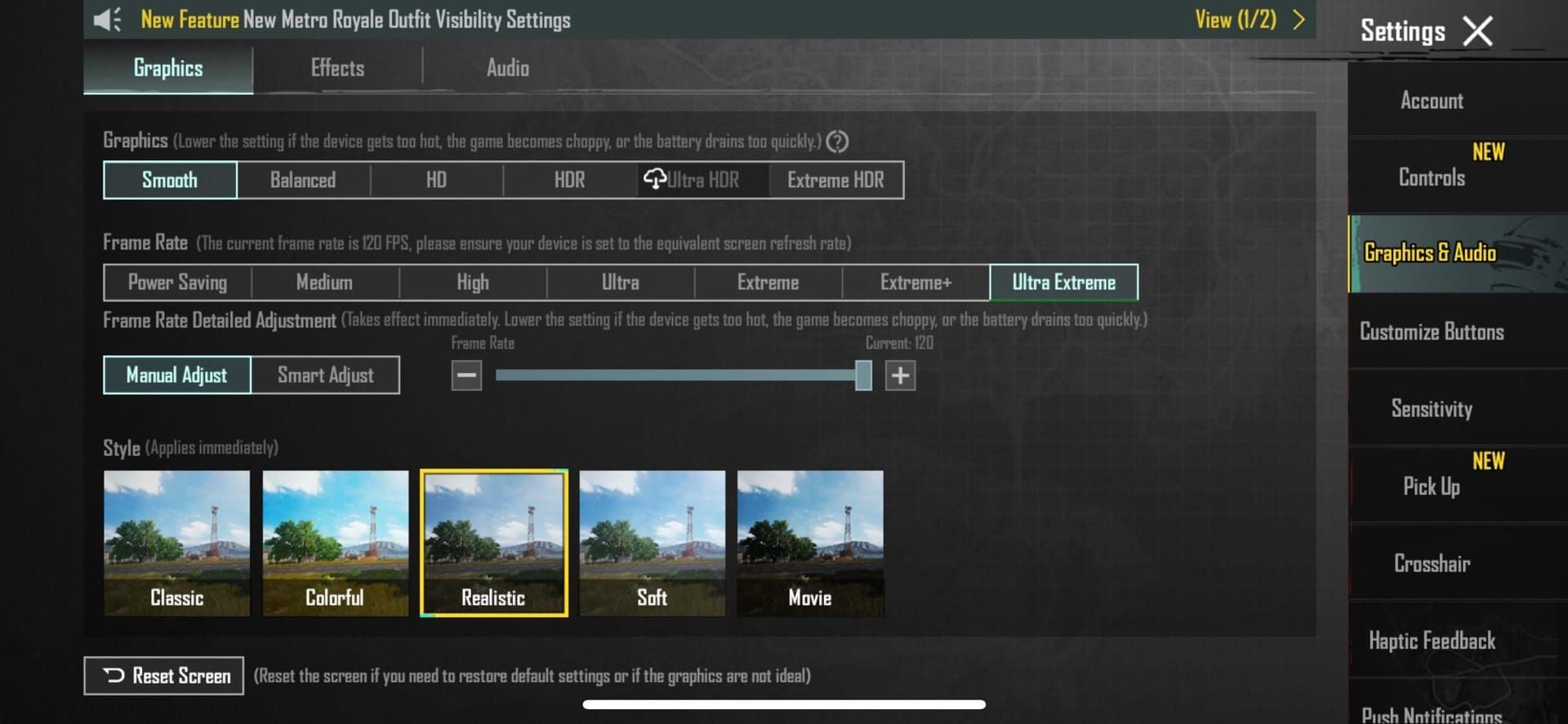
No external tools or system modifications required. If your device meets requirements but lacks Extreme+ option, use following methods.
Before advanced unlocking, consider buy pubg uc cheap at BitTopup to enhance gaming with premium content while maintaining account security.
Method 2: FPS Unlocker APK
FPS Unlocker APK v2.199 provides accessible third-party solution for Android 5.0+. This 20MB app scans device RAM, processor, and display specs to generate performance score out of 100, then applies appropriate unlocking profiles.
Steps:
- Enable Unknown Sources in Android security settings
- Install and grant all requested permissions
- Select your device from compatibility list
- Apply High FPS profile
- Close FPS Unlocker completely before launching PUBG Mobile
Settings persist until PUBG Mobile updates, requiring reapplication.
Method 3: Developer Options Tweaks
Android Developer Options provide system-level controls enhancing 90 FPS stability without modifying PUBG Mobile.
Access Developer Options: Settings > About Phone > tap Build Number 7 times
Recommended Settings:
- Force 90Hz refresh rate system-wide
- Disable HW overlays
- Set background process limit to 2 maximum
- Reduce animation scales to 0.5x (window, transition, animator duration)
These decrease system overhead, freeing processing power for game rendering.
Method 4: Configuration File Editing (Advanced)
Direct config modification offers maximum control but requires technical knowledge.
Path: Android/data/com.tencent.ig/files/UE4Game/ShadowTrackerExtra/ShadowTrackerExtra/Saved/Config/Android/UserCustom.ini
Add/modify lines:
- r.PUBGMobileFrameRate=90
- r.UserQualitySetting=0
First parameter sets 90 FPS target. Second sets Smooth graphics (0 = lowest quality). Save and prevent PUBG Mobile from overwriting.
Requires re-application after major updates. Create backup copies for quick restoration.
Advanced System Optimization for Stable Performance
Consistent 90 FPS requires system-wide optimization beyond unlocking frame rate.
GPU Rendering Tweaks
Beyond basic Developer Options, GPU optimizations significantly impact stability:
- Enable Force GPU rendering to shift interface drawing from CPU to GPU
- On Android 8+ with Adreno 618+ GPUs, enable Vulkan API rendering
- Disable GPU debug layers unless troubleshooting
- Monitor GPU rendering profile to identify frame time spikes
Disable Background Apps
Background apps compete for CPU, RAM, and network bandwidth.
Before launching PUBG Mobile:
- Close all apps through recent apps menu
- Disable automatic app updates and cloud sync
- Use battery optimization to restrict background activity for non-essential apps
- Clear PUBG Mobile cache periodically (Settings > Apps > PUBG Mobile > Storage > Clear Cache)
Avoid clearing data—this resets settings and requires re-downloading resources.
Game Mode and Performance Mode
Most 2026 Android devices include dedicated Game Mode or Performance Mode.
Activate before launching PUBG Mobile:
- Block calls and notifications during gameplay
- Prevent accidental gesture navigation
- Enable performance-focused resource allocation
- Select highest performance tier
Performance Mode increases CPU/GPU clock speeds beyond standard operation, improving consistency at cost of increased battery drain and heat. Monitor temperature during extended sessions.
Graphics Settings Balance: Maximizing FPS While Maintaining Visibility
Achieving stable 90 FPS requires strategic graphics compromises.
Recommended Presets
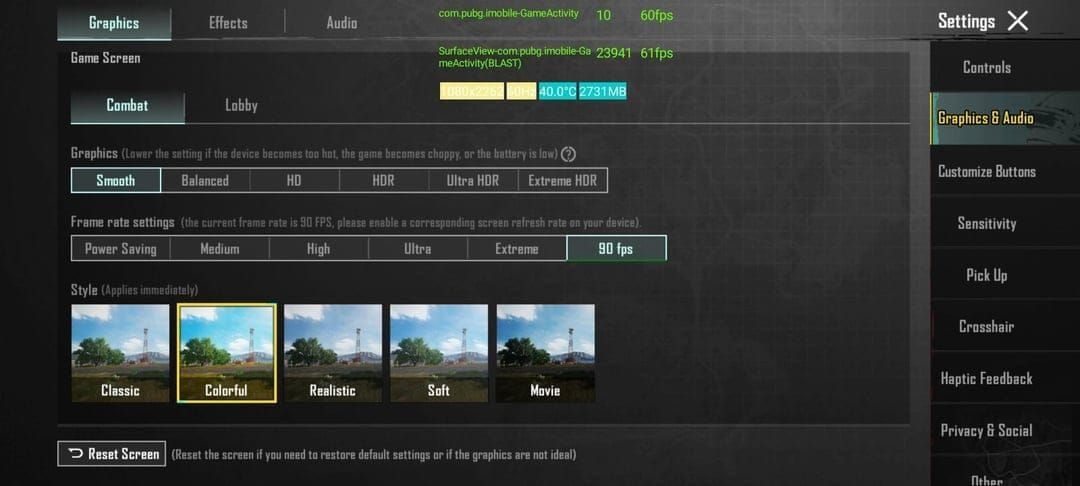
- Graphics quality: Smooth (reduces textures, simplifies details, minimizes particles)
- Anti-Aliasing: Disabled (minimal visual improvement, significant GPU cost)
- Shadows: Disabled (clearer enemy visibility, 8-12 FPS improvement)
- Auto-adjust Graphics: Disabled (prevents distracting visual inconsistency)
- Style: Colorful mode (increases saturation, improves target visibility, zero performance impact)
- Brightness: 120-150% (reveals enemies in shadows, zero performance impact)
Performance Optimization: Preventing Overheating and Frame Drops
Sustained 90 FPS generates substantial heat. Without thermal management, devices throttle performance.
Thermal Throttling
When internal temps exceed ~42°C, systems reduce CPU/GPU clock speeds, directly impacting frame rate. At 90 FPS, battery drain increases 40-60% versus 60 FPS, generating proportionally more heat.
Test stability in Training mode for 45-60 minutes while monitoring temperature. If your device maintains performance without significant drops, it has adequate thermal management. Devices throttling within 20-30 minutes need additional cooling.
Cooling Solutions
- Clip-on cooling fans: Reduce operating temp by 8-12°C, preventing throttling
- Environmental factors: Game in air-conditioned rooms, remove phone cases during sessions
- Avoid charging while gaming: Simultaneous charging and high-performance gaming creates excessive heat
Battery Optimization
40-60% increased consumption at 90 FPS limits session duration.
Strategies:
- Enable battery saver mode in system settings, manually override PUBG Mobile to unrestricted performance
- Reduce screen brightness 30-40% (extends playtime 15-20 minutes per charge)
- Disable vibration feedback (minor savings accumulate during multi-hour sessions)
Competitive Advantages: How 90 FPS Transforms Gameplay
Higher frame rates provide measurable competitive benefits beyond subjective smoothness.
Improved Aim Precision
At 90 FPS, reduced frame time allows more accurate tracking of moving targets. When enemies sprint perpendicular to your position, 60 FPS displays position every 16.7ms while 90 FPS updates every 11ms. This 5.7ms difference provides three additional position updates per second.
Most apparent when tracking through magnified optics. 4x or 6x scopes amplify small errors—additional frames provide finer position data for micro-adjustments. Players report 12-18% improvement in tracking accuracy transitioning from 60 to 90 FPS.
Recoil Control Benefits
Weapon recoil requires continuous downward compensation during sustained fire. At 90 FPS, you receive visual feedback more frequently, allowing more precise counter-adjustments. Testing shows 15-22% improvement in recoil control accuracy at 90 FPS versus 60 FPS.
Particularly significant for complex recoil patterns like AKM and Beryl M762. Additional frames reveal subtle horizontal components less visible at lower rates, enabling more effective compensation.
Faster Reaction Times
5-8ms lag reduction creates measurably faster reactions. When enemies appear unexpectedly, earlier visual detection and faster firing response occur. In close-quarters where first-shot advantage determines survival, this timing benefit provides significant edge.
Advantage compounds with improved tracking. You detect enemies sooner and maintain more accurate aim during initial engagement, increasing first-burst elimination probability.
Smoother Vehicle and Parachute Control
Vehicle control improves noticeably at 90 FPS. Additional frames provide smoother steering feedback and more predictable handling during high-speed maneuvers. Players report fewer crashes and more confident aggressive driving.
Parachute landing precision benefits similarly. Smoother frame delivery allows more accurate distance judgment and landing spot selection. Competitive players consistently land closer to intended positions, gaining crucial seconds in early-game looting.
Troubleshooting Common Issues
Fixing Stuttering and Micro-Lag
Stuttering indicates insufficient RAM or background interference. Close all apps through recent apps menu, restart device to clear memory. Launch PUBG Mobile immediately after restart.
If stuttering persists, reduce graphics further. Change texture quality from Medium to Low, disable all optional effects. Some devices struggle with 90 FPS at Smooth with medium textures.
Network-related stuttering appears as brief freezes followed by position corrections. Ensure stable WiFi or strong cellular signal. Enable network acceleration in Game Mode if available.
Settings Reverting After Updates
PUBG Mobile updates frequently reset graphics to defaults. After each update, verify settings remain configured for 90 FPS. If using FPS Unlocker APK or config modifications, reapply after major updates.
Create settings checklist documenting optimal configuration. After updates, systematically verify each setting.
Compatibility Issues with Specific Devices
Some devices experience unique issues despite meeting requirements. OnePlus 7T with Snapdragon 855+ and Galaxy A74 with Snapdragon 855+ both support 90 FPS but may require specific approaches.
Research device-specific optimization guides in PUBG Mobile communities. Different manufacturers implement Android differently, creating unique optimization opportunities.
Game Crashes After FPS Unlock
Crashes after unlocking indicate aggressive settings exceeding device capability. Revert to stock by clearing PUBG Mobile data (Settings > Apps > PUBG Mobile > Storage > Clear Data).
Reapply 90 FPS with more conservative settings. Use Smooth graphics with all optional effects disabled. If crashes continue, your device lacks sufficient hardware for stable 90 FPS.
Test incrementally. Start with 60 FPS at Smooth and verify stability. If stable, increase to 90 FPS. If crashes occur, remain at 60 FPS for optimal experience.
Maximizing Your PUBG Mobile Experience
Premium Content and Competitive Advantages
Royal Pass subscriptions provide exclusive missions, rewards, and cosmetic items complementing high-performance gameplay. UC currency enables access to time-limited events and exclusive content.
BitTopup offers competitive UC pricing with fast delivery and secure transactions. Excellent customer service and high user ratings make it the preferred choice for reliable game currency top-ups. Wide game coverage ensures managing all gaming needs through one trusted platform.
Complete Gaming Setup
Pair 90 FPS with quality accessories:
- Finger sleeves: Reduce screen friction for smoother aiming
- Gaming triggers: Provide additional input options
- Quality earphones: Enable precise audio positioning for footsteps and gunfire
Ergonomic considerations matter during extended sessions. Maintain proper posture, take breaks every 45-60 minutes, stay hydrated, use comfortable seating.
Frequently Asked Questions
How do I unlock 90 FPS on unsupported devices?
Install FPS Unlocker APK v2.199 on Android 5.0+, grant permissions, apply High FPS profile. Alternatively, edit UserCustom.ini to set r.PUBGMobileFrameRate=90 and r.UserQualitySetting=0. Enable Developer Options and force 90Hz refresh rate system-wide.
Is unlocking 90 FPS safe from bans?
FPS unlocking carries minimal ban risk using established tools and avoiding aggressive modifications. Community reports show few ban cases specifically from frame rate unlocking. Risk never reaches zero—use updated tools, avoid combining multiple methods, maintain conservative settings.
What devices support 90 FPS natively in 2026?
PUBG Mobile 4.1 (November 6, 2025) supports 90 FPS on 100+ devices including Snapdragon 855+, 870, 860, or Dimensity 1200+ processors. Requires 90Hz+ displays, 6GB+ RAM, UFS 3.0+ storage. iPhone 13 Pro+ with A15+ on iOS 17+ also support native 90 FPS.
Does 90 FPS drain battery faster?
Yes, 90 FPS increases battery consumption 40-60% versus 60 FPS due to higher processor/GPU workload. Mitigate by reducing brightness, disabling vibration, enabling battery saver for background apps, avoiding charging during gameplay.
What's the difference between 60 and 90 FPS?
90 FPS provides 33% more visual information per second, reducing frame time from 16.7ms to 11ms. Creates 5-8ms lower input lag, 15-22% improved recoil control, 12-18% better target tracking. Motion appears smoother and more responsive.
How do I prevent frame drops at 90 FPS?
Set graphics to Smooth, disable Anti-Aliasing and Shadows, turn off Auto-adjust Graphics. Close background apps, enable Performance Mode, clear cache regularly. Monitor temperature and implement cooling to prevent throttling above 42°C. Test stability in Training mode 45-60 minutes before competitive matches.
Unlock full competitive potential in PUBG Mobile with optimized 90 FPS gameplay! Enhance your high-performance experience with instant UC top-ups at BitTopup—get exclusive skins, Royal Pass upgrades, and premium items with fast delivery, secure transactions, and best rates for serious players. Visit BitTopup now and dominate the battleground!




























































































































