Common Symptoms
Most frequent: receiving CodaPay payment confirmation emails while SUGO coin balance remains unchanged after 10-15 minutes. This indicates successful payment processing but communication breakdown with SUGO's distribution servers. Check email for CodaPay confirmations containing TXN- reference numbers (12-20 alphanumeric characters).
Error E003: Network Timeout appears when your device loses connection to SUGO servers during final transaction verification. Payment may have processed, but confirmation signal never reached your app.
Error E001: VPN Detected appears when VPNs interfere with SUGO's geolocation verification, causing automatic transaction holds even after payment completion.
Established accounts credit coins within 30 seconds; new accounts require 1-5 minutes. If coins haven't appeared after these timeframes, you're experiencing actual delivery failure.
Payment Pending vs. Failed States
Payment pending: CodaPay successfully received your payment request and is actively processing. Your bank statement may show temporary authorization hold, but funds haven't permanently transferred. Resolves within 1-5 minutes for 85% of transactions. Don't submit duplicate payments—this triggers the 15-minute interval hold.
Payment failed: Transaction rejected before completion. Common causes: insufficient funds, expired payment methods, geographic restrictions. Failed payments shouldn't deduct money. If you see deductions after failed payment notification, contact support immediately.
Identity verification charges: SUGO may authorize test charges of $0.01-$1.00 to verify new payment methods. These are automatically refunded within 24 hours and don't represent actual purchases.
Immediate Verification Steps (First 30 Minutes)
Before contacting support, complete these steps that resolve 80% of cases:
- Force-close SUGO app completely, wait 10 seconds, reopen
- Clear app cache: Settings > Apps > SUGO > Storage > Clear Cache (resolves 95% of connection issues, doesn't delete account data)
- Toggle airplane mode for exactly 10 seconds, then disable (fixes 80% of network delays)
Check Account Balance Correctly
Find current coin balance in top-right corner of home screen. For purchase history: Settings > Payment History, filter by date range (expand filter for purchases older than 30 days).
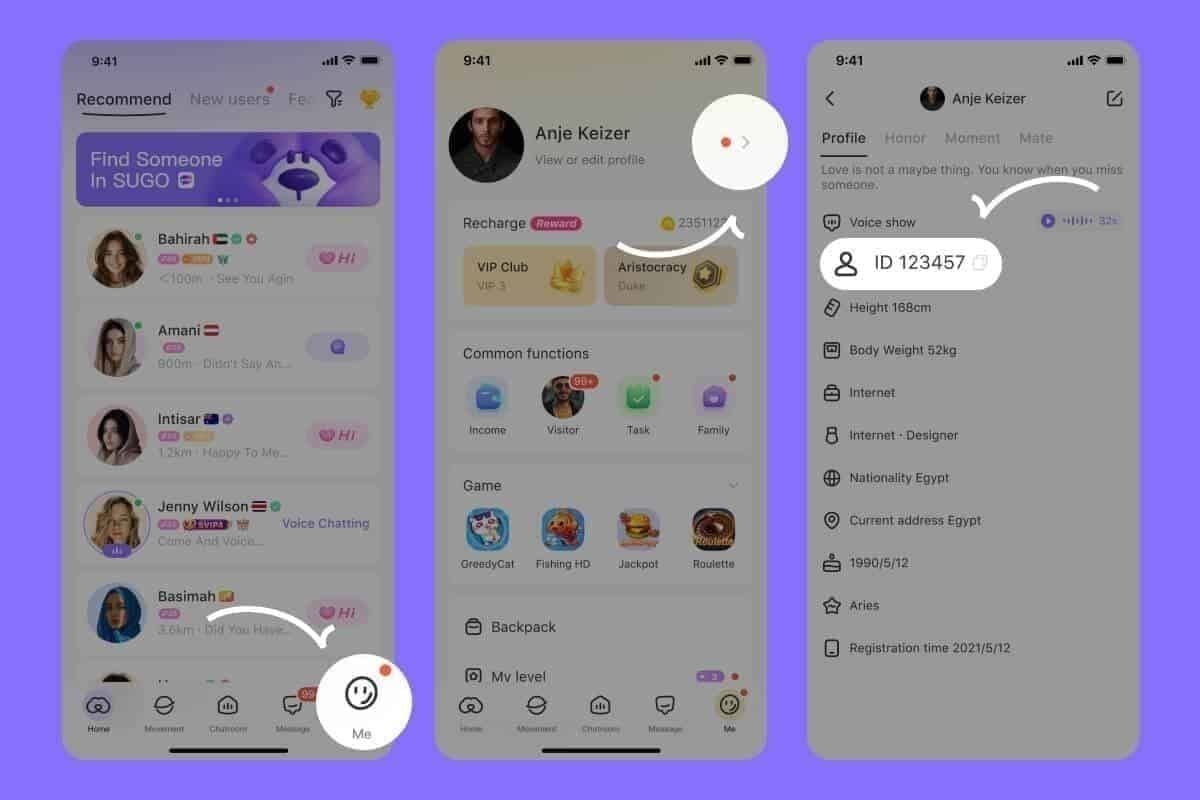
Critical: Verify your User ID (ME > View/Edit Profile > numeric ID field). This 8-12 digit number must match exactly what you entered during CodaPay checkout. Mismatched User IDs are the most common cause of successful payment, no coins scenarios.

Cross-reference payment history timestamps with bank statement or CodaPay emails. SUGO records transactions in UTC; your bank may display local time.
Force Server Synchronization
Complete logout required, not just closing app: ME > Settings > Account > Logout. Wait 30 seconds after logout before logging back in. This allows SUGO servers to fully process session termination.
During login, ensure stable internet with minimum 3 Mbps download and 1 Mbps upload. After successful login, allow 15-20 seconds for complete data loading before checking balance.
Verify CodaPay Payment Status
Access CodaPay transaction history through their web portal using same credentials. Locate transaction by date and amount, check status field.
Completed status confirms CodaPay processed payment and transmitted coin delivery instructions to SUGO.
Processing status means CodaPay is still handling your transaction. Shouldn't exceed 10 minutes. If processing extends beyond 30 minutes, contact CodaPay support directly.
Transaction IDs follow format: TXN- followed by 12-20 alphanumeric characters. Screenshot this exact ID for support tickets. Partial or incorrect IDs delay support resolution by 24-48 hours.
Wait Time Guidelines
Established accounts (7+ days old): Coin delivery exceeding 5 minutes indicates actual problem requiring action.
New accounts: Wait full 24-72 hour security hold period if purchase exceeded $20 USD. Attempting to bypass this hold extends the duration.
Server maintenance windows: Delays up to 2 hours (announced 24 hours in advance through in-app notifications).
Multiple recharges within 15 minutes: Wait at least 30 minutes after final purchase. System processes sequentially, not simultaneously.
Evidence Collection Pack
Effective support resolution depends on evidence quality. Gathering comprehensive evidence before contact reduces resolution time from 7-10 days to 24-48 hours.
Mandatory Screenshots (5 Required)
Save as JPG or PNG (max 5MB each, up to 10 files total):
- CodaPay payment confirmation showing transaction ID (TXN- format), exact amount, completion timestamp, payment method
- SUGO coin balance before payment with visible User ID and timestamp
- SUGO coin balance after payment taken at least 10 minutes post-purchase, showing unchanged balance
- SUGO payment history screen from Settings > Payment History, filtered to purchase date with no matching transaction
- Bank statement or payment provider confirmation showing deducted amount with matching date and transaction reference
For SUGO top up successful but no coins issues, BitTopup's guaranteed delivery system eliminates evidence collection hassles with automatic transaction tracking.
Locate CodaPay Transaction ID
Transaction IDs appear in three locations: payment confirmation screen immediately after purchase, CodaPay account transaction history, and email confirmation. Format: TXN- followed by 12-20 alphanumeric characters (example: TXN-4K7M9P2X5Q8R1T3V).
Access CodaPay transaction history by logging in with same credentials used for payment. Navigate to Transaction History, filter by date range, click transaction to expand full details.
CodaPay retains transaction histories for 90 days. Older transactions require support contact to retrieve.
Email Confirmation Documentation
CodaPay sends automated confirmations within 5-10 minutes to registered email address. Check inbox, spam folder, and promotions tab for emails with subject lines containing Payment Confirmation,Transaction Receipt, or transaction ID.
Critical information: transaction ID, exact amount in local currency and USD, timestamp in UTC format, payment method (last 4 digits or provider name), merchant name (should display SUGO).
If no confirmation email after 30 minutes, verify correct email address in CodaPay account settings. Request email resend through CodaPay support if necessary.
Timestamp Evidence
Include exact timestamps in UTC format or clearly state timezone (e.g., 2:45 PM EST or 14:45 GMT+8). Payment systems log events to the second—around 2 PM provides insufficient precision.
Document complete timeline: when you initiated payment, when you received CodaPay confirmation, when you first checked SUGO balance, when you performed troubleshooting, when you contacted support.
Submitting Effective Support Ticket
Navigate: ME > Help & Support > Contact Us > Payment Issues > Coins Not Received After Payment. This routes your ticket to payment specialists, reducing initial response time from 48 hours to 24 hours on business days.
Support responses arrive within 24 hours on business days (Monday-Friday, excluding holidays). Weekend submissions receive responses following Monday.
Support Ticket Template
Subject Line: SUGO Coins Not Delivered - TXN-[Your Transaction ID] - User ID [Your 8-12 digit ID]
Body:
**I purchased [exact coin package amount] SUGO coins on [date] at [exact time with timezone] through CodaPay. Payment was successfully processed (Transaction ID: TXN-[complete ID]), and [amount] was deducted from my [payment method]. However, coins have not been credited after [time elapsed].
My SUGO User ID: [8-12 digit number]
Transaction ID: TXN-[complete 12-20 character ID]
Payment Amount: [amount in your currency]
Payment Method: [CodaPay via credit card/PayPal/etc.]
Purchase Date/Time: [exact timestamp with timezone]
Troubleshooting completed:
- Cleared app cache
- Logged out and back in
- Toggled airplane mode
- Verified User ID matches payment records
- Waited [time period] for processing
Attached evidence:
- CodaPay payment confirmation
- SUGO balance before payment
- SUGO balance after payment (no change)
- Bank statement showing deduction
- Email confirmation from CodaPay
Please investigate and credit missing coins or provide refund instructions.**
Common Mistakes That Delay Resolution
- Incomplete transaction IDs: Partial IDs force manual database searches, adding 24-48 hours
- Vague descriptions:I didn't get my coins without amounts, dates, or transaction references requires follow-up questions (adds 24 hours per exchange)
- Multiple tickets for same issue: Creates duplicate case numbers, may be marked as spam
- Demanding immediate refunds or threatening chargebacks: Triggers legal review, adds 3-5 business days
Timeline Expectations
Initial response: 24 hours on business days (acknowledgment with ticket number)
Investigation and resolution: 48-72 hours for straightforward cases with complete evidence
Complex cases: 5-7 business days (payment gateway disputes, missing transaction records, account verification issues)
New account security holds: Full 24-72 hour hold period before support can override
Response Times (2026 Data)
- Initial acknowledgment: 24 hours for 90% of tickets (Monday-Friday)
- First substantive response: 48-72 hours after acknowledgment
- Cases requiring CodaPay coordination: 5-7 business days
- Refund processing: digital wallets (1-3 days), PayPal (3-5 days), credit cards (5-10 business days) after SUGO approval
Support Response Meanings
Under Review: Ticket assigned to investigator. Lasts 24-48 hours while querying databases and coordinating with payment processors.
Escalated: Requires senior support or specialized team. Common triggers: missing transaction records, payment gateway disputes, amounts over $100 USD. Takes 5-7 business days.
Pending Additional Information: Support needs clarification or additional evidence. Respond within 48 hours to maintain queue position. Delayed responses reset ticket to back of queue, adding 3-5 days.
Escalation Strategies
If no response within 72 hours (3 business days), check spam folder and SUGO app notifications first. Submit follow-up response to original ticket (don't create new ticket): Following up on ticket #[number] submitted [date]. Could you please provide status update? Thank you.
Wait additional 48 hours after follow-up before escalating further.
Follow-Up Best Practices
Time first follow-up exactly 72 hours after initial submission. Maintain professional, factual tone. Include ticket number, User ID, and transaction ID in every follow-up.
Request Escalation to Senior Support
After 7 business days without resolution or three generic responses that don't address your evidence, explicitly request: I've provided complete evidence and waited [timeframe]. Please escalate this case to senior support for investigation.
Include summary of all previous communications: dates of submission and responses, evidence provided, troubleshooting completed, specific reason escalation is warranted.
Chargeback and Dispute Processes
Chargebacks are absolute last resort after exhausting all support channels and waiting full 72-hour new account hold period. Initiating chargebacks prematurely may result in permanent SUGO account suspension, losing all progress, purchases, and account data.
Prerequisites before chargeback:
- Submitted comprehensive support ticket with all evidence
- Waited minimum 7 business days for resolution
- Sent at least one follow-up request
- Received either no response or inadequate resolution
Successful chargebacks often trigger automatic account bans as anti-fraud measures.
Legal Rights for Non-Delivered Digital Goods
Consumer protection laws classify digital currency as goods subject to standard purchase protections. You're entitled to either delivery or full refund.
Payment processors offer 60-180 day dispute windows depending on region and payment method. Credit cards (Visa, Mastercard): 120-day dispute periods. PayPal: 180-day buyer protection.
Document all communication attempts before initiating disputes. Payment processors require evidence of attempted resolution with merchant.
Initiating Chargeback
Contact bank or credit card issuer's dispute department. Request to dispute charge for goods not received or services not rendered. Provide transaction date, amount, merchant name (CodaPay or SUGO), and brief description.
Submit dispute forms with detailed explanation and supporting evidence: payment confirmations, screenshots showing coins not delivered, support ticket records, timeline documentation.
Investigation takes 30-60 days. Bank may issue provisional credit (temporary refund) during investigation.
Chargeback Consequences
SUGO's automated fraud prevention flags accounts with chargebacks for immediate review. Consequences range from temporary purchase restrictions to permanent account suspension with no appeal.
Even justified chargebacks may trigger account suspension pending investigation (7-14 days). During suspension, you lose access to all account features.
If SUGO determines chargeback was unjustified, they may demand repayment plus fees before restoring access. Refusing results in permanent ban.
Preventing Future Payment Issues
Verify User ID before every purchase: ME > Personal Information, confirm 8-12 digit number matches checkout entry. User ID mismatches account for 30% of payment successful, no coins cases.
Enable two-factor authentication: ME > Account Security before making purchases.
Set battery settings to Unrestricted for SUGO: Settings > Apps > SUGO > Battery > Unrestricted. Battery optimization can force-close SUGO during payment processing.
Most Reliable Payment Methods (2026)
Direct payment platforms with server integration like BitTopup demonstrate significantly higher delivery success rates than traditional payment gateways. BitTopup's direct API connection eliminates multi-step handoff process causing 60% of payment gateway delays.
Credit cards and PayPal through CodaPay: 85% successful delivery within 1-5 minutes, but 15% experience delays requiring support intervention.
Avoid VPNs during purchase: Triggers Error E001 and automatic transaction holds. Disable VPN completely before payment, complete transaction, wait for coin delivery, then re-enable.
Network and Server Considerations
Ensure stable internet meeting minimum 3 Mbps download and 1 Mbps upload before purchases. Test connection speed first.
Reset DNS to Google's public DNS (primary 8.8.8.8, secondary 8.8.4.4) if experiencing recurring connection issues.
Avoid purchases during SUGO server maintenance windows (announced 24 hours in advance through in-app notifications).
Verify Payment Method Compatibility
Check SUGO's official payment methods list in Settings > Payment Options before adding new methods. Not all cards and digital wallets supported in all regions.
New payment methods trigger identity verification with test charges of $0.01-$1.00 (automatically refunded within 24 hours). Wait for verification completion before actual purchases.
New accounts: Start with smaller coin packages (1200 or 2400 coins) for first purchase to avoid $20 USD threshold triggering 24-72 hour security holds. New accounts limited to 6250 coin packages maximum during first 30 days.
Guaranteed Instant Delivery: BitTopup
BitTopup's direct server integration with SUGO eliminates payment gateway intermediary layer causing 60% of delivery delays. Transactions communicate directly with SUGO's coin distribution servers, reducing delivery time to 30 seconds for established accounts.
Automated transaction tracking monitors every purchase from payment initiation through coin delivery confirmation. If any step fails, support receives automatic alerts and contacts you proactively.
24/7 live customer support with average response times under 5 minutes. Live chat connects directly with payment specialists who investigate and resolve issues in real-time.
How BitTopup Ensures Fast Delivery
Dedicated server connections bypass CodaPay and similar third-party gateways. Direct integration triggers immediate coin distribution commands without gateway confirmation handoffs.
Pre-verifies User IDs before payment processing. System confirms account exists and is active before allowing payment submission, preventing wrong User ID delivery failures.
Automatic retry mechanisms detect delivery failures and resubmit distribution commands up to three times within first 60 seconds.
Purchasing Through BitTopup
- Visit BitTopup's SUGO top-up page, select coin package: 1200, 2400, 6250, 12500, 37500, 65000, or 130000 coins
- Enter SUGO User ID (ME > Personal Information). System automatically verifies ID exists
- Select payment method, complete secure checkout
- Coins appear within 30 seconds to 5 minutes
Customer Protection Features
Purchase protection guarantee: successful coin delivery within 10 minutes or automatic full refund. Eliminates evidence collection and support ticket processes.
Transaction records retained for 12 months, accessible through BitTopup account dashboard. Records include exact timestamps, User IDs, coin amounts, delivery confirmation status.
Live chat support operates 24/7 with multilingual representatives. Average response under 5 minutes. Most payment issues resolved within single 10-15 minute chat session.
Common Misconceptions
Myth: Coins always arrive instantly
Reality: Established accounts typically receive coins within 30 seconds, but normal processing extends to 1-5 minutes for new accounts and up to 24-72 hours for new accounts exceeding $20 USD. Server load during peak hours may require full 5-minute window even for established accounts.
Myth: Support tickets are useless
Reality: 90% of properly submitted tickets with complete evidence receive responses within 24 hours on business days. Issues stem from incomplete evidence or vague descriptions requiring follow-up questions.
Myth: Chargebacks have no consequences
Reality: Chargebacks trigger automatic fraud alerts. Even justified chargebacks result in account flags restricting future purchases. Gaming platforms often ban accounts initiating chargebacks due to $15-$25 processing fees. Successful chargebacks don't mean you keep both refund and coins—SUGO deducts coin amount from balance or bans account if balance insufficient.
FAQs
How long does it take for SUGO coins to appear after CodaPay payment?
Established accounts (7+ days old): 30 seconds to 5 minutes. New accounts: 1-5 minutes for standard processing, but purchases exceeding $20 USD trigger automatic 24-72 hour security holds. If coins haven't appeared after these timeframes, clear app cache, toggle airplane mode for 10 seconds, force-close then reopen SUGO.
What should I do if CodaPay payment was successful but SUGO coins didn't arrive?
Verify User ID matches ID entered during payment (ME > Personal Information). Clear app cache (Settings > Apps > SUGO > Storage > Clear Cache), force-close app, wait 10 seconds, reopen. If coins still don't appear after 10 minutes, contact support through ME > Help & Support > Contact Us > Payment Issues with complete transaction ID (TXN- format), User ID, payment screenshots, and timeline documentation.
How do I find my CodaPay transaction ID?
Transaction IDs appear in: payment confirmation screen after purchase, CodaPay account transaction history (login and navigate to Transaction History), and email confirmation. Format: TXN- followed by 12-20 alphanumeric characters. Screenshot complete ID for support tickets.
Can I get a refund if SUGO coins are not delivered?
Yes, but first contact SUGO support with complete evidence and wait 72 hours for investigation. Refund timelines: digital wallets (1-3 days), PayPal (3-5 days), credit cards (5-10 business days) after approval. New accounts with security holds must wait full 24-72 hour hold period before refund requests are processed. Chargebacks are last resort as they often trigger account bans.
What evidence do I need to prove my SUGO payment went through?
Five mandatory items: CodaPay payment confirmation screenshot showing complete transaction ID and amount, SUGO balance screenshot before payment, SUGO balance screenshot after payment showing no change, SUGO payment history showing no matching transaction, bank statement showing deduction. Save as JPG or PNG (max 5MB each). Include 8-12 digit User ID and exact timestamps with timezone.
What are the safest payment methods for buying SUGO coins in 2026?
Direct platform integrations like BitTopup offer highest delivery success rates (99%+) with 30-second to 5-minute delivery and 24/7 live support. Traditional payment gateways like CodaPay show 85% success within 1-5 minutes but remaining 15% require support intervention. Avoid VPNs during purchase, ensure minimum 3 Mbps download speed, update SUGO to version 2.41.0 or later, verify User ID before payment.