App Store Payment Requirements
App stores validate through multiple checkpoints:
- Card number, expiration, CVV through issuing bank
- AVS checks comparing ZIP/street address with bank records
- 3D Secure verification for threshold-exceeding transactions
Prepaid cards fail at AVS because they're issued with corporate addresses, not purchaser's residential address. System detects mismatch, flags as fraudulent.
Prepaid cards operate on closed/semi-closed-loop systems with limited merchant category code (MCC) acceptance. App stores classify in-app purchases under specific MCCs some issuers restrict by default.
AVS Mismatch Problem
AVS failures cause most prepaid rejections. System compares street number and ZIP against issuing bank records. Single-digit discrepancy triggers decline.
Solution: Register card with actual billing address before purchases. Most issuers provide registration via phone/website. Enter full name, complete street address, city, state, ZIP. Info stores in card's authorization database.
Even after registration, some cards maintain issuer's address as primary while storing yours as secondary. This dual-address setup confuses gateways. Web-based platforms without strict AVS become only viable option.
Regional Differences: US, Canada, Australia
US: State-specific taxes affect totals. California: 8.25%, other states: 0-10%. When card barely covers base price, unexpected taxes cause insufficient fund errors. Maintain 15% buffer above package price.
Canada: GST/HST: 5-15% by province. Ontario/Atlantic provinces highest. Canadian cards often carry domestic-only restrictions—contact issuer to enable international transactions, even for Canadian processors (backend may route through US gateways).
Australia: Currency conversion challenges. Bigo supports AUD but uses USD conversion rates that fluctuate daily. Card loaded with exactly AUD $50 may fall short with unfavorable rates plus GST. Maintain 10-12% buffer above displayed AUD price.
Prepaid vs Credit Cards: What Gets Checked
App stores distinguish card types through Bank Identification Number (BIN) lookups. First six digits identify issuing institution and type. Gateways query BIN databases, apply different validation rules. Prepaid triggers enhanced scrutiny: mandatory AVS, restricted MCC acceptance.
Credit cards: highest acceptance (backed by credit lines, comprehensive fraud protection). Debit cards: middle tier (direct bank linkage, less fraud infrastructure). Prepaid: highest-risk category (cash purchases, no identity verification, no chargeback recourse).
Preparing Your Prepaid Card
Proper prep increases success from 70-80% failure to near-guaranteed approval. Three steps: card registration, balance verification, understanding limitations.
Step 1: Register with Billing Info
Activate immediately via issuer hotline (on card back). Enter 16-digit number, security code. Set up billing address—provide complete residential address exactly as on official documents. Abbreviations cause AVS failures.
Visit issuer website, complete online registration. Create account using card number. Enter legal name matching government ID, complete street address including apartment numbers, city, state, ZIP. Some require email verification.
Verify registration in card dashboard. Billing address should show your complete info, not issuer's corporate address. If you see Gift Card Services, PO Box 9999, registration failed. Contact customer service—manual update takes 24-48 hours.
Step 2: Verify Balance and Expiration
Check balance via issuer website/phone before purchases. Don't rely on loaded amount—many deduct activation fees ($3.95-$6.95). $50 card may have only $44.05 available.
Check expiration date (MM/YY format). Cards expire 5-7 years from issuance, but monthly maintenance fees activate after 12 months inactivity. If expiring within 60 days, use immediately—some processors reject near-expiration cards.
Calculate total cost including regional taxes. $9.99 package in California: $10.81 after 8.25% tax. Ontario: $11.29 CAD with 13% HST. Ensure balance exceeds by $1-2 for conversion fluctuations.
Step 3: Understand Purchase Limitations
Review terms for transaction restrictions. Look for domestic use only,not valid for online gambling/digital currency,restricted merchant categories.
Contact customer service to enable:
- Online transactions (if defaulting to in-store only)
- International capabilities (even for domestic purchases—routing may go international)
- Digital goods/entertainment categories (some block to prevent fraud)
Confirm 3D Secure support (required for $50+ purchases). Without it, you're limited to smaller packages, requiring multiple transactions.
Common Activation Mistakes
Address abbreviations:St vs Street,Apt vs Apartment, omitting North/East creates AVS mismatches. Gateways perform exact-match comparisons.
Name variations: Register as John Smith but enter J. Smith at checkout = failure. Use complete legal name consistently.
Missing transaction type activation: Card may be registered but decline online purchases because issuer hasn't activated e-commerce. Requires separate customer service call (15-30 min activation).
Method 1: Official Bigo Top-Up Center
Most direct method, bypassing app store restrictions. Web-based platform accepts prepaid cards app stores reject. Success rate exceeds 90% for properly prepared cards.
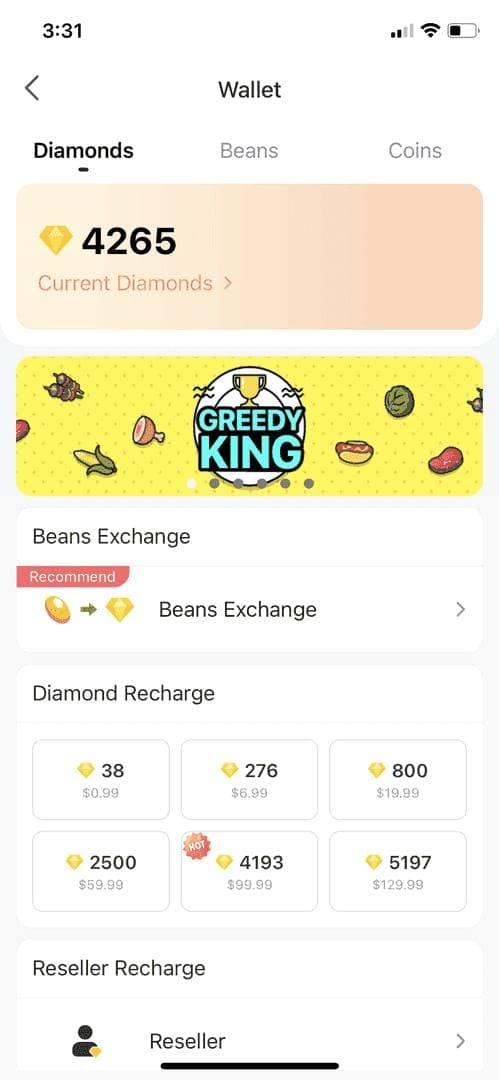
Access via Bigo website (not mobile app). Log in with numeric Bigo ID (find in app: Me > Wallet > Recharge). Top-Up Center doesn't accept usernames, only unique ID number.
For additional convenience, platforms like BitTopup offer streamlined processes to buy Bigo Live diamonds online with prepaid support and instant delivery.
Complete Purchase Process
- Enter numeric Bigo ID in account field

- Select diamond package (60 diamonds at $0.99 to 40,000 max)
- Click Recharge Now
- Select Credit/Debit Card (prepaid processes here)
- Enter 16-digit number (no spaces), expiration (MM/YY), 3-digit CVV
- Fill billing info with exact registered address—double-check every character
- Select country (determines currency/tax)
- Review order summary (base price + taxes + total)
- Verify balance exceeds total
- Click Complete Payment
Processing takes 30-60 seconds. Successful payments credit instantly.
Payment Verification
SSL encryption protects transaction data. Check padlock icon, verify https:// before entering details.
$50+ purchases trigger 3D Secure: redirects to issuer verification page, requests one-time code sent to registered phone/email. Enter within 5-10 minutes.
After payment: confirmation number displays on-screen, sent to email. Save for proof of purchase. Includes Bigo ID, diamond quantity, transaction amount, timestamp.
Delivery Expectations
Diamonds credit within 30-60 seconds. Verify in app: Me > Wallet.
If not appearing within 2-3 minutes, verify correct Bigo ID. Mistyped IDs credit wrong accounts—requires customer service reversal.
Delays beyond 5 minutes indicate authorization holds. Issuer may flag for manual review. Contact issuer to confirm authorization. Diamonds credit within 15-30 minutes once hold releases.
Troubleshooting Payment Errors
Errors fall into distinct categories with specific solutions.
'Card Not Supported': 5 Solutions
Indicates gateway rejected card type before authorization.
- Contact issuer, request reclassification as debit in BIN database (low success rate)
- Enable international transactions via customer service
- Verify card supports MCC 5816 (digital goods/games)—request activation if restricted
- Retry during business hours (high-fraud periods face stricter validation)
- Use alternative platforms with different payment processors
'Payment Declined' vs 'Verification Failed'
Payment Declined: Gateway accepts card type but issuing bank refuses. Indicates insufficient funds, expired card, issuer blocks. Check balance (account for taxes, not just base price). Verify expiration—gateways decline cards within 30 days of expiry.
Verification Failed: Information entry problems, not card validity. Most common: AVS mismatches. Re-enter address exactly as registered, including abbreviations, punctuation, spacing.
For persistent failures, contact issuer to confirm on-file address. Registration updates don't always propagate. Request exact address format, match character-for-character at checkout.
Insufficient Balance Issues
Authorization holds reserve 10-20% above transaction total for conversion fluctuations/tax calculations. $10 purchase may generate $12 hold.
Monthly maintenance fees ($2.95-$4.95) drain inactive cards (12+ months). $50 card from year ago may have only $20 remaining.
Per-transaction fees for online purchases: $0.50-$1.50. Review fee schedule in terms.
Currency conversion fees: 2-3% plus unfavorable rates when card currency doesn't match merchant billing currency.
International Card Problems
International restrictions block cards from non-issuing-country processors. Contact issuer to lift restrictions.
Currency conversion introduces unpredictable costs. Canadian user with USD card: USD→CAD at checkout, potentially back to USD for processing, fees at each step.
Dynamic currency conversion (DCC): offers native currency charging but applies 3-5% worse rates. Always pay in merchant's local currency (USD for Bigo).
Cross-border fees: 1-3% for international gateway processing. Budget additional 5% above displayed price.
Regional Guide: US, Canada, Australia
United States
Vanilla Visa: Requires online activation. Visit website on packaging, complete registration including billing ZIP. Without ZIP registration, all online purchases fail.
OneVanilla: Designed for in-store PIN transactions. Register at issuer website, enable signature-based transactions for online use.
State taxes: Oregon, Montana, New Hampshire: 0%. California: 8.25% state + up to 10.25% local. Texas: 6.25%.
US cards face fewer international restrictions (USD is Bigo's primary currency). Grocery/pharmacy cards often need card-not-present activation for e-commerce.
Canada
Provincial taxes: 5% (Alberta) to 15% (Nova Scotia, New Brunswick, Newfoundland, PEI). Ontario: 13% HST. BC: 5% GST + 7% PST.
Many cards restrict to Canadian merchants only. Contact issuer to enable US merchant transactions.
USD-to-CAD conversion: daily rate fluctuations. Maintain 5-7% buffer above displayed CAD price.
Quebec: Provincial laws require French disclosures. Some processors block Quebec cards for compliance avoidance. Use Quebec-compliant platforms.
Australia
AUD pricing uses USD conversion with 2-3% markup for volatility. Australians pay more per diamond than US users.
GST: 10% on all digital goods. $14.99 AUD package costs $16.49 after GST.
Strong customer authentication (SCA) required for AUD $50+. Many prepaid cards lack 3D Secure infrastructure—limit to sub-$50 packages or multiple transactions.
Australia Post, Coles, Woolworths cards may block international entertainment by default. Contact issuer to enable.
Maximizing Gift Card Value
Best Value Packages
Tiered pricing: larger packages = better per-diamond rates.
- 60 diamonds ($0.99): $0.0165/diamond

- 210 diamonds ($3.99): $0.019/diamond
- 1650 diamonds ($9.99): $0.00605/diamond (first value threshold)
- 40,000 diamonds ($499.99): best rate
Calculate effective cost: total charge ÷ diamonds received. $9.99 + 10% tax = $10.99 ÷ 1650 = $0.00666/diamond.
Timing for Bonuses
Promotional events: 10-30% bonus diamonds during holidays (Christmas, New Year, Valentine's, summer).
First-time bonuses: 5-15% extra for new users on third-party platforms.
Flash sales: 24-72 hour promotions with 15-25% bonuses. Follow official social media for alerts.
Timing difference: $50 card yields 8,250 diamonds standard vs 10,725 during 30% bonus event (2,475 extra diamonds).
Avoiding Hidden Fees
Scrutinize final charge before confirming. If exceeds displayed price + standard tax, hidden fees apply.
Currency conversion compounds when card/merchant currencies differ: 4-6% total fees. Use cards denominated in merchant's currency.
Some platforms inflate base prices above official rates. Compare per-diamond costs. If $9.99 package offers 1,400 vs standard 1,650 diamonds, that's 15% hidden fee.
International transaction fees: 1-3%. Check card fee schedule.
Combining Multiple Cards
Most gateways don't support split payments. Workaround: sequential purchases with each card.
Some issuers allow balance consolidation (may charge $5-10 fees).
Virtual wallets accept prepaid funding but charge 2-4% fees with waiting periods.
For small balances: purchase smaller packages with each card. $15 buys 1650 diamonds, $5 buys 210 diamonds.
Security Best Practices
Protecting Card Info
Only use HTTPS sites (padlock icon, https:// URL). Avoid public WiFi.
Create unique 12+ character passwords (uppercase, lowercase, numbers, symbols). Enable 2FA where available.
Never share CVV/full number via email/text/social media. Provide only last 4 digits for verification.
Recognizing Legitimate Platforms
Check for verifiable business info: registration details, physical address, customer service contacts.
Look for official Bigo partnerships/authorization badges.
Unrealistic pricing (30-50% below standard) signals scams. Legitimate platforms: within 5-10% of official rates.
Verify payment gateway: established processors (Stripe, PayPal, recognized regional). Avoid obscure processors or direct bank transfers.
If Card Compromised
Immediately contact issuer, request card freeze (24/7 fraud hotlines, freeze within minutes).
Review transaction history, note unauthorized charges (date, amount, merchant). File formal fraud report.
Change passwords for all accounts using compromised card. Enable 2FA.
File reports: US (FTC, IdentityTheft.gov), Canada (Anti-Fraud Centre), Australia (Scamwatch).
Safe Storage
Never store card number + expiration + CVV together. Separate locations.
Use encrypted password managers (1Password, LastPass, Bitwarden).
Physical storage: secure location separate from wallet. Home safe/locked drawer.
Don't photograph cards or store images on phone/cloud. If needed, photograph only last 4 digits.
FAQ
Why does App Store reject my Visa gift card?
AVS failures—prepaid cards register with issuer's corporate address, not your personal address, causing mismatches. App stores apply stricter validation (3D Secure) many gift cards don't support. Rejection rate: 20-30%.
Can I use prepaid Mastercard for Bigo Diamonds?
Yes. Same methods as Visa: activate with billing address, verify balance including taxes, use web platforms not app stores. Identical AVS/verification requirements.
How do I activate Visa gift card for online purchases?
Call issuer hotline or visit activation website. Enter card number, security code, register complete billing address. Contact customer service to enable online/international transactions. Activation immediate, AVS updates take 24-48 hours.
In-app vs third-party purchase differences?
In-app: 10-30% higher fees, frequently rejects prepaid cards. Third-party: accepts prepaid with flexible verification, promotional bonuses, lower fees. Requires manual Bigo ID entry, no app store purchase protection.
Are there fees for gift card top-ups?
Taxes: 0-10% US, 5-15% Canada, 10% Australia. Currency conversion: 2-3%. International transaction: 1-3%. Authorization holds: 10-20% temporary reserve. Total fees: 15-20% above displayed price.
What if purchase fails?
No charge typically, but authorization holds reserve funds 3-5 days. Check error: Card Not Supported (issuer restrictions), Payment Declined (insufficient funds/expired), Verification Failed (AVS mismatch). Wait 5-10 min before retry. After 3 failures, contact issuer and platform support.
Ready to convert your gift card? Visit BitTopup for instant, secure prepaid processing with 24/7 support and guaranteed delivery. Start your top-up in 60 seconds!