What's Included in Pre-Registration Gift Package
The 320 Polychrome pre-registration reward arrives in dedicated mail labeled with pre-registration terminology. Separate from maintenance and event rewards.
Beyond pre-registration, maintenance compensation provides 300 Polychrome acknowledging five-hour downtime. Mail appears immediately at 11:00 AM UTC+8, December 30, 2025.
The 1,000 Polychrome login event operates independently—just log in after January 1, 2026 to trigger delivery. No combat, puzzles, or progression gates required.
1000 Polychrome Breakdown and Value Analysis
1,000 Polychrome equals approximately 6.25 standard pulls (Master Tapes). One of Version 2.5's most generous single-source rewards.
Other Version 2.5 Polychrome sources:
- Sword Seeker Chronicles: 1,200
- Joint Investigation Divine Maze: 800
- Coronation of the Void Hunter: 480
- Shadow Riptide Clash: 450
- Wish Filing Station: 420
- Angels and Delusions of Muse: 300 plus 5 Boopons
The 1,000 login reward requires zero effort—just log in. Essential for all skill levels.
Reward Distribution Timeline
December 30, 2025, 11:00 AM UTC+8: Maintenance compensation (300) and pre-registration (320) arrive simultaneously at server reopening.
January 1, 2026: 1,000 Polychrome login event activates. Remains claimable throughout Version 2.5's entire duration.
Staggered delivery prevents mailbox congestion and gives time to complete initial content before receiving major pulling resources.
Eligibility Requirements
Inter-Knot Level 4: Required for maintenance compensation only. Reached within 2-4 hours of gameplay.
Pre-Registration: Account activity before December 30, 2025 through official channels. System flags eligible accounts automatically.
1,000 Polychrome Login Event: Just log in after January 1, 2026. No level restrictions. New players can claim immediately upon account creation.
Step-by-Step: Accessing Your In-Game Mailbox
Mailbox icon = envelope symbol in top-right corner. Red notification badge appears when unclaimed rewards await. Visible across all major screens.

Click icon to open mailbox interface. Messages display chronologically, newest at top.
Exact Navigation Path
Main Screen: Locate envelope icon top-right, adjacent to settings gear and player profile.
Mobile: Same top-right position, slightly smaller on some screens. Tablet layout identical to PC.
Console: Same positioning. Use directional inputs to highlight, press confirm button (A/X) to open.
Mailbox Interface Breakdown
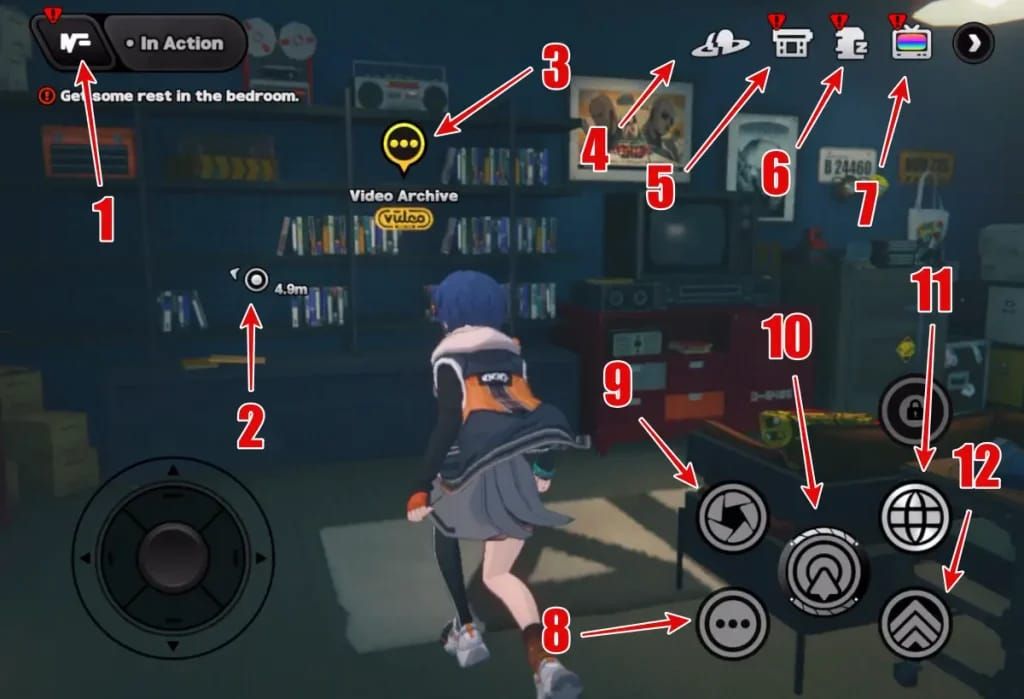
Messages show sender, subject, timestamp, and attachment indicator. Gift box icon = rewards attached.
Three primary categories:
- Maintenance Compensation: December 30, 2025 date, 300 Polychrome
- Event Rewards: 1,000 Polychrome login bonus, event completions
- System Notifications: Version changes, announcements
Claim All button at bottom collects all rewards simultaneously.
Identifying Claimable vs. Already-Claimed Rewards
Unclaimed: Bright yellow/gold Claim button, interactive with visual feedback.
Claimed: Grayed-out Claimed status, gift box icon removed.
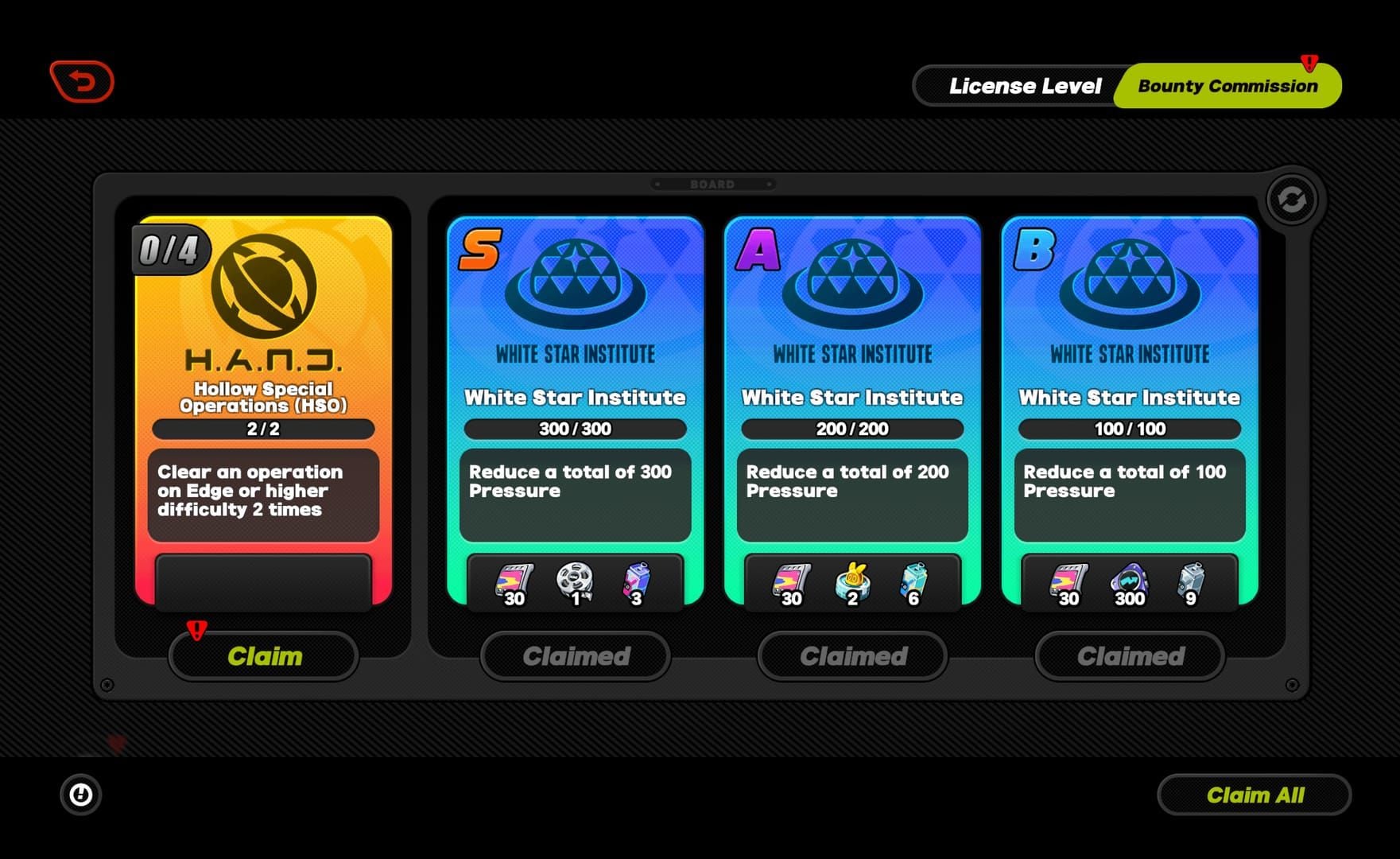
Expiring Soon: Red countdown timer showing remaining days/hours. Maintenance compensation shows countdown to January 29, 2026.
Platform-Specific Differences
PC: Mouse navigation, larger screen shows more messages, less scrolling.
Mobile: Touch-optimized, larger button targets, swipe scrolling, condensed previews.
Console: Controller inputs, highlighted selectable elements, extra confirmation prompt prevents accidental claims.
Complete Claim Process for Version 2.5 Rewards
Open specific mail → press claim button → Polychrome transfers immediately to account. Confirmation popup shows exact amounts.
For 300 Polychrome maintenance: Open mail dated December 30, 2025, labeled Maintenance Compensation. Click claim.
Need more resources? Buy ZZZ polychrome top up from BitTopup for fast, secure transactions.
Claiming Individual Rewards vs. Claim All
Claim All: Processes every unclaimed message simultaneously. Saves time but less control.
Individual: Selective collection. Useful for inventory management or timing resource acquisition.
Confirmation popups differ: Individual shows specific details, Claim All displays scrollable list.
Verifying Polychrome in Inventory
Polychrome appears immediately in top-right balance counter. Updates in real-time.

Compare balance before/after claiming:
- Maintenance: +300
- Pre-registration: +320
- Login event: +1,000
For transaction history: Account menu → currency log section. Records all acquisitions/expenditures with timestamps.
Confirmation Messages
Success = popup with reward icon, quantity, Claim Successful message. Auto-dismisses after ~3 seconds.
Claimed mail updates immediately: claim button → Claimed status.
Failed claims (rare): Error messages reference server connectivity or processing delays. Retry after brief wait.
What to Do After Claiming
Open inventory to view non-currency items (materials, W-Engines). Polychrome displays permanently top-right—no inventory check needed.
Record post-claim balance for future reference. Helps track earning rates and budget resources.
Troubleshooting Missing Rewards: 7 Common Scenarios
Scenario 1: Mailbox Shows Empty Despite Eligibility
- Verify Inter-Knot Level 4+ for maintenance compensation
- Check mailbox filter settings (may hide categories)
- Confirm correct server—mail doesn't transfer across servers. 300 Polychrome delivers per server
Scenario 2: Rewards Claimed But Not in Inventory
- Polychrome = currency balance (top-right), not inventory item
- Non-currency: Check correct tabs (W-Engines = equipment, materials = consumables)
- Server lag: Wait 30-60 seconds, refresh inventory screen
Scenario 3: Pre-Registration Status Not Recognized
- Accounts created after December 30, 2025 don't qualify for pre-reg (but get 1,000 login event)
- Verify participation through official channels only
- Check for separate pre-reg mail (320 Polychrome), distinct from maintenance compensation
Scenario 4: Server-Specific Delivery Delays
- Rewards deliver in waves. High-population servers may delay several minutes
- 11:00 AM UTC+8 = different local times. Verify your timezone
- Server instability can delay up to 30 minutes. Wait before contacting support
Scenario 5: Account Binding Issues
- Rewards deliver to account used during pre-reg/maintenance. Switched accounts won't see rewards
- Check account binding: Settings → account info
- Guest accounts have limited mail functionality. Bind to HoYoverse account for full access
Scenario 6: Expired Mail
- Maintenance compensation expires January 29, 2026 (30 days after delivery)
- Expired mail = permanently unavailable. No recovery options
- Check expiration timers. <7 days = claim immediately
Scenario 7: Cross-Platform Sync
- Mail syncs across platforms with same account. Claiming on one platform = claimed on all
- Requires proper account binding. Guest accounts don't sync
- Verify same account ID in settings. Different accounts = separate mailboxes
Mailbox Mechanics: Expiration Times and Limits
Mail remains 30 days after delivery (most cases). Timer starts at delivery, not when opened.
Standard Mail Expiration Period
30 Days: Maintenance compensation (expires January 29, 2026), pre-registration (320 Polychrome), most system rewards.
60 Days: Some special events (not applicable to Version 2.5 launch rewards).
Version Duration: 1,000 Polychrome login event lasts until Version 2.5 ends (~6 weeks).
Compensation Mail vs. Event Mail
Compensation: Standardized 30-day expiration regardless of amount.
Event: Varies by type. Login event = full version duration. Combat events = 2-3 weeks typically.
System Notifications: No attachments = remains indefinitely or until deleted.
What Happens After Expiration
Expired mail disappears automatically. Message and attachments removed. No warning beyond countdown timer.
Unclaimed Polychrome doesn't transfer or queue. Simply ceases to exist. No recovery through support.
No trash folder. Expiration = permanent loss.
Setting Reminders
- Enable in-game notifications: Settings → notifications → New Mail
- Create calendar reminder for January 20, 2026 (9 days before maintenance compensation expires)
- Daily login routine: Check mailbox first action after loading game (<30 seconds)
Account & Server Requirements
HoYoverse Account Binding Verification
Settings → account information tab. Shows binding status.
Bound: Displays linked email/username. Ensures proper reward delivery and cross-platform progression.
Guest: Shows Not Bound. May limit rewards. Binding takes 2-3 minutes with email verification.
Server Selection Impact
Each server = independent reward distribution. Multiple servers = separate mail on each. Claim individually.
300 Polychrome maintenance = per server. Three servers = 900 total possible.
Server selection at character creation, can't change. Verify correct server for pre-reg activities.
Inter-Knot Level Requirements
Level 4: Minimum for maintenance compensation. 2-4 hours gameplay to reach. Retroactive claim possible if mail hasn't expired.
No Level Requirement: Pre-registration and login event. Accessible to brand-new players immediately.
Regional Restrictions
Version 2.5 launched simultaneously globally at 11:00 AM UTC+8, December 30, 2025. Identical rewards across all regions.
Some regions require additional account verification (during creation, not claims).
No currency conversion—all players receive same numerical amounts (300, 320, 1,000).
Additional Version 2.5 Polychrome Sources
Compensation Rewards
300 Polychrome = baseline for five-hour maintenance. Additional compensation possible for emergency fixes (60-300 per incident, arrives within 24-48 hours).
160 Polychrome for logging in after update (separate from 1,000 login event).
Event-Exclusive Polychrome
- Sword Seeker Chronicles: 1,200
- Joint Investigation Divine Maze: 800
- Coronation of the Void Hunter: 480
- Shadow Riptide Clash: 450
- Wish Filing Station: 420
- Angels and Delusions of Muse: 300 + 5 Boopons
Total: 3,650 Polychrome (≈23 pulls). Events run 2-3 weeks each, staggered throughout version.
Daily/Weekly Missions
Daily Activity: 2,520 Polychrome across Version 2.5 (30-45 min/day).
Shiyu Defense: 2,160 Polychrome per version (bi-weekly resets).
Hollow Zero: 960 Polychrome + 6 Master Tapes + 36 Boopons.
Achievements
New achievements for story, characters, exploration. 20-100 Polychrome each.
Character-specific: Ye Shunguang and Zhao bring 200-300 Polychrome combined.
Exploration: Hidden collectibles and puzzles grant Polychrome on first discovery.
Preventing Future Reward Claim Issues
Enable Push Notifications
Settings → notifications → enable New Mail. Immediate alerts when rewards arrive.
Mobile: Alerts even when game closed. Shows sender/subject.
PC: Desktop notifications via Windows/macOS notification center.
Daily Login Routine
Check mailbox before other content (<1 minute). Ensures no missed rewards.
Set specific time (e.g., 4:00 AM server reset). Claim daily missions + check mail simultaneously.
Use Claim All during daily checks. Prevents individual message oversight.
Bookmark Announcement Channels
Follow official social media for real-time updates. Announcements before in-game notifications.
Join community Discord/forums for daily reminders about expiring mail.
Subscribe to email newsletters for passive notifications.
Document Claim History
Screenshot reward confirmations (especially 1,000 Polychrome).
Record balance before/after major claims. Creates personal transaction log.
Note timestamps of claim attempts during server instability. Helps support investigations.
When and How to Contact Support
Preparing Documentation
Screenshots: Mailbox interface, message list, error messages, account info screen (player ID, server).
Record specific missing amounts: 300, 320, or 1,000 Polychrome. Include expected delivery date and eligibility status.
Document troubleshooting steps already attempted.
Official Support Channels
In-game: Settings → Customer Service. Auto-includes account info and device details.
Select Rewards Not Received category. Routes to specialized agents.
Response times: 24-72 hours initial, 5-7 days for complex cases.
Expected Response Times
Automated: Within minutes. Confirms receipt, provides reference number.
Human Agent: 24-48 hours. May request additional info/screenshots.
Resolution: Simple issues = one cycle. Database investigations = multiple exchanges over several days.
Community Resources
Forums/Discord provide immediate help from experienced players. Faster than official support but can't grant rewards manually.
Search existing threads before posting. Many solutions documented in knowledge bases.
Moderators escalate widespread issues faster than individual tickets. Can trigger official acknowledgment and mass compensation.
FAQ
Where is the mailbox in Zenless Zone Zero Version 2.5?
Top-right corner, envelope icon. Click to access 300 Polychrome maintenance, 320 pre-reg, and 1,000 login event rewards.
How long do I have to claim ZZZ pre-registration rewards?
30 days after December 30, 2025 delivery = late January 2026 deadline. Maintenance expires January 29, 2026. 1,000 login event lasts until Version 2.5 ends.
Why can't I see my 1000 Polychrome in ZZZ 2.5?
Starts January 1, 2026, not December 30 launch. After January 1, verify correct server and account binding.
What are all the Version 2.5 pre-registration rewards?
320 Polychrome (pre-reg), 300 Polychrome (maintenance), 1,000 Polychrome (January 1 login), free S-Rank Zhao, 100% discounted Jane Doe skin, 160 Polychrome (update login).
How do I check if I'm eligible for ZZZ pre-reg rewards?
Look for mail labeled pre-registration containing 320 Polychrome. If present, you qualified.
Does server maintenance affect ZZZ reward distribution?
December 30, 2025 maintenance (6:00-11:00 AM UTC+8) triggered 300 Polychrome compensation. Delivers at 11:00 AM reopening. High-pop servers may delay up to 30 minutes.
Need more Polychrome for Version 2.5 banners? Visit BitTopup for secure, instant ZZZ top-ups with competitive pricing, fast delivery, and excellent customer service!