Need to redeem a voucher? Learn how to change HUAWEI ID region to Saudi Arabia, bypass locked settings, and fix store errors without losing your purchases.
A Saudi prepaid code will fail immediately if your profile territory sits outside the Kingdom. Huawei restricts card activation strictly to accounts matching the voucher's country of issuance; if your profile was registered elsewhere, those funds remain unusable until your account territory aligns.
Changing regions is direct once you know the current OS navigation paths. Recent firmware updates relocated the selector from AppGallery into device settings, and platform quotas govern how frequently you can switch. Below is the procedure to migrate your profile, keep your library intact, and activate your balance.
Why Your Saudi Arabia Gift Card Is Failing
Digital gift cards issued for Huawei devices are hard-coded to specific territories. A voucher issued for Saudi Arabia cannot settle a balance denominated in British Pounds, Euros, or Emirati Dirhams. When an account sits outside Saudi Arabia, the store rejects the redemption string at submission.
Redemption Error: Region Mismatch
[Code: Submitting account territory does not match gift card country of issue]
Status: Transaction Aborted
This behavior is tied directly to regional licensing and currency boundaries. Huawei validates your profile's registered country attribute the instant you confirm redemption. IP masking and VPN tunnels do not bypass this check—only the native country profile setting matters.
If you plan to acquire an official SA voucher on bittopup, your registered profile must point to Saudi Arabia before applying the pin. Forcing cross-border redemptions produces persistent errors and can trigger temporary security holds.
Rules, Limits, and What Happens to Your Data
Migrating your territory functions as an administrative account transfer rather than a cosmetic toggle. Core purchases carry over, but promotional perks and payment configurations reset.
Huawei caps territory adjustments at 20 times within a rolling 90-day window. Once you hit that 20-change boundary, the platform locks the region selector until the earliest switch date clears the rolling period.
Promotional assets do not survive the move. Unused promotional coupons stored in your wallet are erased upon migration. Spend any market-specific campaign discounts before switching.
Saved payment instruments drop off automatically. Credit cards, carrier billing profiles, linked digital wallets, and PIN-free spending permissions are purged. Active subscriptions present a strict barrier: auto-renewing cloud storage, music memberships, or VIP tiers block the migration tool entirely until cancelled.
The update applies across your entire hardware profile. MatePad tablets, MateBook laptops, Vision displays, and wearables tied to the HUAWEI ID synchronize to Saudi Arabia alongside your primary phone.
| Migration Rule | Policy Constraint | System Impact |
|---|
| Frequency Limit | 20 switches per rolling 90 days | Hard lock on region selector upon reaching cap |
| Promotional Balance | 100% coupon forfeiture | All active discount vouchers erased permanently |
| Stored Payment Methods | Automatic de-linking | Bank cards, carrier billing, and PIN-free setups purged |
| Subscriptions | Active auto-renewals prohibited | User must cancel all recurring memberships prior to switch |
| Hardware Sync | Universal ecosystem sync | MatePad, PC, and wearables update region simultaneously |
Locating the Region Switch in Current Firmware
AppGallery no longer hosts the regional selector. Older instructions pointing to Me > Settings > Country/Region inside the store client describe a legacy path that Huawei retired.
Beginning with AppGallery version 15.7.1.300 and HMS Core version 6.15.4.320, country controls moved exclusively into the primary operating system account hub.
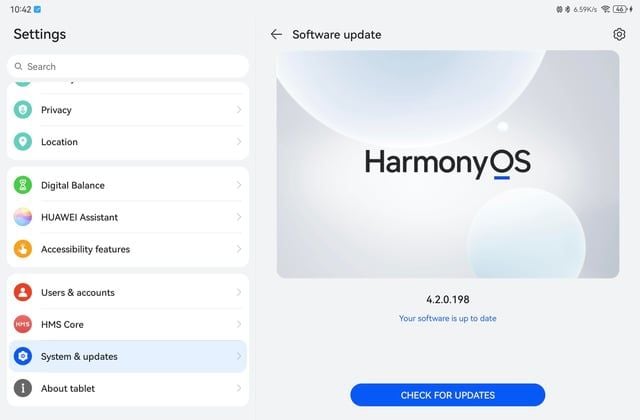
To access the migration settings on devices running current HarmonyOS or EMUI builds, open your system settings:
Device Settings
└── [Your Account Name / HUAWEI ID]
    └── Personal Information
        └── Country/Region
            └── Change Country/Region
If the Country/Region option does not appear under Personal Information, check your platform builds. Devices on HarmonyOS 4.X or earlier require updating HMS Core (Huawei Mobile Services) through system utilities before the interface displays the setting.
Step-by-Step: How to Change HUAWEI ID Region to Saudi Arabia
Complete the preparatory steps before changing your territory to prevent the system from returning an error prompt midway through.
Phase 1: Clear Account Blocks
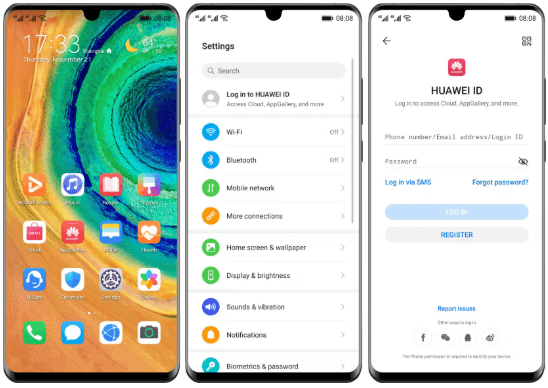
- Open device Settings.
- Tap your profile banner at the top of the menu.
- Select Payment and purchases > Subscriptions.
- Cancel each active recurring membership. Access continues through the end of the current billing period, but auto-renewal must be disabled.
- Open your wallet view and spend any active promotional coupons.
Phase 2: Execute the Territory Change
- Return to the main Settings screen.
- Tap your HUAWEI ID card at the top.
- Select Personal Information.
- Scroll down and tap Country/Region.
- Tap the Change Country/Region button.
- Review the system prompt concerning saved payment instruments and service changes, then tap OK.
- Select Saudi Arabia from the country list.
- Accept the regional terms and verify identity via account password, biometric scan, or SMS security code.
The system refreshes your session tokens, realigning your interface with the Saudi marketplace.
Migration Check: Saudi Arabia Profile Active
- Store Currency: SAR (Saudi Riyal)
- Ecosystem Sync: Applied to all active hardware
- App Catalog: Saudi Arabia Regional Index
With the account configured for the Kingdom, use a HUAWEI Gift Card (SA) from bittopup to add funds without requiring a local credit card.
Solving the Local Payment Method Block
During migration, the operating system may present an identity prompt requiring a local Saudi payment instrument to confirm physical residency.
This verification check typically triggers after irregular IP activity, rapid successive migrations, or internal risk flags. Entering placeholder or false card details can result in profile suspension. Instead, resolve this using one of two functional approaches.
Method 1: The Secondary Regional Profile (Recommended)
Registering a separate account designated for Saudi Arabia avoids the payment method requirement entirely.
- Sign out of your main account under device Settings.
- Tap Log in with HUAWEI ID > Register.
- Set the territory to Saudi Arabia during initial setup.
- Provide an alternative email address not tied to your primary profile.
- Complete SMS validation.
- Skip payment setup to complete registration. The profile opens directly into the Saudi storefront.
This method avoids card prompts, preserves your 90-day switch quota on your main identity, and isolates regional app balances.
Method 2: AppGallery Roaming Mode
Users who have exhausted their 20 switches within 90 days and cannot open a new profile can rely on Roaming Mode. When connecting through an authorized local access point or visiting the country, AppGallery offers a read-only roaming state.
Roaming allows downloading locally available apps without altering your profile's permanent country setting. However, it does not permit applying Saudi gift cards to an external balance. Digital card redemptions require a full country match via migration or a secondary profile.
Firmware Differences and Ecosystem Compatibility
Interface locations and update requirements vary across OS builds and companion devices.
| Hardware / OS Environment | Migration Mechanism | Specific Prerequisites & Limitations |
|---|
| Current HarmonyOS / EMUI | Native System Settings Console | Access via Settings > HUAWEI ID > Personal Info; AppGallery app path retired |
| HarmonyOS 4.X or Earlier | Legacy Account Panel | Requires updating HMS Core to version 6.15.4.320+ to unhide region selector |
| Ecosystem Wearables / Vision | Automated Cloud Propagation | Synchronizes automatically; region-locked local widgets may turn dormant |
| PC Ecosystem Software | Mirrored Identity Suite | Account changes mirror on PC; local desktop software versions must update |
All hardware connected under the same account shifts simultaneously. Secondary devices may require a brief sync period before local widgets refresh.

Troubleshooting Common Configuration Errors
When migration stalls or settings appear greyed out, specific account states are usually responsible.
Symptom 1: Country/Region is Greyed Out
If Country/Region cannot be tapped inside Personal Information, check these barriers:
- Active Subscriptions: Recurring payments remain enabled. Cancel all recurring services in your account console.
- Child Account / Family Sharing: Child identities cannot modify country settings independently. The family group administrator must remove restrictions first.
- MDM Profiles: Work or carrier-issued hardware containing mobile device management software locks region settings by policy.
Symptom 2: The 20-Switch Barrier Error
Exceeding 20 migrations in a rolling 90-day window triggers an automated restriction. Huawei customer support cannot bypass this cooldown period. You must wait for the oldest migration event to clear the 90-day mark or set up a dedicated Saudi profile.
Symptom 3: HMS Core Cache Corruption
If the region prompt displays an unending loading graphic, reset the system services cache:
- Open Settings > Apps > Apps.
- Tap the three-dot menu and select Show system processes.
- Open HMS Core.
- Tap Storage > Clear Cache, then select Manage Space > Clear All Data.
- Restart your device and return to your account panel.
Symptom 4: Gift Card Fails After Region Switch
If a voucher fails following a successful migration, check the active currency. Open AppGallery, select Me, and ensure balance displays read SAR. If an older currency remains visible, force-close AppGallery from recent apps and reopen it.
Check for trailing spaces in the redemption string, or type the code manually if copy-pasting creates formatting issues.
| Issue Observed | Root Cause Analysis | Remediation Action |
|---|
| Greyed Out Region Toggle | Active auto-renewal or child account lock | Cancel subscriptions in account panel; clear family controls |
| Switch Limit Reached | Hit 20 changes within 90 days | Register a dedicated Saudi account or await 90-day rolling reset |
| Missing Region Menu | Outdated platform components | Update HMS Core via device settings or official app manager |
| Infinite Loading Spinner | Corrupted HMS Core cache | Clear HMS Core application cache and data via System Apps |
| Post-Switch Card Failure | Stale application state | Force-close AppGallery, confirm SAR currency, re-enter voucher |
How to Redeem Your Card After the Region Switch
Once the profile confirms Saudi Arabia, voucher codes apply directly inside your system account.
Redemption Path
Settings > HUAWEI ID > Payment and purchases > HUAWEI Points > Redeem
  │
  └── Input Voucher String > Confirm > SAR Added to Balance
- Open Settings and tap your HUAWEI ID banner.
- Tap Payment and purchases.
- Select HUAWEI Points (or Wallet).
- Tap Redeem.
- Enter your voucher string.
- Tap Confirm.
The face value appears in SAR immediately. During in-app purchases, select your account balance at checkout to complete transactions without a local bank card.
To replenish your balance later, purchase prepaid balance for your Saudi account through bittopup.
FAQ
Can I redeem a Saudi Arabia gift card without changing my account region?
No, voucher codes are region-locked and fail on accounts assigned to other countries. You must migrate your profile or register an account set to Saudi Arabia.
How many times am I allowed to change my HUAWEI ID country?
You can switch up to 20 times within a rolling 90-day period. Reaching that limit locks the selector until older switch dates expire.
Why is the Country/Region setting missing from my AppGallery app?
Huawei removed the in-app selector in AppGallery 15.7.1.300 and HMS Core 6.15.4.320. Manage regions under device Settings > HUAWEI ID > Personal Information > Country/Region.
What happens to my account coupons and saved payment methods after changing regions?
Promotional coupons are permanently cleared upon switching. Stored bank cards, carrier billing, and PIN-free payment configurations are removed and require re-entry under the new region.
What should I do if Huawei prompts for a local Saudi payment method I do not own?
Register a secondary account set directly to Saudi Arabia. New registrations do not mandate an immediate local payment instrument.
Will changing my HUAWEI ID region to Saudi Arabia affect my other Huawei devices?
Yes, region adjustments synchronize across every device logged into that identity, including tablets, PCs, and wearables. Region-dependent services may alter availability.
Why is the Country/Region option greyed out in my phone settings?
Active auto-renewing subscriptions, child account restrictions, or outdated HMS Core versions lock the setting. Disable auto-renewals, clear family controls, and update system components.
The Smartest Path Forward
Accounts with clean subscription lists and room under the 20-change cap should migrate directly through device Settings. This preserves purchase history and catalog access while switching currencies to SAR immediately.
If the system demands a local Saudi payment card during migration, do not attempt to bypass verification with incorrect details. Register a secondary profile configured directly for Saudi Arabia. Redeem your balance there, install your target apps, and preserve your primary account without sacrificing existing coupons or payment profiles.