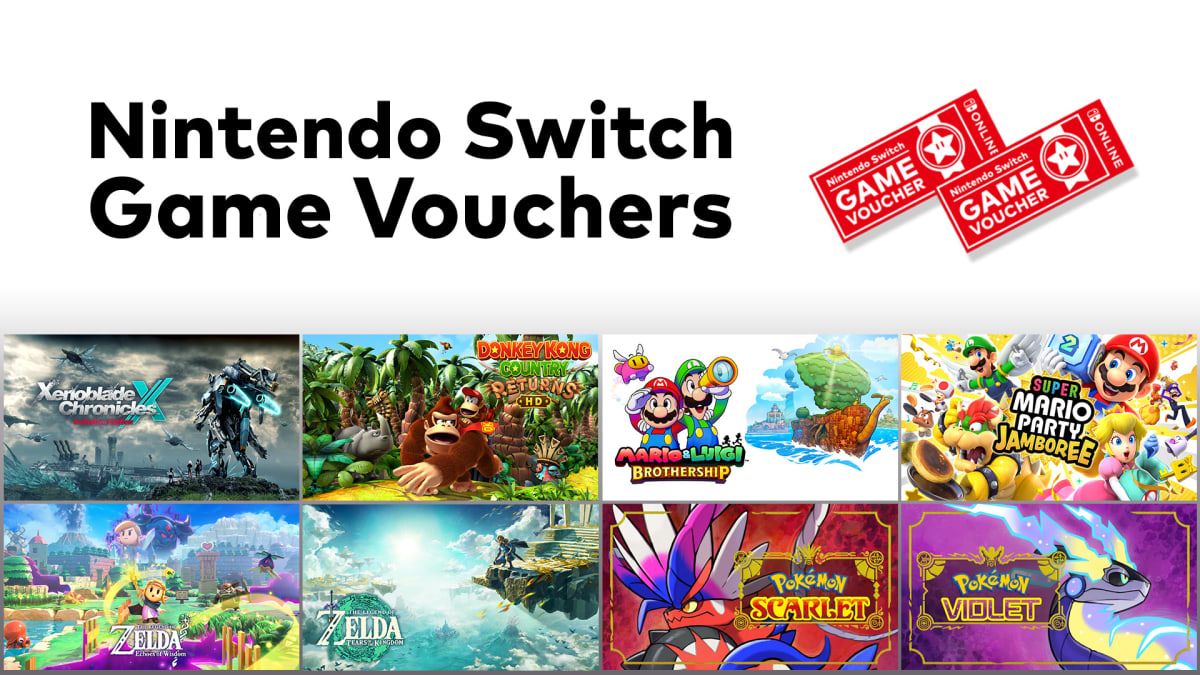
To use Nintendo eShop card UK funds for game vouchers, verify your voucher balance and subscription status. Nintendo discontinued the sale of new voucher pairs on 30 January 2026, but all vouchers purchased prior to that cutoff remain valid for 365 days from purchase, as confirmed by official Nintendo UK support. Because redeeming an existing voucher strictly requires an active, paid Nintendo Switch Online membership, you can apply a Nintendo eShop Gift Card (UK) to fund the required subscription and secure digital titles before each individual voucher expires.
Availability Status for UK Nintendo Switch Game Vouchers
Sales of the voucher pair program ended across the UK storefront at 23:59 local time on 30 January 2026. Accounts can no longer buy new voucher bundles, regardless of available wallet credit.
Every voucher purchased before the cutoff maintains a 365-day validity period. The final batch sold right at the deadline remains valid until 30 January 2027, as documented by Nintendo UK Support.
You do not need to spend both vouchers at once. Each unit functions independently within its own 12-month window.
Third-party platform listings occasionally confuse these timelines. For instance, product descriptions on Eneba have stated standard balance codes expire after 365 days, conflating wallet credit with game voucher terms. UK gift card balance codes do not carry an automatic 365-day expiration; only the game vouchers expire one year after purchase.
Funding the Mandatory Nintendo Switch Online Membership
Unused vouchers sit dormant if your online subscription lapses. Nintendo requires an active, paid Individual or Family Nintendo Switch Online membership to exchange an active voucher for a game. A free trial does not satisfy this redemption check.
Applying a gift card code solves this barrier if you lack an alternative payment method attached to your console.
- Open the Nintendo eShop on your console from the Home menu.
- Select your designated UK user profile.
- Scroll down the left sidebar to Enter Code.
- Input the 16-digit gift card code and confirm the addition of wallet funds.
- Navigate to the Nintendo Switch Online tab on the left.
- Select a paid Individual or Family plan and complete the transaction using your wallet balance.
Once the membership updates to active status, your voucher library becomes usable immediately.
Step-by-Step: Redeeming an Active Voucher for a Game
Do not rush through the software checkout screen. Making a selection without verifying the payment method can charge your wallet balance instead of drawing down your voucher inventory.
[Check Expiration Date]
        │
        ▼
[Confirm Paid NSO Membership Active]
        │
        ▼
[Locate Eligible First-Party Game]
        │
        ▼
[Select 'Proceed to Purchase']
        │
        ▼
[Select 'Redeem Voucher' (Avoid Wallet Debit)]
        │
        ▼
[Download Title to Console]
Follow this sequence to redeem software accurately:
- Launch the UK eShop: Ensure your console is connected to the internet and open the store using your primary profile.
- Locate the target title: Use the search feature or browse the list of eligible voucher catalog releases.
- Check pre-order dates: If you apply a voucher to an unreleased game, verify that the game's release date falls within your voucher's remaining 365-day validity window. If the voucher expires before launch, Nintendo blocks the pre-order.
- Choose redemption at checkout: Select Proceed to Purchase. On the payment confirmation page, choose the option to apply a game voucher rather than spending wallet funds or card credit.
- Confirm the order: The system deducts one voucher from your total (accounts could hold up to 8 active vouchers simultaneously) and adds the game to your download queue.
Regional Wallets and Account Constraints
Digital transactions on Nintendo systems follow strict geographic boundaries. A gift card issued for the United Kingdom cannot be applied to an account set to a different country, per BitTopup product specifications.
Attempting to enter a UK digital code into an account assigned to an unsupported territory returns Error 2813-6561. Game vouchers operate under the same restriction: vouchers bought in the UK store can only redeem software catalog entries listed on the UK eShop.
Account region changes bring another technical hurdle. Nintendo blocks any user from altering their account country if unspent funds remain in the wallet. You must reduce the account to a zero balance before the settings menu allows an account region transfer. Applying a balance card to an account you plan to move internationally will lock that profile to the UK region until every penny is spent.
Profiles also face a strict wallet cap. Entering a balance code that pushes your total store funds past the maximum wallet balance limit triggers Error 2813-0149. You must spend down existing funds before adding larger gift denominations.
Software Compatibility and System Hardware Rules
Remaining vouchers apply exclusively to supported Nintendo Switch software. As detailed in official program terms through the Nintendo Store, software titles developed exclusively for the Nintendo Switch 2 hardware cannot be redeemed with these vouchers.
Cross-generation releases designed for Nintendo Switch that offer upgrade options fall within eligible parameters, as analyzed by IGN. However, dedicated next-generation software releases bypass the catalog entirely. If you hold unredeemed vouchers, prioritize first-party standard Switch releases from the approved catalog before your specific 365-day timer elapses.
Checking Your Remaining Voucher Expiration Date
Because vouchers carry individual 365-day timers rather than a single shared calendar deadline, tracking their validity requires checking your profile history directly on the console.
- Open the Nintendo eShop from your Switch Home menu.
- Tap or click your user icon located in the upper right corner.
- Scroll down the navigation list to the Nintendo Switch Online category.
- Move to the Nintendo Switch Game Vouchers section.
- Review the list showing each active voucher alongside its explicit expiration date.
Do not let the window run down to the final hour. Network maintenance or payment system delays can prevent a redemption from processing before midnight strikes.
Frequently Asked Questions
Can I still buy a new pair of Nintendo Switch Game Vouchers in the UK?
No. Nintendo ended the sale of new vouchers on 30 January 2026. Only vouchers purchased on or before that date can be redeemed within their 365-day validity window, as stated by Nintendo UK Support.
Do I have to redeem both vouchers in a pair at the same time?
No. Each voucher functions on its own. You can redeem one voucher today and save the second for an eligible announced release later in the year, provided the redemption occurs before that voucher's specific 365-day expiration date.
Why am I getting error code 2813-6561 when entering my UK eShop card?
Error 2813-6561 points to a regional mismatch. The card you are entering requires an account registered to the United Kingdom. Verify your profile country setting matches the UK territory via BitTopup specifications.
Can I use a voucher to pre-order an unreleased game?
Yes, provided the software is listed in the voucher catalog and its release date occurs before your voucher expires. If the software launches after your voucher reaches 365 days of age, the eShop will reject the pre-order transaction.