

PlayStation Network Card (MX) Top Up: Overview and Digital Delivery
A PlayStation Network Card (MX) top up provides a secure way to fund your Mexican Sony PlayStation Store account without linking a personal credit card or bank account. Once redeemed, the card adds digital funds directly to your PSN wallet balance, enabling you to buy full PS5 and PS4 games, downloadable content (DLC), season passes, in-game currencies, and PlayStation Plus subscriptions.
Every PlayStation Network Card for Mexico delivers a unique 12-digit digital voucher code. When you purchase through BitTopup, your digital code is generated instantly and displayed directly on your screen as well as sent to your order confirmation email. You do not need to share account passwords or grant access to your console profile.
Compatible Content on the Mexico PlayStation Store
- Digital Games and Add-ons: Purchase standard, deluxe, and pre-order titles for PlayStation 5 and PlayStation 4.
- In-Game Currencies: Buy Fortnite V-Bucks, EA SPORTS FC Points, Call of Duty CP, GTA Online Shark Cards, and Genshin Impact Genesis Crystals directly through the console store.
- Subscriptions: Fund monthly, quarterly, or annual plans for PlayStation Plus Essential, Extra, and Deluxe tiers.
- Virtual Reality Titles: Access games and interactive experiences developed for PlayStation VR and PS VR2.
Mexico PSN Account Region Restrictions and Store Currency Details
PlayStation Network codes are strictly region-locked. A PlayStation Network Card (MX) can only be redeemed on a PlayStation Network account registered with Mexico as its designated country/region.
Mexico PS Store Currency Nuances
The Mexican PlayStation Store displays prices and processes transactions in United States Dollars (USD). While prices are shown in USD, the account region itself remains Mexico. Standard US PSN gift cards cannot be redeemed on a Mexican account, and Mexican PSN cards cannot be redeemed on US, European, or other Latin American accounts. You must use a digital card configured specifically for the Mexican region.
| Feature | Mexico PSN Account (MX) | United States PSN Account (US) | Rest of World Accounts |
|---|---|---|---|
| Designated Country | Mexico | United States | Respective Home Country |
| Store Display Currency | USD ($) | USD ($) | Local Currency / USD / EUR |
| Card Compatibility | Mexico (MX) PSN Codes Only | US PSN Codes Only | Regional Matches Only |
| PS Plus Service Tiers | Essential / Extra / Deluxe | Essential / Extra / Premium | Regional Offerings |
| Account Sharing Required? | Never | Never | Never |
How to Verify Your Mexico PSN Account Region
Before purchasing or attempting to redeem a digital voucher, verify that your PlayStation profile is registered to Mexico to prevent region-mismatch errors.
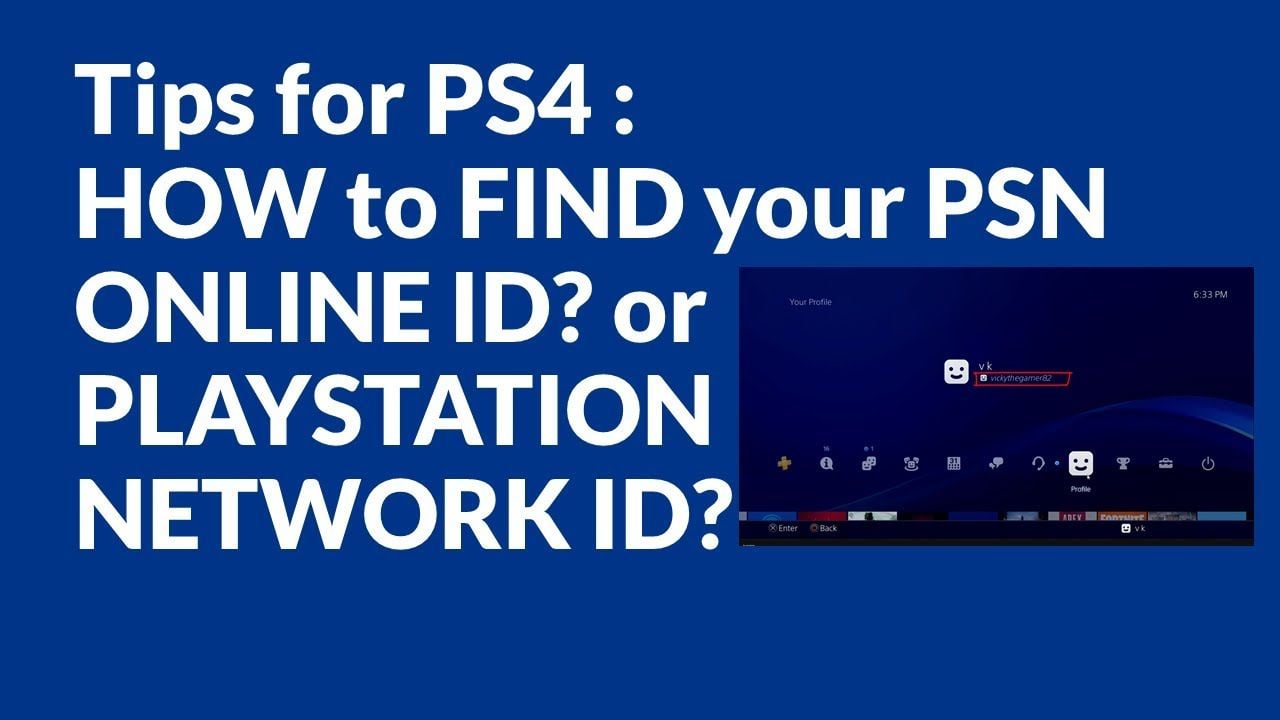
Steps to Check Your Account Country/Region:
- Open your web browser and sign in at the official Sony Entertainment Network / PlayStation Account Management portal.
- Navigate to the Account tab on the left sidebar.
- Select Account Details and scroll down to the Location section.
- Check the Country/Region field. It must state Mexico.
- On a PS5 console: Go to Settings > Users and Accounts > Account > Account Information > Address to check your registered country.
How to Recharge PS Wallet with Mexico Digital Code (PS5, PS4, Web & App)
Redeeming your 12-digit code takes less than a minute. Choose your preferred platform below to complete the recharge.
Method 1: Redeem on PlayStation 5 (PS5)
- Turn on your PS5 and log into your Mexico PSN user profile.
- Open Settings (gear icon in the top right corner).
- Go to Users and Accounts > Account.
- Select Payment and Subscriptions > Redeem Codes.
- Enter the 12-digit alphanumeric code received from BitTopup.
- Select Redeem. The funds will instantly reflect in your PSN wallet balance.
Method 2: Redeem on PlayStation 4 (PS4)
- Sign into your Mexico PSN account on your PS4 console.
- Navigate to the PlayStation Store application on the home menu.
- Scroll down the left-hand sidebar menu and select Redeem Codes.
- Type in your 12-digit code accurately without hyphens.
- Select Continue and confirm the redemption.
Method 3: Redeem via Web Browser (PC or Mobile)
- Open your web browser and go to
store.playstation.com. - Sign in to your Mexico PlayStation Network account.
- Click on your profile avatar located at the top right of the page.
- Click Redeem Code from the drop-down menu.
- Input your 12-character code and click Next to apply the balance.
Method 4: Redeem via the PlayStation App (iOS & Android)
- Launch the official PlayStation App on your smartphone.
- Sign in with your Mexican PSN account credentials.
- Tap the PlayStation Store icon at the bottom center of the screen.
- Tap the menu icon (three lines) in the upper right and select Redeem Code.
- Enter the code manually or scan it with your phone's camera, then tap Confirm.
Using PSN Wallet Balance for PlayStation Plus Tiers in 2026
In 2026, PlayStation Plus provides three distinct service levels: PlayStation Plus Essential, PlayStation Plus Extra, and PlayStation Plus Deluxe (available in Mexico and markets without native cloud streaming).
You can pay for new subscriptions, renew active plans, or upgrade tiers directly using your PSN wallet balance funded by your Mexico gift card.
Steps to Purchase or Upgrade PlayStation Plus:
- Ensure your PSN wallet has sufficient funds to cover the tier duration you want (1-month, 3-month, or 12-month).
- Navigate to the PlayStation Plus tab on your console or the PS Store online.
- Select your desired membership tier: * Essential: Online multiplayer access, monthly downloadable games, cloud saves, and exclusive store discounts. * Extra: All Essential perks plus a large catalog of PS4 and PS5 titles. * Deluxe: All Essential and Extra perks, plus classic game catalogs (PS1, PS2, PSP, and remastered PS3 titles) and time-limited full game trials.
- Proceed to checkout and select PSN Wallet Balance as your payment source.
- Complete the confirmation. No credit card is required if your wallet balance covers the total purchase amount.
Troubleshooting Common Mexico PSN Code Redemption Errors
If you experience an issue when entering your digital code, review these solutions to resolve common errors quickly.
Error: "The code you entered is inactive or invalid" (WC-40371-5)
- Check for Typos: PSN codes use a 12-character alphanumeric format. Avoid confusing easily mistaken characters:
- The number
0versus the letterO - The number
1versus capital letterI - The number
8versus capital letterB - The number
5versus capital letterS - Verify Country Match: Ensure you are not trying to redeem an MX code on a US or European account.
Error: "The funds could not be added to your wallet" (WS-37397-9 / WS-37368-7)
- Check Wallet Limits: PlayStation Network enforces maximum wallet balance limits per account. Ensure the card value does not push your total balance over the allowed threshold.
- Check PSN Server Status: During scheduled network maintenance or global outages, redemption services may be temporarily paused. Wait a few moments and try again.
Checking Code Redemption History
If you suspect a code was already processed:1. Log into your account at store.playstation.com.2. Go to Account Settings > Transaction History.3. Verify recent wallet deposits to confirm whether the funds were already credited.
Why Buy PlayStation Network Card (MX) on BitTopup
BitTopup delivers a straightforward, reliable buying experience for gamers needing Mexico PlayStation Network digital codes.
- Instant Digital Delivery: Codes are generated and delivered immediately after transaction confirmation, allowing you to top up and get back into the game without delay.
- No Password Sharing Required: You only purchase the digital code. BitTopup will never ask for your PSN password, security questions, or account login credentials.
- Clear Pricing & Checkout: Prices are displayed live at checkout with multiple trusted payment options. The price you see on the product page is what you pay.
- 24/7 Dedicated Support: If you ever need help with order status or code verification, BitTopup customer support is available around the clock to assist you.
Frequently Asked Questions
Are PlayStation Network cards reloadable?
No. PlayStation Network cards are single-use digital voucher codes. Once you redeem the 12-digit code into your Mexican PSN account, the entire value transfers permanently to your wallet balance, and the code becomes inactive. To add more funds in the future, simply purchase a new digital code on BitTopup.
How do I add money to my Mexico PlayStation Network wallet?
Purchase a PlayStation Network Card (MX) on BitTopup to receive your 12-digit voucher code. Then, open the PlayStation Store on your PS5, PS4, mobile app, or browser, select Redeem Code, enter your 12 digits, and confirm. The balance updates instantly.
Can I use a PlayStation Network Card (MX) on a US or other regional PSN account?
No. PlayStation Network codes are region-restricted. A Mexico (MX) digital code will only work on an account where the country/region is set to Mexico. It cannot be redeemed on US, Canadian, European, or other regional PSN accounts.
Do PlayStation Network Card (MX) digital codes expire?
PlayStation Network digital codes purchased from BitTopup do not have a short expiration date, but it is best practice to redeem your code into your PSN wallet balance promptly after receipt to keep your funds safe and ready for use.
How do I use my PSN MX wallet balance to purchase PlayStation Plus in 2026?
Redeem your Mexico PSN code to credit your account wallet. Next, go to the PlayStation Plus section in the PS Store, select your preferred plan (Essential, Extra, or Deluxe) and billing duration, and select your wallet balance as the payment method during checkout.
What should I do if my Mexico PSN code returns an invalid code error?
First, double-check that every character was entered correctly without extra spaces or swapped letters (e.g., O vs 0, I vs 1). Next, confirm that your account's registered country is Mexico under Account Management. If the problem persists, check your Transaction History to see if the funds were already added, or reach out to BitTopup 24/7 customer support with your order number for assistance.