





Google Play Gift Card CA Top Up: Overview and Key Features
A Google Play Gift Card (CA) provides digital credit in Canadian Dollars (CAD) to fund your Google Play balance. Redeeming a CAD gift card gives you direct access to millions of Android apps, mobile games, in-game items, subscriptions, digital books, and entertainment on the Google Play Store.
BitTopup provides digital codes for Canadian Google Play accounts. Once your order is complete, your digital redemption code is delivered directly to your account dashboard and email. You do not need to share your Google password or link personal banking credentials to the Google Play Store to add funds.
Popular Canadian Denominations and Balance Uses
| Denomination (CAD) | Best Used For | Typical In-Game / Store Items |
|---|---|---|
| $10 - $15 CAD | Starter packs, basic app purchases, monthly game passes | Mobile battle passes, indie apps, single-issue digital comics |
| $25 - $50 CAD | Premium game bundles, mid-tier currency packs, monthly media subscriptions | Gacha pulls, large gem bundles, multi-month app subscriptions |
| $100 CAD+ | Major in-game events, high-tier currency packages, annual subscriptions | Major gacha banner rolls, annual Google One storage, bulk microtransactions |
Note: Current live prices, available denominations, and processing options are displayed directly on the BitTopup checkout interface.
How to Check Your Google Play Canada Account Region
Google Play gift codes are strictly region-locked. A Google Play Canada (CAD) gift card can only be redeemed on a Google account that is registered with a Canadian payments profile and set to the Canadian region.
To verify that your Google Play profile is set to Canada before redeeming your code:
- Open the Google Play Store app on your Android device.
- Tap your profile icon in the top right corner.
- Go to Settings > General > Account and device preferences.
- Scroll down to the Country and profiles section.
- Confirm that Canada is listed with a green checkmark next to your profile.
If your country is set to a region other than Canada, you cannot redeem a CAD gift card on that profile until you switch your country or use a dedicated Canadian Google account.
Step-by-Step Guide: How to Recharge Your Google Play Account with a CAD Code
Redeeming your digital code from BitTopup takes less than a minute. You can complete the process either directly on an Android device or through a web browser.
Method 1: Redeeming on an Android Phone or Tablet
- Open the Google Play Store app on your device.
- Tap your profile icon at the top right of the screen.
- Select Payments & subscriptions from the menu.
- Tap Redeem code.
- Enter the 16-digit digital code you received from BitTopup.
- Tap Redeem, then confirm the account name and the CAD balance amount.
Method 2: Redeeming via a Web Browser
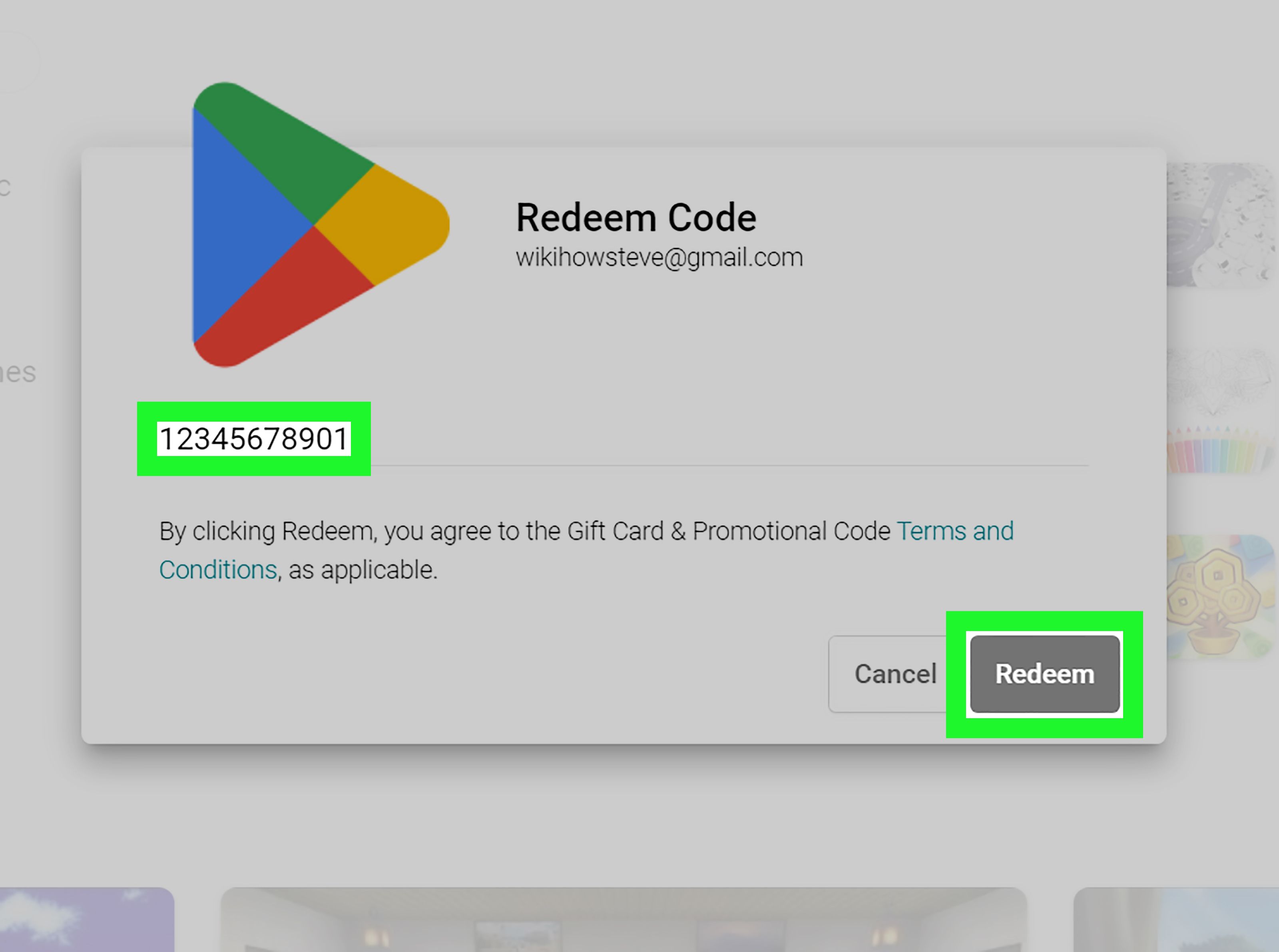
- Go to
play.google.com/redeemon your desktop or mobile browser. - Sign in to the specific Google account where you want the Canadian Dollar balance credited.
- Type or paste your digital gift code into the input field.
- Click Redeem to confirm the addition to your Google Play balance.
Once redeemed, the funds appear immediately in your Google Play balance and will automatically be applied as the primary payment method during your next checkout on supported Canadian transactions.
Regional Restrictions and Canada Account Binding
Google maintains strict geo-location and account security protocols for digital gift card redemptions. Keep the following technical limitations in mind:
- Country Lock: CAD gift cards can only be redeemed on accounts with a Canada billing address and region. They cannot be used on US, UK, European, or Asian Google Play profiles.
- IP & Location Matching: Google's automated systems verify device IP location during the redemption step. Attempting to redeem a Canadian code while connected to a foreign IP address or proxy can trigger automated fraud security blocks.
- Non-Transferable & Non-Refundable: Once a digital code is redeemed onto a specific Google account, the funds are permanently bound to that account. Google does not allow balance transfers between different Google email addresses, nor can digital balances be withdrawn back to bank accounts or cash.
Supported Content: What You Can Buy with Canadian Google Play Balance
Your Canadian Google Play credit can be spent on all eligible digital content available in the Canadian Play Store catalog:
- In-Game Currency & Microtransactions: Buy gems, primogems, Robux, CP, energy packs, and battle passes across major mobile titles.
- Premium Apps and Games: Purchase paid Android games and productivity tools directly from the store.
- In-App Subscriptions: Pay for ongoing subscriptions inside supported apps, including productivity suites and creative apps that process billing through Google Play.
- Digital Media & Entertainment: Buy or rent movies, purchase e-books and audiobooks, or subscribe to digital reading platforms.
- Google Play Pass: Use your balance to fund monthly or annual Google Play Pass access for ad-free games and apps.
Note: Google Play balance cannot be used to purchase hardware (such as Pixel phones or Chromebooks) on the physical Google Store, nor can it be used to buy third-party retail gift cards.
Troubleshooting Common Google Play Redemption and Country Mismatch Errors
If you experience an error while redeeming your CAD gift card, review these solutions:
1. "Code cannot be redeemed from your country / Region mismatch"
- Cause: Your Google account country is not set to Canada, or you have an active secondary payment profile in another currency.
- Fix: Go to
pay.google.com, log in, open Settings, and inspect your Payments Profile. Ensure your active profile is Canada (CAD). Close any unused profiles from other regions. Ensure your device is not routing through an international VPN.
2. "We need more info to redeem your gift card"
- Cause: Google’s automated verification flagged the redemption attempt for additional account authentication.
- Fix: Tap the form link provided by Google on screen to submit account verification details. Keep your BitTopup digital order invoice ready to show proof of code acquisition.
3. "Invalid code or code already redeemed"
- Cause: Typographical errors (confusing 'O' with '0' or 'I' with '1') or double-tapping the redeem button.
- Fix: Check your Google Play transaction history under Payments & subscriptions > Budget & history to see if the funds were already credited. If not, carefully copy and paste the raw text code directly from your BitTopup order history without leading or trailing spaces.
Safe and Instant Digital Code Delivery with Secure Payment Options
BitTopup delivers your Canadian Google Play digital codes instantly upon payment verification. You do not need to wait for physical postal delivery or worry about damaged scratch-off cards.
- Zero Password Sharing: You never need to supply your Google login credentials, recovery keys, or personal account passwords. You receive a standalone digital code that you redeem yourself.
- Verified Digital Codes: Every code sold is generated through direct, compliant digital distribution channels to ensure authenticity.
- Secure Checkout: Process your payment through encrypted channels with live pricing transparency.
- Dedicated Support: BitTopup provides 24/7 customer service assistance if you need help viewing your code or checking your transaction status.
Frequently Asked Questions
Can I use a Canadian Google Play gift card in another country?
No. Google Play gift cards are region-specific. A Canadian (CAD) gift card can only be redeemed on a Google account that is registered with a Canadian payments profile. It will not work on US, European, or other regional Google accounts.
How do I recharge my Google Play account using a digital gift card code?
Open the Google Play Store app on your Android device, tap your profile icon at the top right, select Payments & subscriptions, then tap Redeem code. Enter the 16-digit code delivered to your BitTopup order page and confirm.
Do Google Play Canada gift cards have an expiry date or service fees?
No. Official Google Play gift cards in Canada do not have maintenance fees, dormancy fees, or expiration dates. The credit remains in your account until you choose to spend it.
Can I convert my Google Play gift card balance into cash or transfer to another account?
No. Google Play store credit cannot be exchanged for cash, refunded, or transferred to another Google account. Funds remain tied to the specific account on which they were redeemed.
What should I do if my Google Play gift card shows a region error during redemption?
Verify that your Google Payments profile at pay.google.com is set to Canada with a Canadian address. Disconnect any active VPN services that might show your device outside of Canada, clear the cache of the Google Play Store app, and attempt the redemption again.
What apps and services can I purchase with a Google Play CAD balance?
You can use your balance for Android games, apps, in-game items (such as skins, passes, and currency), Google Play Pass subscriptions, books, and movies. You cannot use it to purchase physical hardware from the Google Store.




































































































































