



The Lord of the Rings: Rise to War Gems Top Up on BitTopup
Gems serve as the premium currency in The Lord of the Rings: Rise to War, driving your strategic expansion across Middle-earth. Whether you are leading the armies of Gondor, Rohan, Mordor, or Isengard, having a reliable reserve of Gems gives you an immediate tactical edge. From acquiring rare Commander respect items in Mathom Chests to accelerating military construction and recovering commander stamina during faction wars, Gems are central to your competitive progress.
BitTopup offers a direct, secure channel to buy The Lord of the Rings: Rise to War Gems using only your in-game Player ID and Server. You never need to share login credentials or link social accounts. Select your desired Gem denomination, complete the transaction, and receive the currency directly in your account.
How to Recharge The Lord of the Rings: Rise to War Gems on BitTopup
To complete your recharge The Lord of the Rings: Rise to War Gems order, follow these simple steps:
- Select Gem Package: Browse the available Gem denominations on the product page and choose the pack that matches your campaign goals.
- Enter Account Details: Input your in-game Player ID and select your current Server in the provided fields.
- Proceed to Checkout: Click the purchase button and select your preferred payment method from the available local and global options.
- Finalize Payment: Complete the secure checkout procedure.
- Receive Your Gems: Your order is processed automatically, and your Gems will be credited directly to your LOTR: Rise to War account balance.
How to Find Your LOTR: Rise to War Player ID and Server
Your Player ID is a unique numeric identifier assigned to your account profile, separate from your character name. Providing the correct ID and Server ensures your order is delivered without delay.
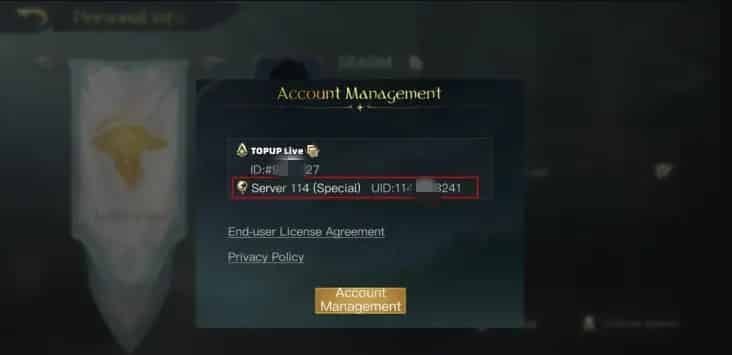
Follow these steps inside the game client to locate your credentials:
- Launch The Lord of the Rings: Rise to War on your mobile device or PC client.
- Tap your Avatar icon located in the top-left corner of the main settlement screen.
- Open the User Profile or Settings menu.
- Your Player ID (a series of numbers) will be visible directly below your character name.
- Note your current Server name/number, which appears on the profile panel and on the initial game login screen.
- Copy the exact Player ID into the checkout field on BitTopup.
Available Gem Packs and Pricing Breakdown
BitTopup provides access to the complete range of standard Gem packs available for The Lord of the Rings: Rise to War. Real-time pricing and localized currency conversions are displayed on the live checkout interface.
| Gem Package | Primary Strategic Uses |
|---|---|
| 60 Gems | Quick stamina refreshes, minor construction completion |
| 300 Gems | Daily Mathom pulls, resource production boosts |
| 980 Gems | Standard Mathom Chest bundles, commander stamina packs |
| 1,980 Gems | Mid-tier gear refinement, urgent war-front relocations |
| 3,280 Gems | High-tier Mathom investment, seasonal commander recruitment |
| 6,480 Gems | Large-scale war support, maximum Mathom pulls, seasonal readiness |
Note: Exact pricing varies depending on selected regional currencies and applicable payment methods. Consult the live product selector above for up-to-date figures.
Best Ways to Spend Gems in LOTR: Rise to War
Maximizing the return on your Gems requires structured spending aligned with your faction's seasonal timeline. Distributing your resources across critical operational areas ensures long-term competitive strength:
1. Mathom Chest Openings
Mathom Chests are the primary source for recruiting new Commanders and obtaining their unique respect items. Unlocking Tier 2 and Tier 3 commanders—such as Gandalf the White, Aragorn, the Witch-king, or Sauron—demands dedicated respect items. Using Gems on guaranteed event pulls or daily discounted Mathom Chests is one of the most effective ways to build a potent lineup.
2. Commander Stamina Refills
During high-intensity war seasons, your armies must capture territory, defend fortresses, and engage enemy warbands. Commander stamina dictates your attack frequency. Investing Gems into stamina recovery items allows your strongest marches to remain active on the front line during critical territory contests.
3. Tactical Building Acceleration
Upgrading military production facilities, fortresses, and command centers early in a season allows you to field higher-tier units before your rivals. Using Gems strategically to finish bottleneck upgrades lets your faction secure resource tiles and high-level keeps ahead of opposing fellowships.
4. Black Market Purchases
The in-game Black Market regularly refreshes with rare equipment enhancement materials, speed-ups, and specialty items. Spending Gems on high-value gear refinement items guarantees steady combat stat growth for your primary commanders.
Safe and Password-Free Top-Up Guarantee
Account safety is a top priority for strategy game players. BitTopup uses a direct-to-account top-up mechanism that relies solely on your public Player ID and Server.
- Zero Password Requirements: You will never be asked for your account password, email access, or social media logins.
- Standard Game Protocol: Gems are credited through standard server routing, keeping your account fully compliant with game policies.
- Data Protection: Your transaction details and player information are encrypted and never stored or shared with unauthorized parties.
Why Choose BitTopup for LOTR: Rise to War Recharge
- Direct UID Processing: Enter your Server and Player ID for rapid fulfillment straight to your in-game balance.
- Global Payment Options: BitTopup accommodates international and regional payment methods so you can buy LOTR Rise to War Gems easily from any country.
- Live Order Tracking: Monitor the status of your order from payment confirmation to delivery completion in your order history.
- Responsive Customer Support: A dedicated customer support team is available to assist you with order verification, inquiries, or payment guidance.
Frequently Asked Questions
How do I recharge Gems in The Lord of the Rings: Rise to War?
Select your preferred Gem pack on BitTopup, type in your numeric Player ID and Server, proceed to the checkout page, and choose your payment method. Once the transaction is confirmed, the Gems will be credited directly to your in-game balance.
Where can I find my Player ID and Server?
Open the game, tap your avatar icon in the upper-left corner of the settlement view, and check your profile panel. Your numeric Player ID is listed under your name, and your active Server is displayed on the profile panel or the start screen.
Do I need to provide my game account password to buy Gems?
No. BitTopup requires only your Player ID and Server. You should never disclose your password, security codes, or login credentials to anyone.
What should I do if my Gems do not appear immediately?
First, restart your game client to refresh the server connection with your account balance. If the Gems have not arrived after a short period, check your BitTopup order history to confirm the status and verify that the submitted Player ID and Server were correct. You can contact BitTopup customer support with your Order ID for immediate assistance.
What can Gems be spent on in LOTR: Rise to War?
Gems can be used to open Mathom Chests for commander respect items and equipment, speed up settlement construction and unit recruitment, purchase items from the Black Market, and replenish Commander stamina during seasonal campaigns.
Which payment methods are supported on BitTopup?
BitTopup supports a wide selection of international and localized payment options, including major credit/debit cards, regional e-wallets, and alternative digital payment methods. Available options for your country are displayed on the checkout page.