







DoorDash Gift Card (US) Recharge and Account Balance Overview
A DoorDash Gift Card (US) provides a direct, flexible way to add prepaid USD funds to your DoorDash customer account. When you purchase a digital voucher, you receive an official redemption PIN. Applying this PIN transfers the full face value into your DoorDash credit balance, ready for immediate use on restaurant takeout, convenience store items, grocery deliveries, and household essentials.
While a physical or digital card voucher itself is single-use and cannot be reloaded after redemption, you can perform a continuous DoorDash Gift Card (US) recharge by acquiring new voucher codes and redeeming them to your profile. All credited amounts combine into a unified account balance, automatically covering food costs, service fees, and driver tips during checkout.
DoorDash US Gift Card Denominations and Specifications
DoorDash digital vouchers come in fixed and custom USD denominations designed to fit any budget. The table below highlights key parameters for US gift cards:
| Feature | Specification Details |
|---|---|
| Region Lock | United States DoorDash accounts only |
| Currency | United States Dollar (USD) |
| Format | Digital alphanumeric redemption PIN |
| Covered Purchases | Restaurant delivery, pickup, groceries, convenience, taxes, fees, tips |
| Maintenance Fees | $0 (No monthly or inactivity deductions) |
| Expiration Policy | Funds do not expire once purchased or redeemed |
| Redemption Limit | Stacks directly onto existing account credits |
Exact card values and live pricing are displayed directly on the BitTopup product selection screen. Check the live checkout menu for currently available balance amounts.
How to Redeem DoorDash Gift Card PIN on App and Web
Redeeming your digital code takes less than a minute across mobile applications and desktop web browsers. Follow the specific instructions for your preferred platform.
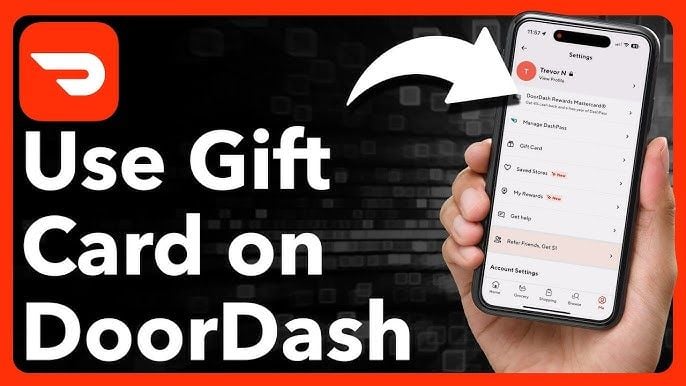
Redeeming on iOS and Android Mobile Apps
- Launch the DoorDash app on your mobile device and log in to your account.
- Tap the Account icon located in the navigation bar.
- Scroll down the menu options and tap Gift Card.
- Type or paste your digital DoorDash voucher PIN into the entry field.
- Press Redeem to instantly add the USD funds to your DoorDash account balance.
Redeeming on Desktop Web Browser
- Visit the official DoorDash website and sign in.
- Click the account menu icon in the upper corner of the screen.
- Select Gift Card from the dropdown navigation panel.
- Enter your alphanumeric gift card PIN.
- Click Redeem Gift Card to confirm the credit transfer.
Applying Credits at Checkout
Once redeemed, your DoorDash balance is stored on your profile. When placing an order:1. Build your cart and proceed to the checkout screen.2. Locate the Payment section.3. Verify that the toggle for DoorDash Credits is switched on.4. If your order total exceeds your gift card balance, select a secondary payment method to cover the remaining difference.
DoorDash Balance Usage: Eligible Orders, Fees, and DashPass
DoorDash credits offer wide spending flexibility across the entire US platform catalog. You can apply your balance toward:* Restaurant Meals: Order delivery or pickup from thousands of local and national dining partners.* Groceries and Essentials: Pay for supermarket items, pharmacy runs, and convenience store deliveries.* Platform Surcharges: Use credits to cover delivery charges, standard service fees, regulatory fees, and local sales tax.* Courier Tips: Tip your delivery driver directly using your gift card credit balance during checkout.* DashPass Subscriptions: In most regions, DoorDash allows recurring DashPass subscription charges to deduct from your account balance, provided an active backup payment card remains on file.
Region Lock and Currency Requirements for US Cards
DoorDash enforces strict regional boundaries. A DoorDash Gift Card (US) is issued in USD and functions exclusively on US-registered accounts for orders fulfilled within the United States.
Key regional rules to keep in mind:* Cross-Border Restrictions: US voucher codes cannot be redeemed on Canadian, Australian, or European DoorDash accounts.* Currency Matching: The platform does not convert USD gift card codes into other currencies upon entry.* Location Verification: Your delivery address and account settings must correspond to the United States store directory to utilize US credits successfully.
Why Buy DoorDash Gift Cards on BitTopup
BitTopup delivers a dependable, hassle-free checkout experience for digital vouchers:* Fast Digital Delivery: Receive your official DoorDash PIN code directly in your order dashboard and email immediately after payment verification.* Clear Pricing: Review transparent costs on the live checkout page without unexpected processing fees at final payment.* Broad Payment Support: Complete your purchase using globally recognized and localized secure payment options.* Customer Support Assistance: Access 24/7 customer service ready to assist with order status inquiries or code questions.
Safe Checkout and Account Security Guarantee
Protecting your personal data is a top priority. When purchasing a DoorDash Gift Card (US) on BitTopup:* No Password Required: You never need to share your DoorDash login credentials, password, or sensitive private information.* Independent Voucher Codes: You receive a distinct digital PIN to enter manually inside your own DoorDash account settings.* Encrypted Transactions: All transactions pass through secure, encrypted checkout gateways to ensure complete payment safety.
Troubleshooting DoorDash Voucher Code Redemption Issues
If you encounter an error message when attempting to claim your voucher, review these common fixes:* Check for Character Typos: Carefully inspect your code for common character mistakes, such as mistaking the number 0 for the letter O, or the number 1 for uppercase I.* Verify Account Country: Confirm that your DoorDash account region is set to the United States. If your profile is linked to an international phone number or non-US address, the system may reject USD codes.* Clear Browser Cache or App Data: Cached application data can occasionally trigger false validation errors. Log out, clear your app cache or browser cookies, and attempt redemption again.* Confirm Balance History: Check your account's Payment Methods page. If you entered the code earlier, the funds may have already credited to your total balance without showing a new confirmation screen.
Frequently Asked Questions
Can I add money or reload an existing DoorDash gift card?
No, individual DoorDash gift cards cannot be reloaded directly. However, you can recharge your DoorDash account balance at any time by purchasing a new digital gift card code on BitTopup and redeeming the PIN to your profile.
How do I redeem my DoorDash Gift Card PIN code?
Log in to the DoorDash app or website, open your Account menu, select Gift Card, type in your digital voucher PIN, and press Redeem. The credit balance updates immediately.
Can I use a US DoorDash gift card in Canada or other countries?
No. DoorDash gift cards are strictly region-locked. A US gift card code is denominated in USD and can only be redeemed on US accounts for deliveries within the United States.
Why won't DoorDash let me redeem my gift card code?
Redemption failures typically stem from typos in the PIN, region mismatches on non-US accounts, temporary app cache errors, or the code having already been redeemed to your balance. Double-check the character string and your current credit total.
Do DoorDash gift cards expire or have maintenance fees?
No. DoorDash gift cards do not expire, nor do they carry monthly maintenance or dormancy fees. Your funds remain available in your account balance until you spend them.
Can I use DoorDash gift card credits to pay for tips and DashPass?
Yes. Your DoorDash credit balance automatically applies toward order subtotals, taxes, delivery and service fees, and driver tips. Credits can also be used toward DashPass membership billing as long as a valid secondary payment card is stored on your profile.










































































































