


Nike Gift Card (NL) Top Up: Instant Digital Voucher Overview
A Nike Gift Card (NL) provides a direct, flexible payment method for purchasing footwear, sportswear, training equipment, and lifestyle apparel on the official Netherlands Nike storefront. Issued in Euros (EUR), this digital prepaid card lets you shop online across Nike.com/nl and the official Nike App without linking a personal credit card or bank account to your profile.
When you complete a digital voucher purchase on BitTopup, your code is generated and sent directly to your order summary and email address. You receive a unique 16-digit card number alongside a secure 6-digit PIN, ready for immediate checkout redemption on official Dutch Nike platforms.
Available EUR Denominations and Regional Eligibility
Nike gift cards are region-locked to the country and currency where they are issued. A Nike Gift Card (NL) is denominated in EUR and is intended specifically for use on the Netherlands regional store (Nike.com/nl) and within the Nike App set to the Netherlands region.
| Feature | Specification |
|---|---|
| Region Lock | Netherlands (NL) |
| Currency | Euro (€ / EUR) |
| Usable Platforms | Nike.com/nl, Nike App (NL Region), Select Nike Retail Stores in NL |
| Delivery Type | Digital Code (16-digit number + 6-digit PIN) |
| Account Requirement | Nike Member Account (Netherlands region) |
| Expiration Policy | No expiration date |
Available denomination options and live product pricing are displayed directly on the BitTopup checkout screen. Review your order details before completing payment to ensure you select the appropriate value for your purchase.
How to Redeem and Recharge Your Nike NL Gift Card Online
Redeeming your digital code is straightforward during the standard checkout process on the Dutch Nike web store or mobile application. Follow these steps to apply your code:
- Go to the official Nike Netherlands website (nike.com/nl) or launch the Nike App on your device.
- Sign in to your Nike Member account. Ensure your account region is set to the Netherlands.
- Add your selected sneakers, apparel, or sporting goods to your shopping cart.
- Click on your cart and proceed to the checkout page.
- Fill in your standard delivery address details within the Netherlands.
- At the Payment stage, locate the option labeled "Heb je een cadeaubon?" (Do you have a gift card?).
- Enter your 16-digit gift card number and 6-digit security PIN in the respective fields.
- Click "Toepassen" (Apply). The system will deduct the card balance from your order total.
- If your order exceeds the card balance, pay the remaining amount using your preferred secondary payment method.
How to Find Your Nike Gift Card Details and UID
Unlike direct mobile game recharges that require a numeric player UID or server ID, a digital gift card functions via a discrete voucher code. You do not need to provide your Nike account password or sensitive login credentials at any point during purchase.
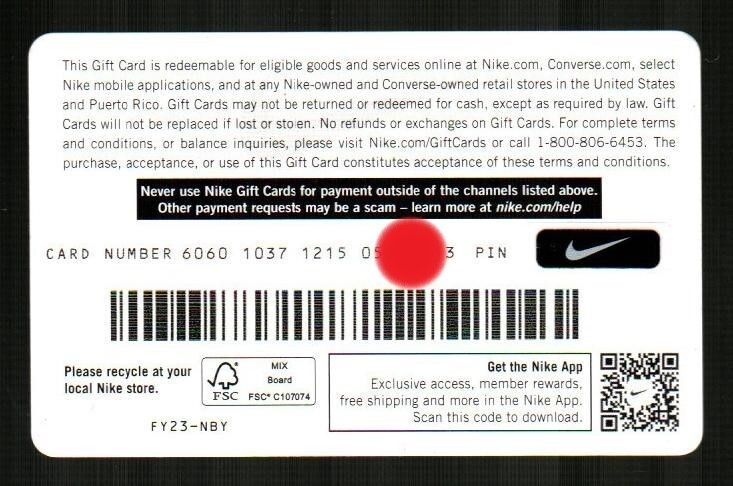
Once your transaction on BitTopup finishes, your 16-digit digital card number and 6-digit PIN appear in your BitTopup order history and arrive in your confirmation email. When applying the voucher on Nike.com/nl, your Nike Member account email serves as your user identifier.
How to Check Your Nike Gift Card Balance
You can verify the remaining balance on your digital voucher at any time prior to shopping. Nike provides an official balance inquiry tool on its website.
- Visit the official Nike Netherlands Gift Card balance page on nike.com/nl.
- Enter the 16-digit card number in the card number field.
- Enter the 6-digit PIN code.
- Complete the security check and click "Controleer saldo" (Check balance).
- Your current available EUR balance will display on the screen.
You can also check your remaining balance during the checkout process by applying the code. The system will show the exact deduction and any balance left over before you confirm your order.
Safe Checkout and Buyer Protection on BitTopup
Buying digital codes online requires trusted transaction standards and dependable order fulfillment. BitTopup provides a protected environment for purchasing your Nike digital vouchers:
- Zero Account Sharing: You never share your Nike login, email passwords, or private profile credentials. You receive an independent digital code to redeem yourself.
- Guaranteed Code Validity: Every digital code issued is brand new, verified, and unredeemed.
- Secure Payment Processing: BitTopup uses encrypted transaction gateways across all supported payment methods at live checkout.
- Customer Support: BitTopup maintains dedicated customer support ready to assist if you have questions regarding your order status or digital delivery.
Troubleshooting Common Nike Gift Card Redemption Errors
If you experience an issue while redeeming your digital code on Nike.com/nl, check the following common causes:
- Typographical Errors: Double-check the 16-digit card number and 6-digit PIN. Ensure there are no accidental spaces before or after the numbers.
- Regional Mismatch: Ensure you are browsing the Dutch portal (nike.com/nl). If your browser or app redirects to a UK, US, or other European storefront, the Dutch EUR code will return an invalid region error.
- Cart Currency Incompatibility: Ensure your cart total is calculated in Euros (EUR) and shipping is directed to a valid Netherlands address.
- Split Payment Requirements: If your cart total is higher than the card denomination, you must add an accepted secondary payment method to cover the difference before the system allows the order to finalize.
Frequently Asked Questions
Can you add more money or reload a Nike gift card?
No, digital Nike gift cards cannot be reloaded or topped up with additional funds once their balance reaches zero. To add more spending balance to your Nike purchases, buy a new digital gift card code on BitTopup and apply it at checkout.
Can I use my Nike Gift Card (NL) in another country?
Nike gift cards are region-specific. A Nike Gift Card (NL) is designed for use on the Netherlands storefront (Nike.com/nl), within the Nike App set to the Netherlands, and at participating Nike-owned retail locations in the Netherlands. It cannot be redeemed on regional sites outside the Dutch market.
How do I redeem my Nike digital gift card on Nike.com NL?
During online checkout on Nike.com/nl, advance to the Payment step and click "Heb je een cadeaubon?" (Do you have a gift card?). Input the 16-digit card number and the 6-digit security PIN provided by BitTopup, then click "Toepassen" to deduct the balance from your order total.
Can I convert my Nike gift card to cash?
No. Nike gift cards cannot be redeemed for cash, refunded, or transferred to a bank account, except where required by applicable local law. The card balance can only be used to purchase eligible Nike products and services.
Do Nike Netherlands gift cards expire?
Nike gift cards issued for the Netherlands do not have an expiration date. Your balance remains valid until fully spent on qualifying purchases.
How can I check my Nike gift card balance?
You can check your balance on the official Nike Netherlands website by accessing the gift card balance lookup tool and entering your 16-digit card number alongside the 6-digit PIN. Your remaining balance will also display on the checkout page whenever you apply the voucher to a cart.