



Shopee Cash e-Voucher MY Top Up: Overview and Benefits
A Shopee Cash e-Voucher (MY) provides prepaid credit in Ringgit Malaysia (RM) directly applicable to purchases on the Shopee Malaysia platform. These digital gift cards allow shoppers to pay for everyday essentials, electronics, fashion, home goods, and groceries without linking a personal credit card or bank account.
Using a digital cash voucher helps you manage shopping budgets, send digital gifts to friends and family, and access platform promotions during peak sales campaigns throughout 2026. Each voucher is delivered as an alphanumeric code ready for immediate redemption in the official Shopee mobile app.
Eligible Stores vs Excluded Product Categories
Shopee Cash e-Vouchers apply across a wide selection of merchants, but strict platform policies govern specific product categories and seller tiers. Review the eligibility rules below before applying your code:
| Category / Feature | Status | Conditions & Details |
|---|---|---|
| Shopee Mall Stores | Fully Eligible | Valid on official brand outlets across all standard retail categories. |
| Preferred / Preferred+ Sellers | Fully Eligible | Applicable to verified merchants carrying the Preferred badge. |
| Standard Marketplace Sellers | Conditionally Eligible | Depends on specific voucher campaign terms; Mall and Preferred are prioritized. |
| Infant Formula & Baby Food | Strictly Excluded | Excluded under local retail regulations (Stage 1 & Stage 2 milk formulas). |
| Digital Goods & Bill Reloads | Strictly Excluded | Cannot be used for mobile prepay reloads, utility bills, game credits, or e-books. |
| Tickets, Vouchers & Services | Strictly Excluded | Dining vouchers, travel tickets, parking passes, and event bookings are ineligible. |
| Gold, Bullion & Financial Items | Strictly Excluded | Gold bars, jewelry coins, and cash-equivalent instruments cannot be bought with vouchers. |
How to Purchase and Recharge Shopee Cash e-Voucher MY on BitTopup
Buying your voucher on BitTopup takes only a few simple steps with immediate digital delivery:
- Select your desired voucher denomination (e.g., RM10, RM20, RM50, RM100) on the Shopee Cash e-Voucher (MY) product page.
- Choose your preferred quantity.
- Enter your contact email address to receive your order receipt and digital code backup.
- Review the live order total shown on the checkout screen. Current rates and processing fees display in real time.
- Select your payment method and complete the transaction.
- Retrieve your unique alphanumeric voucher code instantly from your BitTopup order history screen.
How to Redeem Shopee e Voucher Code in the Shopee Malaysia App
To apply your digital code, use the official Shopee Malaysia mobile application. Web browser checkouts on desktop do not always support direct alphanumeric voucher activation.
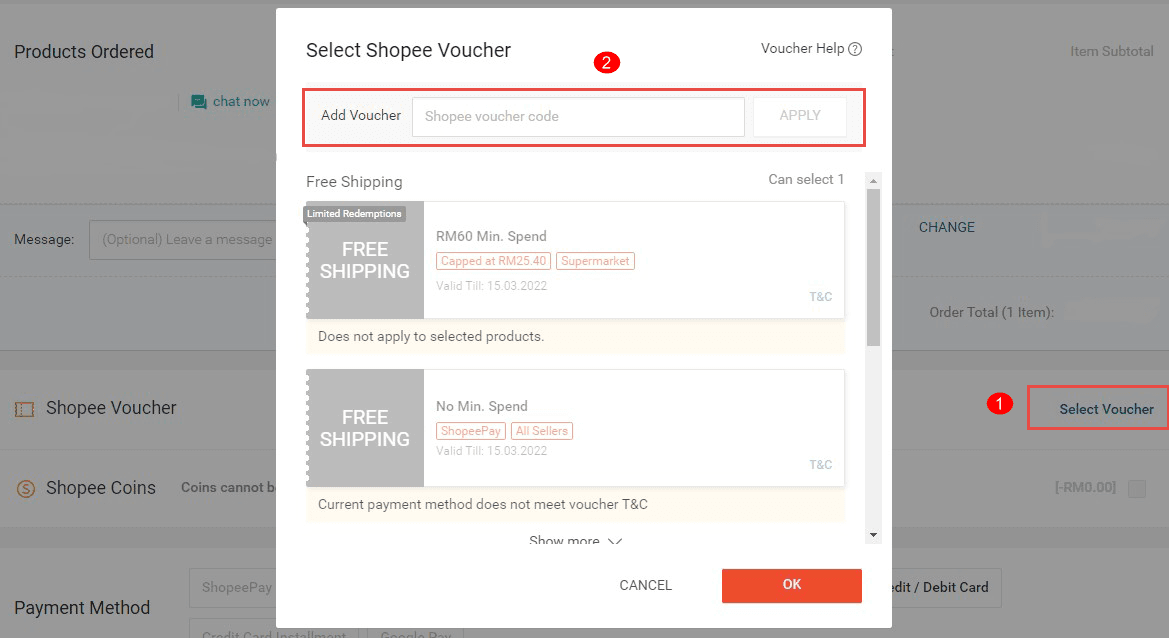
Method 1: Save Voucher to Your Account Wallet First
- Open the Shopee Malaysia mobile app and log in to your account.
- Tap the Me tab located in the bottom-right corner of the home screen.
- Scroll down and select My Vouchers under the account services menu.
- Locate the text box at the top labeled Input promo code / voucher code.
- Paste your alphanumeric code retrieved from BitTopup and tap Apply.
- The voucher will now sit in your wallet, ready to be selected at checkout.
Method 2: Apply Directly During Checkout
- Add your eligible items from Shopee Mall or Preferred Sellers to your shopping cart.
- Open your Cart and tap Check Out.
- On the payment checkout page, tap Shopee Voucher / Platform Voucher.
- Type or paste your code into the voucher input field at the top and tap Apply.
- Confirm that the discount deducts from your merchandise subtotal, then place your order.
Shopee Voucher Rules: Validity, Single-Use Policy, and Balance Restrictions
Shopee Cash e-Vouchers (MY) follow specific usage restrictions enforced by the Shopee platform:
- Single-Use Only: Each code can only be used once in a single transaction. If your cart total is lower than the voucher face value (for example, using an RM50 voucher on an RM40 purchase), the remaining RM10 balance is forfeited immediately. Always ensure your cart total equals or exceeds the voucher value.
- Non-Refundable: Once applied and processed at checkout, vouchers cannot be exchanged for cash, transferred to ShopeePay balances, or split across separate payment sessions.
- Regional Lock: Shopee Cash e-Voucher (MY) codes are strictly valid for accounts registered under Shopee Malaysia (+60 phone numbers) and transactions priced in MYR.
- Validity Duration: Each code comes with an expiration timeframe. Check the details attached to your code after purchase and redeem it promptly.
- Shipping Fee Exclusions: Cash e-vouchers apply strictly to the product subtotal. Unless specified otherwise by an active platform promotion, standard shipping fees must be covered separately using other payment options.
Troubleshooting Common Shopee Voucher Redemption Errors
If you experience an issue when activating your code, review these standard fixes:
- Error: "Code is invalid or does not exist"
- Double-check for typographical errors. Avoid typing trailing spaces when copying and pasting the code from your BitTopup dashboard.
- Verify that you are logged into the Shopee Malaysia region. Codes fail if entered on Shopee Singapore, Indonesia, or other regional storefronts.
- Error: "Voucher has already been redeemed"
- Check your My Vouchers wallet tab under the Me menu. If you entered the code earlier, it may already be saved to your account.
- Error: "Items in your cart do not meet voucher requirements"
- Remove excluded products from your cart. Check for digital reloads, baby milk formulas, tickets, or items sold by unverified third-party sellers outside Shopee Mall or Preferred status.
- Error: "Checkout failed / System busy"
- Ensure your Shopee app is updated to the latest version. Clear the app cache via Me > Account Settings > About > Clear Cache, restart the app, and retry.
Safe Digital Delivery: Why Buy Shopee Vouchers on BitTopup
BitTopup provides a direct, secure channel to purchase your digital shopping vouchers:
- No Account Credentials Required: You never need to share your Shopee account password, phone verification codes, or personal credentials. You receive a direct alphanumeric code to redeem yourself.
- Instant Code Retrieval: Codes display directly inside your BitTopup account dashboard upon successful payment verification, eliminating long delivery delays.
- Transparent Live Checkout: Review exact prices and processing fees directly on the live order screen before confirming payment.
- Dedicated Customer Support: If you experience issues retrieving your digital code, BitTopup customer support is available to assist your order quickly.
Frequently Asked Questions
How to use shopee cash e voucher on the Shopee app?
Copy the code received from BitTopup. Open the Shopee Malaysia app, go to Me > My Vouchers, enter the code into the promo box, and tap Apply. Alternatively, paste the code into the Shopee Voucher field directly on the checkout screen before placing your order.
Can I convert a Shopee E voucher to cash or ShopeePay?
No. Shopee Cash e-Vouchers cannot be exchanged for cash, transferred to bank accounts, or converted into ShopeePay balance. They must be used directly as payment discounts on eligible marketplace purchases.
What products are excluded from Shopee Cash e-Voucher redemption?
Excluded items include Stage 1 and Stage 2 infant milk formulas, mobile reloads, bill payments, digital game points, e-vouchers, event tickets, transport passes, and precious metals like gold bars and bullion.
Can I use one Shopee Cash e-Voucher across multiple orders?
No. These vouchers operate on a single-use basis. If your order subtotal is less than the voucher face value, any unspent amount is permanently forfeited upon checkout.
Can a Shopee Cash e-Voucher (MY) be used on Shopee accounts outside Malaysia?
No. Shopee vouchers are strictly region-locked. Shopee Cash e-Voucher (MY) codes are only valid on Shopee Malaysia and cannot be applied to accounts in Singapore, Thailand, the Philippines, or other regional sites.
What should I do if my Shopee voucher code shows as invalid or already redeemed?
First, check your My Vouchers tab to verify if the voucher was already saved to your account wallet. Next, confirm that you entered the code without leading or trailing spaces. If the error persists, contact BitTopup support with your order number for verification.