



GrabGifts Cash Voucher (TH) Top Up: Digital Vouchers for Grab Thailand
GrabGifts Cash Voucher (TH) is a digital prepaid voucher designed for use within the Grab application across Thailand. Whether you are ordering a meal through GrabFood, commuting across Bangkok with GrabTransport, purchasing groceries on GrabMart, or sending parcels via GrabExpress, these vouchers provide direct credit toward your daily expenses.
When you purchase a GrabGifts voucher, you receive a digital redemption link. Opening this link allows you to claim the value directly into your Grab Thailand account, where it is stored in your rewards wallet ready for immediate checkout deduction.
Supported Grab Services and Category Breakdown
Grab Thailand provides multiple everyday vertical services. Depending on the specific voucher type and redemption flow, your GrabGifts credit can be used across several categories.
| Service Vertical | Supported Uses | Exclusions & Rules |
|---|---|---|
| GrabFood | Restaurant delivery and self pick-up orders | Platform fee and small order fee excluded |
| GrabTransport | JustGrab, GrabCar, GrabTaxi, GrabVan, GrabBike | Highway tolls and parking fees excluded |
| GrabMart | Supermarket, convenience store, and retail orders | Delivery surcharges during peak hours may apply |
| GrabExpress | Instant parcel and document courier delivery | Oversized item extra fees excluded |
During the digital unwrapping and redemption process on mobile, some multi-category vouchers allow you to select your preferred service breakdown (such as allocating specific amounts to Food or Transport). Select your allocations carefully because once you confirm your breakdown selection in the Grab interface, the allocation is permanent and cannot be reversed or modified.
Important Terms: Region Restrictions, Expiry Dates, and Fee Exclusions
Before you redeem your Grab voucher, review these operational rules set by Grab Thailand:
- Strict Region Lock: GrabGifts Cash Vouchers for Thailand (TH) function exclusively within Thailand. They cannot be redeemed or used in Singapore, Malaysia, Indonesia, Vietnam, the Philippines, or other regional Grab markets.
- App Version Compatibility: Ensure your Grab mobile app is updated to the latest 2026 version on iOS or Android. Older builds may fail to process the unwrapping link.
- Fee Exclusions: Grab vouchers deduct value from the order subtotal. They do not cover platform fees, small order fees, driver tips, or highway toll charges. These secondary charges must be settled using GrabPay Wallet, linked bank cards, or cash.
- Non-Refundable and Non-Convertible: GrabGifts vouchers cannot be exchanged for physical cash or transferred out to a external bank account. Unused balances on single-use discount vouchers do not roll over.
How to Retrieve and View Your Grab Voucher Link
After completing your purchase on BitTopup, your digital voucher URL is generated instantly. You do not need to wait for physical shipping.
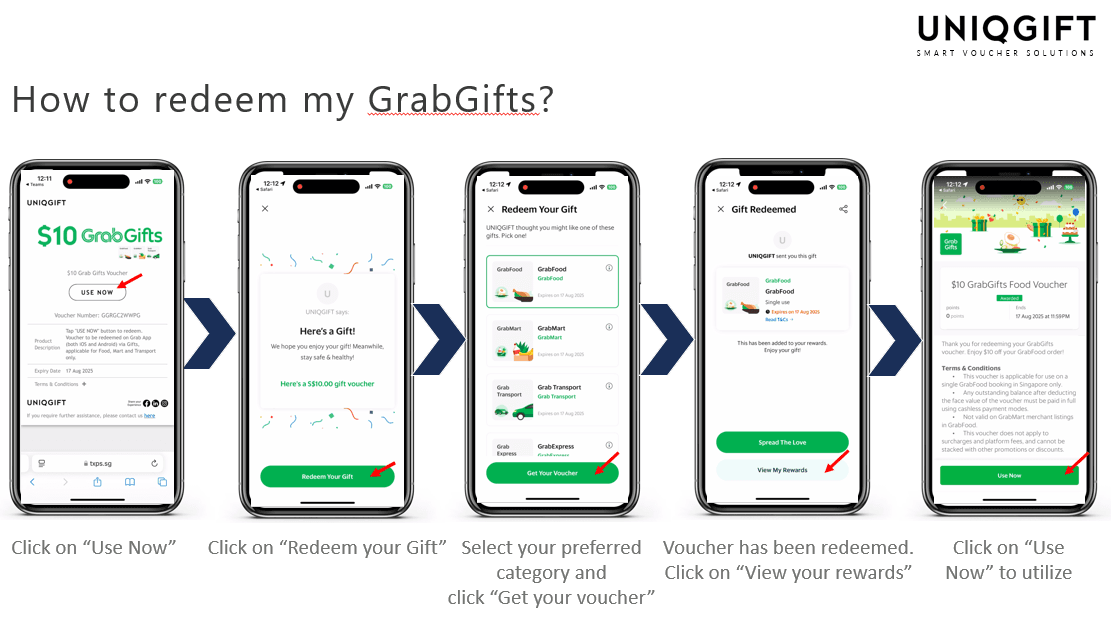
To view your voucher:1. Open your BitTopup account and visit your order history.2. Locate your GrabGifts Cash Voucher (TH) order.3. Click on the order details to reveal the unique redemption URL link.4. Copy the complete link or open it directly on the mobile device where your Grab Thailand app is installed.
Step-by-Step Guide to Buy GrabGifts Cash Voucher (TH) on BitTopup
Ordering your voucher takes only a few steps on BitTopup:
- Select Denomination: Choose the GrabGifts Cash Voucher (TH) value that matches your budget.
- Provide Delivery Information: Enter your active email address so your redemption link and receipt are sent immediately.
- Review Checkout Pricing: Check the live checkout screen for final pricing details.
- Complete Payment: Select your preferred payment method and confirm the transaction.
- Receive Your Code: Access your redemption link immediately on your order confirmation screen and email.
How to Redeem Your GrabGifts Cash Voucher on the Grab App
Follow these steps to claim your digital credit on your mobile device:
- Ensure the Grab app is installed on your phone and you are logged into your account.
- Tap the GrabGifts redemption link received from BitTopup.
- Your mobile browser will redirect to the GrabGifts redemption landing page.
- Tap Open in Grab App or Claim Voucher.
- If prompted, select your preferred service vertical (Transport, Food, Mart, or Express).
- Tap Confirm to add the voucher to your account under Offers / My Rewards.
- When placing an order or booking a ride in Thailand, tap the Offers field on the checkout screen and select your redeemed voucher to apply the discount.
Troubleshooting Common Grab Voucher Issues
- Link Fails to Open Grab App: If tapping the link opens a blank browser page, ensure you have the official Grab Thailand app installed. Copy the link and paste it into your mobile browser (Safari on iOS or Chrome on Android) rather than an in-app browser.
- Region Mismatch Error: If the app indicates the voucher is unavailable in your country, verify that your phone GPS location is set to Thailand and your Grab app profile is active in the Thai market.
- Expired Voucher Link: Redemption links have an activation window. Make sure to unwrap and claim the voucher into your Grab account before the redemption link validity period ends.
- Voucher Not Showing at Checkout: Verify that your order meets the specific vertical requirements (e.g., using a Transport voucher on a GrabCar ride rather than a GrabFood order). Also check if the voucher is already applied under your selected payment methods.
Why Choose BitTopup for GrabGifts Cash Vouchers?
BitTopup provides a straightforward digital checkout experience for travelers, expats, and residents in Thailand.
- Instant Digital Delivery: Voucher links are generated directly upon order completion for immediate use.
- Account Safety: You never need to share your Grab account password, login credentials, or SMS OTP codes. You only receive a secure redemption URL.
- Transparent Pricing: Check live rates directly on the BitTopup product page with no hidden checkout surprises.
- 24/7 Dedicated Support: Customer service is available around the clock to assist you with order inquiries and link redemption guidance.
Frequently Asked Questions
How do I redeem a GrabGifts cash voucher in Thailand?
Open the digital voucher link received after purchase on your mobile device. Tap the claim button to launch your Grab app, select your preferred service category if prompted, and confirm. The credit will appear in your My Rewards section ready to apply at checkout.
Can I convert my GrabGifts voucher into cash or GrabPay balance?
No. GrabGifts vouchers are non-refundable and non-transferable. They cannot be withdrawn to a bank account, converted into physical cash, or credited as a standard transferable GrabPay cash balance.
Can GrabGifts TH vouchers be used in other countries like Singapore or Malaysia?
No. GrabGifts Cash Vouchers (TH) are strictly region-locked for use within Thailand. They will not function on Grab accounts operating outside Thailand.
Does the Grab voucher cover platform fees and small order fees?
No. Grab vouchers apply toward the item subtotal or base ride fare. Additional charges such as platform service fees, small order fees, tips, and road toll charges must be paid separately using GrabPay Wallet, a card, or cash.
Can I change the denomination or service breakdown once unwrapped?
No. Once you choose the service vertical breakdown and confirm the claim inside the Grab application, the selection is final and cannot be reallocated.
What should I do if my GrabGifts voucher code fails to activate?
First, verify that your Grab app is updated to the latest 2026 version and that your device is located in Thailand. If the link displays an error, check that the full URL was pasted without missing characters, or reach out to BitTopup 24/7 customer support with your order ID for fast assistance.