

Deliveroo eGift Voucher (SG) Top Up: What It Is and What It Covers
A Deliveroo eGift Voucher (SG) is a prepaid digital code that adds Singapore Dollar (SGD) credit directly to your Deliveroo account balance. Once applied, your account balance works like digital cash across the Deliveroo platform in Singapore. You can use it to order meals from local hawker stalls, high-end restaurants, cafes, fast-food chains, and on-demand grocery outlets.
Your Deliveroo account credit covers:* Food and beverage items from partner restaurants and cafes across Singapore.* Groceries, fresh produce, household essentials, and snacks from Deliveroo Hop and partner retail supermarkets.* Standard delivery fees and small order surcharges.* Platform service fees.
Using a digital gift voucher gives you full control over your food budget while making it easy to order meals without linking a personal credit card for every single transaction.
Step-by-Step Guide: How to Redeem and Recharge Your Deliveroo SG Voucher
Redeeming your digital code is quick. You do not need to provide your account credentials or password to BitTopup. Once your order is processed, you will receive an alphanumeric voucher code ready for redemption.
Redeeming on the Deliveroo Mobile App (iOS & Android)
- Open the Deliveroo app on your mobile device and log in to your Singapore account.
- Tap the Account Profile icon in the top corner of the screen.
- Select Vouchers and Credit from the menu.
- Tap Add Code (or the + icon).
- Enter or paste your voucher code exactly as received.
- Tap Submit. The credit will instantly reflect in your available account balance.
Redeeming on Desktop / Web Browser
- Visit the official Deliveroo Singapore website (deliveroo.com.sg) and log in.
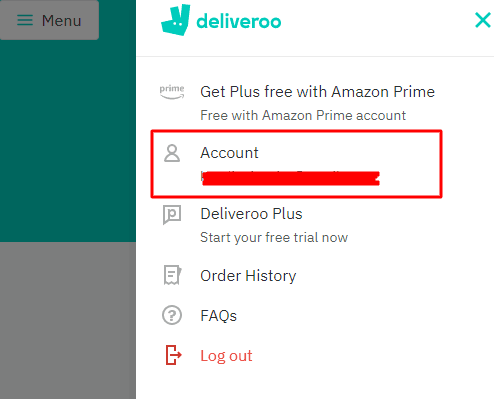
- Click on your profile name in the upper right corner to open the dropdown menu.
- Click on Vouchers and Credit.
- Type your voucher code into the redemption box and click Apply.
- Your updated SGD balance will appear and apply automatically at your next checkout.
Deliveroo vouchers are delivered as direct digital codes, meaning you do not need to locate an in-app User ID (UID) prior to purchasing on BitTopup. You simply claim your code and apply it directly to your profile.
Deliveroo Singapore Account Region and Currency Requirements
Deliveroo eGift Vouchers purchased for Singapore are region-locked. Keep the following regional conditions in mind before redeeming:
- Currency Match: Deliveroo SG vouchers are denominated exclusively in Singapore Dollars (SGD) and can only be credited to Singapore-based accounts.
- Geographic Restriction: You cannot apply a Singapore voucher code to an account registered in the United Kingdom, France, United Arab Emirates, Hong Kong, or any other international Deliveroo market.
- Delivery Address: Ensure your active delivery address is set within Singapore when placing an order with your redeemed credit.
| Item / Charge Type | Covered by Deliveroo SG Credit? | Notes |
|---|---|---|
| Restaurant & Cafe Orders | Yes | Deducted automatically at checkout |
| Grocery & Convenience Orders | Yes | Works for Deliveroo Hop and partner stores |
| Standard Delivery Fees | Yes | Covered entirely by available credit |
| Platform & Service Fees | Yes | Covered by the voucher balance |
| Driver Tips | Varies | App settings may require a direct card payment for tips |
| Promo Codes & Discounts | Yes | Voucher credit stacks with active promo discounts |
Deliveroo Credit Spending Rules: Combining with Promos, Fees, and Tips
When ordering with your Deliveroo balance, the system automatically applies your available credit to eligible items in your basket. Understanding how Deliveroo processes balances ensures you get the most out of your orders:
- Automatic Deduction: Deliveroo defaults to using your account credit before charging any secondary payment method.
- Split Payments: If your total order exceeds your available voucher balance, you can pay the remaining difference using an accepted credit card, debit card, or supported digital wallet.
- Stacking with Promotions: You can combine your account credit with restaurant percentage discounts, free delivery promotions, and platform-wide promo codes. The promo discount applies first, and your voucher credit covers the remaining balance.
- Multiple Vouchers: You can redeem multiple eGift vouchers to your account. The balances combine into one total SGD credit pool.
Troubleshooting Common Deliveroo Voucher Redemption Errors
If you run into an issue while redeeming your code, refer to these common causes and solutions:
- "Invalid Voucher Code": Re-check the code for accidental typos. Make sure there are no trailing spaces before or after the code. Verify numbers and letters that look similar (such as
0andOor1andI). - "Code Already Redeemed": Check your Vouchers and Credit tab to see if the balance has already been added. If someone else had access to the code, verify whether they applied it.
- "Region or Currency Mismatch": Confirm that your Deliveroo account country is set to Singapore and that your delivery address is an active Singapore location.
- "Expired Voucher": Ensure you redeem your code within the stated validity window.
Safe and Secure Digital Voucher Checkout on BitTopup
BitTopup provides a safe and direct way to buy Deliveroo eGift Vouchers for Singapore:
- No Password or Account Sharing: You never need to share your Deliveroo login details. You receive a standalone digital code that you redeem yourself.
- Fast Digital Delivery: Your digital voucher is generated and delivered immediately after payment confirmation.
- Live Pricing and Transparency: All prices, package denominations, and regional indicators are clearly displayed on the live checkout page.
- 24/7 Customer Support: If you have questions about your order or code redemption, customer service is available around the clock to assist you.
Frequently Asked Questions
How do I redeem my Deliveroo eGift Voucher in Singapore?
Open the Deliveroo app, go to your Account Profile, select Vouchers and Credit, tap Add Code, paste your digital code, and submit. The credit will instantly reflect in your SGD balance.
How long do Deliveroo SG gift vouchers last before expiring?
Deliveroo vouchers typically carry a standard validity period from the date of issuance. Check your order confirmation details for the specific expiry timeline, and redeem the code promptly to ensure your credit remains active.
Why is my Deliveroo voucher code showing as invalid or not working?
This usually occurs due to a copy-paste typo, an extra space, or an account region mismatch. Make sure your Deliveroo account is set to Singapore (SGD) and enter the code exactly as shown.
Can I use a Deliveroo Singapore (SG) voucher on an overseas account?
No. Deliveroo vouchers are strictly region-locked and currency-locked. A Singapore (SGD) voucher cannot be redeemed on Deliveroo accounts set to other countries.
Does Deliveroo account credit cover delivery and service fees?
Yes. Deliveroo credit applies to the full order total, including restaurant food costs, grocery items, small order surcharges, service fees, and standard delivery charges.
Can I add multiple Deliveroo eGift Vouchers to one account balance?
Yes. You can redeem multiple voucher codes sequentially. The values will combine into a single Deliveroo balance in your Singapore account.
Are Deliveroo eGift Voucher purchases refundable?
Digital voucher codes are non-refundable once delivered and verified, as they are single-use digital assets. Please confirm your account region and selected denomination before completing checkout.