



Dragonheir Silent Gods Top Up: Direct Dragon Crystal Delivery
Acquiring Dragon Crystals gives you full access to premium summons, resource bundles, and progression acceleration in Dragonheir: Silent Gods. As the primary premium currency in the game, Dragon Crystals allow you to secure powerful heroes across elemental affinities, refresh stamina for dungeon farming, and purchase seasonal event passes.
BitTopup provides a direct Player ID recharge service that credits Dragon Crystals straight to your account balance without requiring account passwords, login credentials, or third-party seller chats. Select your crystal package, provide your Player ID, and complete your order to receive your balance directly in-game.
In-Game Currency Conversion and Summon Economy
Understanding how Dragon Crystals convert into summon items and daily resources is critical for optimizing your team builds and seasonal leaderboards.
Dragon Crystals (Direct Recharge) │ ▼ 1:1 Direct Conversion Wyrmarrow │ ├─► 350 Wyrmarrow ──► 1x Heliolite Dice (Legendary / Epic Summons) ├─► Daily Stamina Refresh (Bread & Energy) └─► Seasonal Passes & Exclusive Shop Bundles1. Dragon Crystals vs. Wyrmarrow
- Dragon Crystals: The premium currency purchased with real funds. Dragon Crystals can buy exclusive store packs, the Dragonlord Pass, cosmetic skins, and special progression packs directly. They also convert into Wyrmarrow at a fixed 1:1 ratio.
- Wyrmarrow: The primary in-game resource used for regular summon dice purchases, stamina refreshes, and merchant inventory resets.
2. Summon Dice Values
- Heliolite Dice: The premium summon currency required to recruit top-tier Epic and Legendary heroes on standard and rate-up banners. One Heliolite Dice costs 350 Wyrmarrow (or 350 Dragon Crystals).
- Starlight Stone Dice: Used for standard affinity summons to gain Rare heroes, artifacts, and skill enhancement fodder.
| Currency / Item | Acquisition Method | Primary In-Game Usage |
|---|---|---|
| Dragon Crystals | Direct Top-Up via BitTopup | Exclusive Bundles, Dragonlord Pass, 1:1 Wyrmarrow Exchange |
| Wyrmarrow | 1:1 from Dragon Crystals / Events | Stamina Refreshes, Heliolite Dice Purchases, Shop Resets |
| Heliolite Dice | 350 Wyrmarrow / Special Packs | Legendary & Epic Hero Summoning on Featured Banners |
| Starlight Stone Dice | Quests, In-Game Shops | Affinity Summons, Rare Heroes, and Upgrade Materials |
How to Find Your Dragonheir Silent Gods Player ID
To ensure your Dragon Crystals arrive instantly, you only need to provide your in-game Player ID (UID). Follow these steps to locate it:
- Launch Dragonheir: Silent Gods on your mobile device or PC client.
- Tap your Avatar Profile icon located in the upper-left corner of the main screen.
- Open your profile page to view your account details.
- Locate the numeric Player ID displayed right below your nickname.
- Tap the Copy icon next to your ID to copy the exact string to your clipboard.
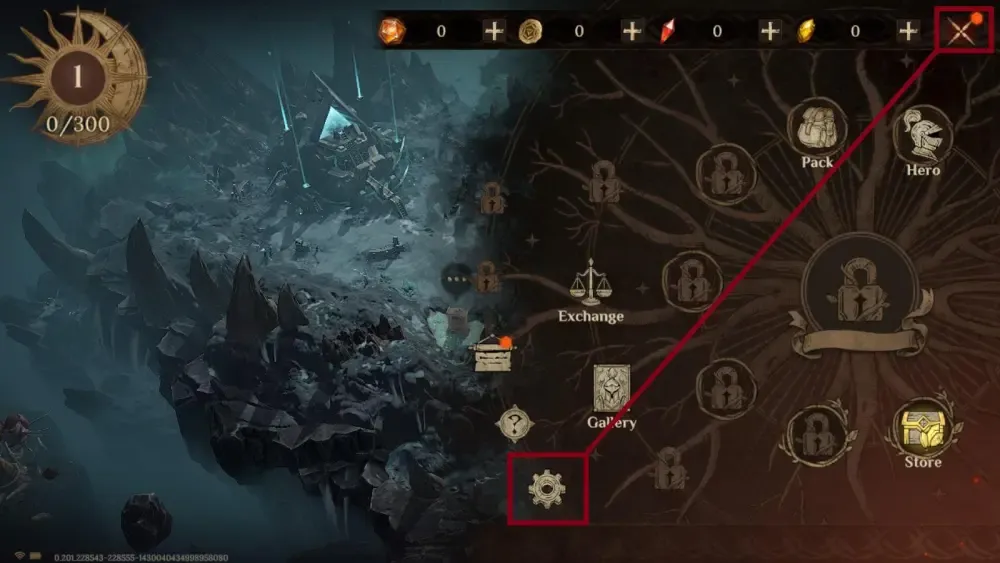
Tip: Always use the in-game copy button rather than typing numbers manually to prevent mistyping errors.
Step-by-Step Guide: How to Recharge on BitTopup
To top up your Dragonheir: Silent Gods account, complete the following steps:
- Select Package: Choose the Dragon Crystal denomination or bundle you wish to purchase from the product catalog above.
- Enter Player ID: Paste your copied numeric Player ID into the required input field.
- Review Details: Confirm that the entered Player ID matches the account you want to credit.
- Proceed to Checkout: Select your preferred payment method on the live checkout screen.
- Receive Crystals: Once payment is processed, the system automatically fulfills the order and credits the Dragon Crystals directly to your in-game balance.
Dragon Crystal Packages and First-Time Purchase Bonus
Dragonheir: Silent Gods features a first-time top-up bonus system across standard crystal tiers. When purchasing a specific denomination for the first time on your account, the game awards double the base amount in equivalent currency value.
First-Time Double Bonus Rules
- Each crystal tier qualifies for its own individual first-purchase bonus.
- Bonus rewards are credited directly as in-game Wyrmarrow or bonus crystals alongside your primary balance.
- First-time purchase bonuses reset periodically during major seasonal updates or annual server resets in 2026.
- Current live prices, local currency conversions, and applicable regional taxes are displayed directly on the live BitTopup checkout page.
| Package Tier | Base Dragon Crystals | First-Time Purchase Bonus | Total First Recharge Currency |
|---|---|---|---|
| Tier 1 | 60 Crystals | +60 Bonus | 120 Total |
| Tier 2 | 300 Crystals | +300 Bonus | 600 Total |
| Tier 3 | 980 Crystals | +980 Bonus | 1,960 Total |
| Tier 4 | 1,980 Crystals | +1,980 Bonus | 3,960 Total |
| Tier 5 | 3,280 Crystals | +3,280 Bonus | 6,560 Total |
| Tier 6 | 6,480 Crystals | +6,480 Bonus | 12,960 Total |
Account Safety: Player ID Direct Top-Up vs. Account Sharing
Protecting your account from unauthorized access, account penalties, or compromised login details is essential when purchasing in-game items.
Direct Player ID Top-Up (BitTopup) ├── Only requires numeric UID ├── Zero password or login sharing ├── Direct server-side crediting └── 100% Account IntegrityRisky P2P / Account Login Top-Up ├── Requires email, Apple ID, or Google login ├── Vulnerable to unauthorized access & data theft ├── Unofficial gift card exploits risking bans └── Delayed manual seller chatsWhy Player ID Direct Top-Up Is the Safer Option:
- No Password Required: BitTopup only requires your public Player ID. We never ask for your Google Play, Apple ID, Steam, or social login credentials.
- No Account Hijacking Risk: Because no login verification codes or passwords are exchanged, your game profile, gear, and heroes remain solely in your control.
- Official Delivery Processing: Orders are credited directly through secure processing channels, preventing currency clawbacks, negative balances, or publisher account suspensions.
- No Manual P2P Interaction: Delivery is fully automated, eliminating the need to coordinate with third-party marketplace sellers in chat windows.
Cross-Platform Synchronization (PC, iOS, and Android)
Dragonheir: Silent Gods supports complete cross-platform progression across mobile devices and the standalone PC/Steam client.
- Unified Account State: Once your game account is linked to your email or social login, all data syncs in real-time across iOS, Android, and PC.
- Instant Crystal Availability: When you recharge using your Player ID on BitTopup, the Dragon Crystals apply directly to your central server profile. You can access and spend them immediately regardless of which device you use to log in.
- Cross-Device Summons: Heroes summoned and items purchased using Dragon Crystals on one platform are instantly available across all other connected platforms.
Frequently Asked Questions
How do I find my Player ID in Dragonheir: Silent Gods?
Open Dragonheir: Silent Gods and tap your profile avatar in the top-left corner of the screen. Your numeric Player ID is displayed underneath your character name. Use the copy button next to the numbers to copy it accurately.
What can I use Dragon Crystals for in Dragonheir: Silent Gods?
Dragon Crystals are used to purchase exclusive shop bundles, acquire the seasonal Dragonlord Pass, buy cosmetic character skins, and convert 1:1 into Wyrmarrow. Wyrmarrow can then be spent on Heliolite Dice for summoning Epic and Legendary heroes or refreshing stamina bread for dungeon grinding.
Do I need to share my account password to recharge Dragon Crystals?
No. Recharging through BitTopup only requires your numeric Player ID. You never need to provide your password, authentication codes, or linked social media logins.
Will recharged Dragon Crystals sync across PC and mobile platforms?
Yes. Dragonheir: Silent Gods uses unified cloud servers. As long as you log into the same game account, any Dragon Crystals purchased via your Player ID will be accessible on PC, iOS, and Android devices.
How does the first-time purchase bonus work for Dragon Crystals?
Each crystal denomination features a one-time double bonus for your account's first purchase of that tier. If you have not purchased that specific package previously, you will receive the base crystals plus the corresponding bonus reward directly in your account.
What should I do if I entered the wrong Player ID during checkout?
If you realize you submitted an incorrect Player ID, contact BitTopup customer support immediately with your order reference number. If the order has not yet been processed by the automated dispatch system, our team can help update your details. Once an order is fulfilled and credited to an existing in-game UID on the server, the transaction cannot be reversed.