



Identity V Top Up: Direct and Secure Echoes Recharge
Identity V requires Echoes to acquire the latest Hunter and Survivor skins, unlock crossover characters, and access seasonal event items. BitTopup provides an efficient Identity V top up service designed for global players across both Asia and NA/EU servers. By using direct Player ID crediting, your account receives Echoes without requiring login credentials or password sharing.
Whether you need Echoes for limited-time crossover Essences, the 30-Day Dice Enthusiast pass, or high-tier costumes in the Illusion Hall, ordering through BitTopup ensures prompt account crediting directly into your Identity V profile.
How to Top Up Identity V Echoes on BitTopup
Recharging your Identity V account is a straightforward process that takes only a couple of minutes:
- Select Your Echoes Package: Choose the amount of Echoes you wish to purchase from the product denomination list.
- Enter Your Player ID: Input your numerical in-game User ID into the Player ID field.
- Select Your Server: Pick the exact game server your account resides on (Asia or NA and EU).
- Proceed to Checkout: Review your order summary and finalize payment through your preferred payment method.
- Verify Delivery: Once the transaction finishes, launch Identity V or restart your client to confirm your updated Echoes balance.
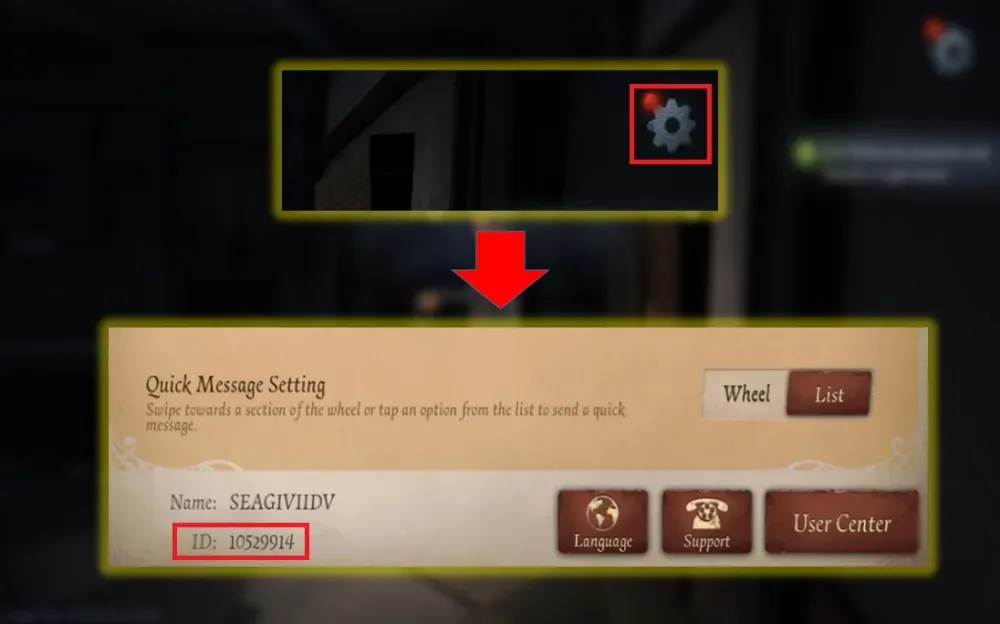
How to Locate Your Identity V Player ID and Game Server
To make sure your Echoes arrive instantly without routing issues, you must supply the correct in-game numerical ID and server name.
- Launch the Identity V app on your mobile device or PC client.
- On the main login title screen, check the server selector at the bottom center to see if your active profile is on the Asia or NA and EU server.
- Enter the game and head to the main lobby (the Manor).
- Tap your Profile Avatar located in the top-right corner of the screen.
- Open your user profile page. Your Player ID (a string of numbers, typically 7 to 9 digits long) is displayed next to your username.
- Tap the small copy icon beside your Player ID to copy it directly to your clipboard and paste it into BitTopup.
Supported Identity V Server Regions: Asia vs. NA and EU
Identity V operates with distinct regional servers. Character data, unlocked skins, Clues, and Echo balances do not transfer between regions. Selecting the correct server during checkout is mandatory for the system to find your Player ID.
| Server Option | Internal Server ID | Supported Regions / Timezones | Target Players |
|---|---|---|---|
| Asia | 6101 | East Asia, Southeast Asia (UTC+8) | Players registered on the Asian regional server |
| NA and EU | 6102 | North America, South America, Europe (UTC-5 / UTC+1) | Players registered on the Global NA/EU server |
Tip: If you play on both servers using the same login account, verify which character profile you want to credit before submitting the order. Player IDs are unique to each individual server profile.
What Are Identity V Echoes and How to Use Them
Echoes serve as the primary premium currency in NetEase's Identity V. Unlike Clues or Fragments, which can be earned slowly through regular matches and deduction paths, Echoes give immediate access to exclusive shop items and gacha events.
1. Season Essences and Crossover Spheres
Every season features new Season Essences containing exclusive S-tier and A-tier costumes for newly released Hunters and Survivors. In addition, major anime and video game crossover events require Inspiration or direct Echo conversions to open limited-edition crossover spheres before they leave the store permanently.
2. Direct Character and Costume Purchases
In the Illusion Hall, players can spend Echoes to purchase newly released Survivors and Hunters immediately upon release without spending Clues. You can also purchase high-tier shop costumes, unique accessory effects (such as carry animations or altered ability visuals), and pets.
3. The 30-Day Dice Enthusiast
The 30-Day Dice Enthusiast pass grants 3 extra 4-sided dice every day upon login for 30 days. This is the most cost-effective way to rapidly advance along the Logic Path to secure the seasonal A-tier Logic Path costume and accumulate Clues and Inspirations.
4. Custom Rooms and Furniture
For players who enjoy Manor customization, Echoes unlock luxury room layouts (such as the Royal Host or Phantom Castle) as well as interactive furniture pieces, dynamic room music discs, and display mannequins for your favorite costumes.
5. Utility Items and Name Changes
Echoes are required to purchase Character Name Change cards, Guild creation licenses, Guild name adjustments, and Spyglass bundles for the Event Shop.
Safe & Secure UID Top-Up: Why No Password Is Required
Account safety is a core priority for Identity V players who have invested time and resources into building their skin collections. BitTopup uses direct API crediting via your public Player ID and Server selection.
- Zero Password Sharing: You never need to provide your NetEase, Google, Apple ID, Facebook, or Twitter login passwords.
- No Account Hijacking Risks: Because no third-party logs into your account, your authentication details remain completely private.
- No Region Lock / VPN Conflicts: Top-ups delivered via UID do not trigger the security flags or temporary locks associated with unexpected IP location changes.
- Safe for Competitive Accounts: Tournaments and ranked tier standings remain safe from suspicious login detections.
Identity V Recharge Troubleshooting and Delivery Verification
How to Verify Your Echoes Balance
- Return to the game lobby (the Manor).
- Open the Illusion Hall (in-game store).
- Check the top-right corner where your current Echoes balance is shown.
- If the number has not updated, close the Identity V app completely from your device's task manager and restart it to refresh your server connection.
Common Issues and Solutions
- Echoes Not Appearing: Peak server traffic during maintenance or new essence releases can cause a brief delay. Allow a few moments and restart the game.
- Incorrect Server Selected: If you entered a valid Player ID that belongs to a different server (for example, choosing Asia instead of NA and EU), the order may fail validation. Double-check your server before purchasing.
- Player ID Typo: Entering an incorrect Player ID may route the order to another player if that ID exists, or cause the order to hold in pending status. Always use the in-game copy button to avoid manual entry mistakes.
- Contacting Support: If your order shows completed on BitTopup but your in-game balance remains unchanged after restarting, contact BitTopup customer support with your Order Number, Player ID, and Server for quick assistance.
Frequently Asked Questions About Identity V Top Up
How do I top up Echoes in Identity V?
Select the desired Echoes package on BitTopup, type in your numerical Identity V Player ID, select your active game server (Asia or NA and EU), and complete your payment. The Echoes will be credited directly to your in-game account.
Where can I find my Identity V Player ID and Server?
Your server is visible on the initial game start screen. Your Player ID is found inside the game by tapping your profile avatar in the upper-right corner of the lobby screen; the ID is the numerical code displayed next to your character name.
Do I need to share my Identity V login password to recharge?
No. BitTopup requires only your public Player ID and Server. You never need to disclose your password or link third-party social logins.
Which Identity V servers are supported for top-up?
BitTopup supports both major global servers: Asia (Server ID 6101) and NA and EU (Server ID 6102).
What should I do if my Identity V Echoes do not appear immediately?
First, restart the Identity V client completely to refresh the connection to the NetEase game servers. If your balance still does not update after several minutes, reach out to BitTopup customer support with your order number and Player ID details.
What in-game items can I purchase with Identity V Echoes?
Echoes can be spent on Season Essences, Crossover Essences, S-tier and A-tier costumes, Hunters, Survivors, Pets, Accessories, Room Furniture, Room Music, Name Change Cards, and the 30-Day Dice Enthusiast pass.
Identity V Recharge Packages
Available Identity V packages: 60 Echoes · 185 Echoes · 305 Echoes · 690 Echoes · 2025 Echoes · 3330 Echoes · 6590 Echoes · 6590 Echoes * 2 · 6590 Echoes * 4 · 6590 Echoes * 8. Enter your UID, pick a package and pay; current prices and discounts of up to 42% are shown in the selector above.
People search for this as "Identity V top up", "IDV top up" or "Echoes Identity V". This page tops up Echoes directly to your Identity V UID.
Identity V Recharge Guides
Other games you can top up
BitTopup also tops up: Whiteout Survival Frost Stars, Genshin Impact top up, Zenless Zone Zero top up, Delta Force top up.