



MiFinity eVoucher INR Top Up: Fast and Secure Prepaid Funding
Managing your online spending requires tools that prioritize privacy and control. A MiFinity eVoucher INR top up offers an efficient way to add funds to your MiFinity eWallet balance or complete direct transactions on supported merchant platforms without exposing sensitive bank cards. When you purchase an Indian Rupee (INR) prepaid voucher, you receive a secure 20-digit digital PIN that converts instantly into available spending power.
Using prepaid digital codes gives Indian users flexibility for gaming, entertainment, and global digital services. BitTopup provides instant delivery of your voucher code immediately upon payment confirmation, giving you rapid access to your funds without waiting periods or complicated setup steps.
What Is a MiFinity eVoucher (INR) and How Does It Work?
A MiFinity eVoucher is a prepaid digital card loaded with a fixed amount of Indian Rupees (INR). It operates similarly to a virtual debit card or prepaid voucher, allowing you to deposit funds into your MiFinity eWallet or make direct payments at partner checkouts.
Key aspects of how the eVoucher functions:- Fixed Value Denominations: Each voucher holds a specific INR balance chosen at checkout.- Secure PIN Authentication: The voucher is secured by a unique 20-digit PIN code and an expiration date provided upon purchase.- Single-Use Structure: The full value of an INR voucher is credited upon redemption into your eWallet.- Direct Account Funding: Once redeemed, the funds merge with your general eWallet balance for immediate spending across thousands of accepting websites.
How to Redeem Your 20-Digit MiFinity eVoucher PIN
Redeeming your code takes just a few steps through the official MiFinity app or desktop portal.
Follow this step-by-step guide to credit your eWallet balance:1. Log in to your MiFinity account via the official website or mobile app.2. Verify that your active wallet is set to Indian Rupees (INR).3. Select Deposit from the main dashboard menu.4. Choose MiFinity eVoucher from the list of available deposit methods.5. Enter the exact deposit amount matching the voucher value you purchased.6. Input your 20-digit eVoucher PIN and the expiry date in the designated fields.7. Click Submit to finalize the transaction. The funds will reflect in your INR balance instantly.
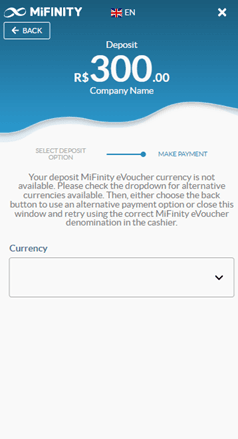
If you want to spend the voucher directly at a partner website without depositing to your eWallet first, select MiFinity at the merchant checkout, choose the eVoucher option, and enter your 20-digit PIN directly.
MiFinity eVoucher Features and Specifications
Before buying or redeeming your code, review the key technical specifications for Indian Rupee vouchers:
| Feature | Specification |
|---|---|
| Currency | Indian Rupee (INR) |
| Code Format | 20-digit numeric PIN with expiry date |
| Usage Model | Single-use redemption per code |
| Wallet Compatibility | MiFinity INR eWallet accounts |
| Delivery Format | Instant digital delivery on BitTopup |
| Validity Period | Up to 12 months from generation date |
MiFinity INR Currency Lock and Account Matching Rules
One critical aspect of using MiFinity eVouchers is the currency match requirement. An INR-denominated voucher is locked to the Indian Rupee.
To ensure a successful redemption:- Account Currency Match: You must have an INR sub-wallet created within your MiFinity account. MiFinity permits users to hold multiple currency pockets within a single primary account. If you only hold a EUR or USD pocket, go to your account settings and add an INR wallet pocket before attempting redemption.- Avoiding Transaction Rejections: Attempting to deposit an INR voucher into an incompatible currency pocket will cause the system to reject the transaction or apply unwanted foreign exchange fees.- Regional Limitations: INR vouchers are intended for use in the Indian region and compatible international services that accept INR balances.
Where to Use MiFinity eVoucher Payments in 2026
In 2026, the MiFinity network supports thousands of online platforms worldwide. By converting local payment options into an eVoucher, you can transact across several sectors:- Gaming and Digital Goods: Pay for digital content, credits, in-game subscriptions, and downloadable items on supported gaming portals.- Online Services & SaaS: Pay for virtual private networks, web hosting, cloud storage, and productivity tools that support MiFinity wallet payments.- International Travel and Retail: Book services, purchase gift items, or fund cross-border digital transactions securely without relying on high-fee credit card processors.
Security and Privacy Benefits of Prepaid eVouchers
Using prepaid vouchers provides significant safety advantages over direct card or bank payments:- Zero Exposure of Banking Details: When you redeem an eVoucher, your primary bank account numbers, debit card details, and CVVs are never shared with the merchant or intermediate platforms.- No Account Sharing Required: You only ever handle the voucher code itself. BitTopup never asks for your MiFinity password or login credentials.- Strict Budget Control: Because the voucher is prepaid with a set amount, you eliminate the risk of accidental recurring charges, unexpected subscription renewals, or overspending.
Why Buy MiFinity eVouchers on BitTopup?
Purchasing your MiFinity eVouchers on BitTopup guarantees a smooth and reliable experience:- Instant Digital Delivery: Your code is generated and displayed immediately on your screen after payment, alongside an instant email backup.- Transparent INR Pricing: Current rates and available denominations are clearly presented on the live checkout page without hidden service surcharges.- Secure Checkout Environment: BitTopup uses high-standard encryption to protect every transaction, offering convenient local payment methods for buyers in India.- 24/7 Customer Support: If you ever experience issues with order tracking or code delivery, the BitTopup support team is ready around the clock to assist you.
Troubleshooting Common MiFinity eVoucher Redemption Errors
If you encounter an issue when redeeming your voucher, review these common fixes:- Invalid PIN Error: Check the 20-digit PIN carefully. Ensure no spaces, hyphens, or mistaken characters (such as mistaking the number 0 for the letter O) were entered.- Currency Mismatch Failure: Verify that you selected the INR wallet inside your MiFinity dashboard. If depositing to a EUR or USD wallet, the PIN redemption will fail.- Voucher Already Redeemed: Remember that MiFinity eVouchers are single-use. Once redeemed, the code cannot be reused. Refresh your eWallet balance to see if the funds were already credited.- Deposit Value Mismatch: Some deposit forms require you to enter the exact voucher face value before submitting the PIN. Double-check that the numerical amount matches your voucher denomination precisely.
Frequently Asked Questions
What is a MiFinity eVoucher (INR)?
A MiFinity eVoucher (INR) is a prepaid digital payment code denominated in Indian Rupees. It allows users to deposit funds into their MiFinity eWallet or pay directly on merchant websites without using personal credit or debit cards.
How do I redeem my 20-digit MiFinity eVoucher PIN to my eWallet?
Log in to your MiFinity account, select the INR wallet, click on Deposit, choose MiFinity eVoucher as your method, enter the voucher denomination along with the 20-digit PIN and expiry date, and confirm the transaction.
Can I use an INR MiFinity eVoucher if my eWallet is set to another currency?
No, the voucher currency must match the wallet currency. However, MiFinity allows users to create multiple currency pockets within one account. You can create an INR pocket in your account settings and deposit the voucher directly into it.
Is the MiFinity eVoucher reusable or single-use?
MiFinity eVouchers are strictly single-use. The entire balance must be redeemed or spent in a single transaction. Once the PIN is processed, the code becomes invalid.
How long is a MiFinity eVoucher valid before it expires?
MiFinity eVouchers typically carry a validity period of up to 12 months from the date of issue. The exact expiration date is provided with your 20-digit code upon purchase on BitTopup.
What should I do if my MiFinity eVoucher code shows as invalid or already redeemed?
First, re-type the 20-digit PIN carefully to avoid typos. Next, check your MiFinity transaction history to see if the deposit already completed. If the problem persists, contact BitTopup customer support with your order details for assistance.