

Miko Era: Twelve Myths Jade Top Up on BitTopup
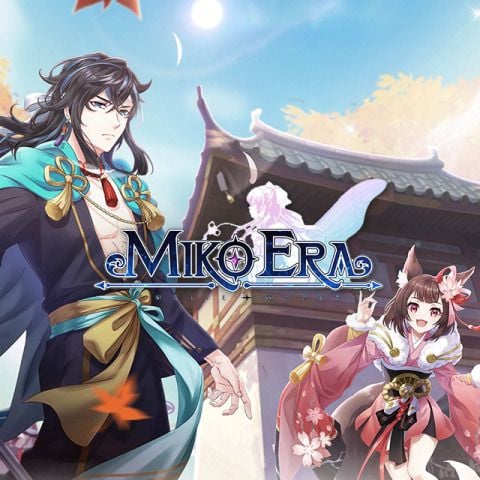
Jade serves as the primary premium currency in Miko Era: Twelve Myths. Whether you want to recruit high-tier Zodiac Mikos, enhance your Card Resonance networks, or unlock rare cosmetic wings and mounts, having an ample supply of Jade is essential for steady progression. BitTopup provides a direct, UID-based recharge service that sends Jade straight to your character without requiring account login credentials.
By choosing BitTopup for your Miko Era: Twelve Myths Jade top up, you get access to competitive real-time pricing, multi-currency payment channels, and reliable order fulfillment. All transactions are processed through encrypted gateways, ensuring your player profile remains secure while your Jade is credited directly to your server.
Step-by-Step Guide: How to Recharge Miko Era: Twelve Myths Jade on BitTopup
To buy Miko Era Twelve Myths Jade quickly and safely, follow these steps:
- Select Your Jade Package: Browse the available Jade denominations on the BitTopup product page and pick the amount you need.
- Provide Account Information: Enter your Miko Era: Twelve Myths User ID (UID), select your Server, and type your Character Name.
- Review Order Details: Double-check that your server and numerical ID match your in-game profile to prevent delivery delays.
- Choose Payment Method: Pick your preferred regional or international payment solution shown on the live checkout screen.
- Complete Checkout: Finalize the payment. Once confirmed, the system processes your request and credits the Jade directly to your character account.
- Verify In-Game: Launch Miko Era: Twelve Myths to check your updated Jade balance or check your in-game mailbox for confirmation.
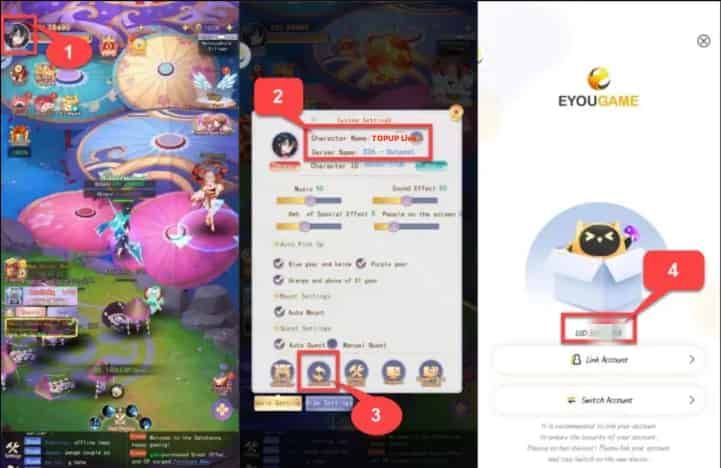
How to Find Your Miko Era UID, Server, and Character Name
To ensure your Jade top up lands in the right account, you must provide your exact User ID and Server. Finding these details inside the game takes only a few seconds:
- Launch Miko Era: Twelve Myths on your device and log in to your character.
- Tap your Character Avatar located in the upper-left corner of the main screen.
- In the profile interface that opens, you will see your Character Name, Server Name/ID, and your numerical UID.
- Tap the Copy icon next to your UID string to copy it directly to your clipboard.
- Paste the UID into the BitTopup order form along with your active server.
Jade Utility Guide: Zodiac Mikos, Card Resonance, and Combat Power
Strategic spending in Miko Era: Twelve Myths allows you to maximize your Combat Power (CP) efficiently. Here is how top players prioritize their Jade investments:
1. Zodiac Miko Summons
Recruiting powerful Zodiac Mikos (such as SSS-tier units) provides the largest immediate boost to team combat strength. Mikos contribute active skills, passive attribute bonuses, and combo synergies in PvE boss battles and PvP arena fights. Using Jade on limited-time Miko recruitment banners helps you assemble optimal elemental lineups.
2. Card Resonance and Spirit Upgrades
Equipping and refining Spirit Cards triggers Resonance links that grant massive percentage-based stat boosts. Jade allows you to purchase card summon vouchers, essence materials, and resonance breakthrough catalysts to strengthen your core build.
3. Daily Boss Resets and Myth Trials
High-level gear drops come from daily World Bosses, Guild Raids, and Myth Trials. Spending a modest amount of Jade daily to buy extra attempt tickets lets you farm legendary equipment and upgrade shards at more than twice the standard rate.
4. Exclusive Mounts, Wings, and Costumes
Cosmetic sets in Miko Era: Twelve Myths are not just visual; they provide permanent account-wide attribute increases to Attack, HP, and Critical Damage. Limited-time Jade events often feature exclusive vanity items that carry substantial passive stats.
| Jade Spending Category | Primary In-Game Target | Impact on Combat Power (CP) |
|---|---|---|
| Zodiac Miko Banners | SSS-Tier Mikos & Shards | High: Unlocks powerful active battle skills & synergies |
| Card Resonance | Spirit Cards & Link Nodes | High: Provides direct % multipliers to core attributes |
| Dungeon & Boss Resets | World Bosses & Myth Trials | Medium-High: Accelerates legendary gear acquisition |
| Mounts & Wings | Event-exclusive cosmetics | Medium: Grants permanent passive stat bonuses |
| Stamina & Growth Packs | Daily resource bundles | Steady: Ensures continuous character level progression |
Safe Top-Up Practices: Secure UID-Only Processing
Account safety is a major concern when purchasing mobile MMORPG currencies. BitTopup uses a UID-based processing system designed to keep your personal data secure:
- No Account Passwords Required: You never need to share your login credentials, email password, or social media link to receive Jade. Your UID and server number are the only details required.
- No Account Sharing Risks: Because third parties never log in to your account, your game profile is protected against unauthorized access, inventory tampering, or location-based security flags.
- Encrypted Transactions: All payment channels on BitTopup use industry-standard encryption protocols to safeguard your financial details during checkout.
- Transparent Pricing: Current prices and exchange rates are displayed live on the checkout screen with no hidden fees.
Troubleshooting Delayed Orders and Server Sync
If you have completed your checkout on BitTopup but do not see your Jade immediately, follow these troubleshooting steps:
- Restart the Game App: Completely close Miko Era: Twelve Myths and relaunch it. This forces the client to sync with the game server and update your currency balances.
- Check Your In-Game Mailbox: In some instances, top-up items or bonus Jade tokens are delivered via system mail rather than direct balance addition. Open your mailbox and claim any unread messages.
- Confirm Submitted Server and UID: Check your BitTopup order receipt to ensure there was no typo in your UID or selected server.
- Verify Payment Status: Confirm that your payment method processed successfully and that you received an order confirmation from BitTopup.
- Contact Support: If your Jade has not arrived after these checks, contact BitTopup customer support with your Order ID, Server, and Character Name for rapid verification.
Frequently Asked Questions
What is Jade used for in Miko Era: Twelve Myths?
Jade is the core premium currency used to summon Zodiac Mikos, purchase rare progression items, reset daily dungeon limits, advance Card Resonance, and unlock exclusive mounts and outfits.
How do I find my Miko Era: Twelve Myths UID and Server?
Tap your character avatar in the top-left corner of the game screen to open the profile page. Your numerical UID, server name/ID, and character name are displayed there. You can tap the copy button next to your UID to copy it directly.
Do I need to provide my game account password to recharge Jade?
No. BitTopup only requires your User ID (UID), Server, and Character Name. You should never share your game password or login credentials with anyone.
How long does it take for Jade to be delivered to my account?
Jade recharges are processed automatically upon payment confirmation. Most orders are credited to your character account within minutes.
Can I recharge Miko Era: Twelve Myths Jade for another player?
Yes. As long as you know their correct UID, Server, and Character Name, you can purchase Jade packages on BitTopup and have them delivered directly to their account.
What should I do if my Jade does not appear in-game after checkout?
Restart your game client to refresh your balance, check your in-game mailbox for delivery tokens, and verify that your submitted UID and server were accurate. If you still need help, reach out to BitTopup support with your order number.
Is Miko Era: Twelve Myths Jade top up supported globally in 2026?
Yes. BitTopup supports global servers for Miko Era: Twelve Myths in 2026, offering international payment options tailored to players worldwide.