

Never After Diamond Top Up and In-Game Utility Overview
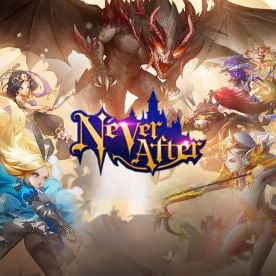
Never After is an action MMORPG set in a twisted fairy-tale universe where classic storybook heroes fight alongside you. As you progress through dungeons, team trials, and guild battles, your character's combat rating and team synergy become vital. Diamonds serve as the core premium currency in Never After, giving you access to essential progression items, partner summons, and character customization.
Primary Uses for Never After Diamonds
- Fairytale Partner Summons: Use Diamonds to purchase Golden Echo Keys and summon high-tier SSR partners such as Snow White, Cinderella, Little Red Riding Hood, Alice, and Prince Charming. Strong partners provide passive stats, combat assist skills, and synergy bonuses.
- Vitality and Daily Energy (Spinach Cans): High-level gear farming and daily dungeon runs consume Vitality. Diamonds allow you to buy Spinach Cans and energy items to keep grinding equipment enhancement materials and skill books.
- Equipment Upgrades and Gem Sockets: Refine your weapons, awaken gear slots, and purchase high-level stat gems from the premium store to boost your overall Gear Score (BR).
- Exclusive Cosmetics and Mounts: Stand out in Saint Pearl and guild halls with unique wardrobe outfits, weapon skins, wing decorations, and rare mounts.
- Castle Customization and Clan Contributions: Upgrade your personal estate, decorate your castle rooms, and contribute resources to unlock high-tier guild buffs.
| Diamond Usage Category | Key Items Purchased | In-Game Progression Benefit |
|---|---|---|
| Partner Gacha | Golden Echo Keys, Shard Chests | Unlocks SSR Fairytale Partners and skill upgrades |
| Energy Recovery | Spinach Cans, Vitality Potions | Enables continuous dungeon and boss farming |
| Gear Enhancement | Refining Stones, Star Gems, Runes | Direct boost to combat power and battle rating |
| Cosmetics & Wardrobe | Outfits, Wing Effects, Mount Skins | Aesthetic changes and minor permanent collection stats |
| Estate & Social | Castle Furniture, Rose Bundles, Gifts | Increases charm rating and manor development levels |
How to Recharge Never After Diamonds on BitTopup
Recharging your Never After Diamonds on BitTopup takes only a few simple steps. You do not need to share your account login credentials or bind external platforms.
- Select Your Diamond Pack: Choose the exact amount of Never After Diamonds you need from the product options above.
- Enter Your Account Information: Input your in-game Role ID and select your current Server from the designated fields.
- Review Your Selection: Double-check that your Role ID matches your profile character to prevent delivery errors.
- Complete the Payment: Choose your preferred payment method and finalize your transaction.
- Receive Diamonds in Game: Once your payment is verified, your Diamonds are transferred straight to your character. Log into the game or restart your client to view your updated balance.
How to Find Your Never After Role ID and Server
To ensure your Never After Diamond recharge goes to the correct character, you must copy your unique Role ID and note your exact server name from within the game client.
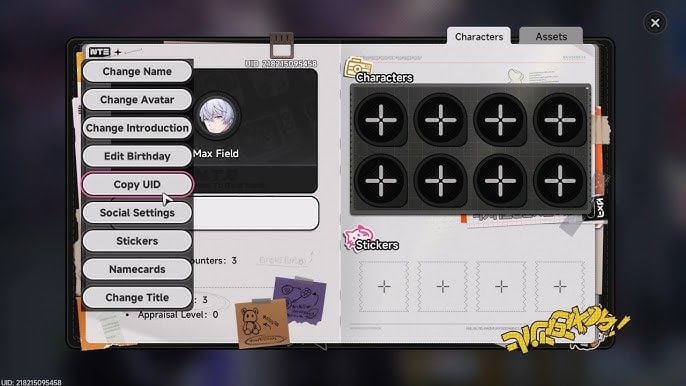
Step-by-Step Instructions to Locate Your ID
- Open the Never After application on your device.
- Log into the server where your primary character is located.
- Tap on your Character Avatar (Profile Icon) located in the top-left corner of the main screen.
- In the profile overview window, locate the Role ID line under your character name.
- Tap the Copy icon next to your Role ID number.
- Note the exact Server Name displayed on your profile or server login window.
Paste this numerical ID directly into the input field on BitTopup before checking out.
Benefits of Topping Up Never After Diamonds via BitTopup
BitTopup provides a straightforward platform designed for mobile and PC gamers looking for reliable in-game currency top-ups.
- Direct UID Crediting: Your purchase relies strictly on your public Role ID and Server. You never have to share passwords, login tokens, or social logins.
- Transparent Live Checkout: The price you see on the product page matches what you pay at checkout with no hidden platform surcharges.
- Multiple Regional Payment Options: Choose from a wide selection of payment gateways tailored to local and international players.
- 24/7 Customer Service: If you have questions about your order status or account details, our support team is available around the clock to assist you.
Account Safety and Password-Free UID Delivery
Account security is critical when purchasing game top-ups online. Traditional top-up methods that require account sharing or third-party login credentials expose your account to potential security risks, unauthorized access, and violations of game rules.
BitTopup uses direct player identification (UID/Role ID) delivery. This means our system only needs your publicly viewable Role ID and Server name to route the purchased Diamonds directly to your in-game mailbox or balance bar. Because we never ask for your password, Apple ID, Google Play account, or social media bindings, your personal information stays entirely under your control.
Troubleshooting Common Never After Top-Up Issues
If you experience any delays or issues with your Never After Diamond delivery, follow these troubleshooting steps:
1. Delivery Delay After Payment Completion
Transactions are processed swiftly, but temporary network congestion between payment providers and game servers can occasionally cause a short delay. Close your Never After application completely, reopen it, and check your currency balance.
2. Incorrect Server Selected
If you selected the wrong server during checkout, the Diamonds may be routed to an alternative character associated with your Role ID on that server or held by the system. Contact BitTopup Customer Support immediately with your Order ID, correct Server name, and Role ID for assistance.
3. Missing Mailbox Items
Some bundle purchases or promotional top-up items arrive via in-game mail rather than directly altering the Diamond counter on your main HUD. Check your in-game mailbox tab in Saint Pearl to claim attached reward letters.
4. Typo in Role ID
If you entered an incorrect numerical ID, reach out to our 24/7 customer support team right away with your transaction receipt so our team can check the processing state of your order.
Never After Diamond Top Up FAQ
How do I find my Never After Role ID and Server?
Tap your character avatar in the top-left corner of the main gameplay screen. Your Role ID is the numerical code displayed below your character name. Your server name appears on the profile window as well as the main login screen.
What items can I buy with Never After Diamonds?
You can use Diamonds to purchase Golden Echo Keys for partner gacha draws, Spinach Cans for vitality restoration, equipment upgrade materials, refining runes, wardrobe cosmetics, mounts, and manor furnishings.
Do I need to provide my account password to top up Never After Diamonds?
No. BitTopup requires only your Role ID and Server. You should never share your password, email login, or verification codes.
How long does it take for Never After Diamonds to reflect in my account?
Diamonds are typically credited shortly after payment confirmation. In rare cases of server synchronization delays, restarting the game client will refresh your current currency balance.
What should I do if my Never After Diamonds have not arrived after payment?
First, restart the game to refresh your connection. If your Diamonds are still not visible after a few minutes, copy your BitTopup Order Number and contact our 24/7 customer support team via live chat for immediate assistance.
Do Never After Diamonds expire after purchase?
No. Once Never After Diamonds are delivered to your character, they remain in your account balance permanently until you choose to spend them in the game shop.