




Nike Gift Card (ES) Top Up: Digital Vouchers for Nike Spain
A digital Nike Gift Card (ES) is the fastest way to purchase footwear, sportswear, training gear, and limited streetwear drops on Nike.es and the official Spanish Nike App. When you complete a Nike Gift Card (ES) top up through BitTopup, you receive a secure 16-digit voucher code along with a 6-digit security PIN delivered directly to your email address.
Digital gift cards give you complete budget control without needing to link your personal credit card or bank details directly to your Nike account. Whether you are picking up running shoes, customizable Nike By You designs, or athletic apparel, these Euro (€) vouchers apply instantly at checkout.
How to Recharge and Buy Nike Gift Card (ES) Online
Buying a replacement digital balance code on BitTopup is fast and direct. Follow these steps to secure your Spain voucher code:
- Select Denomination: Choose your preferred EUR card value available on the product page.
- Provide Email Details: Enter the active email address where you want the digital voucher code and PIN sent.
- Proceed to Checkout: Check the live checkout screen for real-time pricing and select your preferred payment method.
- Receive Digital Code: Complete payment to instantly receive your 16-digit digital gift card code and 6-digit PIN in your inbox.
Where to Find Your Card Details and Code Identification
Unlike direct mobile game top-ups that require an in-game UID or server selection, Nike gift cards operate via digital voucher credentials consisting of a unique 16-digit card number and a 6-digit security PIN.
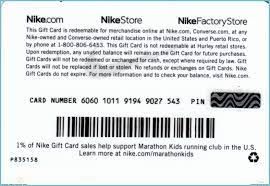
Your digital code invoice sent by BitTopup contains:* Card Number: A 16-digit numeric string used to identify your voucher.* Security PIN: A 6-digit verification code required to authorize redemption at checkout.* Designated Currency: EUR (€), set specifically for the Spanish regional storefront.
You never need to share your personal Nike account password or account login credentials to buy or redeem your voucher.
Step-by-Step Redemption Guide for Nike.es and Nike App
You can redeem your Nike Gift Card (ES) directly on the official Spanish website or through the Nike App on iOS and Android.
Redeeming on Nike.es
- Visit Nike.com/es and sign in to your Nike Member account.
- Add your desired sneakers, clothing, or accessories to the shopping bag.
- Click on the shopping cart icon and proceed to Checkout (Tramitar pedido).
- Under the Payment (Pago) section, check the box labeled "Do you have a Nike gift card?" (¿Tienes una tarjeta de regalo de Nike?).
- Enter your 16-digit gift card number and 6-digit PIN.
- Click Apply (Aplicar). The gift card balance will immediately deduct from your total order value.
- Complete checkout by selecting a secondary payment method if a remaining balance exists.
Redeeming on the Nike App (Spain)
- Open the Nike App and confirm your regional setting is set to Spain.
- Add items to your bag and tap Checkout.
- Scroll to the Payment Options screen.
- Select Add Gift Card (Añadir tarjeta de regalo).
- Type in the 16-digit number and 6-digit PIN, then tap Apply.
Nike Gift Card (ES) Regional Validity and Currency Specifications
Nike gift cards are geo-restricted to their respective issuing currency and regional online store. A card purchased for Spain (ES) must be used on Spanish platforms.
| Platform / Channel | Supported Region | Currency | Compatibility Status |
|---|---|---|---|
| Nike.es (Official Web) | Spain | EUR (€) | Supported |
| Nike App (ES Region) | Spain | EUR (€) | Supported |
| SNKRS App (Spain) | Spain | EUR (€) | Supported |
| Nike Retail Stores (Spain) | Spain | EUR (€) | Supported (via digital barcode) |
| Non-ES Nike Storefronts | Global / Other | Non-EUR / Other | Not Supported (Region Locked) |
Because the card balance is denominated in Euros (€) under the Spanish store system, it cannot be transferred to US, UK, or other regional storefronts with different currencies or local business entities.
How to Check Your Nike Gift Card Balance in 2026
You can inspect the remaining funds on your digital voucher at any point without making a purchase:
- Navigate to the official balance check page on Nike.com/es.
- Enter your 16-digit card number.
- Enter the corresponding 6-digit security PIN.
- Submit the form to view your remaining Euro balance and transaction status.
Alternatively, entering the code on the checkout page displays the remaining balance before you finalize an order.
Combining Multiple Gift Cards and Payment Methods at Checkout
Nike allows customers to combine payment options to cover large purchases:
- Card Stacking: You can apply up to 10 Nike gift cards on a single transaction on Nike.es.
- Split Payments: If your gift card does not cover the complete total of your order, you can pay the remainder using accepted payment cards or PayPal.
- Leftover Balances: If your purchase is less than the voucher value, the unused balance remains stored on your 16-digit card number and PIN for future purchases.
Common Nike Gift Card Redemption Errors and How to Fix Them
If you encounter an issue when applying your code, verify the following practical solutions:
- "Invalid Card Number or PIN": Double-check the numbers sent to your email. Ensure no accidental spaces or dashes are pasted into the input field.
- "Region Incompatibility": Make sure your browser or app is set to the Spain store (Nike.es). Cards issued in EUR for Spain cannot be processed on foreign Nike domains.
- "Card Already Depleted": Use the official balance check tool to verify if the funds were applied to a previous order.
- Session Timeout: Clear your browser cache or re-open the Nike App if the checkout page fails to update after clicking Apply.
Why Buy Your Nike Gift Card on BitTopup
BitTopup provides a reliable way to purchase digital gaming and lifestyle vouchers online:
- Instant Digital Dispatch: Codes and PINs are delivered electronically to your email inbox.
- Zero Account Risk: No passwords, logins, or sensitive account access are ever required.
- Live Price Transparency: View transparent rates and localized options on the live checkout page.
- Customer Support: Responsive support service is available to help answer questions regarding your digital purchase.
Frequently Asked Questions
Are Nike gift cards reloadable?
No. Nike digital gift cards are fixed-value vouchers. Once the balance on a card is spent, you cannot reload funds directly onto the same card number. To add balance for future orders, buy a new digital gift card code on BitTopup and apply it at checkout.
Can you use a Nike Gift Card (ES) outside of Spain?
No. Nike Gift Cards issued for Spain are region-locked to Nike.es, the Spanish Nike App, and participating Nike retail stores within Spain. They cannot be used on foreign regional domains such as the US or UK Nike websites.
How long is a Nike gift card valid?
Nike gift cards issued in Spain do not carry an expiration date. Your balance remains available until fully redeemed.
Can I convert my Nike gift card to cash?
No. Nike gift cards cannot be redeemed for cash, returned, or refunded once delivered, except where required by local consumer law.
Where can I redeem my Nike digital gift card code?
You can redeem your code on Nike.es, the official Nike App (set to Spain), the SNKRS App in Spain, and at eligible official Nike-owned retail stores across Spain.
Can you add more money to an existing gift card?
No. Existing gift cards cannot receive additional balance top-ups. You simply purchase a replacement denomination on BitTopup and enter the new 16-digit number and PIN during checkout.