




Nike Gift Card (UK) Top Up: Digital Balance Recharge Guide
Nike Gift Cards provide the most convenient way to purchase running shoes, sportswear, streetwear, and athletic equipment across the United Kingdom. Whether you are aiming to cop the latest SNKRS release, update your training wardrobe on Nike.com, or shop in person at an official Nike retail location, digital vouchers ensure quick and flexible checkout without linking your personal bank card.
On BitTopup, you can purchase authentic UK digital gift codes with prompt digital delivery. All codes are generated for use with British Pound Sterling (GBP) accounts, ensuring full compatibility with UK regional stores.
How to Recharge Nike UK Balance with a Digital Gift Card
A common question among shoppers is whether you can directly top up an existing plastic or digital card balance. Official Nike policy dictates that physical and electronic gift cards cannot have funds added back onto the same card number once spent.
To recharge your purchasing balance for upcoming Nike orders, you simply purchase a new digital gift card code and apply it during the checkout phase or combine it with your existing payment methods. Each new voucher comes with its own unique 16-digit card number and a secure 6-digit PIN.
Can You Reload a Nike Gift Card Directly?
- Direct Reloads: Not supported on Nike gift cards in the UK.
- Alternative Method: Add new digital vouchers directly during checkout on Nike.com, the Nike App, or the SNKRS App.
- Card Stacking: Nike allows you to apply multiple distinct gift cards to a single transaction, making it easy to combine balances.
Step-by-Step Guide to Redeeming Nike Gift Cards Online and In-Store
Redeeming your UK digital code is straightforward across web platforms, mobile apps, and brick-and-mortar stores.
1. Redeeming on Nike.com (UK)
- Visit the official Nike UK website and sign in to your Nike Member account.
- Add your desired apparel, footwear, or accessories to your shopping bag.
- Proceed to the checkout screen and enter your delivery details.
- Under the Payment section, tick the box marked Do you have a gift card, product voucher or promo code?
- Select Gift Card.
- Enter your 16-digit gift card number and 6-digit security PIN.
- Click Apply. The card balance will automatically deduct from your order subtotal.
2. Redeeming via the Nike App and SNKRS App
- Open the Nike App or SNKRS App on your mobile device.
- Add your chosen items to the cart and head to checkout.
- Tap on the Payment field.
- Choose Add Gift Card.
- Input the 16-digit card number and the PIN provided in your BitTopup order details.
- Confirm to apply the credit toward your purchase.
3. Redeeming at Nike Retail Stores in the UK
- Open your BitTopup digital order confirmation on your smartphone.
- Present the digital code and barcode to the cashier at checkout.
- The staff will scan or manually input the numbers to apply the credit to your in-store purchase.
Locating Your Card Number and PIN
When purchasing digital vouchers on BitTopup, your redemption credentials are sent straight to your dashboard and registered email address upon payment confirmation. You do not need to wait for physical post.
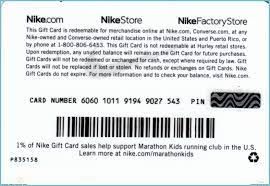
Your digital voucher delivery includes two critical pieces of information:* Gift Card Number: A 16-digit numeric sequence used to identify the voucher balance.* Security PIN: A 6-digit numeric code required to verify ownership during online redemption or balance lookups.
Keep both numbers secure. Anyone with access to both the card number and PIN can spend the remaining funds on Nike platforms.
How to Check Your Nike Gift Card Balance in the UK
Before placing an order, verifying your remaining credit helps you determine if you need to add another voucher or supplement your order with an alternative payment method.
Online Balance Check on Nike.com
- Go to the official Nike UK Gift Card balance check page (
nike.com/gb/help/a/giftcard-balance). - Type your 16-digit card number into the first box.
- Type your 6-digit PIN into the second box.
- Click Check Balance to view your real-time GBP balance immediately.
Alternative Verification Options
- During Checkout: Entering the code on the checkout page will reveal the total balance available before you finalize payment.
- Customer Service: Contact Nike UK support via live chat or phone with your card number ready.
- In-Store: Cashiers at official Nike stores can scan your digital code to print or state your remaining balance.
UK Store Acceptance and Regional Usage Limitations in 2026
Gift cards bought under the UK catalog are locked to GBP currency. Understanding store compatibility ensures a smooth checkout experience.
| Retailer / Platform | Acceptance Status | Usage Rules & Restrictions |
|---|---|---|
| Nike.com (UK) | Accepted | Full order value deduction; up to 10 cards per order |
| Nike App & SNKRS (UK) | Accepted | Must be signed in to a UK-region Nike Member profile |
| Official Nike Flagship Stores | Accepted | Niketown London and official Nike retail outlets in the UK |
| Nike Factory Stores (UK) | Accepted | Supported at checkout counters across UK outlet centers |
| Third-Party Retailers | Not Accepted | Cannot be used at JD Sports, Sports Direct, or Foot Locker |
| Non-UK Nike Websites (EU/US) | Not Accepted | Region-locked to GBP; cannot be spent on foreign storefronts |
Expiry Rules, Fees, and Official Nike Card Limitations
- No Expiration Date: Nike gift cards issued in the United Kingdom do not expire. Your funds remain available until fully spent.
- Zero Maintenance Fees: Nike does not charge dormancy, maintenance, or activation fees on your balance.
- Card Limits per Order: You can combine up to 10 digital gift cards on a single online transaction.
- Split Payment Support: If your order total exceeds your gift card balance, you can cover the remaining amount using standard accepted methods such as credit/debit cards or PayPal.
- Non-Refundable: Gift cards cannot be exchanged for cash, returned, or transferred to another payment card once purchased.
Troubleshooting Common Nike Gift Card Redemption Issues
If you experience an error while applying your code, verify the following common causes:
1. "Invalid Card Number or PIN" Error
- Check for accidental spaces before or after the numbers when copying and pasting.
- Confirm you are entering the 6-digit PIN in the PIN field and not duplicating the card number.
2. Currency and Store Mismatch
- Ensure you are browsing the United Kingdom version of Nike.com (
nike.com/gb). UK gift cards denominated in GBP cannot be processed on European (EUR) or North American (USD) Nike sites.
3. Partner Exclusions
- Gift cards can only be redeemed through direct Nike properties. They do not work on partner retail websites or independent sporting goods chains carrying Nike products.
4. Technical Glitches on High-Heat Drops
- During high-traffic SNKRS drops, checkout servers may experience delays. If an error appears, refresh your cart or verify your balance using the official check tool to confirm funds were not reserved on a pending cart.
Why Buy Nike Digital Codes on BitTopup
BitTopup delivers a secure, streamlined purchasing process for your Nike UK digital vouchers:
- Zero Account Sharing: You never need to share your Nike account password, login details, or sensitive personal credentials. You receive a standalone digital code that you redeem yourself.
- Immediate Digital Delivery: Your card number and PIN are delivered to your BitTopup profile and email inbox shortly after payment processing.
- Transparent Live Checkout: Check live, accurate pricing directly on the checkout screen with no unexpected service fees at payment.
- Reliable Customer Assistance: If you ever need help with order tracking or code delivery, BitTopup provides prompt support to ensure a seamless purchasing experience.
Frequently Asked Questions
Can you add more money to an existing Nike gift card?
No. Nike does not support direct reloads on existing physical or digital gift card balances. To add funds for shopping, purchase a new digital gift card code on BitTopup and apply it at checkout alongside your existing cards.
Where can you use Nike gift cards in the UK?
You can use UK Nike gift cards on Nike.com (UK), the Nike App, the SNKRS App, and in all official Nike retail locations in the UK, including Niketown London and Nike Factory Stores. They are not valid at independent stockists or third-party shoe stores.
How do I check my Nike gift card balance online?
Visit the official Nike UK gift card balance page on Nike.com. Enter your 16-digit card number and 6-digit security PIN, then click Check Balance to see your available funds in GBP.
Can I use a UK Nike gift card on foreign Nike regional websites?
No. Nike gift cards are regionally locked to the currency and country of issuance. UK cards denominated in GBP can only be redeemed on the UK Nike website, UK app store profiles, and UK brick-and-mortar stores.
Do Nike gift cards expire in the UK?
No. In accordance with Nike UK card terms, official gift cards and digital e-vouchers do not carry an expiration date and do not incur administrative dormancy fees.
Can I use multiple gift cards on a single Nike order?
Yes. Nike allows you to apply up to 10 gift cards to a single online order at Nike.com or through the Nike App. If your cards do not cover the full order total, you can pay the remaining balance with any standard accepted payment method.